
reMarkable Paper Pro with Marker Plus
4.2Editor score
11.8 inch Canvas Color display
Marker Plus with built-in eraser
Organized notes and tags
Color E Ink Tablets offer a unique blend of paper-like reading comfort and modern digital functionality. These devices are designed for professionals and students who want to reduce eye strain while staying productive with notes and documents throughout their day.
We compared ten leading models based on display technology, stylus support, battery performance, and software flexibility. Each entry in this list was evaluated for real-world usability, ensuring you get a device that matches your specific workflow and reading habits effectively.
Every pick includes detailed specifications, pros, cons, and expert insights to guide your decision. Keep in mind that availability and pricing can shift frequently, so verify current stock and deals before making your final purchase to ensure you get the best value.
4.2Editor score

4.3Editor score

4.0Editor score
As an Amazon Associate we earn from qualifying purchases.
This table provides a side-by-side view of the top ten Color E Ink Tablet models. Compare screen sizes, storage, OS versions, and key features to find the device that best fits your workflow and budget requirements today.



The Amazon Kindle Scribe Colorsoft stands out as the top choice for those seeking a premium Color E Ink Tablet experience. With a 4.3 rating, it delivers on its promise of a large, paper-like display that reduces eye strain while allowing colorful notes and documents.
We may earn a commission when you buy through this link, at no additional cost to you.
Its standout features include an 11-inch Colorsoft display with front light, built-in notebook capabilities, and AI tools for organizing notes. The pen included never needs charging and features a built-in eraser, making it easy to sketch or mark up PDFs seamlessly without distractions.
While it offers weeks of battery life and is thin and light at 400g, it is purpose-built for reading and writing rather than heavy multitasking. The focused nature means fewer distracting apps, which is ideal for deep work but limits gaming or video streaming capabilities significantly.
If you need a device that balances reading comfort with note-taking power, this model is highly recommended. It suits students and professionals who want to leave chargers behind and focus on content creation in a comfortable, natural environment.
Use AI to find information, ask questions about notes, and generate summaries to streamline your workflow efficiently.
The textured surface and responsive display create a smooth, natural writing feel without distracting flashes.
We may earn a commission when you buy through this link, at no additional cost to you.
The reMarkable Paper Pro is the ultimate paper tablet for professionals who prioritize a natural writing experience. With a 4.2 rating, it offers a full-size 11.8-inch color display that is ultra-slim and portable, making it perfect for sketching and reading anywhere.
We may earn a commission when you buy through this link, at no additional cost to you.
Its key strengths include the Marker Plus pen with a built-in eraser and realistic friction for natural control. Notes and documents are easily organized with folders and tags, and handwriting converts instantly to typed text for better workflow efficiency.
Although the display reflects natural light to reduce eye strain, it is not optimized for video or gaming due to E Ink limitations. The adjustable reading light ensures comfort even when lights go out, making it ideal for evening sessions without strain.
This device is best for those who want distraction-free focus and high-quality writing. If you value organization and comfort over app versatility, the Paper Pro delivers a premium experience that feels like real paper digitally.
The included Marker Plus offers precise control, incredible responsiveness, and all-day comfort for sketching.
Sort notes and documents with folders and tags, and convert handwriting to typed text instantly.
We may earn a commission when you buy through this link, at no additional cost to you.
The BOOX Tablet Go Color 7 Gen II offers exceptional value for those seeking a compact Color E Ink Tablet. Rated 4.0, it features a 7-inch Kaleido 3 screen with 4096 colors, making it versatile for reading books and comics on the go.
We may earn a commission when you buy through this link, at no additional cost to you.
It runs Android 13, allowing support for third-party apps and flexible document formats like PDF and EPUB. The device includes a front light with CTM for comfortable reading day or night, and page-turn buttons enhance the tactile experience significantly.
While the stylus is not included, it supports Active Stylus InkSense. The lightweight 195g build makes it easy to carry, though the screen is smaller than premium models. Refresh modes help manage ghosting, ensuring smoother navigation across content.
Ideal for casual readers or those on a budget, this tablet balances features and cost well. It suits users who want Android flexibility without paying a premium, provided they accept the limitations of E Ink technology.
Run Android 13 and access third-party apps for a more versatile reading and note-taking experience.
At just 195g, this tablet is easy to carry in bags or pockets for reading anywhere.
We may earn a commission when you buy through this link, at no additional cost to you.
The Ocean C ranks highly with a 4.5 rating, offering a powerful 7-inch Color E Ink Display for reading and writing. It supports handwriting and runs on Android for seamless multitasking, making it suitable for diverse workflows beyond just reading books.
We may earn a commission when you buy through this link, at no additional cost to you.
Key strengths include an octa-core processor and 4GB RAM, ensuring smooth performance when handling multiple files. The display is optimized for comics and magazines, with fast page turns and brightness adjustments to enhance the viewing experience.
Musnap Stylus Pen compatibility is available, though sold separately, which adds to the overall cost. The device supports various audio formats and connects via Bluetooth and Wi-Fi, but battery life depends on usage intensity with third-party apps.
This model is perfect for users needing a balance of performance and portability. If you want Android flexibility and support for comics or magazines, the Ocean C delivers solid value with its high performance ratings.
Enjoy support for audio formats like MP3 and FLAC for a richer multimedia experience.
With an octa-core processor and 4GB RAM, this tablet handles multitasking smoothly.
We may earn a commission when you buy through this link, at no additional cost to you.
The reMarkable Paper Pro with Folio bundle offers a complete package for professionals wanting top-tier protection and performance. With a 4.2 rating, it includes the 11.8-inch Canvas Color display and a stylish protective cover in Mosaic weave.
We may earn a commission when you buy through this link, at no additional cost to you.
Its strengths lie in the included Basalt Book Folio and Marker Plus pen with built-in eraser. The writing experience remains unmatched, with realistic friction and natural feel. Organization features like folders and tags keep your work tidy and accessible.
While the Folio adds value, the premium price point might be a barrier for budget-conscious users. The display reflects natural light and is adjustable for any lighting condition, but it lacks video playback capabilities like other tablets.
If you want a durable, high-end solution for daily note-taking, this bundle is ideal. It suits professionals who prioritize protection and organization, ensuring your device remains in pristine condition while delivering a premium experience.
The Basalt Book Folio provides premium protection in Mosaic weave for your device.
Realistic friction and natural feel on the Marker Plus pen for all-day comfort.
We may earn a commission when you buy through this link, at no additional cost to you.
The BOOX Note Air 5 C features a 10.3-inch Kaleido 3 screen, perfect for viewing detailed documents. Rated 3.8, it offers Android 15, 6GB RAM, and fingerprint recognition, making it a robust choice for productivity users requiring more storage and power.
We may earn a commission when you buy through this link, at no additional cost to you.
Key strengths include support for over 35 file formats and advanced refresh modes like Regal to reduce ghosting. The front light with CTM ensures comfort day or night, and the 64GB ROM provides ample space for books and documents.
However, mobile apps optimized for LCD/OLED may face conflicts with E Ink limitations, impacting some user experiences. The weight is higher at 430g, which could be cumbersome for one-handed reading compared to lighter models.
This tablet is best for heavy document users who need screen real estate and power. If you prioritize performance and app flexibility, the Note Air 5 C offers a strong foundation, provided you manage app expectations accordingly.
Use Regal Mode for less ghosting and better display quality on color E Ink models.
Power button includes fingerprint recognition for quick and secure access to your device.
We may earn a commission when you buy through this link, at no additional cost to you.
The Penstar eNote Pro C is an AI-powered notebook featuring a 10.3-inch Kaleido 3 screen. Rated 4.0, it includes an exclusive stylus with 8192 pressure levels and real-time voice-to-text conversion for enhanced productivity and note-taking efficiency.
We may earn a commission when you buy through this link, at no additional cost to you.
Its key strengths include 128GB storage and 4GB RAM for handling large files. The device supports over 35 file formats and includes a magnetic folio cover in the bundle, making it ready to use right out of the box for immediate use.
While E Ink uses pigment particles for natural reading, it is not optimized for fast scrolling or video playback, which limits some users. The battery life lasts up to 3 weeks, ensuring long sessions without frequent recharging during busy periods.
If you value AI integration and storage capacity, this tablet stands out. It suits professionals who need quick voice-to-text transcription and organized files, balancing digital tools with a comfortable paper-like experience effectively.
Boost productivity with real-time voice-to-text and handwriting recognition features for efficient note-taking.
Exclusive 8192 levels of pressure sensitivity provide precise control and virtually zero lag feedback.
We may earn a commission when you buy through this link, at no additional cost to you.
The BOOX Go Color 7 Gen II 4G offers a compact 7-inch screen suitable for reading on the go. Rated 3.7, it supports Active Stylus InkSense and Android 13, providing flexibility for accessing third-party apps and various document formats effectively.
We may earn a commission when you buy through this link, at no additional cost to you.
Its strengths include page-turn buttons and a 2300mAh battery for extended reading sessions. The device supports OTG via USB-C and includes a microSD slot, allowing for expanded storage when handling large collections of books or media files.
Note that the stylus is not included and only Active Stylus InkSense is supported, which limits compatibility. E Ink refresh time is required for actions like menu navigation, which feels slower than conventional screens and may impact some workflows.
If you need a small, affordable device for reading, this model works well. It suits travelers or commuters who prioritize portability and app access, provided you understand the refresh trade-offs inherent to E Ink technology.
Use Fast Mode for browsing websites or Ultrafast Mode for dynamic content to reduce ghosting.
USB-C port supports OTG or audio jack, allowing versatile connection options for accessories.
We may earn a commission when you buy through this link, at no additional cost to you.
The reMarkable Paper Pro Move is designed for travel and productivity on the go. Rated 3.9, it features a 7.3-inch Canvas Color display that slips into jackets or bags, offering a distraction-free environment for capturing thoughts or notes anywhere.
We may earn a commission when you buy through this link, at no additional cost to you.
Key strengths include cloud syncing for access across apps and the ability to search handwritten notes with a subscription. Tags and folders keep work organized, while the Marker Plus pen offers realistic friction and comfort for extended writing sessions.
While it syncs to the cloud and converts handwriting to text, full search features require a Connect subscription. The device is smaller than the full Paper Pro, making it less ideal for detailed diagram work but perfect for quick notes.
If you need a lightweight companion for capturing ideas, this tablet is excellent. It suits travelers who prioritize portability and organization, ensuring your digital notebook is ready whenever inspiration strikes without distractions.
Notes sync to mobile and desktop apps, ready to access whenever you need them instantly.
Convert handwriting to typed text and search through notes efficiently with Connect subscription.
We may earn a commission when you buy through this link, at no additional cost to you.
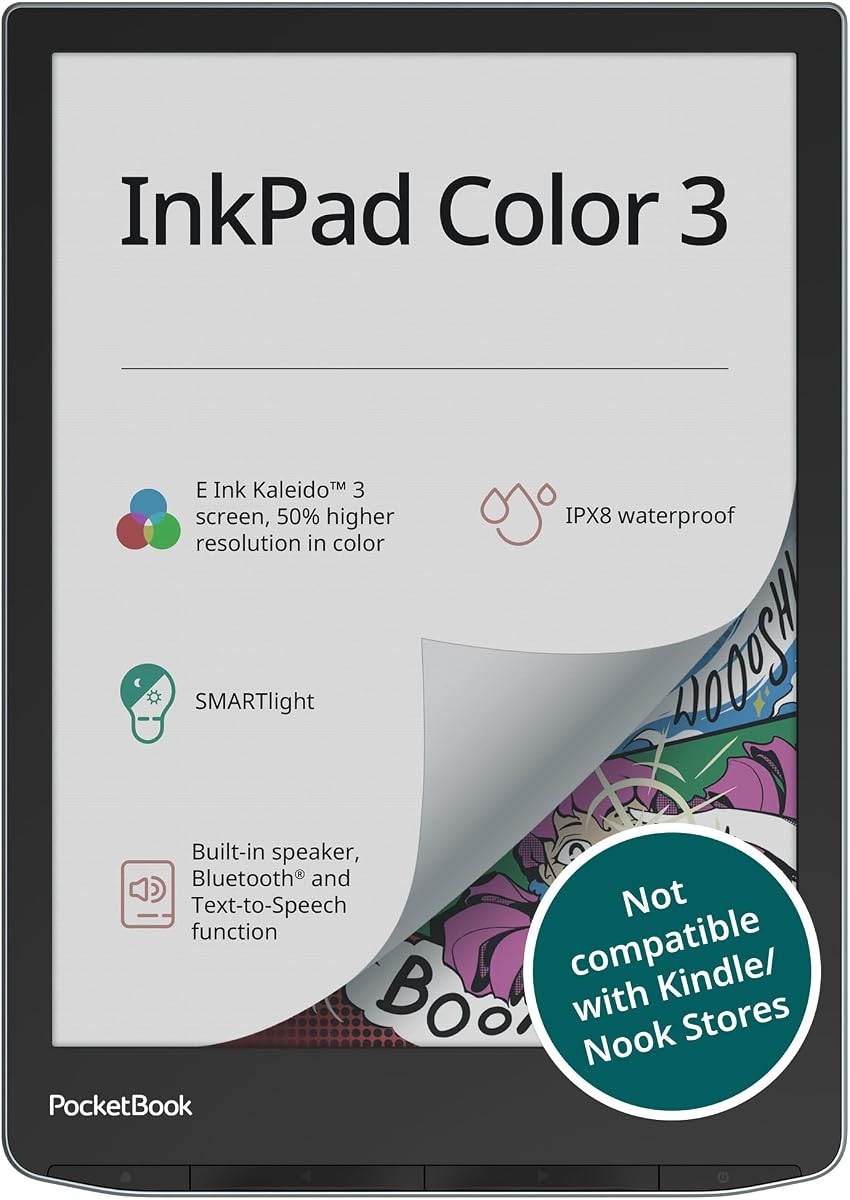
The PocketBook InkPad Color 3 is an ideal companion for outdoor readers with its IPX8 waterproof design. Rated 4.0, it offers a 7.8-inch E-Paper display with SMARTlight and Text-to-Speech capabilities, allowing you to enjoy audiobooks and e-books effortlessly.
We may earn a commission when you buy through this link, at no additional cost to you.
Its strengths include Bluetooth for wireless headphones and long battery life up to one month. The device supports external memory expansion and has built-in apps for music and games, making it versatile beyond just reading text effectively.
However, it does not support handwriting or stylus input, focusing purely on reading and listening. While it handles many document formats, it is less flexible than Android tablets for app-based workflows or note-taking activities.
If you need a device for reading in the rain or by the pool, this tablet is perfect. It suits avid readers who value audio and waterproof protection, ensuring your library is accessible anywhere without worry.
Ideal for travel or outdoor reading with IPX8 water protection for peace of mind.
Listen to audiobooks or have text read aloud through built-in speakers or wireless headphones.
We may earn a commission when you buy through this link, at no additional cost to you.
Selecting the right Color E Ink Tablet requires considering your reading habits, note-taking needs, and budget. Here are the key factors to evaluate before making a purchase decision today.
Color E Ink tablets use Kaleido 3 technology, which offers 4096 colors but has lower resolution than B/W modes. Consider whether you prioritize color for diagrams or comics, or if B/W clarity is more important for text-heavy reading.
Look for displays with adjustable front lights and warmth settings to reduce eye strain during long sessions. A good screen should feel paper-like and comfortable for extended reading.
Most Color E Ink tablets support active styluses for note-taking and sketching. Ensure the device includes a pen or supports a third-party one, and check for pressure sensitivity levels for better control.
Features like built-in erasers or shortcut buttons enhance productivity. A responsive pen ensures a natural writing feel without lag.
Android-based tablets offer access to third-party apps, making them versatile for different workflows. However, E Ink technology limits app performance, so check if the OS supports essential tools like PDF editors or web browsers.
A clean OS focused on reading and writing often provides a better experience than full Android. Prioritize devices optimized for your primary tasks.
E Ink devices typically offer weeks of battery life due to low power consumption. Consider how often you can charge and whether you need extended usage for travel or work trips.
Look for models with efficient power management and long standby times. A good battery ensures you can focus on work without frequent recharging.
Internal storage varies from 32GB to 128GB, affecting how many books or documents you can keep locally. If you read heavily or store large PDFs, prioritize higher storage or SD card support.
Cloud syncing helps expand storage virtually. Ensure the device supports your preferred cloud services for easy access.
Sizes range from 7-inch to 11.8-inch, impacting portability and viewing comfort. Smaller screens are great for reading on the go, while larger ones suit detailed documents or sketching.
Balance the size with weight to ensure it fits your daily routine. A lightweight, larger screen often provides the best experience.
Wi-Fi and Bluetooth are essential for syncing and audio. Ensure the device supports necessary connection types for your accessories and cloud services.
USB-C is standard for charging and data transfer. Look for OTG support if you need to connect external drives.
Budget options offer basic features like reading and simple note-taking. Premium models add AI tools, larger screens, and better build quality. Determine which features add value for your use case.
Avoid overpaying for unused features. Focus on what enhances your specific workflow and reading comfort.
Start by charging the device fully before first use. Most Color E Ink Tablets take several hours to charge, but once done, the battery can last weeks depending on usage and refresh rates.
To extend battery life, minimize usage of third-party apps and animations. E Ink technology works best with static content, so use refresh modes like HD or Balanced for better performance and longer battery life.
Care for the screen by using a soft cloth and avoiding abrasive materials. If the device has a protective cover, use it when not in use to prevent scratches and dust accumulation over time.
Yes, they are excellent for reading as they reduce eye strain compared to LCD screens. The paper-like display is easy on the eyes, even in bright sunlight, and supports long reading sessions without distractions.
Most models support active styluses for note-taking and sketching. Some include a pen, while others require you to purchase one separately. Always check compatibility before buying to ensure it fits your workflow.
Battery life typically ranges from weeks to a month on a single charge. Usage habits like app loading and refresh rates affect duration, but E Ink technology is designed for long-term efficiency and minimal charging.
Yes, Android-based models allow third-party app installation. However, performance is optimized for reading and writing, so complex apps may not run as smoothly as on traditional tablets due to refresh rate limitations.
Color E Ink screens offer 4096 colors but have lower resolution than B/W modes. They are clear enough for diagrams and magazines but may look slightly gray or darker than LCD screens in some lighting conditions.
Some models like the PocketBook InkPad Color 3 are waterproof with IPX8 ratings. Others are not, so check the product specifications if you plan to use the device in wet environments like pools or bathrooms.
Choosing the best Color E Ink Tablet depends on your specific needs for reading, writing, and app flexibility. The top picks include the Amazon Kindle Scribe Colorsoft for AI features, the reMarkable Paper Pro for writing quality, and the BOOX Go Color 7 Gen II for budget-conscious buyers.
Consider factors like display size, stylus support, and battery life when making your decision. Prioritize the features that enhance your workflow most, whether that is portability, screen clarity, or app compatibility.
Remember to verify current availability and pricing before purchase. Prices and stock can change quickly, so double-check the retailer before finalizing your order to ensure you get the best deal possible today.