
NetumScan USB 1D Barcode Scanner
4.4Editor score
Plug and play USB connection
Durable anti-shock design
Supports ISBN and ISSN codes
This guide compares the top barcode scanners for libraries, evaluating wireless connectivity, battery life, and compatibility with library management systems
Libraries require reliable tools to manage vast collections efficiently. A good barcode scanner for library operations must offer seamless connectivity and accurate reading of various code types found on books and media.
We compared ten top-rated models based on wireless range, battery endurance, and ease of integration with existing library software systems to help you find the perfect fit for your needs.
Each pick highlights key strengths and limitations to guide your decision. Keep in mind that product prices and availability may change over time, so verify details before purchasing.
4.4Editor score

4.4Editor score
4.3Editor score
The following table provides a side-by-side comparison of all ten models, highlighting their unique features, connection types, and specific capabilities relevant to library environments.




This NETUM Bluetooth scanner stands out for library environments due to its robust connectivity options and exceptional battery endurance. With a high rating from users, it delivers reliable performance for daily checkout and inventory tasks.
We may earn a commission when you buy through this link, at no additional cost to you.
The 2600mAh battery allows for continuous scanning of up to 200,000 times on a single charge, which is crucial for busy libraries. It supports HID, SPP, and BLE modes ensuring it works across Windows, Mac, and mobile devices seamlessly.
While it is highly versatile, users should note that it does not work with specific POS systems like Square or Lightspeed. Additionally, initial configuration requires scanning setting codes from the manual which might take a few minutes.
For libraries needing a scanner that can last days without charging and handle both physical books and digital screens, this model is an excellent investment. It balances portability with power effectively.
The large battery capacity ensures you can operate for months on a full charge, reducing downtime during critical inventory audits or seasonal rushes.
Supporting Bluetooth, 2.4G wireless, and wired modes means you can adapt to different workstations or mobile scanning carts without swapping devices.
We may earn a commission when you buy through this link, at no additional cost to you.
For libraries with tight budgets, the NetumScan USB scanner offers incredible value without sacrificing essential features. It is designed for basic but critical tasks like checking out books and managing inventory lists efficiently.
We may earn a commission when you buy through this link, at no additional cost to you.
Its CCD sensor technology allows it to read barcodes directly from screens and paper, which is helpful for digital catalogs. The sturdy design can withstand drops from two meters, making it durable for frequent public use.
The main limitation is the lack of wireless capability, requiring a physical USB connection to the workstation. This might restrict movement if you need to scan items in hard-to-reach shelves or stacks.
If you need a reliable, simple, and cost-effective solution for fixed check-out desks, this scanner is ideal. It handles standard library barcodes with speed and precision.
At a low price point, it allows libraries to equip multiple stations without breaking the bank, ensuring every counter has a working scanner.
The ability to scan from computer screens simplifies workflows where digital records need to be matched with physical inventory quickly.
We may earn a commission when you buy through this link, at no additional cost to you.
The Eyoyo Mini scanner is perfect for librarians who need to move around the stacks to conduct quick inventory checks. Its lightweight design reduces hand fatigue during long scanning sessions in various library sections.
We may earn a commission when you buy through this link, at no additional cost to you.
It offers a vibration mode which is particularly useful in quiet library environments to avoid disturbing patrons while confirming successful scans. The 3-in-1 connectivity ensures flexibility whether you are near a desktop or on a cart.
However, it cannot read codes from screens and supports only 1D barcodes, which limits its use for modern multimedia items with QR codes. You also need to be aware of the factory default settings that might disable certain codes.
For mobile shelving checks and quiet circulation tasks, this model offers the best portability. It is a specialized tool for specific moving tasks within the library.
The vibration feedback allows staff to confirm scans without loud beeps, maintaining the quiet atmosphere essential in study areas.
Weighing only 35 grams, it can be carried in a pocket or apron, keeping your hands free for handling books and other materials.
We may earn a commission when you buy through this link, at no additional cost to you.
This Tera model is designed with a unique battery indicator light that eliminates guesswork about charging times. It is ideal for libraries where staff need to ensure equipment is always ready for long shifts.
We may earn a commission when you buy through this link, at no additional cost to you.
The IP54 technology protects against dust, which is beneficial for older libraries with paper dust or storage areas. The wide grip and silicone cover make it comfortable and safe to use in active environments.
While it offers a great range, it is still limited to 1D barcodes which might not cover all new media types. The size is also slightly bulkier than pocket options for very tight spaces.
For front desk stations or staff who need to scan many items without worry, this unit provides reliable performance. The battery indicator is a practical feature for busy operations.
The visual light indicator ensures you never start a shift with a dead scanner, preventing workflow interruptions during peak hours.
Built-in dust protection and a shock-absorbing cover extend the device's lifespan, making it durable for high-traffic library environments.
We may earn a commission when you buy through this link, at no additional cost to you.
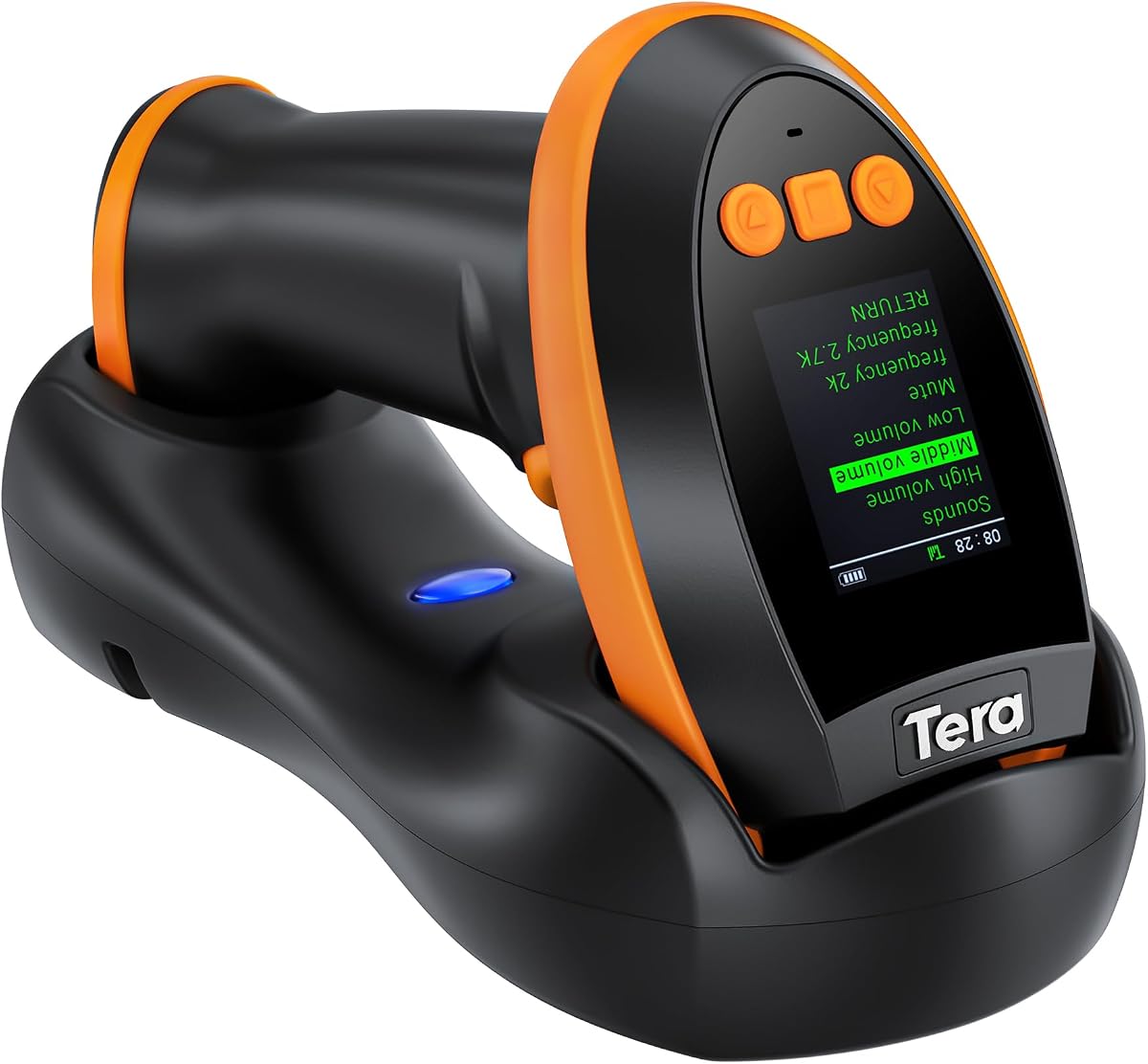
This premium scanner from Tera offers advanced features like a built-in screen for customizing settings without manuals. It is perfect for libraries needing to scan complex codes like QR and PDF417 on media discs.
We may earn a commission when you buy through this link, at no additional cost to you.
The CMOS imaging sensor allows reading codes on reflective surfaces or damaged labels, which is common for older book spines. The included charging cradle adds convenience for keeping the device topped up at a station.
The main drawback is the higher cost and weight compared to simpler models. If your library only uses standard ISBNs, these advanced features might be overkill for your specific needs.
For modern libraries handling multimedia, this scanner is the top choice. Its versatility and user-friendly interface justify the investment for advanced inventory management.
Supporting QR codes and PDF417 allows for scanning digital media, loyalty cards, and modern identification tags effortlessly.
The charging cradle ensures the scanner is always ready and protected, reducing the risk of losing charging cables in the workspace.
We may earn a commission when you buy through this link, at no additional cost to you.
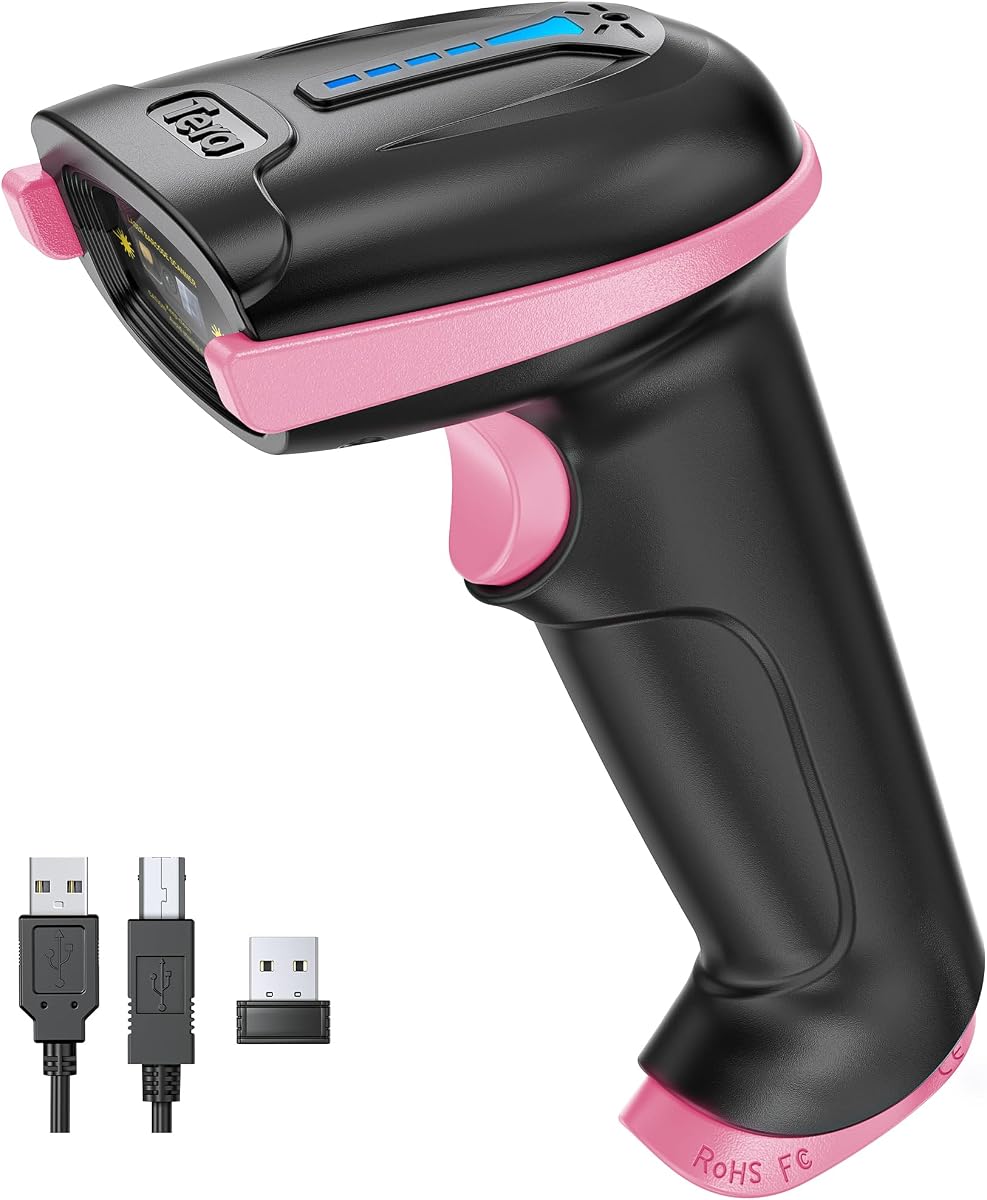
This pink version of the Tera scanner offers the same robust features as the purple model but with a distinct look. It is great for personalization or matching specific library branding themes.
We may earn a commission when you buy through this link, at no additional cost to you.
It maintains the high durability and battery life of the original, ensuring reliable performance. The silicone cover and IP54 rating provide essential protection against dust and accidental drops.
While the color is appealing, it does not add functional differences compared to the other colors. The limitations regarding 1D codes remain the same as the standard models.
For those who want a bit of personality in their tools, this model is a solid choice. It combines style with the reliability needed for daily library work.
A unique color helps staff quickly identify their own equipment, reducing mix-ups in shared workstations.
Despite the stylish finish, it retains the tough construction and battery life of the standard Tera models.
We may earn a commission when you buy through this link, at no additional cost to you.
The WoneNice scanner utilizes laser technology which is known for fast reading speeds of standard linear barcodes. This makes it suitable for high-volume checkout desks where speed is a priority.
We may earn a commission when you buy through this link, at no additional cost to you.
With 200 scans per second, it processes books quickly. The simple USB plug and play setup means IT staff can install it without worrying about complex software configurations.
The wired nature limits movement to the length of the cable, which might be restrictive for checking items in the stacks. Also, laser scanners sometimes struggle with reflective surfaces.
For dedicated checkout counters where speed is key, this model is efficient. It offers a straightforward solution for processing standard ISBNs and barcodes rapidly.
The laser engine ensures quick scans for each book, reducing queue times for patrons waiting at circulation desks.
300 configurable options allow you to customize exactly how the scanner behaves to fit your specific software needs.
We may earn a commission when you buy through this link, at no additional cost to you.
This Symcode scanner offers an impressive 400-meter open-air range, making it ideal for large library facilities or outdoor events. It supports multiple receivers so different staff can use them simultaneously.
We may earn a commission when you buy through this link, at no additional cost to you.
The offline storage mode allows storing up to 100,000 barcodes when out of range, syncing later when back at the station. This is crucial for large-scale inventory counts without constant connectivity.
As a laser scanner, it may struggle with reading codes directly from computer screens, limiting its utility for digital records. The setup for multiple receivers requires careful attention.
For massive warehouses or large campus libraries, this range and storage capability are unmatched. It ensures no data is lost during long inventory sweeps.
Storing scans locally means you can walk through entire aisles without needing to worry about connection drops or signal strength.
The ability to pair with multiple receivers allows different departments to scan independently while sending data to a central host.
We may earn a commission when you buy through this link, at no additional cost to you.
This portable mini scanner from Eyoyo combines style and functionality. Its pink design is appealing and makes it easy to spot among other office supplies. It is lightweight enough to carry all day.
We may earn a commission when you buy through this link, at no additional cost to you.
It offers flexible connectivity via Bluetooth and USB, allowing it to connect to various devices. The battery life supports continuous use for several hours on a single charge.
It shares limitations with other mini models such as inability to scan screens and smaller battery capacity. It is best for light scanning tasks rather than heavy daily use.
If you value aesthetics and portability in a compact tool, this model fits well. It is perfect for part-time staff or auxiliary scanning needs.
Its small form factor makes it easy to store in small drawers or carry in a bag without taking up much space.
Supporting both wired and wireless modes ensures it can connect to any system without compatibility issues.
We may earn a commission when you buy through this link, at no additional cost to you.
This scanner comes with a dedicated stand that allows for hands-free operation. This is useful for counting items or scanning while holding a book in your other hand.
We may earn a commission when you buy through this link, at no additional cost to you.
It supports 2D QR codes which are increasingly common on media and promotional materials. The auto-sensing feature allows automatic scanning when an item passes over.
It is limited to USB wired connection which restricts movement compared to wireless options. The user rating is slightly lower than other models which may indicate some performance quirks.
For self-checkout stations or kiosks, this hands-free feature is valuable. It allows efficient scanning without manual triggering.
The stand allows you to place items on the scanner without needing to hold a trigger, streamlining workflows.
Handling both 1D and 2D codes ensures compatibility with a wider range of library materials and digital tags.
We may earn a commission when you buy through this link, at no additional cost to you.
Selecting the right barcode scanner involves considering connectivity, battery life, and code types your library uses daily.
Libraries must decide between wired and wireless scanners. Wireless models offer mobility for shelf scanning, while wired ones provide consistent connectivity without battery worries.
Prioritize Bluetooth or 2.4G wireless if you need to move around the stacks often.
A long-lasting battery is crucial for full-day operations. Look for capacity between 2000mAh and 2600mAh to avoid frequent charging interruptions.
Check battery life estimates to ensure it lasts through your busiest shifts without recharging.
Ensure the scanner reads 1D ISBNs and 2D QR codes. Modern libraries may need QR support for digital media and event tracking.
Verify compatibility with ISBNs and stacked barcodes before purchase.
Libraries see high traffic so durability is key. Look for shock resistance and protective covers to withstand drops and dust.
IP54 rating or silicone covers add essential protection for longevity.
Your scanner must work with your library management software. Most support Windows and Mac, but check for Linux or mobile compatibility if needed.
Confirm HID or SPP modes are supported by your OS for easy setup.
Quiet environments require silent scanning options. Models with vibration or mute modes prevent disturbing patrons during inventory checks.
Adjustable volume settings or vibration feedback are beneficial for study areas.
Accessories like charging cradles or stands add convenience. A stand enables hands-free scanning which can speed up checkout processes.
Look for bundles that include docking stations if you need hands-free options.
Prices vary significantly from budget wired units to premium wireless models. Balance cost with necessary features like battery life and connectivity.
Invest in features that directly impact your daily workflow efficiency.
Start by connecting your scanner to your device via USB or pairing via Bluetooth. Ensure the battery is fully charged before your first shift.
For best performance, keep the scanner clean and away from direct sunlight. Dust can interfere with optical sensors, so wipe the lens gently.
If you use offline storage, regularly sync data to your main system to avoid loss. Always place the scanner on a soft surface when not in use.
Many modern CCD scanners can read barcodes directly from screens but laser models may struggle. Check product specifications for screen scanning support.
Battery life varies by model but most offer several hours of continuous use. Charging times are generally between one to two hours for a full charge.
Most USB scanners work plug and play without drivers. However, advanced features may require specific software for customization.
1D scanners read standard barcodes found on books. 2D scanners read QR codes and stacked codes which are more data dense.
Check that the USB port or Bluetooth pairing is active. Ensure the device is charged and try resetting the connection by turning the scanner off and on.
Most listed models support Mac OS. Ensure the scanner is in HID mode for seamless keyboard emulation compatibility.
We have reviewed the top ten scanners for libraries focusing on battery life and connectivity. The NETUM Bluetooth and Tera Premium models stand out for robust features.
Choose a scanner that matches your specific workflow whether you need mobility for stacks or speed for checkout. Prioritize battery life and durability for long-term use.
Prices and availability change frequently so verify current details before buying. These guides help ensure you select the right tool for your library.