
XPPen Magic Note Pad
4.4Editor score
16K pressure sensitivity
10.95 inch display
Android standalone system
Electronic sketch pads have revolutionized how creators capture ideas, blending traditional tactile feedback with digital convenience. These devices range from simple LCD boards for kids to professional tablets with advanced pressure sensitivity and color displays, offering solutions for every skill level and budget.
Our team analyzed ten distinct products based on user feedback, technical specifications, and versatility. We considered factors like screen size, battery life, stylus technology, and software compatibility to ensure each recommendation meets specific creative needs whether for note-taking, professional art, or casual doodling.
Each entry in this guide highlights unique strengths and potential trade-offs to help you make an informed decision. While prices fluctuate due to market dynamics, the core features remain consistent so check current listings for the most up-to-date pricing and availability before purchasing your next creative tool.
4.4Editor score

4.2Editor score

4.6Editor score
As an Amazon Associate we earn from qualifying purchases.
The following table provides a side-by-side overview of the key specifications and unique features for each electronic sketch pad to help you quickly identify the model that aligns best with your specific artistic or professional requirements.



The HUION Note Digital Notebook is a unique hybrid tool that captures handwritten notes digitally while maintaining the feel of real paper. With a rating of 4.2, it appeals to students and professionals who value traditional writing but need digital organization.
We may earn a commission when you buy through this link, at no additional cost to you.
Its standout quality is the ability to create digital copies of your handwriting via Bluetooth sync without needing a screen. The battery-free pen ensures uninterrupted use, and the app allows you to merge, split, or highlight notes for better organization.
While it offers great functionality, the A5 size limits large-scale sketches, and the digital experience relies on the companion app. However, these trade-offs are acceptable for those prioritizing portability and simplicity over high-end digital drawing features.
This device is perfect for students taking lecture notes or professionals in meetings who want to share handwritten insights digitally. We recommend it for anyone seeking a bridge between analog writing and digital storage without a steep learning curve.
The app captures vector lines and audio simultaneously ensuring you never miss key details during brainstorming or lectures.
Share your handwritten notes as images or PDFs instantly making teamwork and remote communication more effective.
We may earn a commission when you buy through this link, at no additional cost to you.
The XPPen Magic Note Pad delivers a premium standalone experience with a 10.95-inch color display and realistic paper-like texture. Rated 4.4, it stands out for its ability to mimic traditional sketchbooks while offering advanced digital tools like 16K pressure sensitivity.
We may earn a commission when you buy through this link, at no additional cost to you.
Its key strengths include three color modes for different tasks and an Android 14 system that lets you run creative apps directly without a computer. The battery-free pencil and 90Hz refresh rate ensure smooth, lag-free lines during long creative sessions.
While the price is higher than other options and Android might limit some professional software, the device offers incredible versatility. The eye protection features make it safe for extended use reducing strain during detailed illustration or note-taking work.
Ideal for artists and students who want a dedicated creative device without computer dependency, this tablet offers a robust set of tools. We recommend it for those ready to invest in a high-quality, all-in-one solution for sketching and digital note-taking.
AG nano-etching technology provides friction and resistance similar to real paper enhancing control for shading and strokes.
Switch between nature light color and black white modes to optimize the display for notes sketches or reading.
We may earn a commission when you buy through this link, at no additional cost to you.
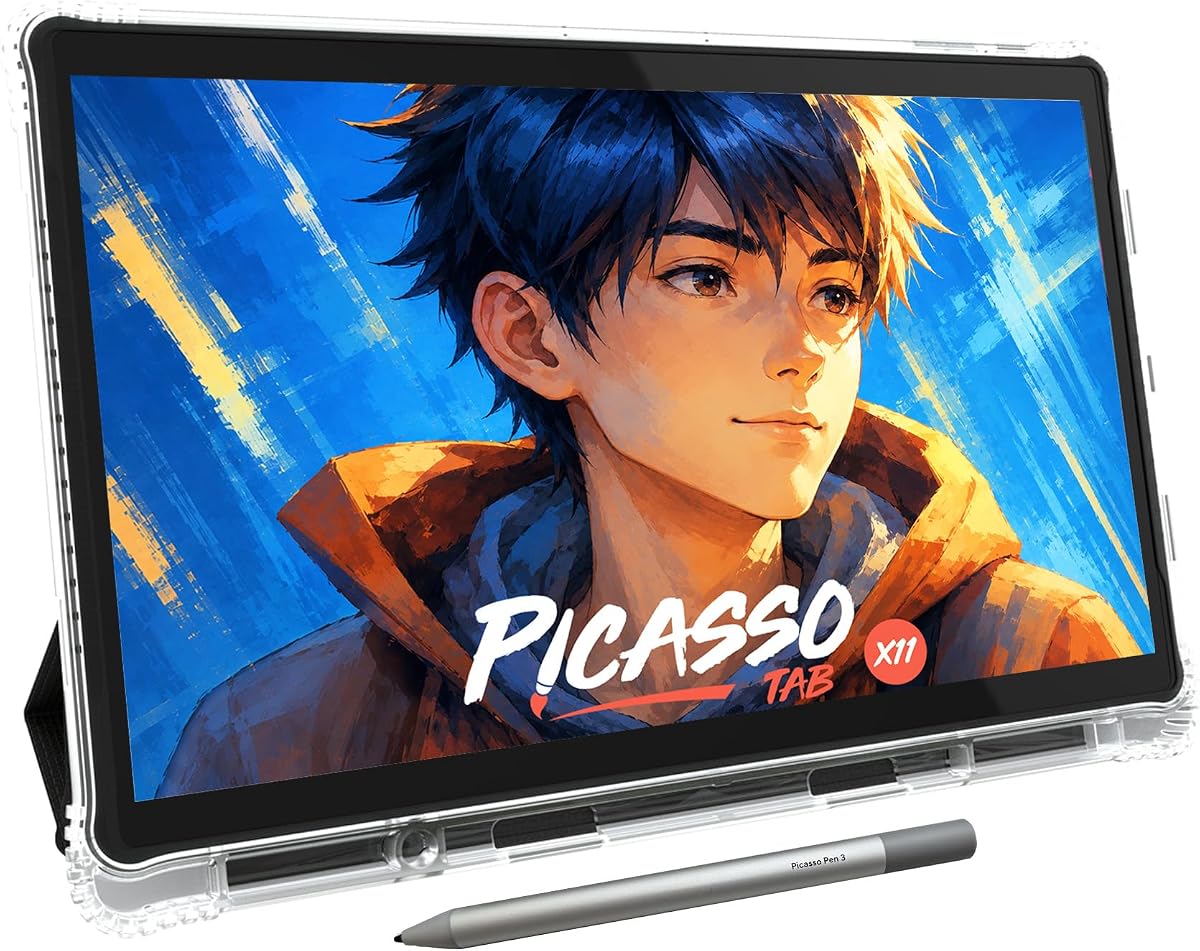
The PicassoTab X11 is an 11-inch standalone tablet designed to make digital art accessible to beginners. With a rating of 4.2, it offers a fully laminated display that reduces parallax and preloaded apps to get you started immediately without extra setup.
We may earn a commission when you buy through this link, at no additional cost to you.
Its standout feature is the lifetime VIP tutorial access and bonus accessories like a drawing glove and case. The octa-core processor and expandable storage ensure it handles drawing apps and multitasking efficiently making it a strong all-rounder for creative projects.
While the pressure sensitivity is lower than professional tablets, the included tutorials and user-friendly design make up for it. The trade-off is acceptable for learners who need guidance and a supportive ecosystem to build their skills over time.
This tablet is perfect for students or hobbyists starting their digital art journey who want a complete package out of the box. We recommend it for those seeking a balance between performance ease of use and educational support without high costs.
Step-by-step lessons and guided practice help you master techniques quickly without needing external resources.
With up to 1TB storage capacity you can save thousands of drawings and download new apps as you grow.
We may earn a commission when you buy through this link, at no additional cost to you.
The Kayoubi LCD Writing Tablet offers a massive 14.5-inch canvas for kids to doodle freely without creating mess. Rated 4.6, it is praised for its simplicity and large drawing area which encourages imagination and storytelling during play or travel.
We may earn a commission when you buy through this link, at no additional cost to you.
Its key strengths include zero blue light emission and a one-click erase function that resets the screen instantly. The lock feature protects masterpieces from accidental deletion making it a safe and reliable toy for children of various ages.
While it lacks color and advanced features, this limitation makes it ideal for focused drawing and writing practice. The trade-off is acceptable for parents wanting a screen-free creative outlet that doesn't contribute to eye strain or clutter at home.
This device is perfect for young children who need a fun educational toy to keep them engaged during car rides or at home. We recommend it for families seeking a cost-effective and environmentally friendly alternative to paper and pens.
The large screen lets kids explore big ideas and detailed stories without running out of space.
Erase and rewrite endlessly without ink or paper waste making cleanup effortless for parents.
We may earn a commission when you buy through this link, at no additional cost to you.
The Bravokids LCD Tablet provides a 10-inch colorful screen designed specifically for young children aged three to eight. With a 4.6 rating, it focuses on safety and durability with a lightweight design that kids can carry easily during travel or play.
We may earn a commission when you buy through this link, at no additional cost to you.
Its standout qualities include an eye-protection screen without radiation and a simple one-second erase function. The durable plastic body resists drops and the secure battery door ensures safe handling for young users in various environments.
While the size is smaller than other options and the battery needs occasional replacement, the device offers great value. These trade-offs are acceptable for parents wanting a compact and safe toy that encourages creativity without screen exposure.
This tablet is perfect for keeping children quiet and entertained during long trips or at home. We recommend it for families looking for a portable and educational gift that supports early writing and drawing skills.
Radiation-free display and secure battery compartment ensure safe extended use for young children.
Lightweight and compact design fits easily in bags making it perfect for on-the-go entertainment.
We may earn a commission when you buy through this link, at no additional cost to you.
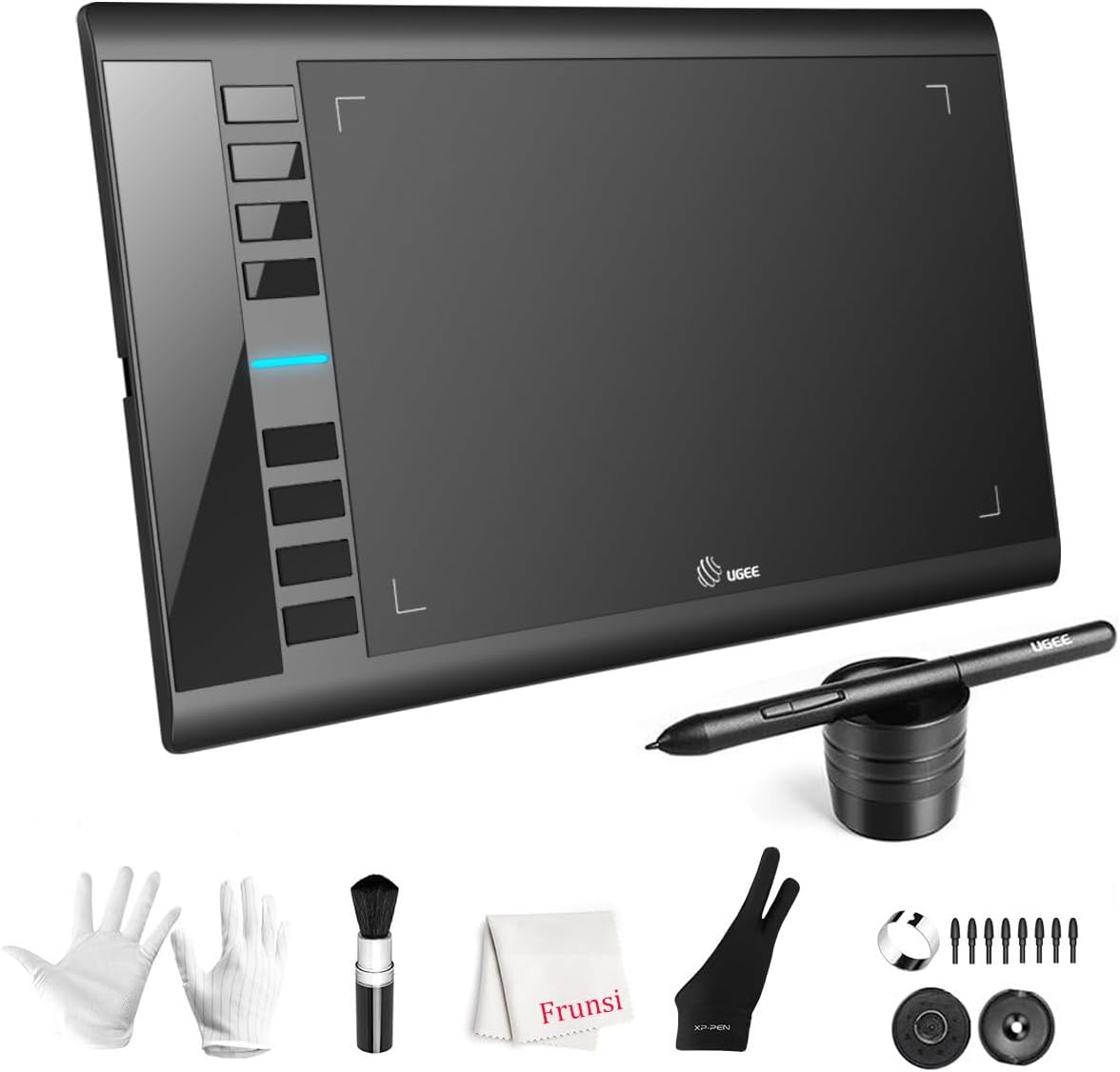
The UGEE M708 is an affordable graphic drawing tablet with a 10×6 inch active area and 16K pressure sensitivity. Rated 4.4, it is designed for digital artists who need a reliable input tool to use with computers and creative software.
We may earn a commission when you buy through this link, at no additional cost to you.
Its key strengths include eight express keys for shortcuts and broad compatibility with Windows Mac and Linux systems. The passive stylus does not require charging providing smooth accurate lines for sketching photo editing or 3D modeling tasks.
While it lacks a built-in screen and requires a computer connection the device offers professional-level features at a budget price. This trade-off is acceptable for those who already have a workstation and want to improve their digital art workflow efficiently.
This tablet is perfect for students and aspiring artists transitioning from traditional to digital art without a large investment. We recommend it for anyone seeking a versatile and ergonomic tool for creative work on a budget.
Customizable express keys let you access common tools quickly speeding up your creative workflow.
Works with major creative software across multiple operating systems ensuring flexibility for different users.
We may earn a commission when you buy through this link, at no additional cost to you.
The Mafiti LCD Writing Tablet is a slim 8.5-inch board designed for quick notes and casual doodling. With a 4.2 rating, it is valued for its portability and updated writing surface that produces clearer lines than previous versions.
We may earn a commission when you buy through this link, at no additional cost to you.
Its standout feature is the kick-stand function that uses the stylus to prop up the device for easy viewing. The replaceable battery allows you to continue using the device without disposal making it an economical choice for daily use.
While the screen size limits complex drawings and features are basic the device excels as a lightweight memo pad. These trade-offs are acceptable for users needing a simple convenient tool for short messages or travel sketches.
This device is perfect for office workers students or parents needing a quick way to jot down thoughts. We recommend it for those who want a hassle-free no-fuss alternative to paper notepads on the go.
Use the stylus as a stand to show messages or drawings to others easily.
Replaceable battery allows continuous use without worrying about disposable electronic waste.
We may earn a commission when you buy through this link, at no additional cost to you.
The TEKFUN LCD Writing Tablet is a 10-inch portable device built to withstand rough handling by children. Rated 4.5, it features waterproof and anti-fall construction making it ideal for road trips or airplane rides where accidents happen.
We may earn a commission when you buy through this link, at no additional cost to you.
Its key strengths include a simple one-second erase and a reliable six-month battery life that reduces replacement needs. The lock function ensures children can save their art without accidental clearing during active creative sessions.
While it lacks color and advanced features, the durability and practical design make it a reliable travel companion. These trade-offs are acceptable for parents prioritizing longevity and ease of use over extra functionality.
This device is perfect for keeping kids entertained during long journeys while promoting creativity without mess. We recommend it for families looking for a robust and stress-free toy for children on the move.
Waterproof and shock-resistant build ensures the tablet survives drops and spills during travel.
Easy to clean and durable materials mean parents spend less time fixing toys more time playing.
We may earn a commission when you buy through this link, at no additional cost to you.
The Wacom Intuos Small is a compact professional graphic tablet known for its industry-leading pen technology. With a 4.6 rating, it offers precision control comparable to a real pen on paper making it a top choice for designers.
We may earn a commission when you buy through this link, at no additional cost to you.
Its standout qualities include included creative software and a battery-free pen that works without charging. The device integrates seamlessly with Photoshop and other major creative apps ensuring a smooth workflow for both professionals and hobbyists.
While the active area is small and it requires a wired connection, the precision and brand reliability make up for it. These trade-offs are acceptable for users focused on detailed design work who prefer stability over wireless flexibility.
This tablet is perfect for graphic designers and editors needing reliable precision for photo editing or illustration. We recommend it for anyone seeking a trusted tool that delivers professional results consistently.
Industry-leading pen technology ensures natural control and accuracy for detailed design tasks.
Register your tablet to access premium creative tools and online training resources immediately.
We may earn a commission when you buy through this link, at no additional cost to you.
The XP-PEN Artist12 is an 11.6-inch pen display offering full HD resolution and 8192 levels of pressure sensitivity. Rated 4.4, it lets artists draw directly on the screen providing a natural workflow for detailed illustration and photo editing.
We may earn a commission when you buy through this link, at no additional cost to you.
Its key strengths include a vibrant color display and six customizable shortcut keys for efficient navigation. The multi-function pen features an eraser and holds multiple replacement nibs ensuring you have everything needed for extended sessions.
While it requires a computer connection and cable management can be tricky, the visual feedback makes it superior to non-screen tablets. These trade-offs are acceptable for professionals needing accurate color and line precision for high-quality artwork.
This device is perfect for illustrators and animators who require a direct visual link to their work. We recommend it for those ready to upgrade to a full display system for professional creative output.
Drawing directly on the display enhances control and accuracy for detailed artistic work.
Customizable shortcut keys streamline your workflow saving time on repetitive tasks.
We may earn a commission when you buy through this link, at no additional cost to you.
Selecting the right electronic sketch pad depends on your specific needs, budget, and how you plan to use the device. Here are the key factors to consider before making a purchase.
Electronic sketch pads generally fall into three categories: standalone tablets with their own screens, pen displays that connect to a computer, and simple LCD writing boards for kids. If you need to work on the go, an all-in-one standalone tablet is ideal. For detailed studio work, a connected pen display might offer better resolution.
Consider where you will use the device most often. If portability is key, look for lightweight designs with battery options. If you work at a desk, a computer-connected option might offer better performance and value.
The stylus is the core of your sketching experience. Professional devices often use active pens with hundreds of thousands of pressure levels to vary line thickness naturally. Basic LCD boards use simple pressure-sensitive surfaces that don't support advanced shading or opacity changes.
Ensure the pen does not require frequent charging if possible. Battery-free pens save time and reduce distractions during creative sessions. Check if the pen includes extra nibs or erasers for added convenience.
Screen size affects how much detail you can see and create. Professional drawing monitors range from 11 to 15 inches, while simple LCD boards are smaller. Larger screens provide more working space but may reduce portability depending on your needs.
For color work, ensure the display supports a wide color gamut. Anti-glare or paper-like surfaces are highly recommended to reduce eye strain and mimic the feel of real paper for a more natural drawing experience.
Standalone tablets run operating systems like Android which allow you to download apps directly from app stores. Computer-connected tablets rely on software installed on your host machine. Decide if you need full desktop app support or mobile app convenience.
Look for devices that offer compatible software bundles or tutorials. Preloaded apps can jumpstart your creative journey, especially if you are new to digital drawing or need structured lessons to improve your skills.
For standalone devices, battery life is critical. Most devices offer several hours of active use, which is essential for long sessions or travel. Check if the device supports fast charging to minimize downtime when the battery runs low.
Basic LCD tablets use replaceable coin-cell batteries that last months. If you prefer not to charge frequently, these might be a better choice. However, rechargeable options are more environmentally friendly and convenient for daily use.
If the device will be used by children or on the go, look for durable materials like anti-shock plastic and reinforced corners. Water resistance is another valuable feature to prevent damage from accidental spills during use.
Professional tablets often have glass screens with anti-reflective coatings. Ensure the build quality can withstand the friction of daily use without scratching easily. A good carrying case can also extend the lifespan of the device.
Check how the device connects to other systems. Bluetooth is essential for standalone syncing, while USB-C or HDMI cables are needed for computer connections. Ensure your host device has the necessary ports to avoid buying extra adapters.
Cross-platform compatibility ensures you can use your device with Windows, Mac, or Linux without issues. Review system requirements before purchasing to avoid driver or software conflicts that could disrupt your workflow.
Prices vary significantly from a few dollars for kids' LCD boards to several hundred for professional displays. Determine your budget and prioritize features that matter most to your use case to avoid overspending on unnecessary capabilities.
Consider long-term value such as warranty and support. Some brands offer lifetime technical support or software upgrades which can add value over time. Read user reviews to ensure reliability before committing to a purchase.
To start using your electronic sketch pad, connect the device to your power source or computer using the provided cable. If it is a standalone unit, turn it on and pair it with your mobile device via Bluetooth if needed. Ensure the stylus is fully charged if it requires power before drawing.
For daily maintenance, keep the screen clean with a soft microfiber cloth to remove dust and smudges. Avoid using harsh chemicals that could damage the anti-glare coating. Store the stylus in a safe place to prevent loss or damage when not in use.
When finished with a session, close any open apps and turn off the device to preserve battery life. Regularly update the software to access the latest features and security patches. If you do not use the device for long periods, charge it partially before storing it to maintain battery health.
Not all sketch pads need a computer. Standalone tablets like the XPPen Magic Note Pad work independently with their own operating systems. However, pen displays such as the XP-PEN Artist12 require a computer connection to display the image and function.
Yes, many electronic sketch pads are designed for professional use. Devices like the Wacom Intuos and XP-PEN Artist12 offer high pressure sensitivity and color accuracy required for detailed illustration and graphic design work.
Battery life varies by model. Some advanced pens are battery-free and never need charging, while others last several hours on a single charge. Simple LCD boards often use replaceable batteries that last for months of casual use.
Yes, many devices like the Kayoubi and TEKFUN LCD tablets are specifically designed for children. They feature no blue light and durable materials. Ensure you choose the right age-appropriate model to avoid overwhelming young users with complex settings.
Standalone tablets usually have built-in storage ranging from 64GB to 128GB to save files locally. Computer-connected models rely on your computer's hard drive for storage. Some devices also support external memory cards for additional space.
Most professional devices work with popular software like Photoshop and Illustrator. Standalone tablets often come with preloaded apps for note-taking and drawing. Check compatibility lists before buying to ensure it supports your preferred tools.
Use a dry or slightly damp microfiber cloth to wipe the screen gently. Avoid paper towels or abrasive materials that could scratch the surface. For stubborn smudges, lightly dampen the cloth with water rather than using chemical cleaners.
Most models include replacement nibs in the box, but full pen replacements depend on the brand. Check the manufacturer's website to see if spare pens are available for your specific model before you run out.
The 10 best electronic sketch pads reviewed in this guide offer diverse options ranging from affordable LCD boards for kids to professional standalone tablets for artists. Each model has unique strengths, whether it is the HUION Note's paper-like feel or the XPPen Magic Note Pad's versatile color display.
When making your choice, prioritize features that align with your primary use case. For beginners or kids, simple LCD boards offer great value and ease of use. Professionals should consider standalone tablets or pen displays that provide higher resolution and advanced pressure sensitivity.
While the prices listed in this guide offer a baseline, always check current listings for the latest deals and availability. Technology evolves quickly, so ensure the model you choose meets your current needs and is likely to remain relevant for several years.