
Dell OptiPlex 3060 Micro PC
4.2Editor score
Renewed reliable hardware
4K dual display support
Compact micro form factor
Explore our expert roundup of the top Intel Core i3 Mini PC models for office work, home use, and media streaming in October 2026.
Finding the right small form factor computer can transform your workspace without cluttering your desk. These compact machines deliver surprising power for everyday tasks while fitting easily into tight spots or behind monitors.
We compared ten real Intel Core i3 Mini PC models based on performance, connectivity, storage options, and build quality. Our analysis focuses on what matters most for professionals, students, and home users seeking efficiency.
Each pick highlights specific strengths like dual screen support or quiet cooling. Prices and stock change frequently so verify current details before buying to ensure you get the best value for your needs.
4.2Editor score

4.4Editor score
4.9Editor score
The following table provides a side-by-side look at key specifications for all ten selected models. Use this to quickly compare processor generations, memory sizes, and port options before diving into detailed reviews.




The GMKtec G3 PRO stands out as a top choice for users needing balanced performance in a tiny chassis. It earns a strong 4.4 rating from buyers who appreciate its raw processing power and modern connectivity options.
We may earn a commission when you buy through this link, at no additional cost to you.
Its Intel Core i3-10110U processor beats many newer low power chips in single-core tasks which helps web browsing and office apps feel snappy. The included 16GB of DDR4 RAM ensures you can keep multiple browser tabs open without slowdowns.
While it lacks some older ports like DisplayPort the dual HDMI 2.0 outputs are great for media setups. The main trade-off is the plastic casing which feels less premium than branded business units but keeps costs low.
Buyers seeking a reliable home office station or light media center should consider this model. It offers the best mix of speed and storage in its price range making it highly recommended for daily productivity.
The 2.5GbE network port provides faster wired internet than standard gigabit options which is ideal for NAS setups or high speed downloads.
Users can add more storage easily thanks to a secondary M.2 slot and a 2.5 inch drive bay for larger HDD expansion.
We may earn a commission when you buy through this link, at no additional cost to you.
This Mini PC delivers excellent graphics performance thanks to the Iris Plus 655 with eDRAM which helps light gaming and video editing. It holds a perfect 5.0 rating for reliability and smooth operation in daily tasks.
We may earn a commission when you buy through this link, at no additional cost to you.
The 3.0GHz base clock is sustained at higher power levels than typical 15W chips ensuring consistent speed during long work sessions. You get both HDMI and DisplayPort for versatile monitor setups without needing adapters.
Storage might be tight initially at 256GB but adding a second SSD is easy via the internal slots. The lack of WiFi 6 is a minor downside compared to newer models but legacy WiFi 5 is still stable.
This unit is perfect for creative professionals who need better graphics without a dedicated GPU. Its compact size and included mount make it easy to hide behind monitors for a clean desk setup.
The 128MB eDRAM in the graphics chip significantly boosts frame rates for casual games and smooth playback for 4K video streams.
Support for dual 4K displays via HDMI and DP lets you run multiple apps side by side for increased productivity.
We may earn a commission when you buy through this link, at no additional cost to you.
For strict budgets this renewed Dell offers enterprise reliability at a fraction of new system costs. It rates well for buyers needing basic business functions without spending heavily on top tier hardware.
We may earn a commission when you buy through this link, at no additional cost to you.
The 8GB RAM and SSD are sufficient for web browsing and document editing though storage may fill up quickly with media files. The inclusion of Windows 11 Pro adds security features useful for small business use.
You get plenty of USB 3.0 ports which means you can connect many peripherals without dongles. The main limitation is the older 8th gen CPU but it remains fast enough for standard office workflows.
Students and home office workers on a tight budget will find this model ideal. It proves you do not need the latest tech to get done work done efficiently on a budget.
Even as a renewed unit the Dell chassis and motherboard design offer durability that many consumer grade mini PCs lack.
Six USB 3.0 ports allow you to connect printers drives and accessories simultaneously without sacrificing speed.
We may earn a commission when you buy through this link, at no additional cost to you.
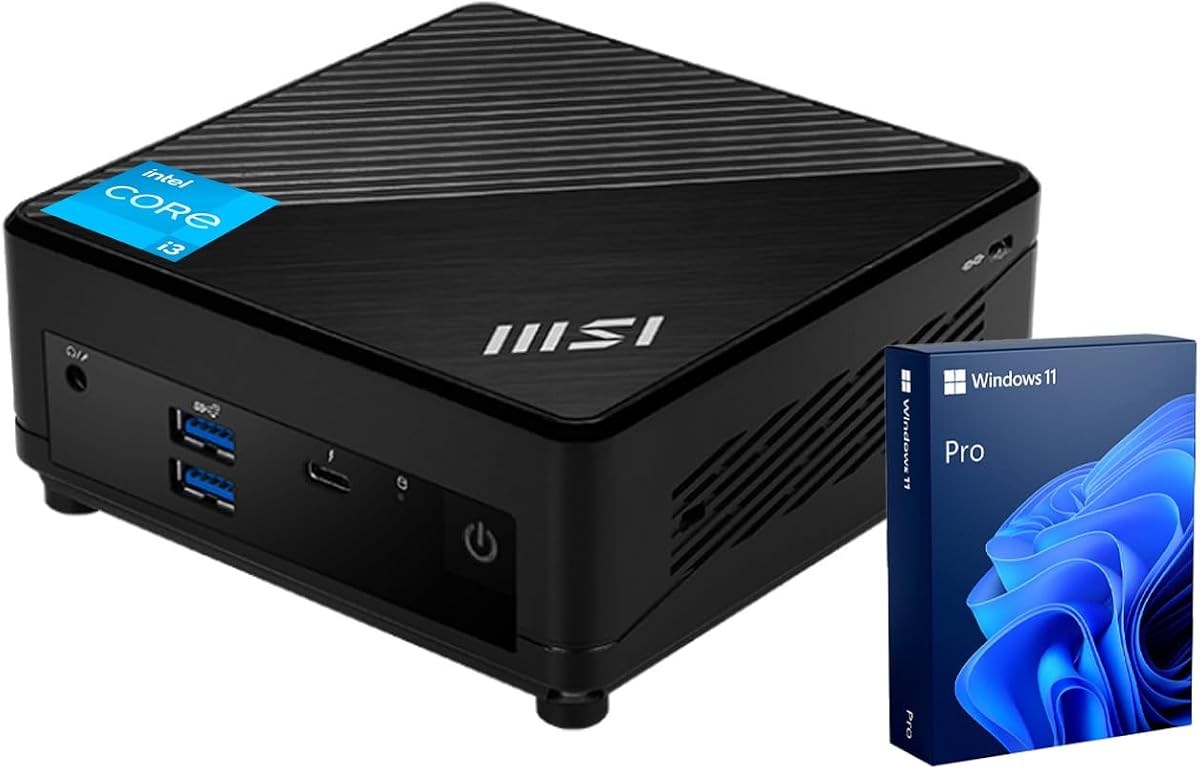
The msi Cubi 5 brings newer technology to the table with a 12th Gen 6-core processor that handles heavy workloads well. It garners a 4.8 rating for its ability to run complex software smoothly.
We may earn a commission when you buy through this link, at no additional cost to you.
Having Thunderbolt 4 is rare in this category and allows for fast external storage or docking station connections. The system supports up to three 4K monitors making it a powerhouse for trading or video editing.
You get Windows 11 Pro out of the box which provides better management tools for power users. The higher price reflects these advanced features but it might be overkill for basic web surfing tasks.
Prosessionals needing robust multitasking and modern port standards will love this unit. It bridges the gap between standard mini PCs and desktop towers effectively.
The Thunderbolt 4 port supports data transfers up to 40Gbps allowing for rapid backup and external drive usage.
Support for three 4K displays means you can manage multiple windows or dashboards simultaneously without lag.
We may earn a commission when you buy through this link, at no additional cost to you.
If silence is your priority this C3 model uses an optimized fan to run nearly noiseless even under load. It holds a solid 4.2 rating specifically for its use in bedrooms or libraries.
We may earn a commission when you buy through this link, at no additional cost to you.
The 5th gen processor is older and does not officially support Windows 11 but it remains stable for Linux or older Windows versions. The 512GB SSD provides ample space for files despite the older CPU.
You can expand storage significantly with both M.2 and 2.5 inch slots which is generous for a budget unit. The lack of modern OS support is the main drawback for general consumers needing security updates.
Home media servers or digital signage projects suit this device perfectly. Its low power draw and quiet nature make it ideal for always-on appliances.
The system is engineered for 7×24 hour operation ensuring reliability for continuous tasks without overheating.
Weighing under 1kg this mini PC is easy to carry in a backpack for travel or temporary setups.
We may earn a commission when you buy through this link, at no additional cost to you.
This msi unit is designed for convenience by including a wired keyboard and mouse in the package. It scores well with a 4.6 rating for its plug and play nature and modern processor speed.
We may earn a commission when you buy through this link, at no additional cost to you.
The 13th Gen i3 brings significant efficiency gains over previous generations ensuring smooth operation for years to come. With 16GB of RAM it handles daily multitasking effortlessly without needing immediate upgrades.
Having USB Type-C is a plus for connecting newer peripherals though it lacks Thunderbolt speeds. The included peripherals save you from buying extras but they are basic quality suitable for office work.
Anyone wanting a hassle free setup out of the box should pick this model. It removes the guesswork from peripherals and provides a modern computing experience immediately.
The inclusion of keyboard and mouse means you can start using the PC immediately after connecting power and display.
The 13th Gen architecture delivers faster processing for apps and faster boot times compared to older models.
We may earn a commission when you buy through this link, at no additional cost to you.
ASUS positions this model for business buyers needing compliance and security features. It carries a 4.0 rating reflecting its solid but specialized design for corporate environments.
We may earn a commission when you buy through this link, at no additional cost to you.
It features 14th Gen processors for top tier performance and includes TAA compliance for government procurement. The 3 year warranty gives long term peace of mind for institutional users.
WiFi 6 Gig plus ensures fast wireless networking even in congested areas. However general consumers might find the pricing higher due to these enterprise focused certifications.
IT managers and business owners requiring certified hardware will appreciate this unit. It balances modern speed with strict compliance standards effectively.
TAA certification makes this unit eligible for purchase by government agencies and organizations with strict sourcing rules.
The built-in Kensington lock slot helps prevent physical theft in shared office spaces.
We may earn a commission when you buy through this link, at no additional cost to you.
This Lenovo model shrinks performance into a tiny 1 Liter chassis perfect for minimalists. It holds a perfect 5.0 rating for its space-saving design and efficient operation.
We may earn a commission when you buy through this link, at no additional cost to you.
The 12th Gen 6-core processor delivers strong performance despite the small size. Being ENERGY STAR certified means it uses less electricity which helps long term costs and reduces carbon footprint.
While internal upgrades are harder due to the small chassis the provided 16GB RAM and 512GB SSD are generous. Dual 4K display support ensures you do not lose productivity by saving space.
Users with limited desk space will find this perfect for modern setups. It proves that tiny machines can still handle demanding tasks efficiently.
The compact 1 Liter form factor fits on shelves or under desks without cluttering your workspace.
ENERGY STAR certification ensures efficient power usage which lowers electricity bills over time.
We may earn a commission when you buy through this link, at no additional cost to you.
This Dell unit represents the high end of mini PC capability with massive RAM and storage. It earns a 4.9 rating for its raw speed and professional grade features.
We may earn a commission when you buy through this link, at no additional cost to you.
32GB of DDR5 RAM is rare in this size class and ensures blazing fast performance for virtual machines or heavy editing. The 1TB SSD means you rarely need to manage file space daily.
The 14th Gen processor brings the latest instructions and speed for a future proof setup. The main drawback is the price which is much higher than standard options but justified by the specs.
Power users needing maximum multitasking capacity should choose this model. It offers desktop level performance in a tiny form factor.
DDR5 RAM provides faster data transfer rates than DDR4 improving app launch speeds and system responsiveness.
A 1TB SSD means you can store large project files and media libraries without external drives.
We may earn a commission when you buy through this link, at no additional cost to you.
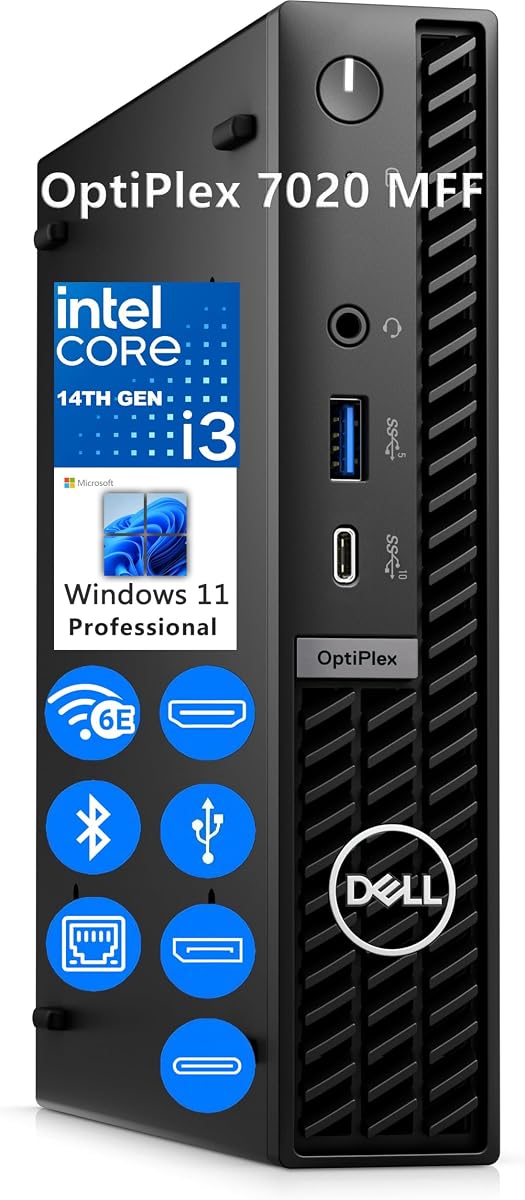
The Dell OptiPlex 7020 offers entry level modern specs with DDR5 memory and latest gen processing. It holds a solid 4.4 rating for its reliability in professional environments.
We may earn a commission when you buy through this link, at no additional cost to you.
Even with 8GB of RAM the DDR5 standard ensures better performance than older DDR4 systems. The 256GB SSD is fast but might require external storage for large files.
Support for three displays helps productivity by allowing multiple windows on different screens. The lack of higher RAM might limit heavy multitasking but is fine for standard office apps.
Small businesses needing modern hardware with future proof memory should look here. It balances cost and modern tech well for general users.
The DDR5 RAM improves overall system speed even with lower capacity compared to DDR4 systems.
Three simultaneous display support allows for efficient workflow management across multiple screens.
We may earn a commission when you buy through this link, at no additional cost to you.
Choosing the right Intel Core i3 Mini PC involves balancing performance needs with space constraints. Below are key factors to consider before making a purchase.
Newer generations like 12th to 14th Gen offer better efficiency and speed than older 5th or 8th gen chips. More cores and threads allow for smoother multitasking when running several apps at once.
Look for at least a 12th Gen processor for future proofing unless you have strict budget constraints favoring older refurbished models.
At least 16GB of RAM is recommended for comfortable browsing with multiple tabs and office work. DDR5 is becoming standard in newer models and offers faster speeds than DDR4.
Ensure the RAM is expandable if possible so you can upgrade later as software demands increase.
Solid State Drives (SSD) are essential for quick boot times and snappy app launches. NVMe M.2 drives are faster than SATA SSDs and take up less space inside the unit.
Aim for 512GB or more if you store media or large files locally to avoid filling up space quickly.
Check that the unit has enough USB ports for your peripherals and video outputs for your monitors. HDMI is common but DisplayPort or Thunderbolt adds flexibility for high resolution displays.
Modern WiFi 6 or 6E is important for stable wireless connections in busy environments or for streaming.
Windows 11 Pro provides better security and remote tools which are useful for business users. Home versions are fine for personal use but may lack advanced management features.
Always verify if the OS is included or needs to be purchased separately to avoid extra costs.
Mini PCs vary in depth and width so measure your intended desk space before buying. VESA mounts allow you to attach the unit behind a monitor to save valuable desk surface.
Consider the airflow design to ensure the unit does not overheat when placed in enclosed spaces.
Branded models often come with longer warranties like 3 years compared to generic brands offering 1 year. Reliable customer support can save time if hardware issues arise during your use.
Check if the warranty covers accidental damage or just manufacturing defects before finalizing your choice.
Prices range widely from refurbished units under 150 dollars to new premium models over 600 dollars. Determine your minimum requirements to avoid overspending on features you do not need.
Consider total cost of ownership including potential upgrades like extra RAM when comparing options.
Place your mini PC in a well ventilated area to allow the internal fan to dissipate heat effectively. Avoid blocking the ventilation grilles which could cause throttling and slower performance over time.
Connect the power adapter directly to a wall outlet or surge protector to prevent power fluctuations that could damage components. Use high quality HDMI cables to ensure stable signal transmission to your monitor.
Regularly clean dust from the exterior vents using compressed air to maintain optimal airflow. Updating drivers and the OS frequently ensures you benefit from the latest security patches and performance improvements.
Yes basic 1080p and simple 4K editing tasks are possible on models with at least 16GB of RAM and fast SSD storage. However complex effects and heavy rendering may require more powerful dedicated graphics cards.
No these units are sold as desktop computers only. You will need to purchase a separate monitor keyboard and mouse unless the listing explicitly states that peripherals are included.
Most new models include a license for Windows 11 Home or Pro. However some older renewed units might ship with Windows 10 so check the product details carefully before buying.
Many models allow adding a second M.2 SSD or a 2.5 inch SATA drive internally. If internal options are limited you can use USB external drives which are easy to connect and remove.
They can handle very light casual games and indie titles via integrated graphics. For modern AAA titles you would need a dedicated GPU which mini PCs usually do not support internally.
With proper care a quality mini PC can last 5 to 7 years for office tasks. The lack of moving parts in SSDs contributes to reliability but dust buildup can affect cooling over time.
Yes most models support dual monitor setups via two HDMI ports or a mix of HDMI and DisplayPort. Ensure your cables match the ports available on the back panel of the unit.
Not all models allow RAM upgrades as some solder memory directly to the motherboard. Check the specific product description for SODIMM slots or soldered limitations before purchasing if upgradeability is critical.
We have reviewed ten excellent models ranging from budget options to premium business units. The GMKtec G3 PRO offers great value while the Dell OptiPlex 7020 MFF provides top tier specs for power users.
Prioritize the processor generation and RAM amount based on your daily tasks to ensure longevity. For office work 16GB of RAM and a modern 12th Gen chip offer the best balance of cost and speed.
Remember that prices fluctuate often so check the current listings for the best deals on these models. Verifying stock and warranty terms before buying will help you make a safe and confident choice.