
NIMO 15.6 Student Laptop
5.0Editor score
Intel N150 CPU performance
128GB SSD storage space
Fingerprint access security feature
Finding the right laptop for kids to learn coding requires balancing performance with durability and ease of use. Young learners need devices that can run educational software smoothly without overwhelming them with complexity.
We evaluated ten top-rated laptops based on processor speed, screen quality, and educational app compatibility. Our comparison focuses on models that support coding environments while remaining affordable for families.
Each pick highlights specific strengths like battery life, keyboard comfort, and parental controls. Please note that product availability and pricing change frequently, so check current offers before purchasing your child's new learning tool.
5.0Editor score

4.2Editor score

4.2Editor score
As an Amazon Associate we earn from qualifying purchases.
This table compares all ten selected laptops side by side. Look at the key specifications to find the device that fits your child's coding needs and budget requirements.




The HP Chromebook 14 x360 Plus earns our Editor's Choice award for its versatility and robust build quality. It features a powerful Intel N150 processor that handles web-based coding tools like Scratch and Code.org with ease. The 14-inch touchscreen provides ample space for dragging and dropping code blocks.
We may earn a commission when you buy through this link, at no additional cost to you.
Its flexible hinge allows four modes, making it easy for kids to switch between typing code and viewing instructions. The MIL-STD 810H testing ensures it can withstand accidental drops or bumps in a classroom environment. Chrome OS offers built-in safety features and automatic updates that keep the device secure without user intervention.
While the 128GB storage is modest, cloud storage options on Chrome OS mitigate this limitation for most educational apps. The battery life is sufficient for a school day but may require charging for extended weekend coding camps. The anti-glare coating reduces eye strain during long sessions.
This model is ideal for elementary to high school students who need a reliable device for both schoolwork and introductory coding. Its touch capabilities enhance interactivity, which is crucial for visual programming environments. We recommend it as a top choice for families seeking a durable all-in-one solution.
The 360 hinge allows kids to use the device as a tablet for touch-based coding apps or as a traditional laptop for typing complex scripts.
Chrome OS includes verified boot and sandboxing to protect against malware, ensuring a safe coding environment without needing extra antivirus software.
We may earn a commission when you buy through this link, at no additional cost to you.
The NIMO 15.6 Student Laptop stands out as the best budget option, offering high-speed SSD storage and a large display at an accessible price. Its Intel N150 processor provides the stability needed for running coding IDEs like Thonny or simple Python environments. The 15.6 inch screen offers extra workspace for multiple windows.
We may earn a commission when you buy through this link, at no additional cost to you.
A standout feature is the backlit keyboard, which allows children to practice coding in the evening without straining their eyes. The fingerprint sensor adds a layer of security, making it easy for kids to log in quickly without remembering complex passwords. The 2-year warranty provides peace of mind for parents.
As a renewed product, cosmetic condition may vary slightly, but performance remains consistent with new units. The plastic chassis is durable but lacks the premium feel of metal laptops. However, the cost savings are significant for families on a tight budget.
This laptop is perfect for middle schoolers starting to learn text-based programming languages. The larger screen real estate helps when working with code editors that require horizontal space. We highly recommend it for cost-conscious buyers who need reliable performance for online classes.
The 128GB SSD loads operating systems and coding applications much faster than traditional hard drives, reducing wait times during lessons.
A 15.6 inch display allows for side-by-side viewing of code and documentation, which is essential for learning syntax and logic.
We may earn a commission when you buy through this link, at no additional cost to you.
The LEXiBOOK LAPTAB 10 inch combines premium features like a full Android ecosystem with robust parental controls. Its octa-core processor handles graphical coding apps and games smoothly. The 10.1 inch touchscreen makes it easy for younger kids to interact with visual programming tools like Blockly.
We may earn a commission when you buy through this link, at no additional cost to you.
Parents appreciate the customizable profiles and time management tools that allow them to limit screen time effectively. Access to the Google Play Store means a wide variety of educational coding apps are available directly on the device. The slim design makes it easy for children to carry in a backpack.
Battery life is shorter compared to larger laptops, requiring mid-day charging for heavy users. While it does not support full desktop software, it excels in app-based learning environments. The build quality feels sturdy enough for daily use by active children.
This device is best suited for younger learners or as a secondary device for mobile coding practice. It bridges the gap between a toy and a real computer, offering real functionality with safety in mind. We recommend it for parents who prioritize content control and portability.
Android allows access to thousands of coding apps that might not be available on other operating systems, expanding learning possibilities.
Built-in tools let parents restrict apps and set time limits, ensuring a balanced approach to digital learning and play.
We may earn a commission when you buy through this link, at no additional cost to you.
The Lenovo Chromebook 14 features a MediaTek Kompanio 520 processor known for excellent battery efficiency, making it ideal for all-day school use. The included accessory bundle adds value with a docking station and wireless mouse, readying the device for immediate coding work. The privacy shutter gives parents peace of mind regarding webcam usage.
We may earn a commission when you buy through this link, at no additional cost to you.
With 64GB eMMC plus a 64GB memory card, it offers flexible storage for downloaded lessons and projects. WiFi 6 ensures stable connections for video tutorials without lag. The slim form factor makes it easy for children to transport between home and school without strain.
The eMMC storage is slower than an SSD but adequate for web-based tools. Performance may lag slightly with heavy multitasking compared to higher-end processors. The accessory bundle compensates for these trade-offs by providing necessary peripherals out of the box.
This Chromebook is perfect for students who need reliability and mobility for remote learning. It supports cloud-based coding environments well, ensuring connectivity remains a priority. We recommend it for families needing a long-lasting device for daily academic tasks.
The included docking station and mouse enhance productivity, making it easier to connect to external monitors for coding projects.
A physical privacy shutter on the webcam ensures that video calls and lessons are secure when not in active use.
We may earn a commission when you buy through this link, at no additional cost to you.
Designed specifically for education, the HP Chromebook 11A G8 features a spill-resistant keyboard and rugged build that withstands classroom chaos. The AMD A4-9120C processor handles basic web apps well, though it is older generation. Its compact 11-inch size fits easily in small backpacks.
We may earn a commission when you buy through this link, at no additional cost to you.
The keyboard is full-size island-style with backlit keys, helping students type code accurately in various lighting conditions. The Chrome OS security model protects against malware automatically, reducing maintenance needs for IT staff or parents. It includes ports for essential peripherals like mice.
Storage is limited to 32GB which may require cloud reliance, but most coding tools are browser-based. The smaller screen makes reading code slightly challenging for advanced projects but acceptable for beginners. Durability is the main selling point for this model.
This device is best for young elementary students needing a durable tool for basic computing literacy. It prepares them for more advanced tools later by introducing keyboarding and navigation skills. We recommend it for schools or families prioritizing longevity over raw power.
The keyboard design allows liquids to drain away from internal components, protecting the device from common accidental spills.
The 11-inch footprint makes it incredibly easy to carry, ensuring kids can take their learning device anywhere without weight issues.
We may earn a commission when you buy through this link, at no additional cost to you.
The VTech Genio is a toy laptop designed to mimic real computing without the complexity. It features a full-size QWERTY keyboard, helping kids learn proper finger placement before transitioning to a real PC. Activities include basic logic games that lay the groundwork for computational thinking.
We may earn a commission when you buy through this link, at no additional cost to you.
Since it does not need an internet connection, it is perfect for travel or outdoor learning without relying on WiFi. The bilingual design supports language skills alongside logic, immersing kids in English and Spanish. It is powered by batteries, making it completely cordless.
While it does not run actual coding software like Python, it introduces the concept of sequencing and problem-solving. The closed system ensures safety from online risks, though it limits customization. It is a precursor device rather than a coding machine.
This product is ideal for children under six who are curious about computers. It builds confidence with typing and mouse handling in a safe environment. We recommend it for early childhood development before investing in a full laptop.
The full QWERTY keyboard helps children learn touch typing fundamentals, a key skill for efficient coding later in life.
By operating offline, the device eliminates internet risks and distractions, focusing purely on educational content.
We may earn a commission when you buy through this link, at no additional cost to you.
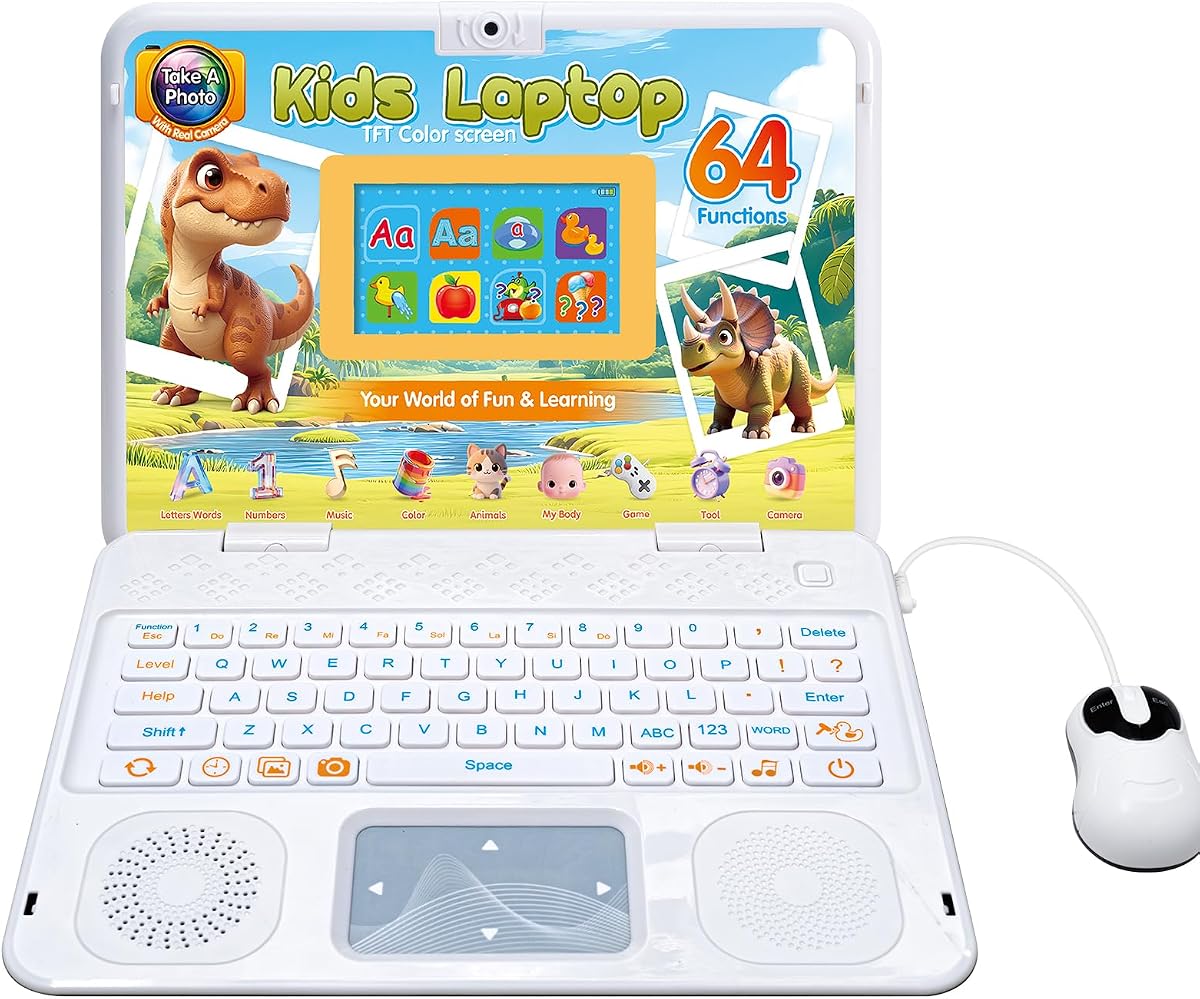
This colorful kids laptop features a functional camera that allows children to take photos with frames, blending photography with computing concepts. It includes 64 modes that teach logic and sequencing, essential precursors to coding. The design mimics a real laptop to encourage familiarity with tech devices.
We may earn a commission when you buy through this link, at no additional cost to you.
The interface is simple and responsive, making it easy for young kids to navigate without frustration. It helps develop motor skills through mouse and keyboard simulation. The bright screen and engaging activities keep children entertained and learning simultaneously.
However, it does not support actual coding software or internet browsing. It is strictly an educational toy rather than a functional computer. The battery life is decent, but it relies on replaceable batteries for operation.
We recommend this for preschoolers transitioning from toys to tech. It fosters curiosity and basic computer literacy in a fun way. It is an excellent gift for introducing the concept of technology usage safely.
The camera feature lets kids capture memories and apply filters, teaching basic digital media concepts.
Built-in games test memory and logic, training the brain to think like a programmer through play.
We may earn a commission when you buy through this link, at no additional cost to you.
The LeapFrog laptop introduces the concept of coding through simple program creation to control a character named Pixel. It teaches letters and numbers alongside basic logic, making it suitable for ages three to seven. The interactive character responds to commands, reinforcing cause-and-effect learning.
We may earn a commission when you buy through this link, at no additional cost to you.
It is designed for small hands with easy-to-press keys and a durable plastic shell. The activities are pre-loaded and do not require internet, ensuring a safe experience. It helps familiarize kids with keyboard layouts early.
As a dedicated toy, it does not have the flexibility to run actual coding apps. It is purely an introductory tool for digital literacy. Battery life is limited, requiring regular AA battery changes for continuous use.
This is the best choice for very young children beginning their tech journey. It makes learning interactive and fun without screen overload. We recommend it for toddlers who need a safe introduction to keyboards and mice.
Pixel the character animates and talks when commanded, helping kids understand input and output concepts in a fun way.
By pressing keys, kids hear letters and numbers, reinforcing academic skills while learning tech basics.
We may earn a commission when you buy through this link, at no additional cost to you.
This kids laptop features a bright 4.3 inch color screen that makes learning activities visually engaging for young children. It includes 48 modes covering logic, music, and general knowledge. The realistic mouse and keyboard help children transition to real devices.
We may earn a commission when you buy through this link, at no additional cost to you.
The design is ergonomic, fitting comfortably in small hands for extended play. It teaches basic problem-solving through interactive games that require sequencing. The bright display is designed to reduce eye strain for young users.
As a toy, it lacks the processing power to run complex software. It is primarily for entertainment and basic digital literacy. The battery requires replacement, which adds to long-term maintenance costs.
We recommend it for preschoolers who need an introduction to computer interfaces. It bridges the gap between toys and real devices effectively. It is suitable for short daily learning sessions.
The TFT color screen provides crisp visuals, ensuring children can clearly see characters and game elements.
The dimensions are tailored for young children, preventing hand fatigue during learning sessions.
We may earn a commission when you buy through this link, at no additional cost to you.
The HP 11 FortisG1m11 stands out with 8GB RAM, which is significantly more than most budget options. This allows for smoother multitasking when kids have multiple coding tabs or apps open. The MediaTek MT8186 processor is efficient and supports Chrome OS well.
We may earn a commission when you buy through this link, at no additional cost to you.
The device is built to withstand physical stress, suitable for classroom environments. The 64GB storage is adequate for system files but relies on cloud storage for larger downloads. The compact size makes it easy to manage for students.
Battery life is a limiting factor compared to other models, so charging is needed more frequently. The smaller screen may limit code visibility but works for basic tasks. The extra RAM provides a buffer for performance needs.
This model is best for students who run multiple applications simultaneously. It handles educational tools well, keeping speed high without lag. We recommend it for families who need performance in a portable form factor.
8GB RAM allows for more browser tabs and applications to run simultaneously without slowing down.
The MT8186 chip balances power and battery use, making it reliable for daily school tasks.
We may earn a commission when you buy through this link, at no additional cost to you.
Choosing a coding laptop involves balancing performance with usability. Here are the key factors to consider when selecting a device for your child.
Coding often requires running multiple browser tabs or lightweight IDEs. Look for at least an Intel N100 class processor or equivalent ARM chips to ensure smooth operation. Avoid older dual-core processors that may lag during compilation or video streaming.
Adequate processing power ensures your child can focus on learning logic rather than waiting for tools to load.
Minimum 4GB RAM is required for Chrome OS and web-based coding tools. Solid State Drives (SSD) are preferred over eMMC for faster boot times. 128GB storage provides enough space for offline lessons and projects.
Prioritize devices with SSDs to prevent frustration caused by slow loading times during lessons.
Larger screens (14 inch or more) help display code and documentation side-by-side. Anti-glare coatings reduce eye strain during long sessions. Touchscreens are useful for younger kids learning visual block coding.
Choose a display that balances portability with readability to protect your child's eyes.
Children may drop or bump devices, so look for MIL-STD certified laptops or ruggedized designs. A spill-resistant keyboard is essential for accidental drinks. The build should be sturdy enough to withstand backpack transport.
Investing in a durable device saves money on repairs and ensures the laptop lasts through school years.
Chrome OS is lightweight and secure, ideal for web-based coding. Android tablets offer more app variety but may lack desktop tools. Ensure the OS supports the coding languages you want to learn.
Select an OS that aligns with the coding curriculum to ensure software compatibility.
For all-day school use, aim for at least 8 hours of battery life. Fast charging capabilities are a bonus. Battery health degrades over time, so check warranty coverage for the battery.
Good battery life ensures learning continues without interruption due to a dead power source.
USB-C and USB-A ports are necessary for connecting external keyboards or mice. Bluetooth support is useful for wireless peripherals. A reliable WiFi connection is crucial for downloading coding tools.
Check that the laptop has enough ports for the accessories your child will use.
Entry-level options start under $300, while premium models exceed $500. Consider refurbished or renewed models for better specs at lower prices. A higher budget often buys better longevity and performance.
Balance the initial cost with expected lifespan to find the best value for your family.
Teach your child proper typing posture to prevent strain. Ensure the laptop is at eye level when possible and hands rest comfortably on the keyboard. Use ergonomic chairs for longer sessions to maintain good posture.
Keep the device clean by wiping the screen with a microfiber cloth. Avoid using harsh chemicals or abrasive materials. Store the laptop in a protective case when not in use to prevent scratches.
Regularly update the operating system to ensure security and performance. Use parental controls to manage screen time and access. Encourage your child to take breaks every hour to rest their eyes.
Yes, Chromebooks are excellent for web-based coding tools like Scratch and Google Blockly. They support lightweight IDEs and offer secure environments. Most schools use Chromebooks for coding education due to their ease of use.
Intel processors generally offer more software compatibility for traditional coding environments. ARM processors like MediaTek are efficient for basic apps but may struggle with complex compilers. Check specific coding requirements before choosing.
Kids can start learning basic logic with block coding around age 5. Real programming languages like Python are suitable for ages 10 and up. Early exposure builds problem-solving skills regardless of the device used.
Touchscreens are helpful for visual coding tools but not strictly necessary. Keyboard typing skills are more critical for text-based languages. Choose based on whether your child prefers interactive apps.
Most coding tools are browser-based and require minimal storage. 128GB is sufficient for system files and offline lessons. Cloud storage helps manage larger projects without using local space.
Older laptops may struggle with heavy IDEs like Visual Studio Code. However, lightweight editors like Thonny work on older hardware. Ensure the processor meets minimum requirements for the chosen software.
Parental controls help manage screen time and prevent access to inappropriate sites. Many Chromebooks have built-in controls for this purpose. It ensures a safe learning environment for children.
An external mouse and keyboard improve ergonomics for long sessions. A protective sleeve or case prevents damage during transport. Ensure the laptop has enough ports for your needs.
We have reviewed ten top laptops suitable for kids learning to code, ranging from durable Chromebooks to specialized educational tablets. The HP Chromebook 14 x360 Plus remains our top choice for its balance of features and build quality.
Consider your child's age and the specific coding curriculum they will follow. Ensure the device has enough power to run necessary software and the durability to withstand daily use.
Prices and availability change frequently. Check current deals on Amazon to find the best value for your chosen model.