
TP-Link Nano AC600
4.5Editor score
Nano compact design
Dual band support
Plug and play ease
This comprehensive guide compares the top 5GHz WiFi Dongle models for desktop and laptop users, focusing on speed, range, and reliability for seamless
Finding a reliable 5GHz WiFi Dongle is essential for modern computing needs. These devices enable high-speed wireless connections that reduce latency and improve streaming quality significantly.
We evaluated ten leading models based on performance metrics, compatibility, and user feedback. Each product offers unique features tailored to different environments and usage scenarios.
Each pick highlights key strengths and potential limitations to help you decide. Remember that prices fluctuate often, so check current listings before making your final purchase.
4.5Editor score

4.4Editor score

4.1Editor score
This table provides a side-by-side view of key specifications for all ten selected models to help you quickly identify the best fit.


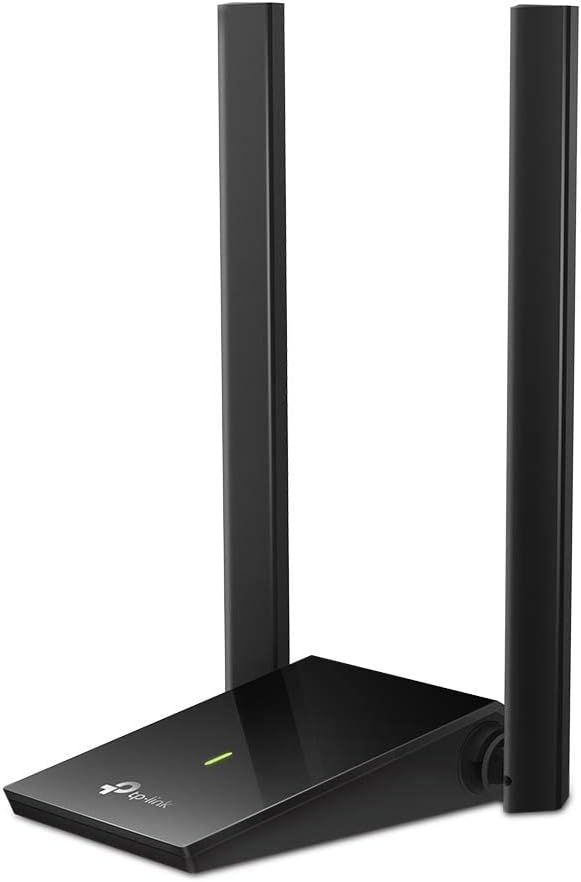

The TP-Link AC600 stands out as a reliable choice for desktop users needing stable wireless connections. With a rating of 4.4 stars, it delivers consistent performance across various usage scenarios including streaming and gaming.
We may earn a commission when you buy through this link, at no additional cost to you.
Its dual band capability allows users to switch between 2.4 GHz and 5 GHz bands depending on network congestion. The adjustable antenna ensures optimal signal reception by allowing users to orient it towards their router for better range.
While it offers impressive speed up to 433 Mbps on the 5 GHz band, users must download drivers for setup which might inconvenience some. It supports Windows operating systems exclusively which limits compatibility for Mac users.
This adapter is ideal for desktop owners who need an affordable upgrade to 802.11ac standards. The combination of long range and lag-free connections makes it a strong recommendation for home office setups.
The multi-directional antenna helps capture stronger signals from routers placed in distant rooms or behind obstacles.
Users can manually select the 5 GHz band for high bandwidth tasks or 2.4 GHz for wider range coverage.
We may earn a commission when you buy through this link, at no additional cost to you.
This Nano adapter is designed for users who prioritize portability without sacrificing essential dual band performance. With a 4.5 rating, it is favored for its small footprint and ability to stay plugged in without obstruction.
We may earn a commission when you buy through this link, at no additional cost to you.
It supports both 2.4G and 5G bands allowing flexible connectivity options. The mini design ensures it does not block adjacent USB ports which is a common issue with bulkier adapters.
Performance is solid for standard web surfing and streaming though it lacks external antennas for extended range. It is best suited for laptops or desktops placed near the router.
Budget conscious buyers will appreciate its affordability and reliable connectivity. The inclusion of 24/7 technical support adds significant value for long term users.
Its miniature size makes it perfect for travelers or those with limited desk space needing wireless connectivity.
Support for multiple operating systems ensures it works across diverse hardware setups without major issues.
We may earn a commission when you buy through this link, at no additional cost to you.
The AC1300 model provides significantly higher speeds than standard AC600 adapters making it suitable for high bandwidth activities. It leverages USB 3.0 to ensure data transfer rates are not bottlenecked by older port standards.
We may earn a commission when you buy through this link, at no additional cost to you.
Beamforming technology directs the signal towards connected devices improving efficiency and reducing interference. This feature is particularly useful in crowded network environments with multiple active users.
Although it offers great performance users may face initial setup hurdles due to driver requirements. The portable form factor helps but relies on consistent USB 3.0 connectivity for peak speeds.
Ideal for users needing faster throughput for video calls or large file transfers. The brand reputation and consistent performance make it a reliable upgrade from older wireless standards.
This technology targets the signal specifically to your device rather than broadcasting blindly to improve speed.
Using the faster port ensures that your wireless speed matches the adapter capabilities without bottlenecking.
We may earn a commission when you buy through this link, at no additional cost to you.
Nineplus offers a robust adapter featuring two external antennas to maximize signal strength. The 5dBi gain antennas help overcome signal loss caused by walls and distance in larger homes.
We may earn a commission when you buy through this link, at no additional cost to you.
It supports AC1300 speeds which provides ample bandwidth for gaming and streaming. The USB 3.0 interface ensures that the adapter runs at full potential without being limited by the cable speed.
Setup can be manual for older Windows versions requiring drivers from their website. However their online setup support helps resolve installation issues for customers needing assistance.
This model is great for those struggling with weak WiFi signals. The combination of hardware gain and software support offers a reliable solution for desktop networking needs.
Higher dB values indicate better signal transmission and reception which is critical for distant connections.
Online guidance ensures that even users with limited technical skills can get their connection working quickly.
We may earn a commission when you buy through this link, at no additional cost to you.
This adapter introduces WiFi 6 technology to desktop users offering improved efficiency and speed. It is designed to work best with newer routers that support the same standard for maximum benefit.
We may earn a commission when you buy through this link, at no additional cost to you.
The 600 Mbps speed on the 5 GHz band provides a significant upgrade over older AC standards. Built-in drivers mean you can plug it in and start using it without CD installation.
However compatibility is restricted to Windows 10 and 11 which limits use on other systems. It also requires a WiFi 6 router to achieve the advertised speeds fully.
For users upgrading their network infrastructure this adapter is a forward looking choice. It prepares your PC for modern network standards while ensuring stable connection quality.
The newer standard reduces congestion in busy networks improving speed even when multiple devices are connected.
Modern encryption methods protect your connection from unauthorized access keeping your data safer online.
We may earn a commission when you buy through this link, at no additional cost to you.
Tenda provides a powerful with a high gain antenna to extend range significantly. The external 6dBi antenna rotates to ensure the best signal direction for your specific environment.
We may earn a commission when you buy through this link, at no additional cost to you.
It offers faster connections compared to older adapters improving performance for gaming and streaming. Preloaded drivers simplify the setup process allowing users to get online within seconds.
AP mode allows the PC to act as a hotspot which is useful for sharing internet. However the physical size might be larger than standard nano adapters.
This adapter is ideal for users needing better range without replacing their whole router. The combination of high gain hardware and modern WiFi 6 tech offers great value.
Turning your PC into a hotspot lets you share internet with other devices like phones or tablets easily.
External antennas generally perform better than internal ones especially in areas with physical barriers.
We may earn a commission when you buy through this link, at no additional cost to you.
This premium model delivers top-tier speeds up to 1800Mbps ensuring future proof connectivity. It uses OFDMA technology to handle multiple data streams simultaneously reducing lag significantly.
We may earn a commission when you buy through this link, at no additional cost to you.
The inclusion of a USB extension cable helps position the antenna in a better spot away from interference. Two high gain antennas ensure the signal is strong even through multiple floors.
The price is higher than basic adapters but the performance justifies it for demanding users. It requires a specific operating system version which must be checked before purchase.
Users seeking the fastest possible wireless speeds for gaming or 4K streaming should consider this option. The hardware quality and cable inclusion add to its premium appeal.
The high throughput ensures that large files transfer quickly without slowing down your other internet tasks.
The extension cable lets you put the adapter near a window for better signal reception.
We may earn a commission when you buy through this link, at no additional cost to you.
This adapter features dual high gain antennas for superior range compared to single antenna models. It supports both Windows and Mac operating systems providing flexibility for different user environments.
We may earn a commission when you buy through this link, at no additional cost to you.
The 867Mbps speed on 5GHz ensures fast downloads and streaming. Adjustable antennas allow you to customize the signal direction for optimal performance in your specific room layout.
The design is somewhat larger which might be an issue for small laptops but ideal for desktops. Regular driver updates ensure security and performance remain at peak levels.
Users needing a robust solution for large homes will appreciate the dual antenna setup. It combines reliability with high speed performance making it a versatile choice.
Having two antennas improves stability and range allowing better connection through walls and floors.
Adjustable design means you can point the signal where it is needed most without moving the PC.
We may earn a commission when you buy through this link, at no additional cost to you.
This model offers advanced WiFi 6 tech with speeds reaching 1201 Mbps on 5GHz. It includes ventilation holes which help keep the device cool during long sessions preventing overheating.
We may earn a commission when you buy through this link, at no additional cost to you.
WPA3 encryption provides stronger security for your browsing ensuring data protection against modern threats. The dual mode feature lets you switch between client and AP roles easily.
It is compatible only with Windows 10 and 11 limiting its use on older systems. The cooling design ensures stable performance during heavy usage times.
Ideal for users needing high security and speed in equal measure. The thermal design is a nice touch for maintaining performance over extended periods of use.
Ventilation helps prevent heat buildup which can degrade wireless performance over time.
WPA3 is the latest encryption standard offering better protection than previous protocols.
We may earn a commission when you buy through this link, at no additional cost to you.
This mini adapter brings WiFi 6 tech to a tiny footprint ideal for portable use. It fits seamlessly without obstructing other ports ensuring a clean desktop environment.
We may earn a commission when you buy through this link, at no additional cost to you.
Despite its size it delivers up to 600 Mbps on 5GHz which is significant for a compact unit. Pre-loaded drivers ensure quick setup without needing extra software downloads.
It uses USB 2.0 which is slower than 3.0 but sufficient for these speeds. The range is standard but may not be ideal for very large rooms.
Best for users needing a discreet WiFi upgrade without compromising on modern standards. The small size makes it perfect for laptops and travel scenarios.
The compact design ensures it stays out of the way while still delivering strong connectivity.
Even with USB 2.0 you get substantial speed gains from older wireless standards.
We may earn a commission when you buy through this link, at no additional cost to you.
Choosing the right adapter involves considering speed, range, and compatibility to match your specific needs.
Ensure the adapter supports high enough speeds for your internet plan and activities like gaming. Higher AC or AX ratings indicate faster throughput capabilities.
Look for models offering at least 500 Mbps on the 5GHz band for smooth performance.
External antennas generally provide better range than internal ones. Adjustable antennas allow you to optimize signal direction.
For large homes, choose models with high-gain external antennas for better penetration.
USB 3.0 offers faster data transfer rates which helps maximize wireless speeds. USB 2.0 may bottleneck performance on high-speed adapters.
Check your PC ports to ensure compatibility with the adapter you choose.
Some adapters work only with Windows while others support Mac. Verify driver support for your current OS version before buying.
Windows 10 and 11 compatibility is standard but older versions might need manual drivers.
Built-in drivers allow instant plug and play use without CD installation. Models requiring downloads might be difficult if you have no internet.
Prefer adapters with online support or preloaded drivers for easier installation.
Modern adapters support WPA3 encryption which is more secure than older protocols. Security is vital for protecting sensitive data online.
Choose models that explicitly mention latest encryption standards for safety.
Nano adapters are great for laptops but may lack range. Desktop users can opt for larger models with better hardware.
Consider how much space you have and if you need to move the adapter often.
Prices vary significantly based on features and speed. Basic AC adapters are affordable while AX models cost more.
Balance cost with necessary features to get the best value for money.
Insert the adapter into a USB 3.0 port for best performance if available. If the light turns on it is detected correctly.
Install any necessary drivers from the manufacturer's website to ensure full functionality. Restart your computer to apply changes.
Keep the adapter in a ventilated area to prevent overheating during long sessions. Dust it occasionally to maintain connectivity.
Yes but it might default to 2.4GHz speeds. Check compatibility if your router supports 802.11ac standards for best performance.
Absolutely low latency is key for gaming. High speed models reduce lag significantly making them ideal for competitive play.
Some models work instantly while others require installation. Always check product details for OS support and driver needs.
It is the latest wireless standard offering faster speeds and better efficiency. It requires a compatible router for full benefits.
Range depends on antenna strength and obstacles. Models with external antennas typically reach further through walls.
The adapter connects one PC to WiFi. You can use AP mode to share that connection to other devices if supported.
Nano adapters avoid this issue. Larger models may block adjacent ports so consider placement carefully.
We reviewed ten top models ranging from budget friendly nano adapters to premium WiFi 6 options.
Prioritize speed and compatibility based on your specific usage needs and operating system.
Always check current listings to ensure you get the best deal before buying.