
RubensTab T11 Pro standalone Drawing Tablet
4.4Editor score
Standalone design without computer needed
Full HD IPS screen with vibrant colors
Long battery life for travel use
Finding the right tool for digital creativity can be challenging when you want portability without sacrificing performance. Many artists seek devices that offer a natural drawing experience with high-quality displays and responsive styluses to bring their visions to life.
We have evaluated ten top-rated tablets based on screen quality, pen performance, software compatibility, and overall usability. Our comparison includes standalone Android devices and connected pen displays to cover various workflows and budgets for artists and students.
Each pick highlights key strengths and potential trade-offs to help you make an informed decision for your creative needs. Please note that product availability and features may change over time so always verify the latest details before purchasing.
4.4Editor score

4.5Editor score

4.4Editor score
As an Amazon Associate we earn from qualifying purchases.
The following table provides a side-by-side overview of the ten selected tablets highlighting their key specifications and primary use cases to help you compare features at a glance.



The HUION KAMVAS Pad 12 stands out as a top choice for artists seeking a powerful standalone drawing tablet without compromising on performance. With a high rating of 4.5 stars it offers a premium experience tailored for digital creators on the go.
We may earn a commission when you buy through this link, at no additional cost to you.
Its 90Hz refresh rate ensures that every stroke appears instantly on screen reducing lag significantly during fast drawing sessions. The 16K pressure levels combined with tilt recognition allow for nuanced shading and detailed work similar to traditional media.
While it is a capable device the battery life may vary depending on screen brightness and app usage which requires careful management during long trips. Additionally its reliance on Android limits access to desktop software like Photoshop though many mobile alternatives exist.
Professional illustrators and students who need a reliable portable workstation will find this tablet an excellent investment for their creative workflow. It balances portability with high-end specs making it a versatile tool for various artistic needs.
The 90Hz refresh rate keeps your digital drawing tablet fluid with no lag so strokes appear instantly as you draw and video playback stays smooth for multimedia use.
The digital sketch pad covers 99% sRGB with factory calibration delivering accurate colors right out of the box ideal for your graphic design tablet.
We may earn a commission when you buy through this link, at no additional cost to you.
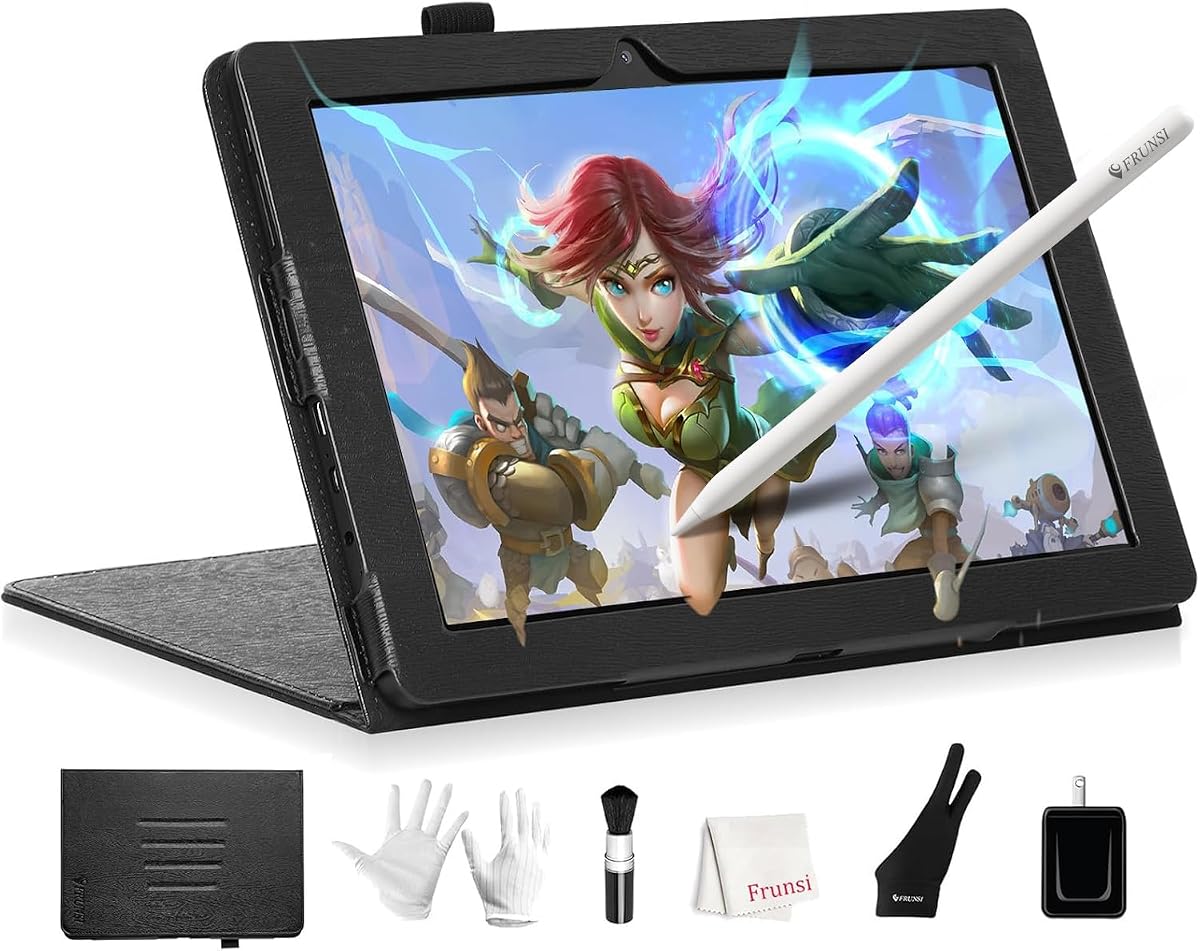
The RubensTab T11 Pro offers an accessible entry point into digital art with a standalone design that removes the need for a computer. Its solid 4.4 rating reflects its reliability and ease of use for students and hobbyists.
We may earn a commission when you buy through this link, at no additional cost to you.
Featuring a 10.1-inch Full HD IPS screen it delivers vibrant colors and sharp details that are essential for precise work. The included pressure-sensitive pen provides natural fluid strokes allowing you to sketch and create immediately upon setup.
However the battery life is rated at up to 5 hours which may require charging during extended use and limits freedom compared to larger battery models. The screen size is also compact which some users might find limiting for complex compositions.
Beginners and travelers looking for a portable and affordable solution will appreciate this device for its convenience and straightforward design. It serves well for quick sketches notes and basic illustration tasks.
Standalone Drawing Tablet No need for a computer! Frunsi T11 is designed to be completely independent allowing you to create sketch and design anywhere anytime.
High-sensitivity pressure-sensitive pen no battery required delivers natural fluid strokes that mimic traditional drawing tools while the responsive screen ensures precise control.
We may earn a commission when you buy through this link, at no additional cost to you.
The Wacom MovinkPad 11 is a high-end option designed for professionals who demand the best pen performance and a natural drawing feel. With a rating of 4.4 it is recognized for its superior build quality and innovative features.
We may earn a commission when you buy through this link, at no additional cost to you.
Its best-in-class Pro Pen 3 delivers 8192 pressure levels and tilt recognition ensuring precise control over your strokes. The matte etched glass surface reduces glare and provides a paper-like texture that many artists prefer over glass screens.
The included two years of Clip Studio Paint Debut adds significant value but the high price point may be prohibitive for casual users. Also while it is powerful it operates on Android which might not support all desktop-class creative software.
For serious illustrators and designers who value pen accuracy and a premium experience this tablet is an excellent choice for portable creation. It bridges the gap between a sketchbook and a digital workstation effectively.
Designed for MovinkPad this slim version of Wacom Pro Pen 3 delivers 8192 pressure levels has three buttons and comes with replacement nibs stored in the pen's back end.
Bright sharp display with matte etched glass surface that feels like paper with subtle texture reduces glare and fingerprints so you can focus on creating without distractions.
We may earn a commission when you buy through this link, at no additional cost to you.
The HUION Kamvas Pro 16 offers a larger canvas for artists who prioritize screen real estate and color accuracy. Rated 4.5 stars it is a reliable companion for desktop-based digital art production.
We may earn a commission when you buy through this link, at no additional cost to you.
Its 120% sRGB color gamut ensures that your creations are vibrant and true to life which is critical for professional design work. The full-laminated screen and anti-glare glass provide a clear view with minimal parallax.
The need for a computer connection reduces its portability compared to standalone options but allows you to use full desktop applications like Photoshop. The lack of a built-in battery means you are tied to an outlet during sessions.
Artists working primarily at a desk will benefit from the spacious screen and customizable keys that streamline their workflow. It is a solid choice for those needing high fidelity and a larger workspace.
See your creations in vibrant and true-to-life colors on this pen display with 120% sRGB 92% AdobeRGB color gamut volume showing shadow details clearly.
Kamvas pro 16 drawing monitors comprise with 6 customized express keys and a touch bar which is helpful to get access to favorite shortcuts and adjust operations like zooming.
We may earn a commission when you buy through this link, at no additional cost to you.
The RubensTab T14 brings a larger 14.1 inch display to the standalone category making it appealing for those who want more room to create without a desktop. It holds a 4.4 rating for its balance of size and performance.
We may earn a commission when you buy through this link, at no additional cost to you.
Equipped with an Octa-Core CPU and a 10000mAh battery it delivers continuous use for up to 5 hours and handles demanding apps well. The larger screen helps in viewing details and managing complex layers.
While the larger size adds some weight making it less pocketable than 10-inch options it remains a good travel companion. Users may note that the display specs are solid but not top-tier compared to premium devices.
Students and artists needing a bigger view for digital painting will find this model a strong contender for portable work. It combines practical features with a generous canvas size for creative projects.
Frunsi RubensTab T14 is designed to be completely independent allowing you to create sketch and design anywhere anytime with a stunning 14.1 inch Full HD IPS screen.
Built-in 10000mAh battery provides up to 5 hours of continuous use making it perfect for long creative sessions or on-the-go use with USB-C charging.
We may earn a commission when you buy through this link, at no additional cost to you.
The PicassoTab 10 A10 is designed with beginners in mind offering a package filled with tutorials and accessories to get you started quickly. It has a 4.2 rating and provides a straightforward path into digital art.
We may earn a commission when you buy through this link, at no additional cost to you.
Its laminated 10 inch screen ensures a smoother drawing feel without parallax which helps maintain accuracy. The 4096 pressure level stylus allows for expressive strokes suitable for sketching and basic illustration.
The inclusion of 6 bonus items such as a case and glove adds value but the device may lag under heavy multitasking due to its modest RAM. The price point is attractive though the performance is geared toward casual use.
New artists and students looking for an easy entry into digital drawing with built-in support will love this device. It simplifies the learning curve with helpful guides and included tools.
Artixo Lifetime VIP upgrade gives you step-by-step lessons guided practice and beginner-friendly exercises plus the Xplore app provides drawing guides and instant help whenever you need it.
Create draw design and learn anywhere on the compact travel-friendly PicassoTab A10 with no computer needed as everything runs directly on the tablet.
We may earn a commission when you buy through this link, at no additional cost to you.
The XPPen Artist 13.3 Pro V2 is a robust pen display for artists who work primarily on a desktop setup. Its 4.5 rating reflects its strong performance and user-friendly design for professional tasks.
We may earn a commission when you buy through this link, at no additional cost to you.
With 16K pressure levels and a 60 degree tilt function it supports natural shading and precise strokes. The fully laminated screen minimizes parallax ensuring that your cursor follows the pen tip accurately.
The device requires a connection to a computer which adds setup time but enables full use of desktop software like Blender and Photoshop. Users should consider cable management as part of their workflow planning.
Digital painters and designers seeking a reliable and high-performance display for home or studio use will find this model satisfying. It offers excellent value for the features provided to dedicated artists.
The 13.3 inch fully-laminated FHD Display pairs a superb color accuracy of 88% NTSC with a 178-degree viewing angle delivering rich colors and vivid images.
XPPen Artist 13.3 Pro supports up to 60 degrees of tilt function so you can add shading to your creation and enjoy smoother transitions between lines and strokes.
We may earn a commission when you buy through this link, at no additional cost to you.
The PicassoTab X14 offers the largest portable canvas in its lineup providing ample space for detailed illustration without a desktop. It has a 4.2 rating and focuses on giving users more room to create on the go.
We may earn a commission when you buy through this link, at no additional cost to you.
Its fully laminated 14 inch screen reduces glare and parallax for a smoother drawing feel. The octa-core CPU ensures smooth multitasking so you can switch between apps without significant lag.
While the 128GB storage is expandable to 1TB the larger physical footprint may make it less convenient for tight travel situations. Users may also need to manage battery consumption carefully during long sessions.
Artists who need a bigger screen for complex projects but still want standalone portability will appreciate this tablet. It is a solid option for creative work that requires space.
Enjoy the freedom to draw design and learn on the largest portable PicassoTab ever. The X14 delivers a premium spacious canvas while staying lightweight and travel-friendly.
With an octa-core CPU 6GB RAM and 128GB storage the X14 runs drawing apps schoolwork streaming and multitasking smoothly and without lag.
We may earn a commission when you buy through this link, at no additional cost to you.
The T8 Standalone Drawing Tablet is an ultra-compact option ideal for quick sketches and notes on the move. It has a 4.4 rating and is designed for maximum portability without sacrificing basic drawing functions.
We may earn a commission when you buy through this link, at no additional cost to you.
Featuring an 8 inch display it fits easily in a bag and weighs very little. The Android 13 operating system allows access to many drawing apps and ensures a modern user experience.
The battery life claim of up to 20 hours is attractive but actual use may vary depending on screen settings. The smaller screen size might make complex work less comfortable for experienced artists.
For travelers and hobbyists who prioritize portability and budget this tablet is a practical choice. It serves well for journaling and casual creative work anywhere.
Your portable canvas crafted for the modern artist who demands power and precision. Designed for freedom unchained by wires this standalone tablet frees you from the desk for graphic designers.
Enjoy the best of both worlds with a tablet that offers powerful drawing functions and the flexibility of Android OS. Install and use your favorite apps with ease.
We may earn a commission when you buy through this link, at no additional cost to you.
The Callsky-Tab 12 offers high hardware specs including 16GB RAM and a 12-inch 2K display for a premium feel. It has a 4.2 rating and is well-suited for multitasking and media consumption.
We may earn a commission when you buy through this link, at no additional cost to you.
Its large battery capacity ensures long hours of use which is beneficial for both creative work and entertainment. The included flip case adds protection and offers multiple viewing angles for comfort.
While the specs are impressive the pen performance may not match specialized drawing tablets in terms of sensitivity and pressure. Users focused solely on drawing might find it less refined than dedicated art devices.
Multimedia users and general artists who need a powerful tablet for various tasks will find this model capable. It provides a balance of display quality and internal power for daily use.
Ctab 12 is a 12-inch Android 15 tablet powered by a T616 octa-core processor with 16GB RAM and 256GB ROM for smooth multitasking.
This tablet with Stylus comes equipped with a rechargeable pen offering 4096 pressure levels and tilt support ensuring precise natural strokes for professional-grade results.
We may earn a commission when you buy through this link, at no additional cost to you.
Selecting the right digital art tablet involves considering several key factors to ensure it meets your specific creative needs and workflow.
Standalone tablets function independently without needing a computer making them ideal for travel and on the go creation. Connected pen displays require a PC or Mac which allows for full desktop software but limits portability.
Decide if you need mobility or the power of desktop apps when choosing between standalone and connected options.
Screen size directly impacts your workspace and portability with larger screens offering more room for detail. Resolution affects clarity so higher pixel counts ensure sharp lines and crisp text.
Choose a size that balances your workspace needs with how often you plan to carry the device with you.
Pressure levels determine how many stroke widths the pen can recognize with more levels allowing for expressive control. Tilt support allows shading by angling the pen which mimics natural media more closely.
Look for at least 4096 pressure levels and tilt support for professional quality drawing and shading capabilities.
Accurate colors are vital for graphic design and illustration to ensure your work looks as intended on print. Higher color gamut coverage like sRGB ensures vibrant and true-to-life hues.
Prioritize models with high color gamut coverage if color fidelity is critical for your design projects.
Android tablets offer mobile apps which are powerful but limited compared to desktop programs like Photoshop. Connected displays let you use full desktop software which expands your creative tools significantly.
Check if your favorite drawing apps are available on the tablet's operating system before purchasing.
For standalone tablets battery life determines how long you can draw without searching for an outlet. Longer battery life supports travel and uninterrupted creative sessions.
Opt for models with high capacity batteries if you plan to use your tablet frequently away from power sources.
A sturdy build ensures your device survives daily use and travel bumps without damage. Materials like aluminum or reinforced plastic add to the longevity of the tablet.
Invest in models with robust build quality and warranty coverage for peace of mind.
Packages that include cases gloves and stylus replacements add value and protect your investment immediately. Some also bundle software subscriptions or tutorials which help beginners learn quickly.
Review the included accessories to see if they meet your needs and save you from extra purchases.
To begin ensure your tablet is charged and the stylus is paired or ready. Install your preferred drawing apps and adjust settings like pressure sensitivity to match your style.
Use a drawing glove to reduce friction and prevent smudges on the screen during long sessions. Regularly update your software to keep performance optimized and features current.
Clean the screen with a soft microfiber cloth to avoid scratches and maintain clarity. Store your tablet in a protective case when not in use to prevent physical damage.
Many models listed offer high pressure levels color accuracy and software support suitable for professional work. However desktop-connected displays may provide more power for complex projects.
Standalone tablets do not require a computer and run independently. Pen displays like Kamvas Pro need a PC or Mac to function.
Popular apps include Clip Studio Paint ibisPaint X Medibang and Adobe Fresco. Check the Google Play Store for specific version availability.
Use a soft dry microfiber cloth to wipe the screen gently. Avoid harsh chemicals or wet wipes that might damage the coating.
Active pressure-sensitive styluses are recommended for best performance. Regular capacitive pens may work but lack pressure and tilt sensitivity.
Battery life varies by usage and settings but ranges from 5 to 20 hours on a full charge. Standalone models are designed for portable all-day use.
These ten options offer a range of features for every type of artist from beginners to professionals seeking portability or desktop power.
Focus on what matters most for your work whether it is screen size battery life or software support to find the perfect match.
Always check current product details and availability before purchasing to ensure the device meets your latest needs.