
NIMO 15.6'' AI Ready Laptop
4.8Editor score
4-Core Intel N150 Processor
8GB RAM and 256GB SSD
15.6 inch Full HD Display
Finding the right laptop for karaoke gear means looking beyond just raw speed. You need reliable audio interfaces, clear displays for lyrics, and enough ports to connect microphones and mixers without hassle.
We evaluated ten top models based on processor power, RAM capacity, storage speed, and connectivity options. Each device was chosen for its ability to handle karaoke software, streaming apps, and multimedia files smoothly.
Every pick shows real-world suitability for home parties or mobile performances. Note that availability and pricing change frequently, so check current listings before making your final decision to ensure you get the best value today.
4.8Editor score

4.5Editor score

4.5Editor score
As an Amazon Associate we earn from qualifying purchases.
This side-by-side comparison highlights key specifications across ten leading laptops suitable for karaoke gear integration. Review processor types, memory sizes, storage capabilities, and display features to find the perfect match for your setup.






This HP laptop stands out as a top choice for karaoke gear setups due to its expansive 17.3 inch display. With a rating of 4.5 stars, users appreciate its reliable performance and clear visuals needed for scrolling lyrics during parties.
We may earn a commission when you buy through this link, at no additional cost to you.
The AMD Ryzen 5 processor paired with 16GB RAM ensures smooth operation even when running karaoke software alongside streaming apps. The 512GB SSD provides ample space for storing song libraries and backup files without slow boot times.
While the battery life is commendable, the weight is slightly heavier than smaller ultrabooks which might be a factor for mobile performers. The digital microphones integrated into the webcam are useful for video chats but external mics are better for serious audio.
Ideal for home entertainers who want a dedicated station for lyrics and mixing, this device balances power and portability well. Its Windows 11 environment supports most karaoke tools seamlessly for a worry-free experience.
The large FHD display ensures text is readable from a distance, making it easier for guests to follow along during performances.
Multiple USB ports and HDMI connectivity allow you to link external speakers or projectors for a larger karaoke environment.
We may earn a commission when you buy through this link, at no additional cost to you.
The Dell Pro offers premium features like a 120Hz refresh rate display which brings fluid visuals to any video content. It holds a 4.5 star rating for its responsive performance and build quality suitable for daily karaoke hosting tasks.
We may earn a commission when you buy through this link, at no additional cost to you.
Intel Core 3 100U with 16GB DDR5 memory handles multitasking effortlessly ensuring lag-free transitions between music playlists and video streams. The SSD ensures quick access to your favorite tracks when you need to change the vibe quickly.
Storage might require external expansion for large media libraries and the keyboard lacks backlighting which can hinder setup in dimly lit rooms. However the touchpad and ports are designed for robust connection handling.
This laptop is perfect for users who value screen smoothness and system speed over sheer storage volume. It delivers a premium computing experience that elevates your entertainment setup significantly.
A higher refresh rate means video playback appears smoother reducing motion blur during fast-paced music videos or live feeds.
DDR5 RAM provides greater bandwidth allowing faster data processing which is crucial for real-time audio effects and visualizers.
We may earn a commission when you buy through this link, at no additional cost to you.
Rated 4.8 stars, the NIMO laptop impresses with its budget-friendly price point without sacrificing essential features for casual karaoke use. Its lightweight build makes it easy to carry for small gatherings or home setups.
We may earn a commission when you buy through this link, at no additional cost to you.
The 4-core N150 processor handles basic media tasks well though it may struggle with heavy video processing. The 180 degree hinge allows for flexible screen positioning which is helpful when sharing lyrics with guests nearby.
Performance limits appear when running multiple high-demand apps simultaneously and the RAM is not easily expandable later. However the included warranty offers peace of mind for long-term ownership.
Ideal for beginners or casual hosts, this laptop provides a solid foundation for streaming karaoke videos and managing playlists. Its affordability makes it an accessible entry point for those new to digital singing setups.
Weighing just over three pounds, this laptop fits easily in backpacks allowing you to take your setup anywhere effortlessly.
Multiple USB ports and HDMI output ensure you can connect various peripherals without needing extra adapters or dongles.
We may earn a commission when you buy through this link, at no additional cost to you.
With up to 14 hours of battery life, this HP OmniBook keeps you going through long parties without needing a power outlet. Users rate it 4.5 stars for its balance of performance and endurance in daily tasks.
We may earn a commission when you buy through this link, at no additional cost to you.
The AMD Ryzen 3 30 processor delivers steady speeds for media playback while the 512GB SSD provides room for large media files. Advanced AI noise reduction helps filter background sounds during calls or recording sessions.
The processor is not designed for heavy gaming or complex rendering which might limit advanced visual effects in karaoke software. Port selection is moderate so you may need a hub for multiple simultaneous connections.
Best suited for all-day events or travel, this laptop offers reliability where power access is uncertain. Its efficient design ensures your entertainment runs smoothly without constant charging interruptions.
Fast charge technology means you can regain hours of use quickly even if the battery runs low during an event.
Advanced microphones help isolate your voice reducing unwanted noise for clearer recordings or video calls with friends.
We may earn a commission when you buy through this link, at no additional cost to you.
This model features a total storage capacity of 628GB including an external drive which is excellent for storing extensive music libraries. It holds a 4.2 star rating for its value in hardware and included software benefits.
We may earn a commission when you buy through this link, at no additional cost to you.
16GB RAM supports smooth multitasking across apps while Windows 11 Pro offers enhanced security features for home business use. The bundled accessories like wireless earbuds enhance the audio experience during setup testing.
The screen size is smaller than ideal for shared viewing and mixing external drives can be slower than internal SSDs. However the comprehensive bundle reduces the need for immediate extra purchases.
Great for users who want an all-in-one package, this laptop handles storage needs effectively. It balances business reliability with entertainment utility for versatile usage scenarios.
Lifetime Microsoft Office adds significant value allowing you to manage playlists and notes without additional subscription costs.
WiFi 6 ensures faster internet speeds for downloading new songs or streaming live content during your sessions.
We may earn a commission when you buy through this link, at no additional cost to you.
The HP 255 G10 is a reliable everyday device rated 4.2 stars for its balance of speed and simplicity. Its lightweight design makes it convenient for users who move their setup frequently.
We may earn a commission when you buy through this link, at no additional cost to you.
Equipped with 16GB RAM, it handles multiple browser tabs and media players without stuttering. The Ryzen 3 7330U processor ensures energy efficiency which helps keep operating temperatures low.
Port selection is somewhat restricted meaning you might need a hub to connect multiple peripherals at once. Battery performance is standard so planning for power access during long events is wise.
Best for general home use and occasional party hosting, this laptop offers solid performance for the price. It is a dependable choice for users who prioritize simplicity and speed.
Thin and light design ensures easy transport so you can set up quickly in different rooms or locations.
LED backlighting provides clear visibility even in moderately lit rooms ensuring lyrics remain easy to read.
We may earn a commission when you buy through this link, at no additional cost to you.
Featuring a 2K touchscreen, this HP OmniBook offers interactive control over your content rated 4.5 stars for its vibrant visuals. The screen clarity allows for precise navigation during song selection.
We may earn a commission when you buy through this link, at no additional cost to you.
The 8GB RAM is adequate for standard use but might limit heavy multitasking. The 14 hour battery life ensures sessions remain uninterrupted while fast charge restores power quickly when needed.
Touch input can increase power consumption slightly and storage is limited to 256GB which requires cloud management for large files. However the display quality is superior to many competitors.
Ideal for creative users who enjoy interactive interfaces, this laptop brings modern features to the entertainment space. It combines visual excellence with portable convenience effectively.
Touchscreen technology allows quick scrolling through song lists adding a fun element to guest participation.
2K resolution provides sharp text and images making video playback look polished on the screen.
We may earn a commission when you buy through this link, at no additional cost to you.
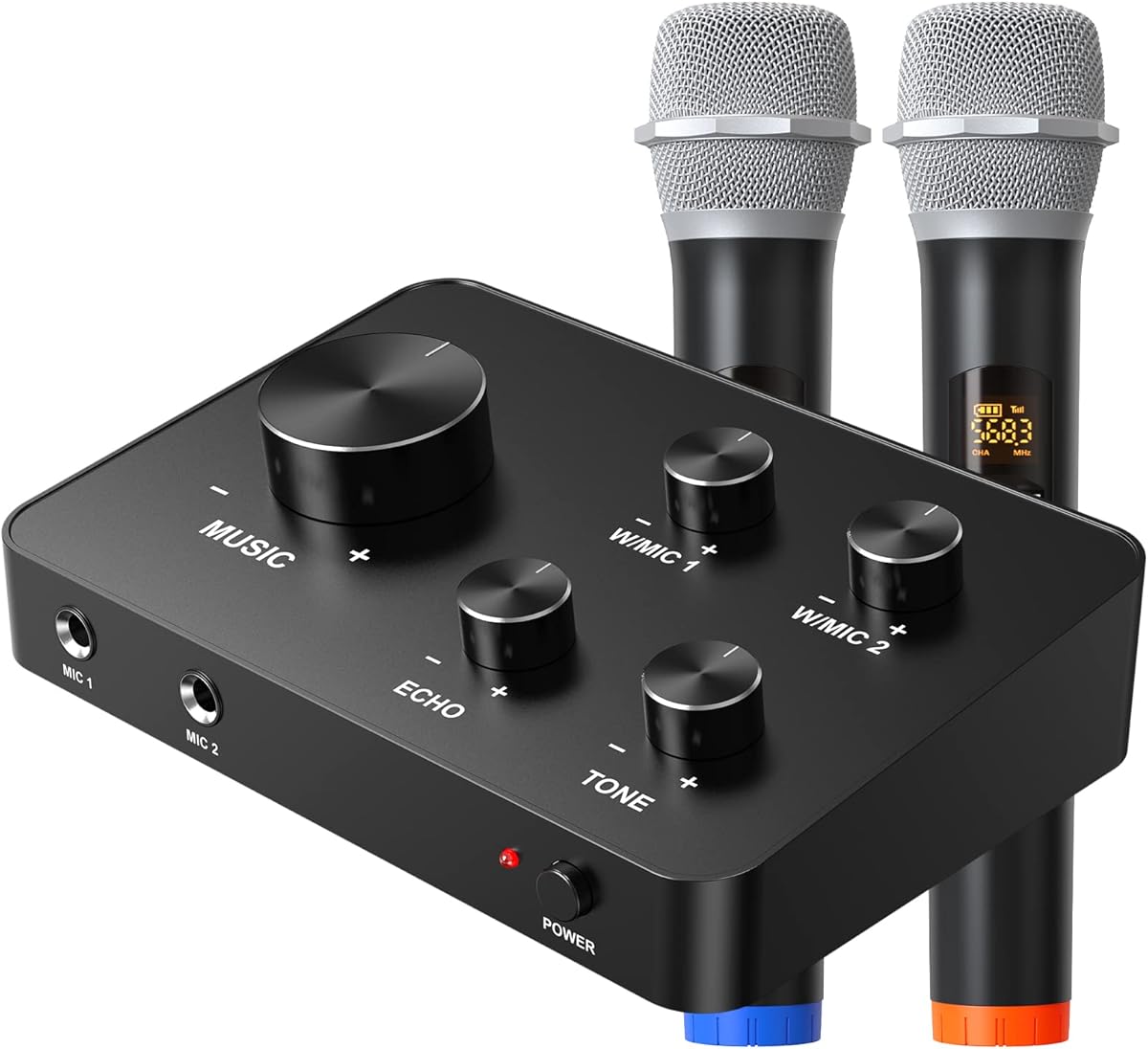
This mixer system provides a complete solution for microphone audio with dual wireless mics and echo effects. Rated 3.8 stars, it is a straightforward choice for basic karaoke hardware needs.
We may earn a commission when you buy through this link, at no additional cost to you.
The UHF wireless technology offers a stable 100 foot range allowing guests to move freely. Dials for volume and tone give you control over the sound without complex settings.
Battery life for mics depends on usage and the mixer itself needs power which adds to cable management. Audio quality is good but not studio-grade for professional recording sessions.
Best for home parties, this system integrates easily with TVs and speakers for instant singing. It is a practical add-on to any laptop-based karaoke setup.
Plug and play design means you can start singing right after connecting cables without technical configuration.
Adjustable echo and tone allow you to tailor the sound to suit different voices and room acoustics.
We may earn a commission when you buy through this link, at no additional cost to you.
Designed for detailed audio control, this mixer handles multiple inputs and outputs with professional features. It scores 3.7 stars for its versatility in connecting various media devices.
We may earn a commission when you buy through this link, at no additional cost to you.
HD ARC and optical inputs ensure high fidelity sound from modern TVs while Bluetooth support allows wireless streaming. Independent volume controls let you balance music and vocals precisely for better listening experiences.
Setup requires reading diagrams to connect devices correctly and mics may be purchased separately adding to cost. The vocal cut mode is particularly useful for practice sessions.
Best for enthusiasts who want detailed sound shaping, this unit offers robust control. It enhances the audio output of any laptop driven karaoke system.
High-quality channels and optical inputs preserve sound integrity ensuring your performance sounds as intended.
Support for diverse inputs means you can connect laptops, TVs, and phones simultaneously without swapping cables.
We may earn a commission when you buy through this link, at no additional cost to you.
This handheld mic offers built-in speakers and effects making it a standalone fun gadget for casual singing. Rated 4.1 stars, it adds a playful element to any gathering.
We may earn a commission when you buy through this link, at no additional cost to you.
With 10 hours of battery life, it lasts through multiple sessions without frequent charging. The dynamic lights create a visual atmosphere that enhances the party mood effectively.
It connects primarily via Bluetooth and may not integrate deeply with PC audio software for full mixing. The sound quality is fun but not suitable for professional setups.
Best as a supplementary fun item or gift, this mic brings joy to family parties. It is a lightweight option for quick sing-alongs without heavy hardware.
Dynamic light modes add excitement to performances engaging guests visually alongside the audio experience.
Portable and self-contained means you can use it anywhere without needing external speakers or complex wiring.
We may earn a commission when you buy through this link, at no additional cost to you.
Selecting the right laptop involves weighing hardware capabilities against your specific karaoke setup needs. Consider processor power, storage, ports, and display clarity to ensure smooth performance.
The processor handles song loading, effect processing, and video playback simultaneously. Look for at least a quad-core i5 or Ryzen 5 equivalent to avoid lag during performance.
Prioritize modern processors for better efficiency and longevity in your karaoke setup.
Running karaoke software, browsers for lyrics, and music players requires ample memory. 8GB is the minimum but 16GB ensures smoother transitions and responsiveness.
More RAM allows for future updates and additional apps without slowing down your system.
Music files and video tracks consume significant space. Aim for at least 256GB SSD storage for fast access and room for your library expansion.
SSDs offer faster load times compared to traditional hard drives which improves user experience.
A clear screen makes reading lyrics easier for everyone in the room. Full HD resolution is essential and larger screens help with visibility.
Anti-glare coatings can improve visibility in bright rooms during gatherings.
You need enough USB ports to connect mixers and microphones. HDMI is required for connecting external displays or TVs.
Ensure your laptop has the right ports or invest in a compatible dock for flexibility.
Portability is key for mobile setups. Look for a battery that lasts at least 8 hours to cover long sessions.
Efficient processors help extend runtime so you stay powered without cords.
Windows 11 provides robust support for most modern audio drivers and software. It ensures compatibility with various karaoke apps.
Verify your preferred software runs smoothly on the chosen OS before purchasing.
A quality headphone or microphone jack helps connect external audio gear. Check if the port supports high impedance devices.
Built-in microphone quality matters if you plan to use the laptop without external mics.
Start by connecting your external speakers and microphones to the laptop using the available USB or HDMI ports. Ensure all drivers are installed to guarantee smooth audio transmission without latency.
Adjust display settings to ensure text is readable and brightness is comfortable for your environment. Use the night light feature if operating in dim conditions to reduce eye strain for guests.
Clean the screen and keyboard regularly with a soft cloth to maintain visibility and touch sensitivity. Store the laptop in a cool place when not in use to prolong battery health and internal components.
Yes most modern laptops have USB-A or USB-C ports that support audio mixers. You may need a specific driver for certain hardware but plug and play devices work immediately.
Full HD or 1080p is ideal for clear text readability. Higher resolution helps but 1080p provides a good balance of sharpness and performance.
Indoor use often allows for charging but having decent battery life offers backup during power outages or long events where cables might be inconvenient.
Windows is widely supported by most karaoke software due to its driver ecosystem. Mac users should check compatibility with specific apps before committing to a purchase.
Organize tracks into folders by genre or artist and use media player software that supports playlists. Keep backups on external drives to prevent data loss.
Wireless mics offer more freedom of movement but require battery management. Wired mics are simpler and reliable if guests do not need to move far from the setup.
Many laptops support recording through apps or built-in tools. Ensure your storage is sufficient for video files if you plan to save memories.
Basic integrated graphics are usually sufficient for lyrics and static video. Dedicated graphics are only necessary for heavy visual effects or gaming style apps.
The HP 17 inch Business Laptop and Dell Pro models stand out as top performers for balancing power and display quality. The NIMO option remains a strong budget choice for casual hosts.
Prioritize screen size and RAM when selecting a unit to ensure smooth playback and easy lyric reading. Connectivity options are equally important to match your audio hardware.
Remember that prices and availability shift regularly so verify current specs before buying. Investing in the right laptop ensures every party delivers a polished and enjoyable experience.