
Redragon S101-3 PRO
4.2Editor score
Programmable RGB backlight
Independent macro record keys
Anti-ghosting support
Discover the top Baldurs Gate 3 Keyboard and Mouse options for immersive gameplay. Our expert guide compares features, performance, and value to help you
Finding the right peripherals for Baldurs Gate 3 is essential for an immersive role-playing experience. A responsive keyboard and precise mouse ensure your commands execute flawlessly during critical combat moments and complex dialogue choices.
We compared ten top-rated gaming combos based on build quality, customization options, and ergonomic comfort. Our analysis focuses on features that enhance gameplay, such as anti-ghosting, customizable RGB lighting, and reliable connectivity for seamless interaction.
Each pick below highlights specific strengths suited to different playstyles and budgets. While pricing may fluctuate over time, these selections represent the most reliable and high-performing options currently available for adventurers seeking a tactical edge in their journey.
4.2Editor score
4.4Editor score
3.9Editor score
This side-by-side comparison highlights the key specifications and unique attributes of each selected combo. Whether you prioritize wireless freedom, mechanical feel, or large print visibility, these options cover the most relevant needs for modern gamers.


The Redragon S101-3 PRO stands out as a highly accessible entry-level option for Baldurs Gate 3 players seeking reliable performance without breaking the bank. Its complete wired set includes a full-size RGB backlit keyboard and a high-precision mouse, offering everything needed for immersive gameplay sessions. The combination of durability and responsive input makes it ideal for first-time gamers and students looking for an upgrade from standard peripherals.
We may earn a commission when you buy through this link, at no additional cost to you.
This combo shines with its extensive customization capabilities, including dynamic lighting modes and programmable macro keys. The software allows for easy adjustments to colors, brightness, and patterns, giving users control over their setup aesthetic. Additionally, the anti-ghosting feature ensures that every key press is registered instantly, which is critical during intense combat encounters where multiple commands are often required simultaneously.
While it uses membrane switches rather than mechanical ones, the soft-touch keys provide satisfying feedback while remaining quiet enough for shared spaces or late-night sessions. The ergonomic wrist rest helps reduce fatigue during long play hours. The main trade-off is the lack of tactile mechanical feedback, but for the price point, the responsiveness is generally acceptable for most RPG needs.
This set is perfect for budget-conscious users who want a plug-and-play solution with solid performance. The saved settings on hardware mean you do not need to reconfigure every time you reboot. Overall, it delivers a reliable and feature-packed experience that balances cost with essential gaming functionalities effectively.
The intuitive software and dedicated macro keys allow you to record complex command sequences, giving you a competitive edge in any game.
Designed for marathon sessions, the ergonomic wrist rest and quiet keys ensure comfort during extended play in shared environments.
We may earn a commission when you buy through this link, at no additional cost to you.
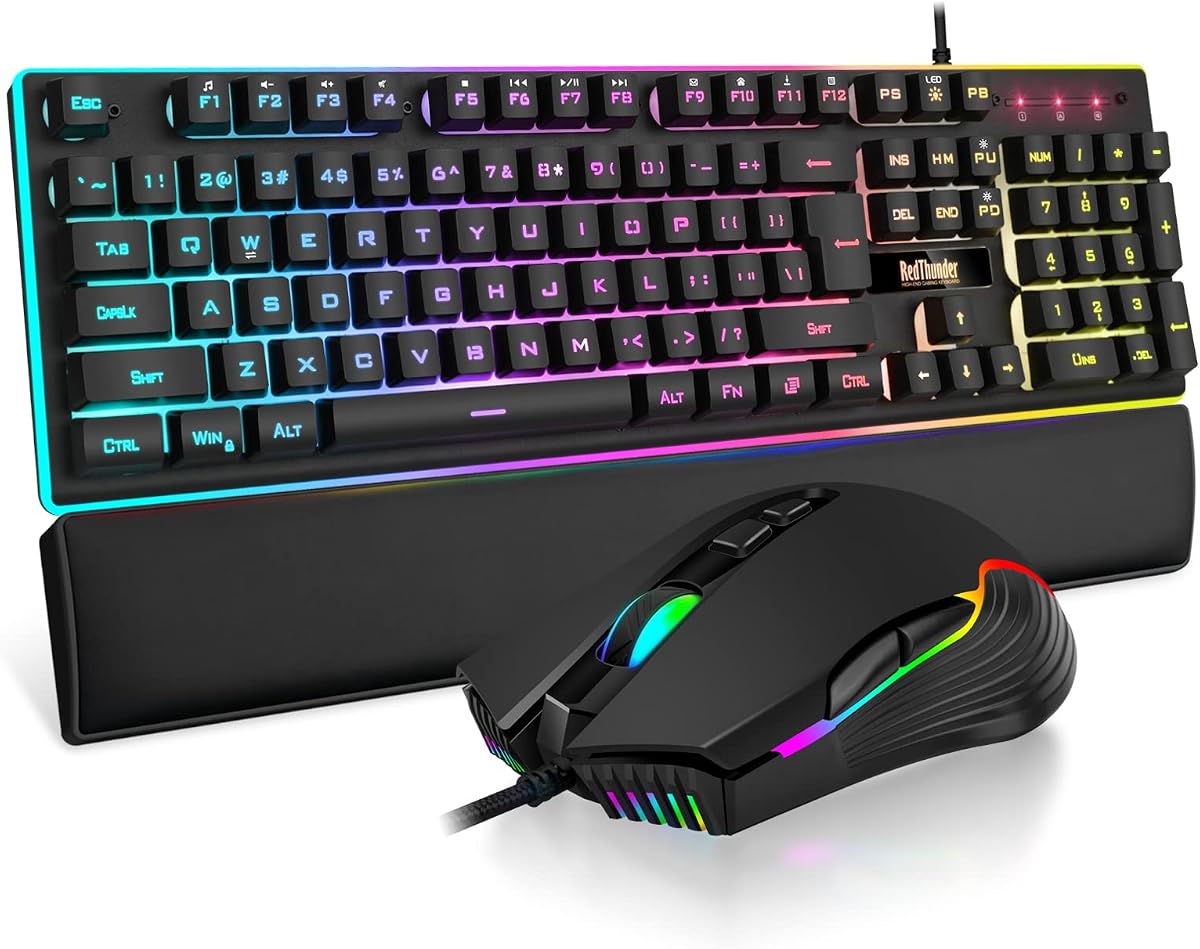
The RedThunder K10 Wired is our top pick for its balance of mechanical feel and robust build quality. It features a full-size keyboard with anti-ghosting keys that allow simultaneous presses, essential for complex skill chains in Baldurs Gate 3. The high-precision optical mouse with a 7200 DPI sensor ensures accuracy during both exploration and combat.
We may earn a commission when you buy through this link, at no additional cost to you.
Its standout feature is the integrated steel plate within the keyboard base, which provides exceptional durability and resistance to flexing. The soft leather wrist rest, filled with memory foam, offers extra relaxation during long gaming marathons. The RGB lighting enhances the aesthetic appeal, creating an immersive atmosphere that matches the game's detailed environments.
While it lacks wireless capabilities, the wired connection ensures zero latency, which is crucial for responsive gameplay. The only drawback is the reliance on a fixed connection, which might limit cable management options compared to wireless alternatives. However, the stability and tactile feedback compensate well for this limitation.
This combo is best suited for gamers who prioritize performance and tactile feedback over wireless convenience. The high-quality construction ensures it can withstand daily use, making it a reliable choice for both work and gaming scenarios where precision matters most.
The 12000fps scan rate and adjustable DPI ensure that your movements translate instantly to on-screen actions.
The adjustable tripod keyboard and anti-slip mouse reduce hand fatigue, allowing for more comfortable extended sessions.
We may earn a commission when you buy through this link, at no additional cost to you.
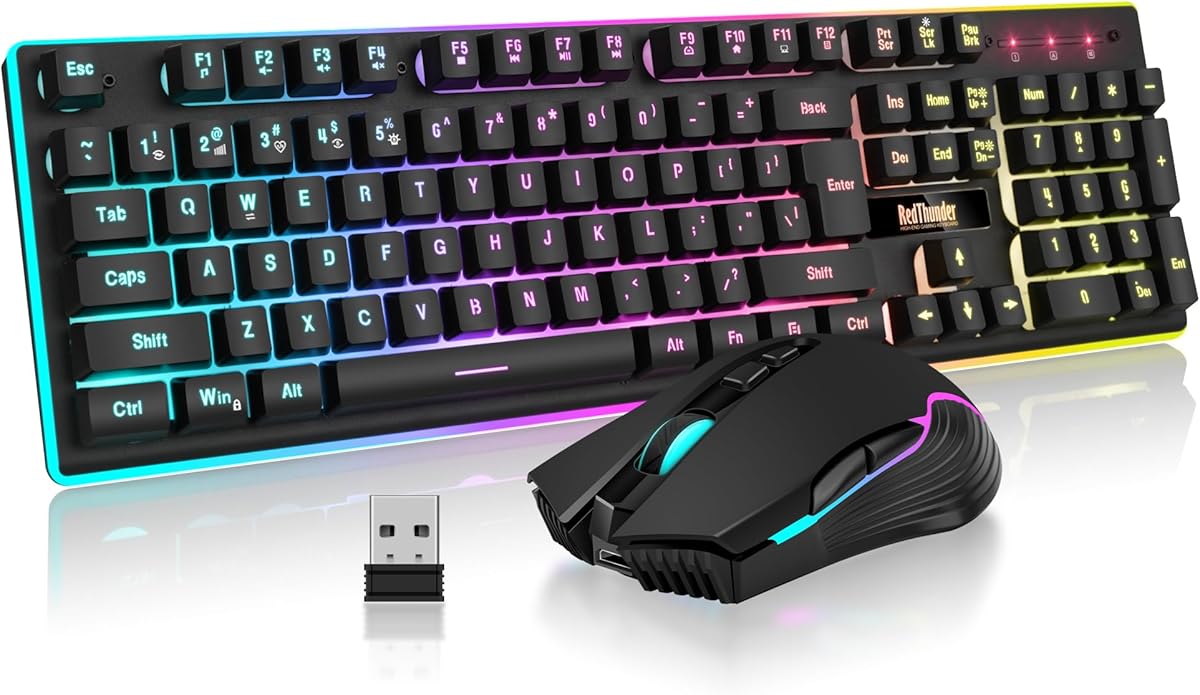
The RedThunder K10 Wireless offers a premium experience by combining mechanical feel with the freedom of wireless connectivity. Its 2.4G high-speed transmission ensures stable performance even during intense battles. The rechargeable design with a 3800mAh battery provides hours of continuous use without the hassle of disposable batteries.
We may earn a commission when you buy through this link, at no additional cost to you.
Its RGB lighting effects are among the best on the market, with multiple modes and brightness levels to customize your setup. The mouse features a built-in 7-color cyclic lighting effect that adds to the immersive experience. The shared USB receiver simplifies setup, making it easy to plug and play across different devices.
While the wireless connection is reliable, it requires a USB port which might be limited on some devices. The weight is slightly higher due to the battery, but this is a minor trade-off for the mobility it provides. The durability of the frosted metal cover ensures long-term reliability despite the wireless components.
This set is ideal for gamers who value cable-free setups without compromising on tactile feedback or battery longevity. It bridges the gap between budget and high-end wireless options, offering a robust feature set that appeals to both casual and serious players looking for enhanced mobility.
The 2.4G transmission ensures stable performance even during intense battles, balancing work and gaming seamlessly.
Smart energy-saving functions automatically put the devices to sleep when not in use, extending battery life further.
We may earn a commission when you buy through this link, at no additional cost to you.
The Rii Gaming Set RK108 provides a reliable and ergonomic experience suitable for everyday gaming needs. Its mechanical feel keys offer a cool usage experience whether you are working or engaging in gameplay sessions. The 3-LED backlit keyboard and 7-color breathing light on the mouse create a practical and aesthetic setup for dark environments.
We may earn a commission when you buy through this link, at no additional cost to you.
Durability is a key strength here, with a keyboard key life of 5 million clicks and a mouse life of 3 million. The laser-carved characters ensure longevity, and the 4 DPI options allow for basic adjustments to suit different tasks. The ergonomic design helps release hand fatigue during prolonged use.
Installation is straightforward since no drivers are required, making it compatible with a wide range of operating systems and devices. While the DPI settings are limited compared to high-end models, they are sufficient for most standard gaming requirements. The value it offers makes it a strong contender for budget-focused buyers.
This set is perfect for users who need a durable and comfortable solution without complex software requirements. Its compatibility with various devices ensures versatility for different setups. Overall, it delivers a solid and practical performance that meets the essential needs of casual gamers effectively.
With millions of clicks lifespan and laser-carved characters, this set is built to withstand regular daily use.
Support for multiple operating systems and smart TVs ensures it works well across different devices.
We may earn a commission when you buy through this link, at no additional cost to you.
The K1 RGB LED Combo delivers a full-size experience with a scientific layout designed for comfort and efficiency. Its floating keycaps are removable and provide a good tactile feel during typing or gaming sessions. The RGB backlight offers 8 colors and 5 modes, allowing users to personalize their lighting to match their mood or environment.
We may earn a commission when you buy through this link, at no additional cost to you.
The high-resolution mouse features 6 speed levels, enabling quick responses and precise movements across different scenarios. The double-shot injection molding ensures that letters never fade and light transmission remains clear even in the dark. A waterproof USB cable and anti-interference magnet ring ensure stable data transmission over time.
While it does not use mechanical switches, the layout and key feel provide a comfortable experience for extended use. The lack of advanced software customization is a trade-off, but the plug-and-play nature simplifies setup significantly. The non-slip pads on the bottom enhance stability during intense play.
This combo is best for users seeking a complete full-size layout with customizable lighting at an affordable price. It supports a wide range of operating systems, making it versatile for both work and gaming. Overall, it offers a reliable performance that balances simplicity with essential visual appeal.
Multiple brightness levels and light speeds allow for easy personalization to suit any gaming environment.
The mouse allows high speed for quick responses, ensuring your actions match your intent accurately.
We may earn a commission when you buy through this link, at no additional cost to you.
The Large Print Light Up Keyboard is designed with high-contrast keys that offer superior visibility for those who struggle to see standard layouts. The larger and bolder font helps users identify keys quickly, making it ideal for elderly users or those with visual impairments. The adjustable 7 color backlight adds customization to your desk setup.
We may earn a commission when you buy through this link, at no additional cost to you.
The ergonomic design includes a foldable stand that reduces hand fatigue during long hours of use. The full QWERTY layout with a numeric keypad ensures functional completeness without requiring relearning of typing habits. The USB plug and play design eliminates the need for charging or batteries, ensuring constant availability.
While it focuses on visibility, it also provides a comfortable typing position even for long working sessions. The lack of advanced gaming features like macro keys is expected, but the reliability and comfort make up for it. The compatibility with multiple operating systems ensures broad usability across different environments.
This set is perfect for anyone prioritizing clarity and comfort over advanced gaming features. It serves well in schools, offices, and homes where visibility is a key concern. Overall, it delivers a functional and supportive experience that enhances productivity and ease of use effectively.
High-contrast keys with larger characters ensure you can see clearly even in low-light conditions.
The kickstand construction and ergonomic layout keep your hands comfortable during extended periods of typing.
We may earn a commission when you buy through this link, at no additional cost to you.
The BlueFinger RGB Combo is a visually appealing set that combines a rainbow backlit keyboard with a responsive mouse. The letters glow through the keys, making typing in dark rooms easier and adding a cool aesthetic to your desk. The built-in steel plate ensures durability and resistance to falling, while the braided wire adds to the robust build.
We may earn a commission when you buy through this link, at no additional cost to you.
Its 19 non-conflict keys allow for simultaneous key presses, which is vital for complex gaming moves. The mouse features adjustable DPI settings and a breathing light effect that enhances the immersive experience. The included mouse pad provides a smooth surface and additional wrist support, completing the gaming setup.
While the DPI settings are basic, they are sufficient for most tasks, and the ergonomic design ensures comfort during use. The compatibility with various systems means you can use it on consoles or PCs without issues. The main limitation is the lack of advanced customization options found in higher-end models.
This set is ideal for users who want a stylish and reliable gaming experience without overspending. The inclusion of a mouse pad adds extra value, making it a complete package. Overall, it offers a balanced mix of visual appeal and functional performance suitable for everyday gaming.
Rainbow backlit keys ensure you can type easily in the dark while looking stylish.
The included mouse pad offers a comfortable wrist rest support and non-slip base for stability.
We may earn a commission when you buy through this link, at no additional cost to you.
This Large Print Combo is tailored for seniors and visually impaired users with oversized keys that offer better visibility and effortless typing. The quiet low-profile keys reduce noise, allowing for concentration on tasks without distraction. The adjustable tilt legs and integrated wrist rest support extended use with minimal strain.
We may earn a commission when you buy through this link, at no additional cost to you.
The RGB mouse features adjustable DPI settings to suit different needs, while the dynamic lighting can be turned off if preferred. The multimedia hotkeys provide quick access to volume and audio settings, enhancing convenience for daily use. The spill-resistant design ensures durability in various environments.
While it is optimized for accessibility, it maintains a functional layout with a numeric keypad. The compatibility across systems ensures it works well for both work and light gaming. The only limitation is that some multimedia keys may not work on Mac, which is a minor consideration for most PC users.
This set is perfect for those prioritizing comfort and visibility in their daily computing tasks. It serves as a thoughtful gift for family members or colleagues who need easier-to-read interfaces. Overall, it delivers a reliable and user-friendly experience that enhances productivity effectively.
Keys printed three times larger than standard ensure effortless typing and better visibility for all users.
The silent low-profile keys minimize noise, ideal for quiet office environments or shared spaces.
We may earn a commission when you buy through this link, at no additional cost to you.
The SABLUTE Wired Large Print Keyboard and Mouse Combo offers enhanced accuracy with characters that are four times larger than standard. The integrated palm rest and foldable stand help reduce wrist fatigue during long work or study sessions. The backlit design ensures comfortable typing even in dim or low-light conditions.
We may earn a commission when you buy through this link, at no additional cost to you.
Its ergonomic mouse with anti-slip base prevents misclicks and reduces hand fatigue during daily tasks. The 7-color adjustable backlight offers customization options to suit preferences, and brightness can be adjusted or turned off as needed. The simple plug-and-play setup means no drivers or batteries are required.
While it lacks advanced gaming features, the focus on comfort and readability makes it a reliable choice for students and office workers. The compatibility with multiple operating systems ensures it works across different devices without hassle. The only limitation is the basic functionality of the mouse compared to gaming models.
This set is perfect for users who prioritize comfort and accessibility in their daily computing needs. It serves as a thoughtful gift for students and seniors who need a more ergonomic and visible setup. Overall, it delivers a practical and reliable performance that supports extended use effectively.
The integrated palm rest and stand provide a comfortable angle to reduce wrist fatigue during long sessions.
Larger characters and adjustable backlighting ensure keys are easy to identify in any lighting condition.
We may earn a commission when you buy through this link, at no additional cost to you.
The VEILZOR Wireless combo maintains a clean workspace with a reliable 2.4G wireless connection and a 10m range. The ergonomic design with a wrist rest and adjustable tilt legs helps prevent hand cramps during long work or gaming sessions. The silent keys reduce noise significantly, ideal for office environments or quiet rooms.
We may earn a commission when you buy through this link, at no additional cost to you.
The USB-C rechargeable design eliminates the need for disposable batteries, saving expense and hassle over time. The phone holder adds a unique convenience for multitasking, and the RGB effects allow for some personalization of the setup. The mouse features 3 DPI settings that ensure precise control during use.
While the RGB options are basic, they enhance visibility in dark environments to improve typing accuracy. The wireless range allows for comfortable positioning without being tethered to the computer. The only trade-off is the dependency on charging, but the weeks between charges make this a minor inconvenience.
This set is ideal for users seeking a tidy and quiet workspace without sacrificing essential gaming features. It balances functionality with convenience, making it a great choice for remote work or light gaming. Overall, it offers a comfortable and efficient experience that supports productivity effectively.
Silent keys and wireless connection ensure a tidy desk with minimal noise distractions during tasks.
The USB-C rechargeable design keeps you powered up for weeks without needing battery replacements.
We may earn a commission when you buy through this link, at no additional cost to you.
Selecting the right peripherals for Baldurs Gate 3 involves understanding your specific needs regarding input precision, comfort, and customization options.
Wired connections offer zero latency, which is crucial for competitive gaming, while wireless options provide a clutter-free workspace. Consider your desk setup and whether you prioritize mobility over absolute signal stability.
Choose wired for reliability or wireless for convenience based on your gaming environment and preferences.
Mechanical switches provide tactile feedback and durability, whereas membrane keys are quieter and more budget-friendly. For RPGs requiring precise key presses, mechanical or hybrid feels often enhance the experience.
Opt for mechanical switches if you prefer tactile feedback, or membrane for a quieter and more affordable solution.
Full-size keyboards include a numeric keypad and function keys that can be useful for complex commands or productivity. Compact layouts save space but may lack essential keys for certain gameplay strategies.
Ensure the layout matches your need for function keys and numeric inputs during gameplay.
Wrist rests and adjustable tilt legs reduce strain during long sessions, ensuring comfort over extended play. Look for designs that support natural hand positioning to prevent fatigue.
Prioritize ergonomic features to maintain comfort during long gaming marathons.
RGB lighting and macro keys allow you to personalize your setup and automate complex commands for better efficiency. Software support can significantly enhance the usability of these features.
Select models with software customization if you want to tailor lighting and macro commands.
Build quality like steel plates and high click counts ensures the peripherals withstand regular use over time. Durability is essential for long-term value and consistent performance.
Look for durable materials to ensure your setup lasts through countless gaming sessions.
Adjustable DPI on the mouse allows for precision control across different screen sizes and game modes. Higher DPI can improve speed, but accuracy should not be compromised.
Ensure the mouse offers adjustable DPI settings to suit your preferred sensitivity levels.
Verify that the keyboard and mouse work seamlessly with your operating system and console setup. Driver-free setups simplify installation and reduce potential technical issues.
Check compatibility with your specific OS and devices before making a purchase.
Begin by connecting the USB receiver or cable directly to a port on your computer. For wireless models, ensure batteries are charged or the rechargeable unit is fully powered before use.
Customize your lighting and macro settings using any provided software if available. Adjust the DPI on the mouse to find the right sensitivity that feels natural for your gameplay style.
Maintain your devices by cleaning keys and the mouse surface regularly with a soft cloth. Avoid spills and store them in a dry place to extend their lifespan and functionality.
Yes, many of the models feature dedicated macro keys or software that allows you to record complex command sequences. This functionality is especially useful for executing multi-step combat abilities quickly during gameplay.
Most of the listed keyboards and mice are designed for PC and laptop use. However, some models support consoles like PS4 or Xbox One, so it is important to check specific compatibility details before buying.
Modern wireless technology using 2.4G connections offers stable performance with minimal latency. For most RPG players, wireless options provide a convenient and reliable experience without noticeable lag.
Mechanical keys use individual switches that provide tactile feedback and longer lifespan. Membrane keys rely on a single flexible layer under the keys, offering a quieter and more budget-friendly option.
Look for models with ergonomic wrist rests and adjustable tilt legs. These features support a natural hand position and reduce pressure on your wrists during extended play.
Yes, most RGB models allow you to adjust brightness levels and lighting modes. This customization helps you tailor the visual experience to your environment and preferences.
Full-size layouts typically provide ample space for larger hands. Additionally, ergonomic designs and adjustable wrist rests can accommodate a wide range of hand sizes comfortably.
Use a soft dry cloth to wipe the keys and surfaces regularly. For deep cleaning, you can use compressed air to remove dust from between the keys without using liquids.
The Redragon S101-3 PRO offers exceptional value for budget-conscious users, while the RedThunder K10 Wired delivers premium performance and durability for serious gamers.
Prioritize comfort and customization features that align with your playstyle, whether you prefer wireless convenience or the responsiveness of a wired connection.
Always check the current pricing and availability before making a final decision to ensure you get the best deal for your chosen setup.