
TECKNET Wired Keyboard
4.5Editor score
7-color RGB backlight
Spill-resistant design
12 FN multimedia shortcuts
Explore our expert guide comparing the best backlit illuminated keyboards for visibility and comfort, featuring large print, RGB options, and ergonomic designs
Finding the right backlit illuminated keyboard can transform your typing experience, especially in low-light environments or for users who need enhanced visibility. Whether you require large print keys for ease of use or vibrant RGB lighting for style, the market offers diverse solutions to meet specific needs.
We evaluated ten top-rated models based on brightness control, layout comfort, durability, and user feedback to bring you a curated selection. Each product was assessed for its ability to provide clear key visibility while maintaining a comfortable typing posture throughout extended work or gaming sessions.
Each review below details specific strengths and potential trade-offs to help you decide which model aligns with your workflow. Keep in mind that product availability and pricing fluctuate frequently, so checking current listings ensures you get the most accurate information before making a purchase.
4.5Editor score

4.9Editor score

4.1Editor score
This side-by-side comparison highlights the key specifications and unique attributes of each selected backlit illuminated keyboard to help you quickly identify the model that best suits your specific visual and ergonomic requirements.





The TECURS Large Print Backlit Keyboard stands out as the top choice for users prioritizing visibility and comfort. With a rating of 4.9 stars, it offers oversized letters and a silent typing experience that makes it ideal for shared offices or home use.
We may earn a commission when you buy through this link, at no additional cost to you.
Its design features printed letters that are four times larger than standard keyboards, significantly reducing eye strain. The 7 adjustable brightness levels ensure keys are visible in any lighting condition, while the spill-resistant design adds durability for daily tasks.
While it lacks wireless connectivity, the plug-and-play USB and Type-C compatibility ensures stable performance across devices. The silent membrane structure is a trade-off for those who prefer tactile feedback, but it benefits noise-sensitive environments.
This model is highly recommended for seniors, visually impaired users, and anyone seeking a reliable, easy-to-read keyboard. Its blend of ergonomic design and clear key labels makes it a superior choice for long typing sessions.
The oversized printed letters and adjustable backlight ensure keys remain clear and easy to identify, reducing typing errors and visual fatigue for users with low vision or in dim environments.
Silent membrane switches and a spill-resistant design provide a comfortable and resilient typing experience, making it suitable for both professional offices and busy home workspaces.
We may earn a commission when you buy through this link, at no additional cost to you.
The TECKNET Wired Keyboard delivers excellent value with its combination of silent typing and customizable RGB lighting. Rated at 4.5 stars, it is a top pick for budget-conscious users who still want advanced features like programmable shortcuts and spill resistance.
We may earn a commission when you buy through this link, at no additional cost to you.
Its quiet membrane keys create a focused workspace ideal for libraries or offices, while the 7-color RGB backlight adds aesthetic appeal. The sturdy frame and spill-resistant conductive film ensure it withstands accidental splashes and long-term daily use.
One limitation is that some multimedia keys have limited functionality on Mac systems, which may affect cross-platform users. However, the lifetime warranty offers significant peace of mind for buyers seeking a reliable long-term solution.
This keyboard is perfect for gamers, students, and office workers looking for an affordable yet feature-rich option. Its balance of quiet performance and vibrant lighting makes it a standout choice in the budget category.
With 7 vibrant colors and 2 lighting modes, users can personalize their desk setup to match their mood or environment, adding visual flair without compromising on functionality.
Low-profile membrane keys ensure that typing remains quiet, making this keyboard ideal for shared spaces where noise reduction is a priority for productivity and comfort.
We may earn a commission when you buy through this link, at no additional cost to you.
The HP 400 Backlit Wired Keyboard is designed for professionals who value premium aesthetics and portability. With warm white LED illumination and a slim profile, it offers a sophisticated look that fits seamlessly into modern workspaces.
We may earn a commission when you buy through this link, at no additional cost to you.
Its 12 programmable keys allow for customized workflows, while the spill-resistant and sanitizable surface ensures hygiene and durability. The USB-C connectivity with an adapter provides flexibility for various devices, including laptops and tablets.
Although it comes at a higher price and lacks the colorful RGB options found in gaming models, its focus on efficiency and cleanliness makes it ideal for corporate environments. The compact design is also perfect for travelers.
This keyboard is recommended for business professionals and hybrid workers who need a reliable, sleek, and hygienic typing solution. Its combination of programmability and high-end materials justifies the investment for daily heavy use.
The slim profile and warm white LED keys create a professional look that saves desk space and reduces eye fatigue, making it ideal for modern offices.
With 12 programmable key shortcuts, users can tailor the keyboard to their specific needs, streamlining tasks and improving efficiency throughout the workday.
We may earn a commission when you buy through this link, at no additional cost to you.
The X9 Large Print Backlit Computer Keyboard is explicitly designed for seniors and visually impaired users, featuring oversized letters that are easy to read. With a 4.5-star rating, it combines visibility with the colorful 7-color backlight system for a vibrant typing experience.
We may earn a commission when you buy through this link, at no additional cost to you.
Its full-size layout includes a number pad and shortcut keys to enhance productivity, while the USB plug-and-play connection ensures it works instantly without software installation. The durable design makes it a long-lasting solution for home or office use.
While the keyboard is reliable and easy to see, its heavy and bulky design may not be suitable for portable setups. Additionally, the lack of wireless connectivity means it is best suited for stationary desktop configurations.
This model is highly recommended for older adults or those with vision challenges who need clear visual feedback while typing. The bright backlight and large print make it an excellent tool for confident and efficient computer use.
Large bold print and 7-color backlighting ensure keys are clearly visible in any lighting condition, significantly reducing typing errors for seniors and low-vision users.
The USB wired connection provides stable and immediate performance without the need for batteries, making it a hassle-free choice for daily computing tasks.
We may earn a commission when you buy through this link, at no additional cost to you.
The Arteck Backlit USB Wired Full Size Keyboard is a slim, lightweight option designed for users who value comfort and portability. Rated at 4.4 stars, it features a scissors X structure that provides a low-profile and quiet typing experience.
We may earn a commission when you buy through this link, at no additional cost to you.
With 7 unique backlight colors and 3 brightness levels, it offers visual customization while remaining easy to set up via USB. The inclusion of media hotkeys allows for quick control of volume and playback, enhancing multimedia usage.
Its ultra-thin design makes it easy to transport, though it lacks wireless capabilities or significant ergonomic adjustability. This limits its suitability for users who prefer wireless freedom or adjustable typing angles.
This keyboard is ideal for travelers and professionals who need a compact, reliable typing tool. The combination of ergonomic comfort and media controls makes it a strong contender for everyday office work and laptop use.
The scissors X structure ensures stable, quiet keystrokes, offering a comfortable typing experience that reduces fatigue during extended work sessions.
With 7 unique backlight colors and adjustable brightness, users can personalize their workspace to suit their preference or environment without sacrificing functionality.
We may earn a commission when you buy through this link, at no additional cost to you.
The KOPJIPPOM Large Print Backlit Keyboard is built for durability and ease of use, featuring a spill-proof design that protects against accidental liquid damage. Its 4.5-star rating reflects strong performance in comfort and visibility for both home and office use.
We may earn a commission when you buy through this link, at no additional cost to you.
The keyboard includes white illuminated keys that are evenly distributed for clear visibility, along with oversized fonts that aid users with low vision. The full-size ergonomic layout ensures comfortable long-term typing without requiring a learning curve.
While it offers robust protection and visibility, the backlight is limited to white, and multimedia keys may not function fully on Mac systems. These limitations make it better suited for Windows environments and users who prioritize function over color.
This model is recommended for heavy users in workshops or shared spaces where durability and readability are paramount. Its spill-proof feature and large keys make it a practical choice for reliable everyday computing.
The spill-resistant design and durable frame protect the keyboard from accidental spills and wear, ensuring it remains functional in demanding environments.
Large print keys and white LED backlighting provide clear visibility, making it easier for users with visual challenges to type accurately and efficiently.
We may earn a commission when you buy through this link, at no additional cost to you.
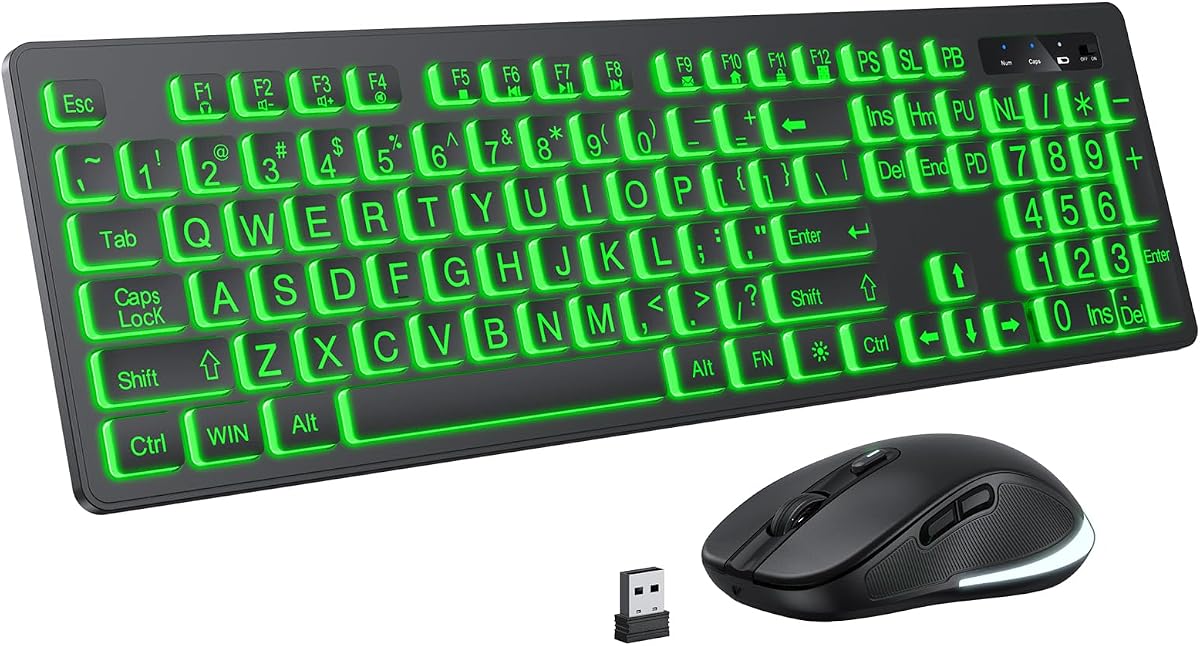
The Large Print Wireless Keyboard and Mouse combo offers the flexibility of wireless typing paired with high-visibility large keys. With a 4.2-star rating, it provides a clean desk setup and convenient recharging via Type-C for uninterrupted use.
We may earn a commission when you buy through this link, at no additional cost to you.
Its 7-color backlight and adjustable brightness levels allow for visual customization, while the silent typing ensures a quiet workspace. The rechargeable battery can last up to 2000 hours on standby, reducing the need for frequent battery changes.
However, users must remember to charge the device periodically, and multimedia keys may have limited functionality on Mac systems. These minor drawbacks do not overshadow the significant convenience of a wireless, fully integrated typing experience.
This model is perfect for users seeking a clutter-free setup without sacrificing visibility or comfort. The combination of wireless freedom and large print keys makes it ideal for seniors and professionals working from home.
A stable 2.4GHz wireless connection offers up to 33 feet of range, allowing users to type comfortably from a distance without cable constraints.
Rechargeable battery with energy-saving features provides up to 2000 hours of standby time, ensuring minimal downtime for charging.
We may earn a commission when you buy through this link, at no additional cost to you.
The Perixx PERIBOARD-317 Wired Backlit USB Keyboard combines a slim profile with large print keys, making it ideal for users with limited desk space. Its 4.3-star rating highlights its quiet, reliable performance and ease of use for daily typing tasks.
We may earn a commission when you buy through this link, at no additional cost to you.
With bright white LED illumination and low-profile keys, it offers a comfortable and consistent typing experience that reduces fatigue. The plug-and-play setup ensures it works instantly on Windows systems without requiring driver installations.
While it is slim and efficient, its compatibility with Mac systems is limited for multimedia keys, and the brightness adjustments are minimal. These constraints make it better suited for dedicated Windows setups and home office use.
This keyboard is recommended for users seeking a simple, no-frills device that prioritizes readability and space efficiency. Its clean design and reliable performance make it a practical choice for standard computing tasks.
The compact dimensions and slim profile save desk space, making it a perfect fit for smaller workstations or shared desks.
Large print keys and evenly distributed white LED backlighting ensure that characters are easy to read, reducing strain during extended use.
We may earn a commission when you buy through this link, at no additional cost to you.
The Large Print Backlit Keyboard Wired USB is designed with ergonomics in mind, featuring a foldable wrist rest and protective keyboard cover. With a 4.4-star rating, it offers excellent support for users who type for long periods or need to protect their device from dust.
We may earn a commission when you buy through this link, at no additional cost to you.
Its white LED backlight and large font keys provide clear visibility, while the ergonomic design helps reduce hand fatigue. The included cover extends the keyboard's lifespan by protecting against spills and pet shedding, making it a practical choice for busy households.
Although it lacks wireless features and has limited Mac support for multimedia keys, its focus on health and durability is a major advantage. These features make it ideal for users prioritizing physical comfort and device protection.
This keyboard is highly recommended for seniors and office workers who need both visual clarity and ergonomic support. The combination of wrist rest and cover makes it a thoughtful choice for long-term daily use.
A foldable wrist rest and ergonomic design reduce hand fatigue, supporting healthier typing habits during extended work or gaming sessions.
An included keyboard cover prevents dust and spills from damaging the keys, extending the lifespan of the keyboard in busy environments.
We may earn a commission when you buy through this link, at no additional cost to you.
The Large Print Backlit Computer Keyboard offers extensive customization with its 7-color backlight and ergonomic wrist rest. Rated at 4.4 stars, it balances visual appeal and physical comfort, making it a versatile choice for home, office, or gaming.
We may earn a commission when you buy through this link, at no additional cost to you.
The oversized keys and adjustable brightness ensure easy reading in any environment, while the soft-touch keys reduce typing noise. The ergonomic angle and wrist support help prevent strain, supporting comfortable long sessions.
Its only drawbacks are the lack of a wireless option and limited Mac support for multimedia keys. However, for users who prefer a stable wired connection and value customization, these are minor compromises.
This model is ideal for users who want a visually appealing and comfortable typing experience without breaking the bank. The combination of large print and vibrant lighting makes it a standout choice for personal workspaces.
Seven color options and adjustable brightness levels allow users to tailor their keyboard's look to match their style or mood.
The soft-touch keys and included wrist rest provide a comfortable typing angle, reducing strain during long work or gaming sessions.
We may earn a commission when you buy through this link, at no additional cost to you.
Selecting the right backlit illuminated keyboard involves balancing factors like visibility, ergonomic comfort, and connectivity to match your specific needs.
Backlit keyboards offer various lighting options, from single-color white LEDs to RGB multi-color settings. White lighting is often more professional and easier on the eyes, while RGB adds customization for gaming or personal style. Brightness levels are also crucial for ensuring keys are visible in any room lighting without causing glare.
Choose a model with adjustable brightness to suit different times of day and environments.
For users with visual impairments or seniors, large print keys are essential. These oversized letters improve accuracy and reduce eye strain. Standard sizes may suffice for others, but consider key spacing to avoid accidental presses.
Prioritize models with oversized fonts if visibility is your main concern.
Wired keyboards offer stable, latency-free connections ideal for work or gaming. Wireless options provide freedom of movement but require battery or charging. If portability is key, wireless is best; otherwise, wired ensures reliability.
Decide based on whether you prefer stability or mobility for your setup.
Ergonomic designs include curved layouts, wrist rests, and adjustable tilt feet to promote a neutral hand position. These features help reduce strain during long typing sessions. Soft-touch or membrane keys can also reduce noise and fatigue.
Look for wrist rests and adjustable angles to enhance comfort over time.
Spill-resistant designs and durable frames protect against accidents and daily wear. Some keyboards even include covers for dust protection. Key switch lifespan ratings also indicate how long the keyboard will last.
Invest in models with spill resistance and high durability ratings if longevity is important.
Programmable keys or dedicated multimedia controls allow for quick access to volume, media playback, or custom functions. These features streamline workflow and enhance productivity but may have limited cross-platform support.
Check if the shortcuts support your operating system and workflow needs.
Ensure the keyboard is compatible with your OS. While many work on Windows, macOS compatibility can vary for multimedia keys. USB or USB-C connectivity also affects device support.
Verify system compatibility to avoid functionality issues.
Prices vary based on features like RGB, wireless capability, and ergonomics. Higher-priced models often offer better build quality or advanced customization. Determine which features are essential to avoid overspending.
Balance cost against essential features to find the best value.
To set up your keyboard, plug the USB connector into your computer. If using a wireless model, insert the receiver and press the power button. Most keyboards are plug-and-play, requiring no additional software installation.
Adjust the backlight brightness to suit your environment. Use the designated FN keys or controls to cycle through colors or brightness levels. Proper adjustment helps reduce eye strain during night or low-light use.
Keep your keyboard clean by wiping the keys with a soft cloth. Avoid excessive moisture unless the model is spill-resistant. For wired models, ensure the cable is not bent sharply. Wireless models should be charged regularly to maintain battery health.
White backlighting provides a consistent, professional glow that is easier on the eyes in office settings. RGB backlighting offers multiple colors and effects for customization and gaming aesthetics. White is often more energy-efficient.
Yes, backlit keyboards with large print keys significantly improve visibility for users with low vision. The added light helps distinguish keys in dim environments. Combined with oversized fonts, they reduce typing errors and strain.
LED backlight systems typically last for tens of thousands of hours. They are designed to endure daily use without burning out. Proper handling ensures they remain functional for the lifespan of the keyboard.
Most backlit keyboards connect via USB and work with laptops. Some models support USB-C adapters for modern devices. Wireless options offer portability but may need charging. Ensure your laptop has an available port.
Wired models draw power directly from the USB port, so battery usage is not a concern. Wireless models rely on batteries, but LED lights are generally low-power. Battery life can last weeks or months depending on usage.
Use a soft, dry cloth to wipe the keys. Avoid excessive moisture. If the keyboard is spill-resistant, you may use a slightly damp cloth. For deeper cleaning, remove debris carefully with compressed air or a soft brush.
The TECURS Large Print Backlit Keyboard, TECKNET Wired Keyboard, and HP 400 Backlit Wired Keyboard represent the top choices for visibility, value, and premium features respectively. Each model offers unique strengths tailored to different user needs.
Consider factors like backlight type, ergonomics, and connectivity before making your decision. Prioritize models that align with your daily tasks and environment to ensure the best typing experience.
Remember that product availability and pricing may change. Always verify current listings and features before purchasing to ensure you get the most up-to-date version.