
GIGABYTE B550 Gaming X V2
4.5Editor score
AMD Socket AM4 Ready
DDR4 Memory Support
PCIe 4.0 Slots
This guide compares ten top Gigabyte Motherboard models across different chipsets and sockets to help you find the perfect fit for your build needs.
Finding the right motherboard is crucial for any computer build. Gigabyte offers a wide range of options that balance performance and value. We look at what makes a solid choice for your specific processor and budget needs.
We evaluated these models based on power delivery, thermal design, and connectivity features. Each pick offers unique strengths for gaming, content creation, or general productivity tasks. Our analysis ensures you see the full picture before spending your hard earned money.
Every selection highlights key specs and real world capabilities. Prices fluctuate often so check current listings before buying. This list helps you narrow down choices quickly without missing important details about compatibility and future proofing options.
4.5Editor score

4.4Editor score

4.2Editor score
This side-by-side comparison covers all ten models to highlight their distinct features and target audiences. Use this table to quickly identify which board matches your processor type and performance requirements.


This board delivers solid performance for AMD Ryzen processors on the AM5 socket. It stands out with robust power delivery and modern connectivity options like PCIe 5.0 and WIFI6E.
We may earn a commission when you buy through this link, at no additional cost to you.
The 14+2+1 power phases ensure stable operation even under heavy loads. Its thermal design keeps temperatures in check while the included EZ-Latch features simplify component installation for builders.
While it supports future tech well the number of rear USB-C ports is somewhat limited compared to higher tier boards. The RGB Fusion software can also be tricky for users who prefer simple lighting control.
Buy this if you want a reliable AM5 foundation that balances price and performance. It is ideal for gamers and creators who need fast storage and wireless connectivity without overspending.
The digital VRM solution provides consistent power to the CPU ensuring stability during intensive tasks.
Front and rear USB-C ports plus WIFI6E make connecting peripherals and networks seamless.
We may earn a commission when you buy through this link, at no additional cost to you.
This model pushes the envelope with cutting edge wireless and storage options. It is designed for users who want the latest tech and plenty of expansion space for fast drives.
We may earn a commission when you buy through this link, at no additional cost to you.
With four M.2 slots and USB4 ports it handles multiple high speed devices effortlessly. The WIFI7 capability ensures low latency networking which is great for competitive gaming and cloud applications.
The cost is higher than average and it requires a spacious case due to its ATX layout. The power design is robust but may be overkill for standard mid-range processor builds.
Choose this for a future proof build that prioritizes speed and connections. It fits professionals and enthusiasts who need maximum storage capacity and next gen networking.
WIFI7 delivers faster speeds and reduced congestion for a smoother online experience.
Four PCIe 5.0 compatible M.2 slots allow for massive storage arrays without add-in cards.
We may earn a commission when you buy through this link, at no additional cost to you.
This board offers the same high-end features as the Elite but with a distinct white aesthetic. It appeals to builders who want a clean look without sacrificing performance or connectivity.
We may earn a commission when you buy through this link, at no additional cost to you.
The 80A smart power stages provide excellent efficiency and heat management. It supports DDR5 memory and includes dual USB4 ports for versatile peripheral connections and data transfer.
The white color scheme can show dust or discoloration over time if not maintained. It is also priced at a premium which may not fit tighter budgets despite similar internal specs.
Opt for this if your build theme demands a specific look. It is perfect for white themed gaming rigs or professional workstations that value style alongside substance.
The white PCB and heatsinks create a cohesive look for light colored cases.
Despite the design focus it retains all the top tier connectivity of the X870 series.
We may earn a commission when you buy through this link, at no additional cost to you.
This flagship board is built for Intel Core Ultra processors and offers unmatched connectivity. It is ideal for power users who need extreme data speeds and multiple high-performance storage drives.
We may earn a commission when you buy through this link, at no additional cost to you.
The 10GbE LAN and dual Thunderbolt 4 ports enable professional grade network and peripheral throughput. Its power design supports high-end CPUs without throttling during long rendering sessions or heavy multitasking.
The price is steep and requires a newer CPU socket which may limit upgrade paths for existing owners. The board is also complex for casual users who do not need every available feature.
Select this for a top tier workstation or enthusiast gaming PC. It is best for those who demand the fastest networking and storage speeds available in the current market.
10GbE LAN ensures your system keeps pace with modern high-speed internet infrastructure.
Thunderbolt 4 allows for high speed external storage and docking stations easily.
We may earn a commission when you buy through this link, at no additional cost to you.
This board offers excellent value for those entering the AM5 platform with essential features. It provides a balanced mix of connectivity and performance suitable for most gaming and productivity needs.
We may earn a commission when you buy through this link, at no additional cost to you.
The triple M.2 slots and WIFI6E make it versatile for modern setups. Its thermal design handles heat well ensuring your components stay cool during extended play or work sessions.
The rear I/O is fixed which limits customization for custom cases and the USB count is modest. It does not support as many overclocking tweaks as premium models in the same line.
Pick this for a budget friendly AM5 build that does not compromise on core features. It is perfect for gamers who need wireless connectivity and fast storage at a lower cost.
You get the benefits of the new socket without paying a high premium for extra bells.
Triple M.2 slots give room for OS and game drives without extra controllers.
We may earn a commission when you buy through this link, at no additional cost to you.
This board is a solid choice for upgrading existing AM4 systems with modern connectivity. It brings WIFI6 and faster ethernet to older builds at a reasonable cost.
We may earn a commission when you buy through this link, at no additional cost to you.
The 2.5GbE LAN and front USB-C add utility without needing extra adapters. Its VRM design supports high core count Ryzen processors ensuring stable performance for everyday tasks.
DDR4 memory is cheaper than DDR5 so savings add up here but the platform is nearing end of life. It lacks the latest PCIe 5.0 features found on newer AM5 boards.
Use this to refresh an older PC without a full new system build. It suits users who want better networking and features on a budget before upgrading to AM5 later.
Continues to support Ryzen 5000 series for powerful performance on older sockets.
Q-Flash Plus lets you update BIOS even without a CPU installed for easy troubleshooting.
We may earn a commission when you buy through this link, at no additional cost to you.
This model bridges the gap between Intel generations with support for 12th through 14th Gen chips. It offers modern DDR5 support and PCIe 5.0 readiness for next gen graphics cards.
We may earn a commission when you buy through this link, at no additional cost to you.
Its thermal armor protects critical components during intensive gaming sessions. The WIFI6E and Q-Flash features make system management and online play smooth and hassle free.
The PCIe lane distribution may limit storage options depending on slot usage. Some users may find the rear USB options less generous than higher-end Z790 variants.
Ideal for gamers seeking a balanced platform for Intel processors. It provides strong performance without the premium cost of top tier gaming motherboards.
PCIe 5.0 support prepares your build for future graphics card releases.
Supports faster memory speeds for improved application and game performance.
We may earn a commission when you buy through this link, at no additional cost to you.
This board offers enhanced power and storage compared to the Eagle model. It is tailored for overclockers and users with multiple high speed storage requirements in their PC.
We may earn a commission when you buy through this link, at no additional cost to you.
The 16+1+2 VRM design ensures stability under heavy loads. Its thermal design keeps temperatures low even when running powerful processors at higher clock speeds.
It is priced higher than basic options and may have complex BIOS menus for beginners. The RGB software offers customization but can be heavy on system resources for some.
Buy this for a performance focused Intel build with plenty of storage. It suits users who need reliable power delivery and fast networking for demanding applications.
Strong VRM phases allow for stable overclocking of compatible Intel processors.
Enlarged heatsinks and thermal guards protect against heat related throttling.
We may earn a commission when you buy through this link, at no additional cost to you.
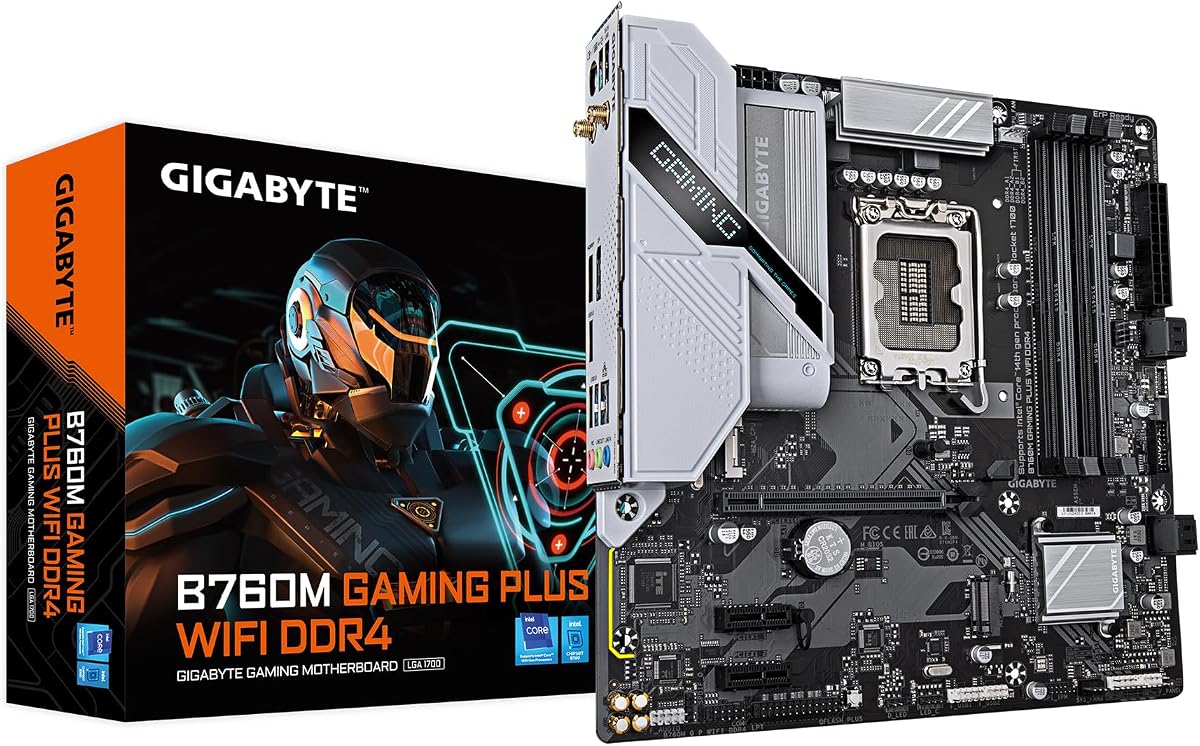
This compact board fits well in smaller cases while keeping essential features. It is designed for users who want a small PC without sacrificing connectivity or build ease.
We may earn a commission when you buy through this link, at no additional cost to you.
It includes WIFI and a front USB-C port which are rare on budget M-ATX boards. The thermal armor helps dissipate heat in confined spaces typical of compact builds.
It lacks the PCIe slots for multiple expansion cards and uses DDR4 memory which is older tech. The power delivery is sufficient for mid-range CPUs but not for extreme overclocking.
Choose this for a small gaming or home office PC. It balances size and features well for builders with space constraints on a budget.
M-ATX layout saves space in smaller cases while keeping key connections.
Offers essential features like WIFI and USB-C at a very low cost.
We may earn a commission when you buy through this link, at no additional cost to you.
This board provides the most affordable entry into AM4 builds with decent features. It keeps costs low while still offering modern connectivity like front USB-C and M.2 storage.
We may earn a commission when you buy through this link, at no additional cost to you.
The power phases support a range of Ryzen processors well enough for gaming. Its thermal design is straightforward but effective for average usage scenarios and moderate loads.
It uses DDR4 memory which is cheaper but older than DDR5. It lacks some advanced features like WIFI or extensive USB-C options found on pricier models.
Pick this for a tight budget build that still needs performance. It is great for first time builders or those focused purely on gaming value.
One of the cheapest options available for a solid gaming platform today.
Q-Flash Plus and RGB features add utility without raising the price.
We may earn a commission when you buy through this link, at no additional cost to you.
Choosing the right motherboard requires understanding your processor needs and desired features. This guide breaks down the main factors to consider.
Ensure the motherboard socket matches your CPU such as AM5 for Ryzen 9000 or LGA 1700 for Intel 14th Gen. Mismatched sockets will not work physically.
Always check the specific CPU support list on Gigabyte's site before buying.
VRM phases determine how stable power is under load. High end CPUs need 16+ phases while mid range works with 12+.
More phases mean better cooling and overclocking headroom for your processor.
Decide between DDR5 and DDR4 based on budget and speed needs. DDR5 offers faster speeds but costs more.
DDR4 is still excellent for budget builds and reduces overall system cost.
Count the M.2 slots to see how many fast SSDs you can add directly. PCIe 5.0 slots are future proof but expensive.
Most users need two to three M.2 slots for OS and game storage.
Look for WIFI and USB-C if you plan to use modern peripherals. Ethernet speed matters for networking and streaming.
WIFI6E or WIFI7 provides better wireless performance than older standards.
ATX boards offer more slots while M-ATX save space in smaller cases. Measure your case clearance before ordering.
A larger board allows for better airflow and easier cable management.
Heatsinks and thermal guards keep components cool during heavy use. Look for covered MOSFETs and thick copper layers.
Better thermal design improves long term stability and reduces noise from fans.
Features like Q-Flash Plus allow easy updates without a CPU installed. RGB Fusion controls lighting but can be complex.
A clear BIOS interface helps you tune settings without needing extra software.
Install the motherboard in a clean environment to avoid static electricity. Use the anti-static bag until you are ready to place it in the case.
Connect power and data cables firmly to ensure stable operation. Check that all standoffs align with the screw holes on the board.
Update the BIOS regularly using Q-Flash for the latest features and fixes. Clean dust from heatsinks with compressed air every few months.
The B650 AORUS Elite AX is highly recommended for its balanced features and strong power delivery. It supports Ryzen 9000 chips out of the box and offers PCIe 5.0 slots for future storage. This model gives you the latest tech without a premium price tag.
Z890 is the best choice for full Core Ultra Series 2 support with features like 10GbE LAN. It provides the latest connectivity and power phases needed for the new chips. You can use older boards but may miss out on key performance updates.
DDR5 offers higher speeds which benefit gaming and content creation on newer platforms. If your budget allows it is worth the upgrade for future proofing. However DDR4 still provides excellent value for budget builds on AM4 or LGA 1700.
Q-Flash Plus lets you update the BIOS using just a USB stick and power connection. You do not need a CPU or RAM installed to flash new firmware. This feature saves time and prevents issues when upgrading to newer processor generations.
The X870 AORUS Elite WIFI7 and Z890 AORUS Master models feature WIFI7 support. These boards offer the latest wireless standards for low latency and high speeds. If you need next gen networking you must choose one of these specific models.
No AM5 motherboards from Gigabyte only support DDR5 memory. The physical slots and electrical design are different for DDR5. If you have DDR4 RAM you will need to buy new modules or choose an AM4 motherboard instead.
These ten boards cover a wide range of needs from budget builds to high-end workstations. The B650 AORUS Elite AX stands out as the top pick for most users seeking balance.
Prioritize socket compatibility and power delivery when narrowing down your choices. Ensure you get the right memory type and storage options for your specific goals.
Prices change frequently so check current listings before finalizing your purchase. This guide helps you focus on the right features for a smooth build experience.