
0.5 Inch Print Height Intelligent JC01
4.2Editor score
390g lightweight body
Wrist strap included
USB file import
This guide compares the top 10 handheld inkjet printers for barcode labeling on plastic, metal, wood, and cardboard with detailed specs and expert insights.
Handheld inkjet printers offer a practical solution for marking products with dates, barcodes, or logos without needing bulky machinery. They are essential for small businesses and warehouse operations needing flexibility.
We evaluated ten models based on print quality, battery life, and ease of use. Each entry in this list provides a thorough look at the features that define modern portable coding devices.
Every product pick highlights specific strengths and limitations to help you decide. Note that prices and availability can fluctuate, so always check the latest details before purchasing any model.
4.2Editor score

4.7Editor score

4.7Editor score
The following table provides a side-by-side overview of each model to help you compare core specifications quickly before making your final choice.
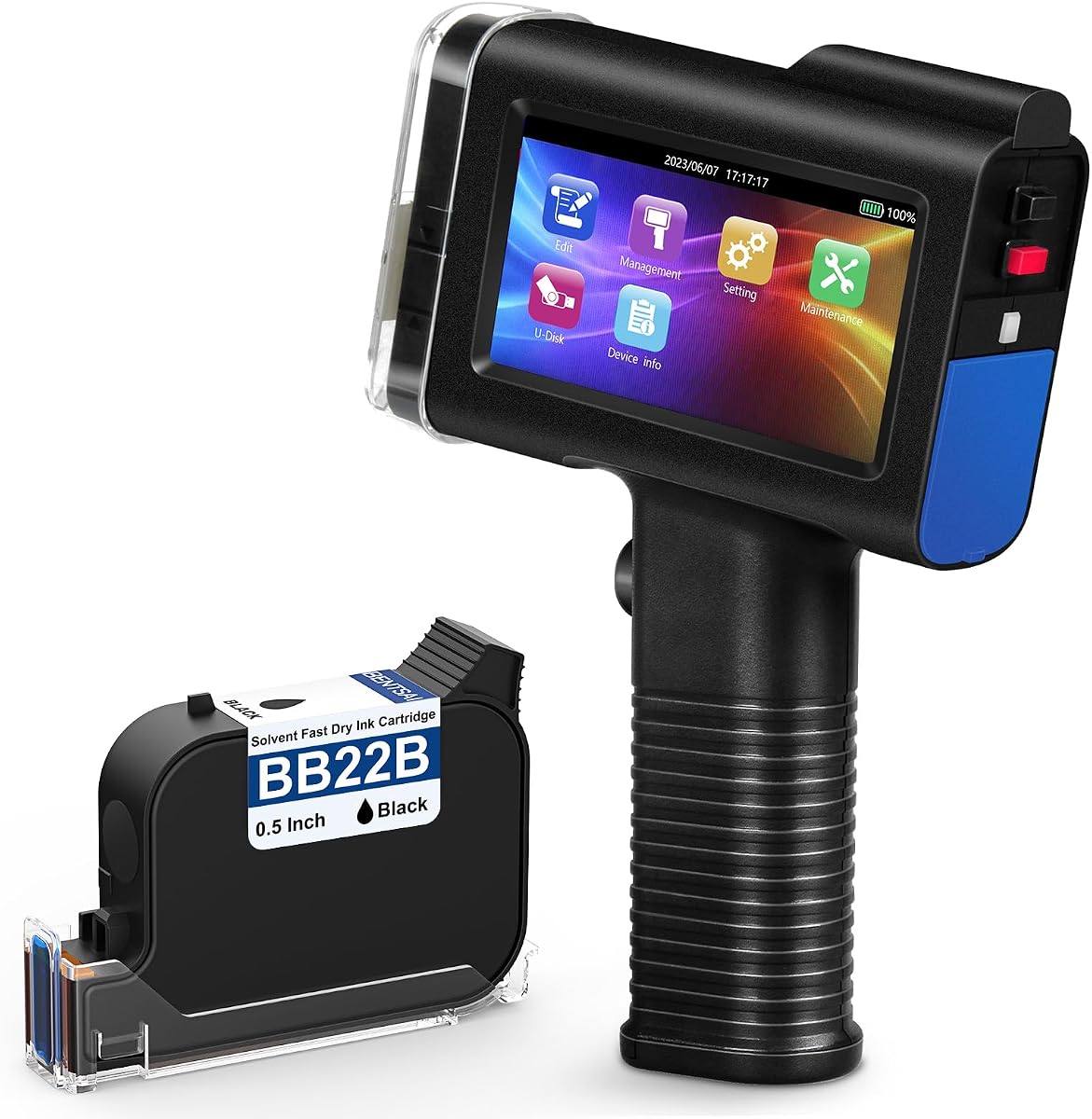


This printer is the standout choice for its robust feature set and reliability. It earned a 4.7 rating because it balances speed with precision, making it ideal for professional environments.
We may earn a commission when you buy through this link, at no additional cost to you.
Its standout quality is the fast-drying ink that lasts over a million characters. The interface is intuitive, allowing users to edit templates directly on the device without external software.
The main trade-off is that it is slightly heavier than ultralight models. However, the ergonomic design compensates for this, ensuring comfort during extended coding sessions.
It is perfect for businesses needing consistent labeling on various surfaces like metal or glass. We recommend it for anyone seeking a reliable, high performance portable solution.
The ink system prevents clogging, ensuring every print job starts clean and finishes sharp.
With 28 language options, this printer supports international teams and diverse work environments seamlessly.
We may earn a commission when you buy through this link, at no additional cost to you.
This model is perfect for those prioritizing affordability without sacrificing core functionality. It is rated 4.2 for offering excellent value in the portable coding market.
We may earn a commission when you buy through this link, at no additional cost to you.
Its lightweight design at 390g makes it easy to handle during high paced shifts. The wrist strap adds a layer of security to prevent accidental drops in busy warehouses.
The trade-off is a simpler interface compared to high-end rivals. This is acceptable given the price point and the fact that it handles essential tasks like barcodes and dates efficiently.
We suggest this for small businesses needing reliable labeling on plastic or cardboard. It strikes a great balance between cost and performance for daily industrial use.
The device is designed to withstand the rigors of industrial environments, reducing downtime and maintenance.
Solvent-based ink ensures quick drying, which is crucial for moving items through production lines quickly.
We may earn a commission when you buy through this link, at no additional cost to you.
This device is designed for users who require precision and advanced features for industrial automation. It stands out with a 4.4 rating for its robust build and versatility.
We may earn a commission when you buy through this link, at no additional cost to you.
It supports high resolution graphics and can be mounted on conveyor lines for semi automatic operation. The ink adheres well to fabric and metal, making it ideal for diverse materials.
The main trade-off is the cost, which is higher than basic models. However, the productivity gains from conveyor mounting and superior print quality justify the investment for larger operations.
It is recommended for businesses needing detailed logos or complex barcodes. Choose this if you need a premium device that handles specialized surfaces with ease.
Mounting it on a conveyor line boosts labeling speed, ensuring consistent batch coding without manual intervention.
Whether you are marking on cloth or concrete, the ink system adapts to porous and non porous surfaces equally well.
We may earn a commission when you buy through this link, at no additional cost to you.
This model is tailored for users needing larger text or more lines of information on a single surface. It offers a 4.3 rating for its extended operation capabilities.
We may earn a commission when you buy through this link, at no additional cost to you.
It supports up to 10 lines of text with adjustable height up to one inch. The upgraded 5 roller system ensures stability on uneven surfaces like concrete or textured metal.
The trade-off is its slightly larger physical profile. This is a necessary compromise to accommodate the larger print head and extended battery life required for heavy duty shifts.
We suggest it for logistics or manufacturing where visibility of codes is critical. It is a top choice for those needing detailed, multi-line information on large packages.
The 5 roller design reduces shaking, ensuring straight lines and clear text even on rough materials.
Double the operation time means fewer interruptions, keeping your workflow continuous throughout long shifts.
We may earn a commission when you buy through this link, at no additional cost to you.
This printer offers a unique feature set by eliminating the need for external devices or apps. It maintains a 4.1 rating for its independent system and ease of use.
We may earn a commission when you buy through this link, at no additional cost to you.
The quad core CPU ensures stable performance even during extended use. With support for multiple ink colors and 25 languages, it is highly versatile for various labeling tasks.
The trade-off is that it is slightly heavier than some ultralight models. This does not significantly impact handling but is worth noting for users sensitive to weight.
It is ideal for businesses needing colorful codes or quick setup without software. Choose this if you want a straightforward tool that works right out of the box.
By removing the need for a computer, this printer ensures you can mark items instantly without technical setup.
Having options like white or UV ink allows for specialized branding or hidden security marks on products.
We may earn a commission when you buy through this link, at no additional cost to you.
This model provides a straightforward coding solution for basic marking needs. It is rated 3.9 for delivering core functionality at an accessible price point.
We may earn a commission when you buy through this link, at no additional cost to you.
It supports varying DPI settings and includes a positioning plate to help align prints accurately. The quick drying ink is water resistant, ensuring that marks remain visible for short term storage.
The trade-off is a lower build quality compared to premium brands. This is acceptable for occasional use or DIY workshops where extreme durability is not the primary concern.
We recommend it for retail or small workshops needing fast, basic labeling. It is a cost-effective way to manage inventory without investing in high-end equipment.
The ability to adjust print height allows for flexible coding on items of different shapes and sizes.
With responsive technical support, users can resolve minor issues quickly, keeping the device operational.
We may earn a commission when you buy through this link, at no additional cost to you.
This printer is built for reliability in environments where battery life and ink durability are paramount. It holds a 4.0 rating for its consistent performance and useful features.
We may earn a commission when you buy through this link, at no additional cost to you.
The infrared aiming assist helps with positioning, which is crucial for maintaining accuracy on moving or irregular surfaces. The ink is waterproof, ensuring labels survive moisture exposure.
The trade-off is that it lacks some of the advanced customization options of higher-end models. This is acceptable if your primary goal is clear, durable codes without complex graphics.
It is a solid choice for warehouses and food processing facilities. We suggest it for anyone who needs a dependable tool that can handle tough conditions.
The infrared system guides your hand, ensuring straight and well-placed codes every time you print.
With fast-drying, waterproof ink, your labels remain legible even in humid or wet storage areas.
We may earn a commission when you buy through this link, at no additional cost to you.
This model stands out for its exceptional portability and user-friendly setup. It earned a 4.5 rating for being easy to use and carry in tight spaces.
We may earn a commission when you buy through this link, at no additional cost to you.
At just 0.54 pounds, it is one of the lightest options available, reducing hand fatigue significantly. The anti-interference screen ensures responsive touch even in dusty environments.
The trade-off is a smaller screen size which might take some getting used to. However, the provided video tutorials make learning the interface quick and efficient.
We recommend it for retail employees who need to scan and print quickly. It is ideal for anyone prioritizing light weight over complex features.
The included video tutorials ensure you can start printing within minutes of unboxing the device.
The ER520 cartridge is designed to minimize waste, providing a consistent flow for clear prints.
We may earn a commission when you buy through this link, at no additional cost to you.
This printer is engineered for users who need high performance in a tiny package. It has a 4.7 rating for its clever design and effective ink delivery system.
We may earn a commission when you buy through this link, at no additional cost to you.
The detachable handle allows you to switch between full handheld and mini modes easily. This flexibility is perfect for navigating ladders or confined spaces where space is limited.
The trade-off is fewer lines of text per print job. This is acceptable given its primary role as a compact tool for specific, targeted labeling tasks.
It is a top pick for warehouse staff who need to move quickly. Choose this if you need a powerful printer that fits easily in a pocket or tool belt.
Its compact dimensions mean you can bring it anywhere without the bulk of traditional industrial printers.
The anti-clog nozzles ensure that even after periods of inactivity, the printer starts up smoothly.
We may earn a commission when you buy through this link, at no additional cost to you.
This device is designed for straightforward, efficient batch coding without unnecessary complexity. It holds a 4.5 rating for its balance of portability and functional features.
We may earn a commission when you buy through this link, at no additional cost to you.
Supporting direct USB file uploads means you can send batch data quickly without typing manually. The wrist strap ensures that you never lose the device in a crowded warehouse.
The trade-off is that it lacks advanced graphic capabilities. This is a fair limitation for a device focused on speed and practical utility in everyday tasks.
We suggest it for logistics and shipping centers. It is a practical choice for anyone needing to mark large volumes of items reliably and quickly.
Uploading files via USB speeds up the process, allowing you to mark batches with minimal effort.
The grip design reduces strain, allowing you to work for longer periods without discomfort.
We may earn a commission when you buy through this link, at no additional cost to you.
Choosing the right handheld inkjet printer depends on your specific labeling needs and work environment.
Consider the maximum print height you need. Some models offer 0.5 inches while others go up to 1 inch. Higher resolution like 600 DPI ensures clear barcodes.
Ensure the resolution matches your scanning requirements to avoid unreadable codes.
Look for a battery life that covers your shift. Many models offer up to 16 hours of continuous operation.
Long battery life reduces downtime and ensures you are always ready to label.
Check for ink that dries quickly and is waterproof. Standard cartridges often hold 42ml which yields thousands of prints.
A robust ink system prevents clogging and ensures consistent output quality over time.
Verify the printer works on your specific materials such as wood, metal, or plastic. Some models are better for non-porous surfaces.
Compatible ink ensures adhesion regardless of the texture or material of your product.
A touchscreen makes editing templates easier. Look for intuitive interfaces with support for multiple languages.
An easy-to-use UI reduces training time and minimizes errors during data entry.
Models with USB support allow direct file import. This is useful for batch coding without needing a computer.
Connectivity options should match your workflow to maximize efficiency and speed.
Lighter devices reduce fatigue during long shifts. Check if it includes features like a wrist strap for safety.
A comfortable design ensures your team can use the device for hours without strain.
Review the warranty terms and availability of customer support. Reliable brands offer clear documentation.
Good support guarantees you can resolve technical issues quickly and keep operations running.
Start by charging the battery fully and loading the ink cartridge securely. Ensure the nozzle is clean before beginning to avoid blockages.
For best results, test the print on a scrap piece of material. Adjust the speed and distance from the surface to optimize clarity.
Clean the nozzle regularly using the protective cap when not in use. Proper maintenance extends the life of the printer significantly.
Most standard 42ml cartridges yield between 800,000 to over 2 million characters depending on print height and frequency. This makes them suitable for extended industrial use.
Yes but you should allow the ink to dry first. Waterproof inks are available but moisture may delay the drying process on the surface.
No many models operate independently. You can edit templates directly on the device or transfer files via USB without a computer.
They work on wood metal plastic glass and cardboard. Some models are specifically optimized for non porous surfaces like metal or glass.
Always replace the protective cap immediately after use. Regular cleaning and avoiding long periods of inactivity help maintain nozzle health.
Most reputable brands offer a one year warranty. Check the specific listing for details on coverage and technical support availability.
Yes most models support BMP and JPG files. You can import your own designs directly via USB for professional branding.
Use a soft cloth to wipe the screen gently. Avoid using harsh chemicals that could damage the touch layer.
The Handheld Inkjet Printer stands out as the top choice for overall performance and reliability. The JC01 and E12 Mini offer excellent alternatives for budget and portability needs respectively.
Focus on battery life and ink compatibility to ensure your device meets your daily demands. The right choice depends on your specific industrial environment.
Remember to check current prices and availability before purchasing as details may change. Select the model that best fits your workflow and budget.