
CENMATE Aluminum 4 Bay Hard Drive Enclosure
4.3Editor score
Affordable four bay SATA enclosure
Built in aluminum alloy cooling fan
USB A and C 3.0 support
Direct Attached Storage offers a reliable way to expand your computer storage without network complexity. These enclosures connect directly via USB or Thunderbolt for fast data access and simple file management across multiple systems.
We evaluated ten leading DAS models based on performance, compatibility, build quality, and drive capacity support. Our analysis highlights which enclosures deliver the best value for specific workflows like video editing, backups, or media libraries.
Each pick shows key features, real-world speed expectations, and trade-offs to help you choose wisely. Remember that product availability and pricing can change frequently so verify current details before making your final purchase decision.
4.3Editor score

4.2Editor score

3.5Editor score
As an Amazon Associate we earn from qualifying purchases.
The following comparison table outlines the core specifications and capabilities of each top rated Direct Attached Storage enclosure to help you find the perfect match for your storage expansion needs.


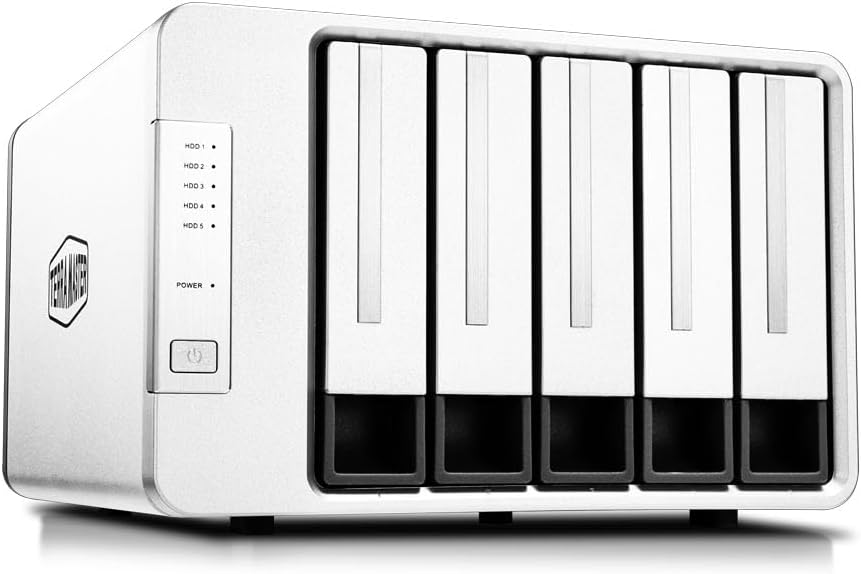


The TERRAMASTER D4-320 stands out as a versatile Direct Attached Storage solution offering reliable 10Gbps performance through its USB 3.2 Gen2 interface. It earns top marks for its broad operating system compatibility and intuitive plug and play design that requires no additional drivers.
We may earn a commission when you buy through this link, at no additional cost to you.
Its standout quality lies in the tool free hard drive tray design featuring a unique Push-lock mechanism that secures drives automatically. The intelligent temperature controlled fan ensures efficient heat dissipation while sound absorbing panels keep noise levels remarkably low during normal use.
While it lacks hardware RAID options which limits redundancy features for critical data the straightforward JBOD style operation makes file management simple. Users needing complex array configurations might find this limiting but for pure storage expansion the trade off is acceptable.
Professionals and power users who need fast reliable access to large volumes of data without network overhead will appreciate this enclosure. Its high capacity support up to 120TB combined with excellent speed makes it the best overall choice for most direct storage needs.
The intelligent fan adjusts speed based on drive temperature ensuring optimal operation without excessive noise during idle periods.
Whether you use Windows Mac or Linux the D4-320 connects seamlessly without requiring any software installation or configuration.
We may earn a commission when you buy through this link, at no additional cost to you.
The QNAP TR-004 serves as an excellent Direct Attached Storage option especially for users within the QNAP ecosystem who need to expand their existing network storage systems. It offers hardware RAID capabilities which provide data redundancy not typically found in standard DAS enclosures.
We may earn a commission when you buy through this link, at no additional cost to you.
Its key strength is the hardware RAID support allowing configurations like RAID 0 1 and 5 for better performance or data protection. The device connects via USB Type-C and includes lockable drive bays to prevent accidental drive removal in shared environments.
Users should note that it cannot be used as a standalone NAS and requires specific QNAP models running updated firmware for full NAS expansion features. This limitation means it is less versatile for general purpose use compared to other pure DAS solutions.
This enclosure is ideal for businesses or individuals using QNAP NAS devices who want affordable and secure expansion without upgrading their main server. If you need simple external storage without network dependencies consider alternatives but for QNAP users this is a top choice.
Lockable drive bays add a layer of physical security preventing unauthorized access or accidental removal of critical drives.
Works seamlessly as external storage for QNAP NAS systems providing additional volume space when connected via USB.
We may earn a commission when you buy through this link, at no additional cost to you.
The TERRAMASTER D8 Hybrid introduces a unique hybrid architecture combining four traditional SATA bays with four dedicated M.2 NVMe slots for ultimate flexibility. This design allows users to separate hot and cold data across high speed SSDs and high capacity HDDs effectively.
We may earn a commission when you buy through this link, at no additional cost to you.
Its standout feature is the massive 152TB maximum capacity alongside read speeds up to 980MB/s for NVMe drives. The enclosure includes TPC Backupper software for automated backups and features power on recovery to resume operations after unexpected power loss.
The complexity of managing two different drive types may confuse casual users and the price reflects the premium feature set. Additionally cooling performance depends on fan speed which might introduce noise during heavy mixed workload transfers on both drive types.
Creative professionals handling massive media libraries or data scientists needing tiered storage will find this D premium worth the investment. It offers the perfect balance of raw capacity and high speed access making it a top premium choice for 2026.
Store frequently accessed hot data on NVMe SSDs while archiving cold data on HDDs for cost effective and fast access.
TPC Backupper software enables scheduled and incremental backups to protect your valuable files from accidental loss.
We may earn a commission when you buy through this link, at no additional cost to you.
The CENMATE Aluminum 4 Bay delivers solid performance at an entry level price point making it accessible for home users or small businesses needing basic storage expansion. It supports both 2.5 and 3.5 inch SATA drives and offers a reliable five gigabit per second connection.
We may earn a commission when you buy through this link, at no additional cost to you.
Its standout quality is the durable aluminum alloy casing paired with a built in fan to keep drives cool during operation. The tool free hot swappable design allows for easy drive changes without needing to disconnect power or tools.
The main trade off is the fan noise which can reach around 50 decibels under load so this might not suit quiet office environments. Also speeds are limited to 5Gbps compared to newer 10Gbps options which may affect large file transfer times.
Budget conscious buyers who prioritize capacity and build quality over top tier speed will find this enclosure excellent value. It provides a stable plug and play solution for backing up files or expanding storage without breaking the bank.
The aluminum alloy shell provides excellent structural integrity and heat dissipation for reliable long term performance.
Accommodates both smaller 2.5 inch laptop drives and standard 3.5 inch desktop drives for maximum versatility.
We may earn a commission when you buy through this link, at no additional cost to you.
The SABRENT 5-Bay DAS dock provides five independent 3.5 inch drive bays making it ideal for users needing substantial storage capacity in one connected device. Each bay has its own dedicated ASMedia controller ensuring stable and independent connections for every drive.
We may earn a commission when you buy through this link, at no additional cost to you.
Its standout feature is the per-bay power switch and LED activity lights which make troubleshooting drive issues straightforward without powering down the whole unit. The rear USB-C port allows daisy chaining additional peripherals so you maintain a clean desk setup.
Without hardware RAID support the drives operate in JBOD style which limits redundancy unless handled by software. The price point is higher than basic models but the reliability and flexibility justify the cost for serious workstation users.
Professionals managing extensive media archives or large database files will appreciate the sheer capacity and reliability. It balances speed and capacity well ensuring consistent performance even when multiple drives are active simultaneously.
Individual power switches let you manage specific drives independently for safer maintenance or troubleshooting.
Daisy chaining support allows you to connect multiple docks or hubs through a single USB-C cable.
We may earn a commission when you buy through this link, at no additional cost to you.
The TERRAMASTER D8 Hybrid 2 refines the hybrid storage concept with advanced power management technology that optimizes energy use without sacrificing performance. It offers one touch switching between Power Save and Active modes tailored to different workflow requirements.
We may earn a commission when you buy through this link, at no additional cost to you.
Its standout feature is the proprietary TPM power management system which enhances operational safety and reduces energy consumption significantly. With read speeds up to 1020 MB/s for NVMe SSDs it accelerates video editing and large file transfers effectively.
Users should be aware that this model carries a premium price tag reflective of its advanced capabilities. The hybrid setup requires careful planning to allocate data correctly across SSD and HDD bays for best performance.
Creative professionals and power users needing both high speed access and energy efficiency will value this upgrade. It provides the best balance of modern connectivity and intelligent power control available in direct attached storage today.
Switch modes instantly to balance between energy saving and maximum performance based on your current task.
Supports Thunderbolt 3 and 4 interfaces ensuring compatibility with high speed laptops and workstations.
We may earn a commission when you buy through this link, at no additional cost to you.
The TERRAMASTER D5-310 distinguishes itself with a dedicated hardware RAID system controlled by a physical knob on the rear panel. This makes switching between RAID 0 1 5 10 and Single modes straightforward without needing software tools.
We may earn a commission when you buy through this link, at no additional cost to you.
Its standout quality is the hot spare disk feature that automatically replaces failed drives in RAID configurations to minimize downtime. The inclusion of TPC Backupper software adds value by enabling scheduled and differential backups easily.
Transfer speeds top out at 5Gbps which may feel slower compared to newer 10Gbps options available in the market. However the reliability and redundancy of hardware RAID often justify this limitation for critical data storage needs.
Users requiring robust data protection and simple RAID configuration without complex software will find this enclosure practical. It balances capacity and safety features well making it a solid choice for small business workloads.
The dedicated knob simplifies RAID changes requiring no software installation or system restarts.
Hot spare disk support ensures continuous operation even when a drive fails unexpectedly during use.
We may earn a commission when you buy through this link, at no additional cost to you.
The WAVLINK 4-Bay enclosure goes beyond storage by including a 4K HDMI port that enables video output for dual monitor setups or media viewing. This added connectivity makes it a useful docking station for multimedia professionals.
We may earn a commission when you buy through this link, at no additional cost to you.
Its standout feature is the combination of fast 10Gbps data transfer with dual temperature controlled fans that activate only when needed. The aluminum shell ensures sturdy build quality and effective heat dissipation during intensive workloads.
Users must ensure their host supports video over USB-C for the HDMI port to function correctly. Fan activation at 48 degrees may cause noise during heavy use but keeps drives safe from overheating effectively.
This docking station is perfect for users who need both storage expansion and screen connectivity in one device. It streamlines your workspace by reducing cable clutter while providing high speed and reliable data access.
Use the HDMI port to connect external monitors directly without needing extra adapters.
Fans automatically manage temperature ensuring drives stay cool without constant noise during idle.
We may earn a commission when you buy through this link, at no additional cost to you.
The ORICO 5 Bay enclosure simplifies access with magnetic chips on the cover that allow quick opening without tools or screws. This design saves time during drive installation and removal while keeping the interior protected effectively.
We may earn a commission when you buy through this link, at no additional cost to you.
Its standout quality is the honeycomb rear panel design which improves airflow alongside the 60mm cooling fan. The enclosure supports up to 110TB capacity and includes multiple protection features against voltage spikes and heat.
Transfer speeds are capped at 5Gbps which may limit performance for large file transfers compared to faster USB 3.2 models. Additionally the fan noise can be noticeable during heavy usage periods in quiet environments.
Home users and small offices needing straightforward five bay expansion will find this enclosure practical and efficient. It balances ease of use with reliable protection making it a solid option for general storage tasks.
Magnetic covers eliminate the need for screws allowing quick and easy drive management.
Honeycomb rear holes work with the fan to maximize air circulation for stable drive temperatures.
We may earn a commission when you buy through this link, at no additional cost to you.
The QNAP TR-002 offers a compact solution for users needing straightforward storage expansion with hardware RAID options. Its small footprint fits easily on any desk while providing reliable USB Type-C connectivity for modern systems.
We may earn a commission when you buy through this link, at no additional cost to you.
Its standout quality is the hardware RAID support for RAID 0 and 1 configurations ensuring basic data protection without network complexity. The lockable drive bays add physical security for shared workspaces or offices.
With only two bays capacity is limited compared to larger four or five bay models. This makes it better suited for light workloads or users who prioritize space savings over massive storage potential.
Individuals or small businesses wanting simple reliable direct storage with minimal footprint will appreciate this model. It provides essential redundancy features in a portable form factor that integrates seamlessly with QNAP NAS systems.
Compact two bay profile leaves more room on your desk while still supporting large capacity drives.
Lockable bays prevent unauthorized access and keep drives secure in shared environments.
We may earn a commission when you buy through this link, at no additional cost to you.
Selecting the right Direct Attached Storage enclosure requires careful consideration of your speed needs capacity requirements and workflow compatibility.
Choose enclosures with USB 3.2 Gen2 or Thunderbolt 3 and 4 for maximum transfer speeds. These interfaces support 10Gbps data rates which are essential for handling large media files quickly.
Verify your computer has matching ports to ensure you utilize full available bandwidth without bottlenecks.
Determine how many drives you need to connect simultaneously for your storage expansion needs. Four and five bay models offer significant capacity while two bay units save space for lighter workloads.
Ensure the enclosure supports the physical sizes of your drives such as 2.5 inch or 3.5 inch options.
If data redundancy is critical look for enclosures with hardware RAID support to protect against drive failures. JBOD setups provide maximum flexibility but require software solutions for redundancy.
Decide whether you prefer simple individual drive access or complex RAID configurations based on your backup strategy.
Effective cooling is vital to maintain drive health during prolonged transfers. Look for temperature controlled fans that adjust speed based on heat levels to reduce noise when not needed.
Consider models with sound absorbing panels or aluminum shells to minimize operational noise in quiet environments.
Ensure the enclosure works seamlessly across Windows macOS and Linux without needing drivers. True plug and play support reduces setup time and avoids configuration issues.
Check system requirements carefully to confirm compatibility with your specific operating system version.
Premium enclosures often feature aluminum alloys or reinforced housing to dissipate heat effectively and protect drives. Look for sturdy locking mechanisms and secure drive trays.
Investing in a well built device ensures long term reliability and reduces risk of physical damage.
Some models include backup software or power management tools that enhance usability without extra purchases. These tools can automate data protection tasks easily.
Evaluate included software value against your need for third party solutions to save costs.
Look for enclosures with additional USB ports that allow connecting other peripherals or daisy chaining more drives. This flexibility keeps your workspace organized.
Verify if the device supports pass through connections if you plan to expand your setup further later.
Begin by connecting the enclosure to a power source and your computer using the provided USB or Thunderbolt cable. Ensure both your drives and the enclosure are seated firmly before powering on.
Format drives if needed to match your operating system file format such as exFAT or APFS. Keep your enclosure in a well ventilated area to maintain optimal operating temperatures.
Regularly monitor drive health using included software or third party tools to catch errors early. Avoid moving the device while drives are active to prevent data corruption or physical damage.
Direct Attached Storage connects directly to a computer via USB or Thunderbolt offering faster single user access without network overhead. Network Attached Storage connects over ethernet for shared access across multiple devices on a local network.
Some advanced enclosures offer hardware RAID support for data redundancy while basic models operate in JBOD style. Check specific product specs to confirm RAID capabilities before purchase.
Most multi-bay enclosures support both sizes but may require mounting brackets for 2.5 inch drives. Verify compatibility details for mixed drive setups to ensure secure mounting.
Heat is normal during large data transfers due to drive activity. Ensure the cooling fan works properly and the enclosure sits in a ventilated area to prevent overheating issues.
Yes enclosures with 10Gbps speeds and multiple drive bays provide sufficient bandwidth for editing high resolution footage directly without network bottlenecks.
Most modern enclosures are plug and play requiring no driver installation. However some advanced RAID models might need software for specific configuration settings.
Yes many models support daisy chaining through additional USB ports allowing multiple enclosures on one system. Check individual specs for pass through support to confirm.
Use the hot swap feature if available or eject drives properly from your system before removal. Ensure power is off when manually disconnecting to avoid data loss risks.
Our top picks highlight exceptional options like the TERRAMASTER D4-320 for overall performance and the CENMATE Aluminum 4 Bay for budget friendly expansion. These models balance speed capacity and reliability effectively for diverse user needs.
Prioritize interface speed and cooling solutions when selecting your enclosure to ensure smooth operation under heavy workloads. Consider your specific workflow requirements such as RAID support or hybrid drive options before purchasing.
Remember to verify current product availability and pricing before finalizing your purchase as these details can change frequently. Choosing the right Direct Attached Storage ensures your data remains accessible secure and ready for any project.