
Cable Matters Punch Down Tool
4.3Editor score
Affordable reliable termination solution
Removable secure locking blade design
Wide keystone jack compatibility
Discover the best Ethernet punch down tools for reliable network cabling. This guide compares top models for speed, durability, and precision across various
Selecting the right Ethernet punch down tool is crucial for any network installation project. Whether you are working on a home office or a large enterprise server room, the correct tool ensures secure and efficient cable terminations without damaging delicate wires.
We evaluated ten top-rated models based on build quality, blade versatility, and ergonomic design. Our comparison covers impact settings, compatibility with different patch panels, and ease of use for both professionals and DIY enthusiasts seeking reliable performance.
Each pick highlights specific strengths such as speed, durability, or cost-effectiveness to help you find the ideal match for your needs. Please note that product availability and pricing may change over time, so verify details before purchasing your next networking tool.
4.3Editor score

4.8Editor score

4.7Editor score
This table provides a side-by-side overview of the ten selected Ethernet punch down tools. Review key specifications like blade types, impact settings, and included accessories to quickly identify the model that fits your specific cabling requirements.


The Klein Tools VDV427-300 stands out as the top choice for professionals seeking reliability. With a high user rating, it delivers precise connections consistently across various cable types including Cat 5e and Cat 6.
We may earn a commission when you buy through this link, at no additional cost to you.
Its metal injection molding blade ensures durability while the adjustable impact force allows customization for different wire gauges. The ergonomic handle reduces hand fatigue during extensive wiring projects in tight spaces.
While it costs more than entry-level tools, the long-term value is clear. The inclusion of a pick and spudger adds utility, making it a complete solution for complex network installations without needing extra accessories.
Buy this tool if you prioritize quality and performance. It is ideal for network technicians who demand precision and durability in their daily work environment for consistent results.
The MIM blade resists wear and tear, ensuring sharp cuts and reliable terminations over many years of heavy use.
Cushioned handles and non-slip grips allow for extended use without strain, improving efficiency during large scale cabling jobs.
We may earn a commission when you buy through this link, at no additional cost to you.
The Cable Matters Punch Down Tool offers excellent value for DIYers and light users. Its 4.3 rating reflects consistent performance for standard home or small office network setups without breaking the bank.
We may earn a commission when you buy through this link, at no additional cost to you.
Features like the removable locking blade and adjustable impact settings provide flexibility. The spring-action mechanism ensures fast seating of wires into keystone jacks or patch panels with minimal effort required.
While it may not withstand industrial daily use as well as high-end tools, it performs reliably for occasional projects. The wide compatibility with Cat 5 through Cat 8 cables makes it a versatile choice for most residential needs.
Choose this tool if you need a cost-effective solution for basic termination tasks. It is perfect for hobbyists or those setting up a home network who do not require professional grade durability.
The twist-and-lock design prevents the blade from loosening during use, ensuring safety and consistent performance throughout the job.
Supports a broad range of Ethernet cables from Cat 5 to Cat 8, making it suitable for various modern networking standards and upgrades.
We may earn a commission when you buy through this link, at no additional cost to you.
Fluke Networks delivers top-tier quality with the D914S model, earning a strong 4.7 rating. This tool is designed for professionals who require absolute reliability and long-term support for their critical infrastructure work.
We may earn a commission when you buy through this link, at no additional cost to you.
The automatic spring selection adjusts impact force based on wire gauge, reducing user error. Its ergonomic soft touch handle minimizes fatigue, while built-in storage keeps hooks and spudgers handy for efficient workflows.
The lifetime warranty adds significant value, protecting your investment against defects. Although the cost is high and blades are specific to the brand, the durability and performance justify the expense for frequent users.
Invest in this tool if you are a professional installer needing the best. It ensures precise terminations and offers peace of mind with unmatched warranty coverage for your networking equipment.
The tool automatically chooses low or high impact based on wire gauge, simplifying the process and preventing wire damage during termination.
A lifetime warranty ensures that your tool is protected against defects, offering long-term reliability and support for your investment.
We may earn a commission when you buy through this link, at no additional cost to you.
The TRENDnet TC-PDT Punch Down Tool is notable for its compliance with NDAA and TAA regulations. This makes it a preferred choice for government projects in the US and Canada where strict sourcing rules apply.
We may earn a commission when you buy through this link, at no additional cost to you.
It features precision interchangeable blades for both 110 and Krone standards, offering versatility in diverse environments. The twist-lock holder prevents blade loss during transport, ensuring your tool is ready when you arrive on site.
With a three-year manufacturer protection plan and dedicated tech support, TRENDnet stands behind the quality. While it may not have advanced impact settings, it delivers reliable connections for standard networking installations consistently.
Select this tool if you require compliance for public sector work. Its robust support and dual-blade capability make it a solid choice for contractors working on regulated network infrastructure projects.
Fully NDAA and TAA compliant, this tool meets strict federal sourcing requirements essential for government and defense projects.
Precision blades work with both 110 and Krone standards, allowing one tool to handle various patch panel types effectively.
We may earn a commission when you buy through this link, at no additional cost to you.
This Cable Matters model expands versatility by including both 110 and 66 blades. It is ideal for users who encounter different block types in their network installations and want a single tool to handle both standards.
We may earn a commission when you buy through this link, at no additional cost to you.
The twist-lock sockets allow for secure blade storage within the tool body. This design enhances safety and usability during transport, ensuring the blades remain in place when not in active use for quick access.
Adjustable impact settings provide control over termination force for jacks or panels. The spring-action mechanism ensures fast seating while the wide compatibility covers most Cat 5 to Cat 8 Ethernet and voice cables effectively.
Choose this tool if you need flexibility between block types. It offers a balanced mix of features and affordability for those managing mixed infrastructure environments without needing premium extras.
Includes both 110 and 66 blades for broader application across different wiring block types and legacy systems.
Twist and lock sockets secure blades within the tool body during transport, enhancing safety and preventing loss.
We may earn a commission when you buy through this link, at no additional cost to you.
The VCELINK Punch Down Tool stands out for its multifunctional features. Beyond standard termination, it includes a wirepuller and flat blade on the sides to clean up excess cables efficiently during installation tasks.
We may earn a commission when you buy through this link, at no additional cost to you.
It comes with a Mini Wire Stripper as a bonus, adding value to the package. The double cutter head design allows cutting excess cables while punching down, saving time and effort in typical network cabling projects.
Adjustable impact settings help adapt to different termination needs, and the reversible blades increase utility. While the materials may not match premium brands, it offers practical functionality for budget-conscious installers.
Pick this tool if you value extra utility features. It is well-suited for hobbyists or small office setups where having multiple functions in one device reduces the need for separate tools.
Includes a wirepuller and flat blade to clean excess cables, making cleanup faster during termination.
Comes with a Mini Wire Stripper providing added value and convenience for preparing cables before termination.
We may earn a commission when you buy through this link, at no additional cost to you.
Designed specifically for VCE 90-degree keystone jacks, this tool offers significant speed improvements. It can punch down and cut wires eight times faster than traditional tools, streamlining the termination process significantly for high-volume work.
We may earn a commission when you buy through this link, at no additional cost to you.
Unlike standard tools, it does not require a platform or flat surface, allowing direct termination on patch panels. The replaceable SK5 steel blade head ensures longevity without needing to replace the entire tool when worn.
This tool is optimized for slim keystone jacks that fit easily into multi-port wall plates. While limited to specific brands, the efficiency gains make it a valuable asset for installers using compatible systems.
Consider this tool if you use VCE 90-degree jacks. The speed and convenience of one-hand termination without a platform save time during large installations in commercial environments.
Punches down and cuts eight wires in one operation, reducing install time by up to eight times.
Terminates directly on patch panels or wall plates without needing a separate stand or flat surface.
We may earn a commission when you buy through this link, at no additional cost to you.
The Rapink Speed Keystone Tool is designed to protect fingers during termination. It holds the jack securely in its housing, preventing rolling or injury while ensuring a perfect connection with a high success rate.
We may earn a commission when you buy through this link, at no additional cost to you.
It features a carbon steel body and alloy steel head, tested to press over 10,000 times. This durability combined with the finger-hurt-free design reduces repetitive strain and hand fatigue during extended use on projects.
An adjustable trimming depth allows users to customize the cut for clean wire trimming. While limited to Rapink jacks, the speed and ergonomic benefits make it a strong choice for those using this ecosystem.
Select this tool if you prioritize safety and speed. It is ideal for installers concerned about finger injuries or repetitive strain while working on 90-degree keystone patch panels or wall plates.
Prevents fingers from getting hurt by holding the jack securely, eliminating rolling risks during termination.
Keeps jacks in place for perfect crimps even in tight spaces like wall plates or patch panels.
We may earn a commission when you buy through this link, at no additional cost to you.
This Klein Tools kit provides a complete solution for various cable types. While focused on coaxial work, it includes a precision punchdown tool with a DuraBlade edge for reliable and accurate wire termination for network cables.
We may earn a commission when you buy through this link, at no additional cost to you.
It comes with a radial stripper and ratcheting crimper, offering accuracy in cable preparation. The inclusion of RJ45 data plugs adds convenience for immediate testing of connections without needing extra supplies.
All tools are organized in a convenient zipper bag for easy transportation and storage. The high-quality build ensures clean and efficient termination tasks, making it a versatile option for general networking needs.
Buy this kit if you need a comprehensive set. It is suitable for those who work with both coax and Ethernet cables, providing reliable tools in one organized package for various tasks.
Features a DuraBlade cutting edge ensuring clean and accurate wire termination for consistent connections.
Includes cutters, strippers, crimpers, and plugs in a single storage bag for complete project readiness.
We may earn a commission when you buy through this link, at no additional cost to you.
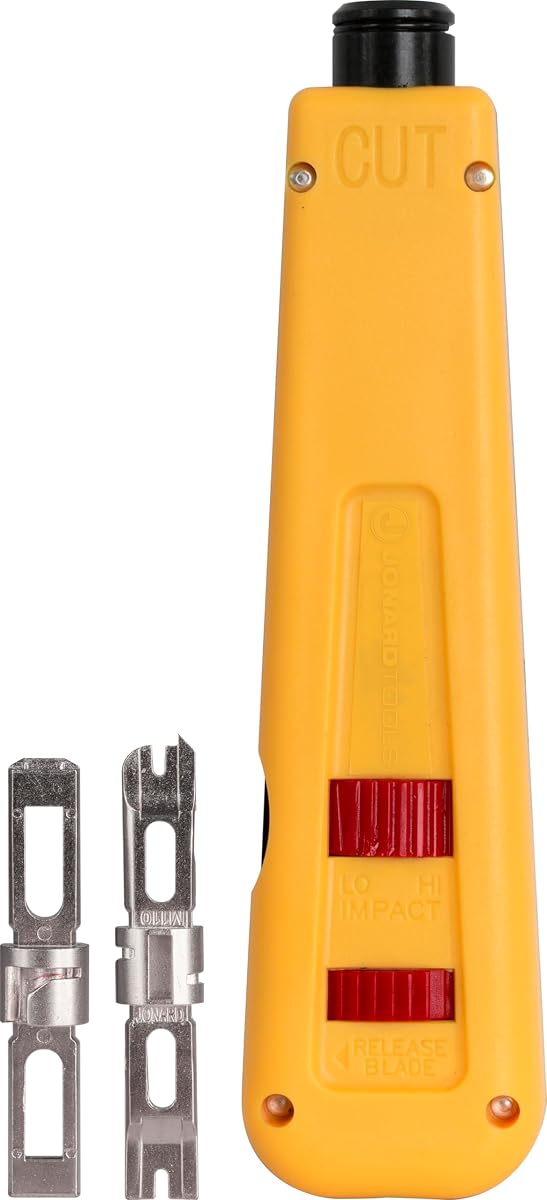
The Jonard Tools EPD-91461 offers practical design with its color-coded body. Half yellow and half blue for ease of use, it simplifies blade orientation during busy installation tasks for quick identification.
We may earn a commission when you buy through this link, at no additional cost to you.
It is tested up to 100,000 cycles ensuring high durability. Blades are made of hardened alloy steel and nickel plated to resist corrosion and ensure long life during frequent professional use.
The sleek ergonomic design includes an enlarged blade storage compartment and combined hook/spudger. This tool provides reliable performance with adjustable settings making it a solid choice for general wiring needs.
Choose this tool if you value durability and ease of use. It is well-suited for installers who want a tough, straightforward tool with helpful features for efficient daily work.
Color coded body helps distinguish cut side and other features for ease of use during work.
Tested up to 100000 cycles with hardened steel blades ensures long life even with frequent use.
We may earn a commission when you buy through this link, at no additional cost to you.
Selecting the right tool depends on your specific needs and budget. Consider these factors to find the ideal match for your projects.
Ensure the tool supports the block types you use such as 110 or 66. Some tools include multiple blades while others are specific to one standard.
Adjustable impact force allows customization for different wire gauges. This prevents wire damage and ensures secure terminations across various applications.
Comfortable handles reduce fatigue during extended use. Look for cushioned grips and lightweight designs if you plan to work for long hours.
Materials like hardened steel or metal injection molding improve longevity. Check warranty terms and build quality to ensure the tool lasts.
Speed tools can terminate multiple wires at once saving time. Decide if you need standard or high-speed options based on your workflow.
Choose brands known for quality and support. Established manufacturers often offer better warranties and customer service for technical issues.
Set a reasonable budget based on usage frequency. Entry-level tools work for occasional projects while professionals may need higher investment.
Look for useful extras like wire pullers or storage for accessories. These features can simplify tasks and improve overall tool utility.
Align the cable properly with the blade before applying pressure to ensure accurate termination and prevent wire damage during the process.
Adjust the impact setting based on wire thickness to avoid over-punching which can damage connectors or under-punching leading to loose connections.
Store the tool in a dry place and clean the blades regularly to prevent rust and maintain sharpness for consistent performance over time.
For Cat6 cables, use the high impact setting if your tool allows adjustment. This ensures a secure connection without damaging the thicker gauge wires. Always test on a sample first to confirm stability.
No, 110 and 66 blades are designed for specific block types. Using the wrong blade may damage the panel or result in poor connections. Verify your block type before selecting a tool.
Check for signs of dullness or difficulty cutting the wire. If the blade requires more force or fails to cut cleanly, it may need replacement. Regular inspection ensures consistent results.
Speed tools are worth it if you perform frequent terminations. They save significant time compared to standard tools. However, for occasional use, standard models may suffice.
Some kits include extra blades but most require separate purchases. Check the product description to see what is included and order spares if needed for long-term use.
Yes, many tools support voice cables and telephone sockets. Ensure the blade matches the wiring standard used in your phone system for proper connections.
Our top picks include the Klein Tools VDV427-300 for overall performance and the Cable Matters model for budget-conscious users. Each offers unique strengths depending on your installation needs.
Prioritize durability and ergonomics if you plan to use the tool frequently. Investing in a quality model reduces fatigue and improves connection reliability in critical network setups.
Always check current product availability before purchasing to ensure you get the right model. Prices and specs may change so verify details for the best experience.