
NZXT H6 RGB+
4.4Editor score
Compact dual-chamber design
Curved glass paneling
High-airflow mesh panels
Discover the top dual system PC cases for 2026. This guide compares features, cooling, and design to help you choose the ideal chassis for your build.
Dual system PC cases offer a unique solution for enthusiasts needing multiple computing environments in one chassis. These specialized enclosures support separate motherboards or distinct operational zones within a single footprint. They are ideal for developers, testers, or home labs requiring isolated power and cooling systems.
We evaluated ten leading models based on airflow, expandability, and build quality. Our analysis focuses on thermal performance, cable management, and compatibility with high-end components. Each product was assessed for its ability to handle complex configurations without compromising on aesthetics or functionality.
Each pick highlights specific strengths like modular design or advanced cooling options. We prioritize cases that balance practicality with modern styling trends. Note that availability and pricing fluctuate frequently so check current listings before purchasing to ensure you get the best deal available today.
4.4Editor score

4.3Editor score
This table provides a side-by-side comparison of the top ten dual system PC cases available this year. Review the key specifications and unique features to determine which chassis fits your specific hardware and workflow needs.


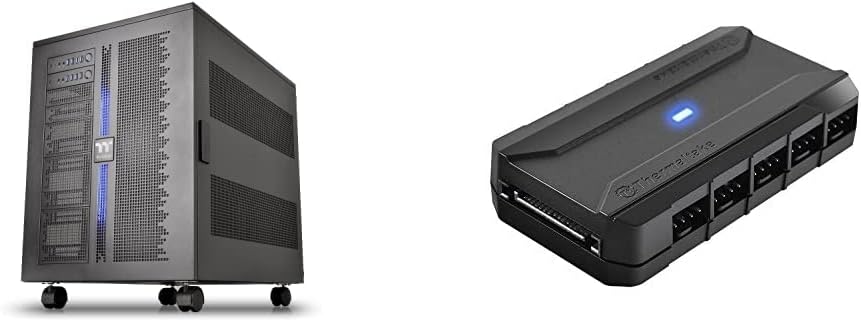
The Thermaltake Core W200 stands out as a unique option for users needing two distinct systems in one enclosure. It allows for a back-to-back configuration that supports two complete sets of motherboards, supplies, and graphics cards. This model comes bundled with a Commander FP hub to manage extensive cooling requirements efficiently.
We may earn a commission when you buy through this link, at no additional cost to you.
Its standout feature is the fully modular design that allows users to dismantle the chassis completely for easier component installation. The case supports massive liquid cooling setups with space for two 600mm radiators. The included hub powers up to ten fans simultaneously ensuring optimal thermal performance for high-load scenarios.
While the design is impressive it requires significant desk space due to its large dimensions. The price is also higher than standard towers reflecting its specialized purpose. However for users needing parallel computing power or testing environments the flexibility and cooling capacity make it a worthwhile investment.
This case is best suited for professionals or enthusiasts running dual workstations or testing rigs. If you need maximum cooling and modular flexibility the Core W200 delivers unmatched performance. It is a specialized tool for those who prioritize functionality over compact form factors.
The back-to-back configuration allows two independent systems to operate within one chassis saving desk space and cable clutter.
With support for dual 600mm radiators and a ten-fan hub this case handles heat generation from complex dual builds effortlessly.
We may earn a commission when you buy through this link, at no additional cost to you.
The Cooler Master HAF II 500 is designed for users prioritizing raw cooling performance over compact aesthetics. It features an oversized Mighty40 cooling system with massive 220mm front intake fans that move air efficiently. This case is ideal for high-heat builds that demand unrestricted airflow to maintain stable temperatures under load.
We may earn a commission when you buy through this link, at no additional cost to you.
Its low airflow resistance design uses large ventilation openings to maximize throughput. The split-level cable management creates extra room for rear exhaust cooling and keeps the interior clean. The MasterRail system supports various fan and radiator sizes providing flexibility for different cooling configurations.
The dual-mode GPU holder supports up to two thick GPUs ensuring stability for heavy graphics cards. Flexible storage cages accommodate drive orientations based on power supply length. While it is a large and heavy unit its performance capabilities make it a strong choice for serious PC enthusiasts.
This case is perfect for gamers or creators who need maximum airflow for overclocked components. The robust construction and large fans provide excellent thermal headroom. If you have the desk space the HAF II 500 offers superior cooling compared to standard towers.
The inclusion of 220mm fans and large vents ensures that heat is expelled quickly keeping components cool during intense use.
The MasterRail system and split-level management allow for a wide variety of fans and radiators without obstructing airflow.
We may earn a commission when you buy through this link, at no additional cost to you.
The NZXT H9 Flow RGB+ combines a dual-chamber design with a stunning panoramic view of your components. It separates the PSU and drives from the main system improving thermal performance and cable management. The wraparound tempered glass showcases every detail of your build without visual obstructions.
We may earn a commission when you buy through this link, at no additional cost to you.
Its optimized airflow uses perforated steel panels and angled fans to ensure efficient cooling for high-performance builds. The case supports up to ten fans across multiple zones for flexible temperature control. It is also back-connect ready compatible with motherboards designed for cable-free aesthetics.
Large radiators up to 420mm fit on the top and front-right making it versatile for liquid cooling setups. The extra-wide channels and built-in straps make cable routing effortless for clean interiors. While the glass looks great it can show fingerprints easily requiring regular cleaning.
This case is ideal for users who want a clean modern look with strong cooling capabilities. The dual-chamber design helps keep power cables hidden away from the main build. If you prioritize aesthetics alongside performance the H9 Flow RGB+ delivers a premium experience.
The seamless wraparound glass provides an immersive view of your components making it perfect for custom loop and RGB builds.
Separating the PSU from the main chamber improves airflow and keeps heat away from sensitive components like the GPU.
We may earn a commission when you buy through this link, at no additional cost to you.
The Antec Flux Pro features a distinctive design combining metal glass and wood for a high-quality texture. It is a full-tower case supporting E-ATX motherboards and multiple radiator configurations simultaneously. The case includes six pre-installed PWM fans to ensure robust cooling right out of the box.
We may earn a commission when you buy through this link, at no additional cost to you.
Its multi-directional vent design supports up to twelve fans for extensive airflow control. The innovative iShift PSU mount rotates the power supply to optimize airflow dynamics. It also features a dual temperature display for CPU and GPU providing real-time monitoring directly on the case.
Removable cooling brackets on the top front and PSU shroud allow for customization based on your build needs. While the material mix looks premium it may attract dust on certain surfaces. The dual radiator support allows for complex liquid cooling loops without space constraints.
This case is perfect for enthusiasts who value unique aesthetics and strong thermal capabilities. The included fans and flexible design save time during assembly. If you want a case that stands out visually while performing well the Flux Pro is a strong contender.
The combination of wood metal and glass gives the case a premium look that stands out from standard all-metal designs.
With six included fans and support for more the cooling potential is high ensuring components stay cool during intense tasks.
We may earn a commission when you buy through this link, at no additional cost to you.
The ASUS TUF Gaming GT502 offers a robust build with a dual-chamber design that separates internal components. This layout allows for independent cooling zones for the CPU and GPU improving overall thermal efficiency. It includes a vertical GPU mount to showcase graphics cards while keeping them stable.
We may earn a commission when you buy through this link, at no additional cost to you.
Tool-free side panels make access easy by pressing a button on the rear of the chassis. The tempered glass panels at the front and side provide a tinted view that reduces glare while showing off your components. It features high-speed front connectivity including USB 3.2 Gen 2 Type-C.
The sturdy construction ensures it can support heavy hardware without flexing. While it is heavier than some competitors the durability is a worthwhile trade-off. The independent cooling zones help prevent heat soak from the PSU affecting your main system performance.
This case is ideal for gamers who want easy access and a clean aesthetic. The vertical mount and tinted glass add a unique touch to any setup. If you prioritize durability and airflow separation the GT502 delivers reliable performance.
Separating the main chamber from the rear allows independent cooling zones preventing heat from the PSU affecting your CPU and GPU.
The included vertical mount allows you to display your graphics card while keeping it securely supported against sag.
We may earn a commission when you buy through this link, at no additional cost to you.
The ASUS ROG Strix Helios II is a premium case designed for showcase builds with high-end hardware. It features an aluminum front panel with a diamond-grille design that offers both style and effective cooling. The case supports graphics cards up to 450mm ensuring compatibility with the longest models available.
We may earn a commission when you buy through this link, at no additional cost to you.
It includes four pre-installed performance fans to deliver ultimate airflow right out of the box. Cable management is effortless with multifunction covers and dedicated holders. The advanced I/O panel features two 20Gbps Type-C ports providing fast connectivity for modern peripherals.
While the price is high the build quality and material selection justify the cost for enthusiasts. It requires significant space but offers exceptional support for E-ATX boards and liquid cooling. The detachable PSU bracket and graphics card braces add to its functional design.
This case is best for users who want a flagship product with strong aesthetics. It handles large components and cooling setups with ease. If you want a case that looks professional and performs reliably the Helios II is an excellent choice.
The aluminum diamond-grille front provides a distinct look while ensuring effective cooling for internal components.
The advanced I/O panel includes 20Gbps USB-C ports ensuring you have the fastest connection options available on your desk.
We may earn a commission when you buy through this link, at no additional cost to you.
The HAVN HS 420 features a hybrid structure designed to optimize airflow specifically for the GPU. Its dual-chamber design balances traditional case ratios with targeted cooling from the bottom intake. The case supports up to eleven 140mm fans allowing for extensive cooling options across the chassis.
We may earn a commission when you buy through this link, at no additional cost to you.
Its unique SimpliCable routing system uses grooved guides to cleanly route cables for a pristine appearance. The heat-formed UniSheet glass panel minimizes distortion providing a clear continuous view of the interior. It includes a PWM fan hub to simplify fan control without external accessories.
The three-way adjustable GPU support bracket handles various shapes and sizes while maintaining a neat look. Vibration isolation pads on fan brackets prevent resonance build-up. While less common than other brands its features offer great value for enthusiasts seeking customization.
This case is perfect for users who prioritize cable management and cooling flexibility. The glass design provides an impressive look while the hybrid structure supports high-performance builds. If you want a unique alternative to standard towers the HS 420 is worth considering.
The hybrid structure directs cool air from the bottom intake onto the centrally positioned GPU for targeted thermal performance.
The SimpliCable system with grooved guides makes cable management effortless resulting in a tidy interior that looks professional.
We may earn a commission when you buy through this link, at no additional cost to you.
The NZXT H6 RGB+ brings the dual-chamber design to a compact size for smaller desks. It isolates the power supply and cables from the main build while angled fans deliver targeted airflow to hot components. The single-piece tempered glass is curved to a tight radius for minimal distortion.
We may earn a commission when you buy through this link, at no additional cost to you.
Its high-airflow mesh panels across top front and right improve ventilation without sacrificing style. The bottom nylon filter keeps dust out while allowing unrestricted intake. Although it ships without fans this allows for fully custom lighting and cooling choices by the user.
The integrated adjustable anti-sag bracket supports modern GPUs ensuring they remain aligned and secure. This case fits in tighter spaces while maintaining the benefits of a dual-chamber layout. It is an excellent entry point for those wanting clean aesthetics without a full tower size.
This case is ideal for users with limited space who still want strong airflow and clean looks. The curved glass and chamber separation provide a premium feel. If you want a stylish compact build the H6 RGB+ is a solid budget-friendly option.
The compact design fits on smaller desks while still offering the thermal benefits of a dual-chamber layout.
The seamless curved glass offers a premium look that stands out compared to standard flat panel designs.
We may earn a commission when you buy through this link, at no additional cost to you.
The Thermaltake Capo X delivers the ability for parallel operation from a single chassis housing two independent mATX systems. This architecture minimizes footprint while keeping extra desk space open for tools or accessories. Each system features its own I/O ports located on the top and bottom of the chassis.
We may earn a commission when you buy through this link, at no additional cost to you.
It supports up to thirteen 120mm fans and large radiators ensuring ample cooling for dual setups. The hidden connector support allows for cleaner builds by using motherboards with rear connectors. Two detachable GPU braces provide top and bottom support for each graphics card ensuring stability.
The compact design makes it unique for developers needing separate environments in one enclosure. While it is limited to mATX boards its functionality is unmatched. The individual I/O panels ensure that users can access each system independently without confusion.
This case is best for professionals needing a lab environment or testing station. Its specialized features justify the price for users with specific workflow needs. If you require two systems in one box the Capo X is the ideal solution.
The ability to house two independent mATX systems allows for efficient testing or development workflows in a compact space.
Each system has its own I/O panel allowing separate power control and USB access for independent operation.
We may earn a commission when you buy through this link, at no additional cost to you.
The Thermaltake View 380 TG offers a dual chamber design with a pillarless front and side glass panel for a seamless view. It supports hidden-connector motherboards to help hide cables for a cleaner build aesthetic. The case comes with four hydraulic bearing 120mm ARGB fans pre-installed.
We may earn a commission when you buy through this link, at no additional cost to you.
Its dual tempered glass panels provide a tactfully tinted view of the components. The case supports a max radiator size of 360mm and VGA length of 415mm. It includes standard I/O ports like USB 3.2 Type-C and 3.0 for modern connectivity needs.
As a budget-friendly option it delivers solid features like hidden connector support and ARGB lighting out of the box. The price is competitive making it accessible for users who want dual-chamber benefits without breaking the bank. It requires careful handling of the glass during cleaning.
This case is ideal for users seeking value and a modern look. The inclusion of fans saves money on accessories. If you want a clean dual chamber system on a budget the View 380 TG is a great choice.
The case supports rear-connecting motherboards allowing for a cleaner look by hiding cables behind the motherboard.
Providing dual chamber benefits at a lower price point makes this case accessible for budget-conscious builders.
We may earn a commission when you buy through this link, at no additional cost to you.
Choosing a dual system PC case requires understanding the balance between cooling power, physical space, and component compatibility.
Dual systems generate significant heat so look for cases with high fan counts and radiator support. Ensure airflow is optimized to prevent heat from one system affecting the other.
Prioritize cases with open vents and large intake fans to maintain stable temperatures.
The internal configuration should support separate chambers or distinct mounting zones. Check if the case physically separates power components from the main motherboard slots.
A well-separated layout improves cable management and thermal performance significantly.
Confirm whether the case supports two ATX boards or if it is limited to mATX formats. Ensure the mounting holes align with your specific motherboard choice.
Matching the board size to the case design prevents fitting issues during assembly.
Graphics cards may span two systems or sit in different zones. Measure the maximum GPU length supported in each chamber.
Always check for vertical mount options if you plan to display heavy components.
Dual systems require sufficient wattage and physical space for two or three power supply units. Verify the PSU shroud dimensions and fan placement.
Ensure cables can reach both systems without strain or obstruction.
With double the cables look for cases with wide routing channels and Velcro straps. Hidden connector support helps reduce clutter.
Clean cable routing ensures better airflow and easier future upgrades.
These cases are often larger than standard towers. Measure your desk space before purchasing to ensure it fits comfortably.
Consider weight as well since dual systems can become heavy during transport.
Many users want the case to look good on a desk. Check for glass panels, RGB lighting, or unique materials like wood or aluminum.
Choose a finish that matches your workspace style and lighting needs.
Start by installing the power supplies and cooling fans before mounting motherboards. Ensure all cables are routed through the dedicated channels to avoid congestion.
Regularly clean dust filters and fans to prevent overheating. Use compressed air gently to remove debris from the interior chambers.
Check fan speeds and temperatures periodically. Adjust settings in BIOS or monitoring software to balance noise and cooling performance.
A dual system PC case allows you to install two independent computer systems in one chassis. This is useful for testers or developers who need parallel workloads.
Not all models support E-ATX. Check the specific product details for motherboard size compatibility. Many cases are designed for ATX or mATX configurations.
Yes, typically each system needs its own power supply. Ensure the case has enough space for both units and their cables.
Use cases with dedicated channels and Velcro straps. Hidden connector motherboards can also reduce cable clutter significantly.
Many models support large radiators like 360mm or 420mm. Check the specific clearance limits for each chamber.
Some models include GPU support brackets. Others may require you to purchase them separately to prevent sagging.
The Thermaltake Core W200 leads our list with unmatched dual system capability and modularity. The NZXT H6 RGB+ offers a compact budget-friendly option for smaller setups.
Prioritize airflow and motherboard compatibility to ensure your build runs smoothly. A dual system case is a specialized investment so verify all specs before purchasing.
Prices and availability change frequently so check current listings on Amazon. Always confirm warranty terms to protect your hardware investment effectively.