
HP OmniBook 3 14 inch Next Gen AI PC
4.4Editor score
2K OLED Display
Snapdragon X Processor
Up to 41 Hours Battery Life
Artificial intelligence is reshaping how we interact with personal computers, bringing powerful tools directly to our devices. AI laptops integrate specialized hardware to run tasks like image generation, language translation, and video editing locally. This shift promises faster speeds and better privacy for users who need reliable performance on the go.
We evaluated ten leading models released or updated for the current year to find the best options. Our comparison focuses on processor capabilities, memory capacity, screen quality, and battery endurance. Each entry reflects real-world usage scenarios for students, professionals, and creative work seeking the advantages of on-device artificial intelligence.
Every selection in this list highlights specific strengths such as long battery life, vibrant displays, or robust security features. Note that availability and configuration options may change as manufacturers update their product lines regularly. Always verify the latest details before making your final decision to ensure you get the exact model you expect.
4.4Editor score

4.3Editor score

5.0Editor score
As an Amazon Associate we earn from qualifying purchases.
The following table provides a side-by-side overview of the key specifications for each selected model to help you quickly identify which device matches your specific requirements for performance and portability.


This HP OmniBook X 14 inch model stands out as a top contender in the AI laptop market. With a rating of 4.3 stars, it delivers a compelling blend of premium hardware and intelligent software capabilities. The device is designed to handle complex workflows while providing a visually immersive experience through its high-resolution display.
We may earn a commission when you buy through this link, at no additional cost to you.
The standout feature is undoubtedly the 3K OLED touchscreen which offers deeper blacks and richer contrast than traditional LED panels. This display technology enhances productivity by making text and images pop with clarity. Paired with the Intel Core Ultra 7 processor, the laptop handles multitasking effortlessly and supports advanced AI tasks like real-time video effects and natural language processing.
While the device excels in performance and visual quality, users should consider the potential for screen burn-in if static elements are displayed for extended periods daily. Additionally, the premium materials contribute to a higher cost which may be a consideration for budget-conscious buyers looking for standard performance.
This laptop is an ideal choice for professionals and creators who need a portable yet powerful machine. If you value display quality and battery endurance above all else, this model offers a robust solution for your daily computing needs. It is highly recommended for those seeking a modern Windows experience with integrated AI tools.
The OLED panel ensures that every pixel is lit individually for true blacks and vivid colors.
With up to 27 hours of battery life you can work through long flights or meetings without a charger.
We may earn a commission when you buy through this link, at no additional cost to you.
The HP OmniBook 3 14 inch is a fantastic option for those seeking the latest AI features without a high price tag. It has earned a strong rating of 4.4 stars from users who appreciate its efficiency and build quality. This device represents a significant step forward in making AI laptops accessible to a broader audience.
We may earn a commission when you buy through this link, at no additional cost to you.
One of its most impressive attributes is the battery life which can last up to 41 hours on a single charge. This endurance is ideal for students and professionals who travel frequently or work in environments with limited access to power outlets. The Snapdragon X processor is optimized for low power consumption while still delivering smooth performance for everyday tasks.
A potential limitation is the storage capacity which may require external drives or cloud storage for users with large file libraries. Additionally, as an ARM-based device some legacy Windows applications might not run natively without virtualization which could be a hurdle for specific enterprise software needs.
Buyers looking for a reliable daily driver that prioritizes portability and battery longevity will find this laptop particularly appealing. It serves well for web browsing, media consumption, and note-taking. For the price it offers a rare combination of modern AI features and exceptional energy efficiency.
The Snapdragon chip allows for multi-day usage on a single charge for most users.
Built-in Otter.ai helps you capture notes and summaries automatically during calls.
We may earn a commission when you buy through this link, at no additional cost to you.
The ASUS Vivobook S16 has achieved a perfect 5.0 rating reflecting its high-quality construction and performance. It is designed for users who demand the best in AI processing and visual fidelity. This model combines powerful hardware with a refined design that appeals to both work and entertainment needs.
We may earn a commission when you buy through this link, at no additional cost to you.
At the core of this machine is the AMD Ryzen AI 9 processor which provides up to 50 NPU TOPS for AI acceleration. This ensures that tasks like image editing and video summarization run smoothly without cloud dependency. The 32 GB of RAM allows for seamless switching between dozens of browser tabs and professional applications.
Despite its premium status users should be mindful of the OLED screen which requires occasional use of screen savers to prevent permanent image retention. The price is also higher than average which might not suit every buyer. However the quality of materials and performance justifies the investment for power users.
This laptop is recommended for creative professionals and power users who need significant memory and processing power. It is an excellent choice for those who value a large beautiful screen and robust AI capabilities. The combination of performance and design makes it a standout product in the current market.
The 50 TOPS NPU allows for rapid local AI processing of complex tasks.
Dolby Atmos and enhanced speakers deliver immersive sound for media consumption.
We may earn a commission when you buy through this link, at no additional cost to you.
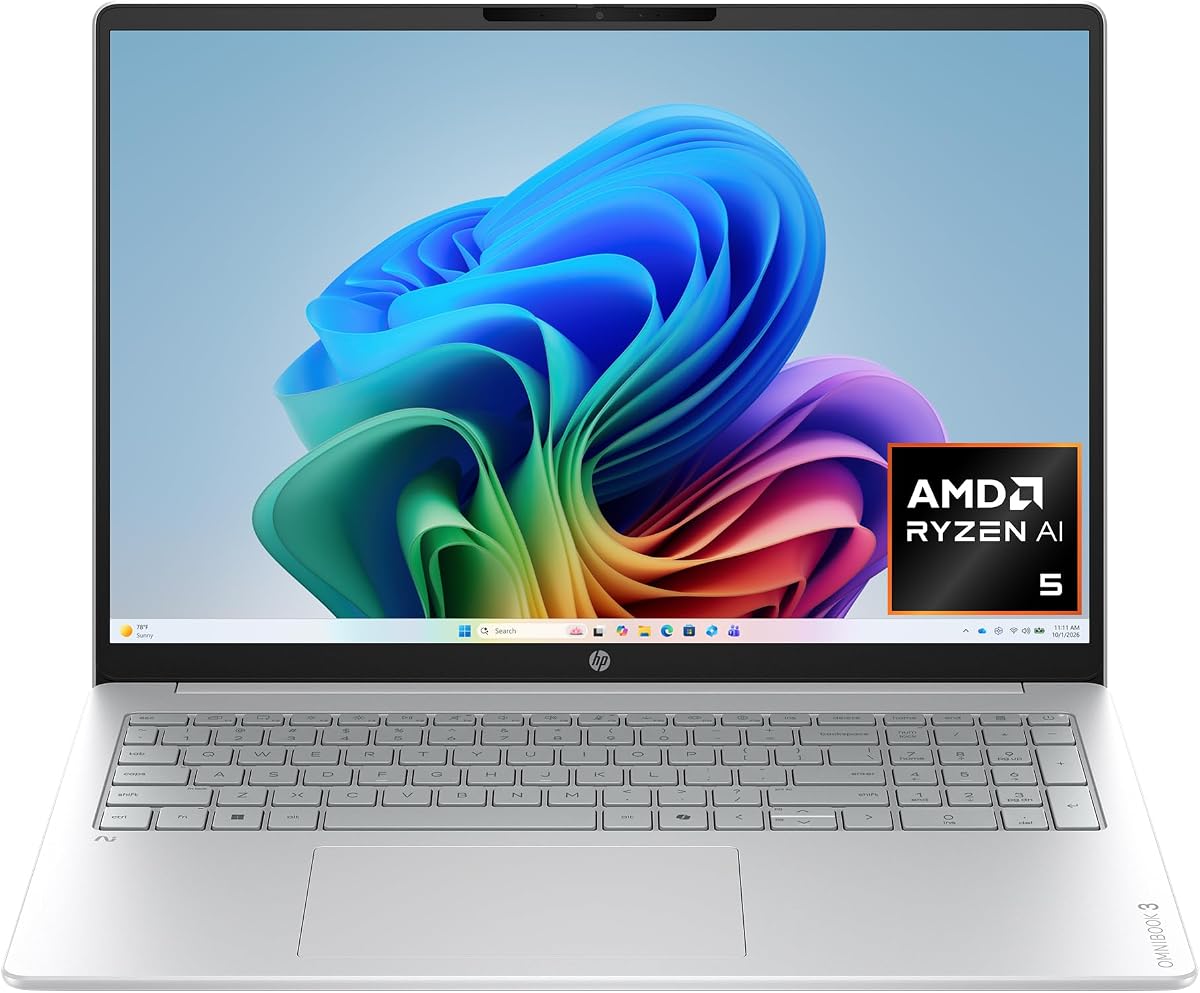
The HP OmniBook 3 16 inch is highly rated by users with a 4.8 star score reflecting its reliable performance. It is designed for those who need a larger display for work without sacrificing too much portability. The device integrates advanced AI features to streamline daily workflows effectively.
We may earn a commission when you buy through this link, at no additional cost to you.
Its standout quality is the advanced AI noise reduction which ensures clear communication during virtual meetings. The AMD Ryzen AI 5 processor handles everyday tasks with ease and supports creative applications efficiently. The larger screen real estate is perfect for editing documents or spreadsheets side by side.
The battery life is adequate for a workday but may not match the extreme longevity of the Snapdragon models. Additionally users requiring extensive local storage might find the 512 GB limit restrictive. However these trade-offs are acceptable given the high performance and display size offered at this price point.
This laptop is ideal for business professionals and students who prioritize screen size and communication quality. It serves as a robust tool for productivity and collaboration. If you need a balance between performance and a large viewing area this model is a smart choice.
AI noise filtering ensures you are heard clearly even in noisy environments.
The battery charges to 50 percent in just 45 minutes for quick power boosts.
We may earn a commission when you buy through this link, at no additional cost to you.
The HP OmniBook 5 16 inch is designed for users who need a reliable AI laptop with great battery endurance. It holds a rating of 4.2 stars indicating solid performance for general use. The machine balances modern AI features with a design that is comfortable for long periods of use.
We may earn a commission when you buy through this link, at no additional cost to you.
The Snapdragon X processor is the heart of its efficiency allowing the battery to last up to 34 hours. This makes it perfect for long work sessions without needing to plug in. The 2K OLED display provides a vibrant viewing experience for media and documents alike.
Users should be aware that while the Snapdragon chip is efficient it may not support all traditional Windows applications perfectly. The rating is slightly lower than some other models which may reflect software compatibility nuances. However the hardware quality is robust and well-suited for cloud-focused workflows.
This laptop is a great choice for travelers or students who prioritize battery life and screen quality. It offers a modern take on the standard laptop form factor. If your work relies mostly on web apps and cloud services this device will serve you well.
The high capacity battery supports uninterrupted work for multiple days.
The OLED screen ensures that colors are accurate and text is sharp.
We may earn a commission when you buy through this link, at no additional cost to you.
The HP OmniBook 5 16 touchscreen model offers a strong balance of power and usability with a 4.5 star rating. It is built for users who need ample storage and a responsive screen for daily tasks. The inclusion of the Intel Core Ultra 7 processor ensures efficient multitasking and AI integration.
We may earn a commission when you buy through this link, at no additional cost to you.
A key strength is the 1TB SSD which provides plenty of space for large files and applications. This removes the need for external drives and keeps all your data local. The touchscreen interface adds an intuitive layer for navigation and creative input which enhances the overall experience.
While the display is versatile it may contribute slightly to the weight of the device compared to non-touch models. Battery performance is standard and may not meet the extreme demands of some users. However the overall reliability and feature set make it a competitive option in its class.
This laptop is suitable for professionals and students who value storage and screen interactivity. It handles both creative and administrative work with ease. If you need a reliable machine with plenty of room for your digital life this model is a strong contender.
1TB of space ensures you never have to worry about deleting important files.
The touchscreen allows for intuitive navigation and easy access to apps.
We may earn a commission when you buy through this link, at no additional cost to you.
This model of the HP OmniBook 3 14 inch is recognized for offering high value with its AI capabilities. With a rating of 4.4 stars it appeals to budget-conscious buyers who do not want to compromise on features. The device is designed to deliver long battery life and a vibrant display.
We may earn a commission when you buy through this link, at no additional cost to you.
The primary advantage is the battery life which can reach up to 41 hours. This is a significant benefit for users who need to work for extended periods without access to power. The OLED display provides a sharp and colorful visual experience for media consumption.
Storage is a limitation for users with large libraries as the 256 GB capacity is relatively small. The Snapdragon architecture may also require checking app compatibility before purchase. However for general tasks and productivity the device performs well within its price range.
It is an ideal choice for travelers and students who need a light and reliable machine. If your work is primarily cloud-based you will benefit from its speed and endurance. This model proves that AI laptops can be accessible without a high cost.
Go for days without a charger thanks to the efficient Snapdragon X processor.
The 2K OLED screen brings your content to life with accurate colors.
We may earn a commission when you buy through this link, at no additional cost to you.
The Lenovo ThinkBook 16 Gen 8 is engineered for business users who need reliability and security. It holds a rating of 4.6 stars reflecting its solid build and professional features. The laptop is designed to handle complex business applications and large data sets with ease.
We may earn a commission when you buy through this link, at no additional cost to you.
A key strength is the inclusion of Windows 11 Professional and a fingerprint reader for enhanced security. The 32GB of RAM ensures that heavy enterprise applications run smoothly without lag. This makes it a versatile tool for office work and data analysis on the go.
The design is utilitarian which may lack the aesthetic appeal of consumer-focused laptops. It is also slightly heavier which might be a factor for those traveling frequently. However for users who prioritize performance and security over style it is a highly capable machine.
This laptop is recommended for professionals and business owners who need a robust workstation. It provides the tools necessary for secure and efficient computing. If your work involves sensitive data and demanding applications this device is a solid investment.
Windows 11 Pro and biometric login keep your business data secure.
32GB of RAM allows you to run multiple enterprise apps simultaneously.
We may earn a commission when you buy through this link, at no additional cost to you.
The acer Aspire 16 AI Copilot+ PC is designed to offer a rich feature set at a competitive price point. With a rating of 4.2 stars it offers a good balance of performance and display quality. It is built for users who want a high refresh rate screen and advanced connectivity.
We may earn a commission when you buy through this link, at no additional cost to you.
The standout feature is the 120Hz touchscreen which provides smooth scrolling and interaction. The Snapdragon X processor supports advanced AI features like Recall to help you find past content easily. Wi-Fi 7 ensures that your connection is fast and stable even in busy environments.
One consideration is that battery life may not match the longevity of some other Snapdragon models due to the display refresh rate. Also app compatibility remains a factor for any Snapdragon device. Despite this the hardware quality is impressive and supports modern workflows well.
This laptop is a good choice for users who value screen smoothness and connectivity. It is suitable for media consumption and general productivity. If you want a modern display and strong AI features at a lower price this model is worth considering.
A 120Hz refresh rate makes interactions feel fluid and responsive.
Wi-Fi 7 ensures you stay connected with minimal latency.
We may earn a commission when you buy through this link, at no additional cost to you.
The HP Omnibook 16 2K Touchscreen Laptop is a powerful option for users who need significant performance. It has a rating of 4.6 stars reflecting its capability and reliability. The machine is designed for heavy multitasking and professional workflows with Windows 11 Pro.
We may earn a commission when you buy through this link, at no additional cost to you.
The Ryzen AI 7 processor provides robust AI acceleration and efficient power management. With 32GB of RAM and a 1TB SSD it handles large files and multiple applications without hesitation. The 2K touchscreen offers a sharp and responsive experience for creative work.
While the performance is high the device may be heavier than portable models. Battery life is not detailed as a standout feature but is expected to be standard for this class. Overall the combination of RAM and storage makes it a future-proof choice.
This laptop is ideal for power users and professionals who need performance and security. It serves well for editing and data management tasks. If you require a reliable machine with ample resources for demanding work this model is a top recommendation.
The 32GB RAM ensures smooth operation even with many apps open.
Windows 11 Pro provides advanced security tools for businesses.
We may earn a commission when you buy through this link, at no additional cost to you.
Selecting the right AI laptop depends on your specific needs regarding performance portability and budget. Consider the following factors to ensure you choose a device that fits your workflow.
The heart of an AI laptop is its processor and neural processing unit which handle local intelligence tasks. Look for models with dedicated NPUs like the Snapdragon X Intel Core Ultra or AMD Ryzen AI series to ensure smooth AI workflows.
Prioritize devices with high TOPS ratings if you plan to use generative AI or real-time video effects.
AI applications and large files require significant memory to run without slowing down. Aim for at least 16GB of RAM with 32GB being ideal for professionals who run multiple heavy applications.
Ensure your laptop has enough SSD storage to keep files local and accessible. 512GB is a good baseline but 1TB is better for creators.
One of the main advantages of AI laptops is their ability to run efficiently without constant power. Check the estimated battery life to ensure it meets your daily needs especially if you travel frequently.
Models with ARM-based processors often offer longer battery life so consider this if portability is a priority.
A high-quality display is essential for viewing AI-generated content and working on detailed projects. Look for resolutions of at least 2K with color accuracy and touch capability for enhanced interaction.
OLED panels offer deeper blacks and vibrant colors which can make your content look better but be mindful of potential burn-in risks.
The operating system plays a crucial role in how well you can use AI features. Windows 11 is the primary platform for Copilot+ features so ensure your device is certified.
Check for pre-installed AI tools like Otter.ai or meeting assistants that can add immediate value to your productivity.
If you need to carry your laptop daily pay attention to its weight and thickness. A sleek design often correlates with better build quality and durability.
Consider the port selection to ensure you have the connectivity you need without carrying extra dongles.
AI laptops often handle sensitive data so security should be a top priority. Look for features like fingerprint readers or Windows Hello support for quick and secure access.
Enterprise models may offer additional security layers that are beneficial for business users handling confidential information.
Fast internet is crucial for syncing data and using cloud AI tools. Ensure your laptop supports the latest Wi-Fi standards such as Wi-Fi 6E or Wi-Fi 7 for optimal speeds.
Bluetooth support is also important for connecting peripherals like headphones or mice.
To get the most out of your AI laptop ensure that all software and drivers are updated regularly. This keeps the AI features and security systems running at their best performance.
Take advantage of the AI tools provided such as Copilot or Otter.ai to streamline your workflow. These tools are designed to save time and help you focus on creative work rather than administrative tasks.
Protect your device by using a screen protector if you use a touchscreen frequently. Keep the laptop in a cool dry place when not in use to maintain battery health and prevent dust buildup.
An AI laptop includes a dedicated neural processing unit to process artificial intelligence tasks locally. This allows for features like real-time video effects and voice isolation without relying on the cloud.
No Copilot+ features are included for free with eligible Windows 11 devices. You simply need a compatible laptop to access the AI tools.
For general productivity and battery life Snapdragon chips are often superior. For heavy gaming or legacy apps Intel might still have an edge due to broader compatibility.
Most modern AI laptops have soldered RAM to save space and improve efficiency. Check the specs before buying as upgrades may not be possible later.
Yes efficient processors like Snapdragon often provide significantly longer battery life than traditional chips. This allows for extended work sessions without needing a charger.
Many AI laptops feature high-quality OLED displays and powerful GPUs making them suitable for video editing and design. Ensure you get a model with enough memory for your software.
The top picks in this guide highlight the best options available in November 2026 for various needs. The HP OmniBook X leads in display quality while the HP OmniBook 3 offers exceptional battery life for less.
When choosing prioritize the processor and memory to ensure your device can handle future AI advancements. A balance between screen quality and portability will serve most users well in daily tasks.
Remember that technology evolves quickly so verify current availability and features before purchasing. These devices are designed to make your digital life smoother and more efficient.