
EMEET C960 1080P Webcam with Microphone, 2 Mics, 90° FOV, Computer Camera
4.4Editor score
1080P video with privacy cover
Built-in 2 Omnidirectional Mics
Automatic light adjustment
Plug-and-Play with USB connectivity
Wide 90 degree angle
Choosing the right 1080p webcam is essential for clear video calls and streaming. A good webcam ensures your face is well-lit, your audio is crisp, and your privacy is protected. Whether you work from home or stream content, finding the perfect camera makes a big difference.
We evaluated ten leading models based on video resolution, microphone quality, privacy shutters, and ease of use. Each product was analyzed for compatibility with major platforms like Zoom and Teams. Our goal is to help you find a reliable camera that fits your specific needs and budget.
Every pick highlights unique strengths, from budget-friendly options to premium business cameras. We focus on real-world performance and user-friendly features. Prices and availability can change frequently, so please verify current details before purchasing your next video conferencing tool or streaming camera today.
4.4Editor score

4.6Editor score

4.4Editor score
As an Amazon Associate we earn from qualifying purchases.
This table provides a side-by-side overview of the ten selected webcams. It highlights key specifications like resolution, lens type, and connectivity to help you quickly identify the best fit for your setup.




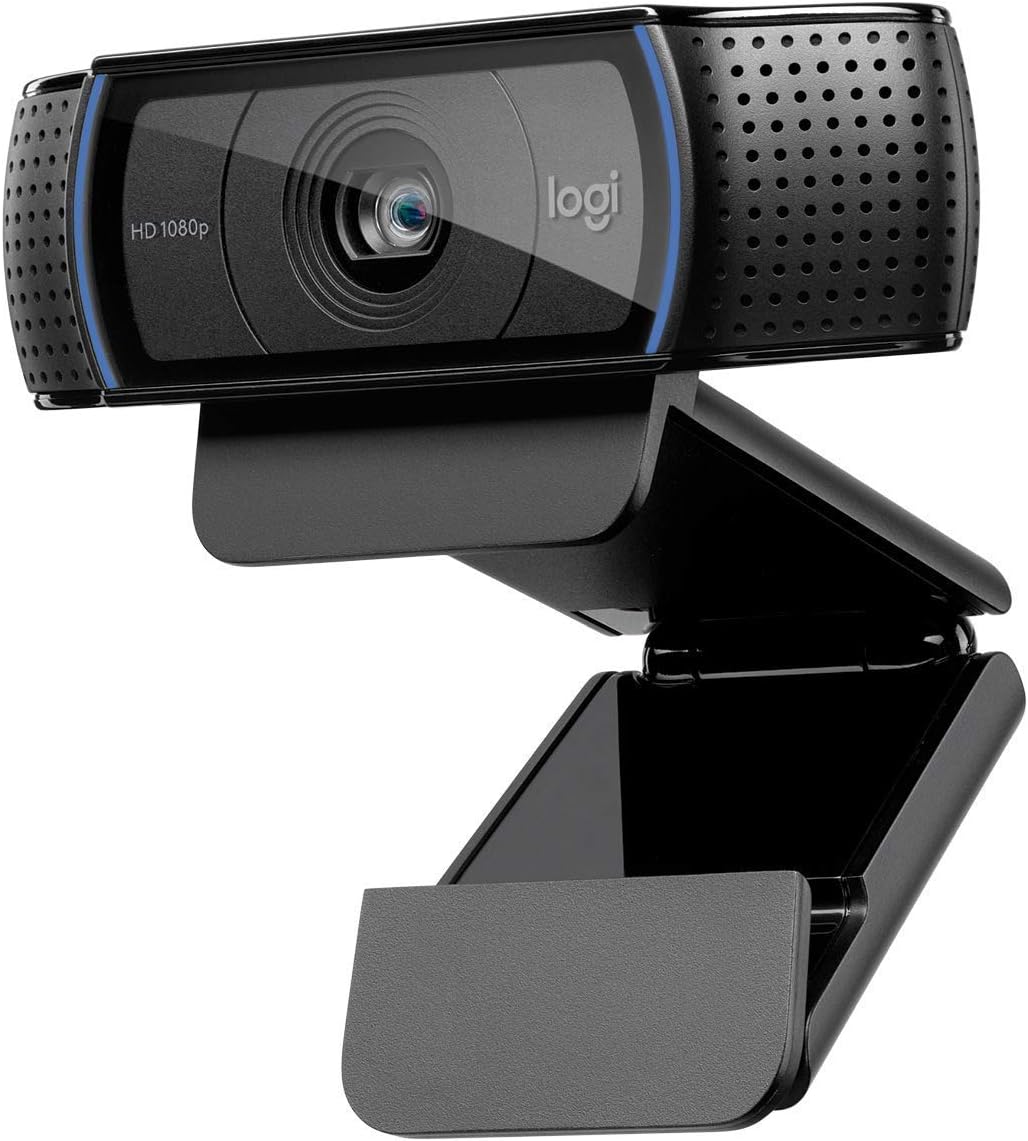


The Logitech C920x HD Pro is a top-rated webcam that delivers sharp Full HD video at 30fps. It stands out for its advanced autofocus and HD lighting adjustment, ensuring you look good even in dim rooms. The dual microphones capture natural stereo audio, making calls sound professional.
We may earn a commission when you buy through this link, at no additional cost to you.
This webcam is designed for both desktop use and laptop setups. It includes a 3-month XSplit VCam license, allowing you to blur or replace backgrounds without a green screen. The compatibility with Windows 11 and major platforms like Zoom and Teams makes it a versatile choice for hybrid work.
While the video and audio quality are excellent, it lacks a built-in privacy shutter, which might be a concern for privacy-focused users. However, the overall performance and ease of use make it a strong contender for anyone needing reliable video conferencing gear.
If you want a high-quality webcam that balances performance and features, the C920x HD Pro is an excellent pick. It is ideal for streamers and professionals who need clear visuals and sound without complex setup or additional software.
The HD autofocus and light adjustment features automatically fine-tune the image to ensure bright, razor-sharp visuals regardless of your environment.
Dual microphones capture natural sound during calls, ensuring your voice is clear and free from the distraction of background noise.
We may earn a commission when you buy through this link, at no additional cost to you.
The EMEET C960 offers a budget-friendly way to get 1080P video quality for your calls. It features a privacy cover and dual omnidirectional microphones, ensuring both visual and audio clarity. The wide 90-degree field of view allows you to capture more of your room.
We may earn a commission when you buy through this link, at no additional cost to you.
Automatic light adjustment helps maintain stable image performance even if your lighting changes. It supports USB Type-A and C connections, making it compatible with a wide range of computers and devices. Setup is straightforward with plug-and-play functionality.
One trade-off is that it uses fixed focus, which might require positioning yourself at a specific distance for the sharpest image. Despite this, the combination of features and low cost makes it a great entry-level option for remote workers.
This camera is perfect for users on a tight budget who still need reliable video quality. It works well with platforms like Zoom and Teams, making it a practical choice for everyday video meetings and casual streaming.
The included privacy cover allows you to physically block the lens when not in use, ensuring your space remains private and secure.
A 90-degree wide-angle lens captures more participants or your surroundings, reducing the need for frequent camera adjustments during calls.
We may earn a commission when you buy through this link, at no additional cost to you.
The Logitech Brio 101 is a premium 1080p webcam designed for streaming and professional meetings. It features RightLight technology to boost brightness by up to 50% and an integrated privacy slide for easy protection. The build uses 77% post-consumer recycled plastic, making it environmentally friendly.
We may earn a commission when you buy through this link, at no additional cost to you.
This webcam includes a built-in microphone for clear calls and works with most video platforms like Zoom and Microsoft Teams. You can customize your view using the Logi Options+ app, adjusting zoom and framing to fit your setup perfectly.
While it offers great video quality and privacy features, it does not include the XSplit VCam software that some other Logitech models provide. However, its durability, design, and performance make it a strong choice for those who prioritize sustainability and ease of use.
If you want a sleek, reliable webcam with excellent privacy controls, the Brio 101 is a top recommendation. It is well-suited for hybrid workers who need consistent quality and a modern look for their home office setup.
The integrated webcam slide makes it simple to get reliable privacy when you are not on a call, giving you peace of mind.
Built with a minimum of 77% post-consumer recycled plastic, this model helps reduce environmental impact without sacrificing performance.
We may earn a commission when you buy through this link, at no additional cost to you.
The Logitech C920S HD Pro is a classic webcam known for its reliable 1080p video and included privacy shutter. It uses a glass lens to produce crisp and vibrantly colored videos for calls and recording. The dual microphones capture natural sound, enhancing the clarity of your conversations.
We may earn a commission when you buy through this link, at no additional cost to you.
With HD autofocus and light correction, this camera ensures you look sharp in any environment. The privacy shutter gives you full control over what you show, making it a secure choice for professional and personal use. It is a versatile model for desktop or laptop setups.
While it does not include the XSplit VCam license, its strong video quality and privacy features make up for it. Users appreciate the straightforward plug-and-play setup that works seamlessly with major calling apps like Zoom and Microsoft Teams.
This webcam is a solid choice for anyone who needs dependable performance and privacy protection. It is ideal for remote professionals who want high-quality visuals without compromising on security or ease of use.
The glass lens ensures your recorded videos are crisp and vibrantly colored, delivering premium video quality for your calls and content.
The snugly fitting privacy shutter puts you in control of what you show, protecting the lens and ensuring your privacy at all times.
We may earn a commission when you buy through this link, at no additional cost to you.
The Logitech C920e HD is designed specifically for business environments, offering certified compatibility with Zoom and Microsoft Teams. It includes an attachable privacy screen and a sturdy adjustable clip that mounts easily on laptops or monitors. The dual omnidirectional microphones ensure clear audio from up to one meter away.
We may earn a commission when you buy through this link, at no additional cost to you.
Its 78-degree field of view displays individual users in a well-balanced frame while leaving room to share projects or documents. With built-in HD autofocus and automatic light correction, it delivers optics that help you look good in all meetings. It also supports tripod mounting via 1/4" threads.
While the fixed field of view is narrower than some wide-angle cameras, it is optimized for single-user business calls. The Sync device management software helps IT teams keep devices updated. This makes it a robust choice for corporate setups.
If you need a reliable webcam for professional use, the C920e is a top pick. Its certified compatibility and privacy features make it ideal for teams that prioritize seamless integration and security.
The attachable privacy screen flips up and down to cover the lens, allowing you to confirm visually whether the camera is active.
Certified for Zoom and Microsoft Teams, this webcam ensures compatibility and seamless integration in the workplace for hybrid teams.
We may earn a commission when you buy through this link, at no additional cost to you.
The NexiGo N60 offers a simple plug-and-play experience with 1080P video at 30fps. It includes a privacy cover and a built-in noise-cancelling microphone to reduce ambient noise. The 3.6mm glass lens provides a crisp image for indoor use, and it is ready to use in less than a minute.
We may earn a commission when you buy through this link, at no additional cost to you.
This webcam works with a wide range of operating systems including Windows, Mac, Linux, and Chrome OS. It does not require additional drivers, making setup incredibly fast. It is ideal for conferencing, streaming, and online school where quick connection is key.
The fixed focus works well for standard desk setups but may not suit users who need to move further back. Despite this, the combination of privacy features and universal compatibility makes it a practical budget-friendly choice for general users.
If you want a no-fuss camera that just works, the NexiGo N60 is a great option. It balances ease of use with decent video quality, making it perfect for casual calls and remote learning.
The built-in noise-canceling microphone reduces ambient noise to enhance the sound quality of your video calls significantly.
Compatible with Windows, Mac, Linux, and Chrome OS, this webcam ensures you can use it on almost any device without extra drivers.
We may earn a commission when you buy through this link, at no additional cost to you.
The EMEET S600 brings high-end features to 1080p streaming with smooth 60FPS video and PDAF autofocus. It includes a built-in privacy cover and noise-canceling microphones. The adjustable FOV allows you to focus on yourself or surroundings, making it ideal for content creators.
We may earn a commission when you buy through this link, at no additional cost to you.
This webcam features Phase Detection Autofocus for faster and more precise tracking. It is built with a rugged design that stays securely in place during use. EMEETLINK software is available for advanced customization, letting you fine-tune parameters or enhance sound quality.
While it offers 4K resolution, using 1080P at 60FPS ensures smoother motion for gaming and streaming. The auto light adjustment balances shadows and highlights. It is a versatile pick for streamers who want control over their image.
If you seek advanced customization and high frame rates, the S600 is an excellent choice. It supports content creation needs while keeping setup simple and intuitive for everyday use.
Phase Detection Autofocus offers faster speed and higher precision than common autofocus for stable performance in various scenes.
Adjustable FOV and advanced software options allow you to focus on yourself and surroundings with ease during your streams.
We may earn a commission when you buy through this link, at no additional cost to you.
The Logitech HD Pro C920 is a classic 1080p webcam known for its widescreen video calling and recording capabilities. It delivers high-definition video quality that works well with both desktop and laptop setups. This model has been a trusted choice for remote work for years.
We may earn a commission when you buy through this link, at no additional cost to you.
It provides reliable performance for meetings and content creation. Its simple design integrates well with various environments. While it may not have the newest software features, its core video and audio quality remain strong and consistent for daily use.
Users often choose this model for its proven reliability. It is a straightforward solution for those who need standard HD video without extra bells and whistles. It is easy to set up and use.
If you want a dependable camera that has stood the test of time, the HD Pro C920 is a solid option. It is perfect for basic conferencing and recording needs where quality is key.
Full HD 1080p resolution ensures clear and sharp visuals for your video calls and recorded content.
Designed to work with both desktop and laptop, this camera adapts to different setups easily for flexible positioning.
We may earn a commission when you buy through this link, at no additional cost to you.
The Logitech Brio 105 offers affordable Full HD 1080p video with RightLight 2 light-balancing technology. It includes an integrated webcam cover for privacy and is certified for Google Meet. This model works seamlessly with Chromebooks and major operating systems for broad business use.
We may earn a commission when you buy through this link, at no additional cost to you.
You can simply plug it into an available USB-A port to start your call. The clear video helps employees feel confident during meetings. It is designed for simplicity and reliability, making it a great value for organizations needing multiple units.
While it lacks advanced customization features, its focus on core video quality and privacy makes it a practical choice. It is ideal for those who want a straightforward, budget-friendly solution without sacrificing essential functions.
If you are looking for a cost-effective webcam that gets the job done, the Brio 105 is a top pick. It balances affordability with essential business features like auto-light balance and privacy protection.
RightLight 2 technology automatically improves image quality in suboptimal conditions to keep your meetings clear and professional.
Certified for Google Meet and supported by Logitech Sync, this model ensures seamless deployment for remote teams.
We may earn a commission when you buy through this link, at no additional cost to you.
The Logitech Brio 100 Renewed offers a sustainable option with Full HD 1080p resolution at 30fps. It features a 58-degree field of view to capture your surroundings during video calls. This renewed model provides clear video quality while being budget-friendly and easy to set up.
We may earn a commission when you buy through this link, at no additional cost to you.
It includes a built-in microphone for convenient all-in-one audio capture. The easy USB connection works seamlessly with popular conferencing apps. Choosing renewed reduces waste and provides high performance at a lower cost.
While it does not include a privacy shutter, its video quality and ease of use make it a strong contender. It is ideal for users who want an eco-conscious choice without compromising on essential video conferencing features.
If you value sustainability and want a reliable camera, the Brio 100 Renewed is a smart pick. It delivers smooth streaming and recording while helping to reduce electronic waste in your setup.
Opting for this renewed model helps reduce electronic waste while providing high-quality Full HD video for your meetings.
The built-in microphone offers a convenient all-in-one solution for audio, reducing the need for additional equipment.
We may earn a commission when you buy through this link, at no additional cost to you.
Selecting the right 1080p webcam involves balancing several key features to match your specific needs. This guide outlines the critical factors to consider.
When choosing a webcam, ensure it supports full HD 1080p resolution at 30fps for smooth visuals. Look for features like autofocus and light correction to maintain clarity in different lighting conditions.
Prioritize cameras with sharp lenses and automatic adjustments to ensure you always look your best on camera.
Clear audio is just as important as video. Look for models with built-in microphones, preferably dual mics with noise-canceling capabilities. This ensures your voice is captured clearly without distracting background noise.
Check if the microphone supports omnidirectional capture so you can move around without losing audio quality.
Privacy is a major concern for many users. Webcams with physical shutters or slide covers provide a simple way to protect your privacy when not in use. This physical barrier ensures no one can access your camera remotely.
Always choose a model with a reliable privacy shutter if you value security in your home or office.
The field of view determines how much of your surroundings are visible. A wider angle is useful for group calls or streaming, while a narrower one focuses more on you. Check if the webcam has an adjustable clip or tripod thread for stable mounting.
Select a mounting system that fits your desk or laptop securely to avoid shaky video.
Ensure the webcam works seamlessly with your operating system and video apps like Zoom or Teams. Certified models often guarantee better integration and fewer driver issues. Plug-and-play support simplifies setup significantly.
Verify compatibility with your specific OS before purchasing to avoid connectivity problems.
Balance your budget with the features you need. Entry-level models offer solid performance for basic calls, while premium options provide better audio and advanced customization. Consider long-term value rather than just the lowest price.
Invest in a camera that meets your primary needs without unnecessary extras if you are on a tight budget.
Many modern webcams include auto light adjustment to brighten your image in low-light rooms. This feature is crucial if you often work from dimly lit spaces. Good lighting adjustment helps reduce shadows and ensures a professional look.
Prioritize models with RightLight or similar technology if you struggle with lighting in your environment.
Some brands now use recycled plastics in their construction, offering a more sustainable choice. Additionally, durable build quality ensures the camera lasts longer. Check for design elements that indicate quality engineering and environmental responsibility.
Choose a model that aligns with your values for sustainability and durability.
To ensure optimal performance, position your webcam at eye level and ensure the lens is clean and free of dust. Use a soft cloth to gently wipe the glass regularly. Check that the USB connection is secure and that your computer recognizes the device automatically.
Keep your camera away from direct sunlight or strong lights behind you to avoid backlighting. Adjust your room lighting so your face is well-lit. If your webcam has a privacy cover, remember to slide it open when you are ready to join a call.
Update your webcam firmware and drivers occasionally to maintain compatibility with new software. Store your webcam in a safe place when not in use to prevent accidental damage. Following these simple care tips will help extend the life of your device.
Most modern webcams are plug-and-play and work immediately after connecting to a USB port. You typically do not need to install additional drivers for basic functionality. However, installing manufacturer software may unlock advanced features like zoom or custom lighting adjustments.
To improve video quality, ensure your room is well-lit from the front. Position the camera at eye level for better framing. Use the built-in or external software to adjust brightness and contrast settings. Clean the lens regularly to avoid blurry images.
Yes, you can use a webcam with multiple devices as long as they have compatible USB ports and support the resolution. Simply unplug the USB cable and plug it into the other device. Note that some settings may need to be adjusted for each device.
Grainy video is often caused by poor lighting or low resolution settings. Check your lighting to ensure it is balanced. Verify the resolution in your video app settings. Also ensure your camera drivers are updated to the latest version.
Most modern webcams are compatible with both Mac and PC systems. Always check the product specifications for system requirements before purchasing. Some models may require different drivers or settings for each operating system to function correctly.
Physical shutters provide the highest level of privacy as they block the lens entirely. This prevents any software from accessing the camera. Always ensure the shutter fully covers the lens to guarantee privacy when not in use.
Use webcams with noise-canceling features or external software to filter background noise. Position your mic away from noisy appliances and adjust the sensitivity. Some models allow you to mute the microphone when you are not speaking.
Yes, 1080p webcams are excellent for streaming and provide clear video for audiences. Ensure your internet upload speed is sufficient for smooth streaming. Many models support high frame rates like 60fps for smoother motion in gaming or content.
We have reviewed ten top 1080p webcams ranging from budget options to premium business models. Each camera brings unique strengths, whether it is the Logitech C920x HD Pro for professional use or the EMEET C960 for budget-friendly clarity.
When choosing a webcam, prioritize features like privacy shutters, light adjustment, and microphone quality. Your ideal choice depends on your specific needs for streaming, conferencing, or casual calls. A reliable camera ensures clear communication and professional presence.
Please check current prices and availability before making a purchase as these details can change frequently. With the right webcam, you can enhance your video meetings and content creation with confidence and clarity.