
Cherry Stream Wired Keyboard
4.3Editor score
Scissor switches
Quiet typing
Compact layout
Finding the right keyboard layout can transform your workspace efficiency and comfort. The 1800 compact keyboard offers a full function row and numpad in a smaller footprint, balancing ergonomics with essential controls for daily tasks.
We compared ten real models based on switch type, connectivity, build quality, and user ratings. This guide highlights key differences like mechanical versus membrane switches, wireless options, and specific layout variations to suit your workflow.
Each pick includes detailed specifications and honest insights on performance and comfort. Prices and availability change often so verify current details before purchasing to ensure you get the best value for your specific needs.
4.3Editor score

4.6Editor score

4.4Editor score
As an Amazon Associate we earn from qualifying purchases.
This side-by-side comparison highlights key specs for all ten models including switch type, connectivity options, and design features to help you find the perfect fit.
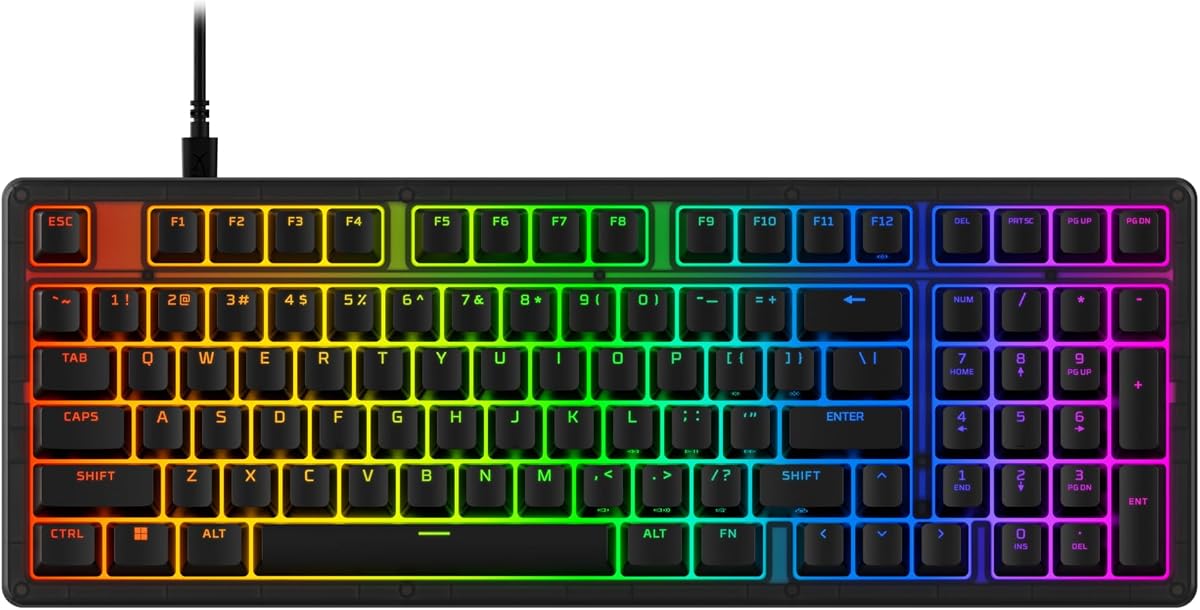




The HyperX Origins 2 1800 stands out with hotswap switches and an 8k polling rate making it ideal for precision gaming and typing. Its high profile design enhances comfort while the swappable housing allows easy aesthetic changes.
We may earn a commission when you buy through this link, at no additional cost to you.
Its O-ring mount and silicone weight deliver a deep sound and reduced wobble during use. The factory lubricated linear red switches provide smooth actuation rated for 80 million presses ensuring longevity.
The only trade-offs are the higher price point and reliance on software for full customization. These are acceptable given the performance features and build quality you get with this board.
It is best for gamers and enthusiasts who value speed and customization. If you want a compact layout with top tier mechanical features this is the top recommendation.
The eight screw assembly and open-source files let you print custom housings or swap parts without soldering effort.
With an 8k polling rate you get near instant input updates that matter during fast-paced gaming sessions.
We may earn a commission when you buy through this link, at no additional cost to you.
The HyperX Eve 1800 delivers a full-size layout in a condensed form with ten-zone RGB lighting and dedicated media controls. It suits casual gamers and budget users seeking style without mechanical costs.
We may earn a commission when you buy through this link, at no additional cost to you.
Its membrane switches provide cushioned feedback and include anti-ghosting plus 12-key rollover for reliable keypress performance. The NGENUITY software allows macro building and lighting customization easily.
The lack of mechanical switches means less tactile feedback and durability compared to higher end boards. However the price and feature set make it a great starter option.
Buy this if you want an affordable compact board with full controls. It is perfect for smaller desks where space matters but function remains important.
The 1800 form factor keeps the numpad and function row while freeing desk space for mouse movement.
Ten RGB zones offer dynamic effects that sync with gaming styles for an immersive setup experience.
We may earn a commission when you buy through this link, at no additional cost to you.
The Cherry G80-1800 is built for continuous use with gold crosspoint contacts and over 100 million actuations. Its wired compact design suits industrial workstations needing reliable mechanical performance.
We may earn a commission when you buy through this link, at no additional cost to you.
MX Black switches offer powerful direct typing with no click making them ideal for repetitive tasks. The PS2 adapter ensures compatibility with legacy systems for Unix computers.
It weighs more and lacks modern RGB features which may not fit home setups. Still the reliability and robust construction justify its specialized use cases.
Choose this for office or industrial environments requiring high durability. If you need a mechanical keyboard that withstands heavy daily use this model excels.
Gold crosspoint contacts ensure each keypress registers consistently even after years of continuous use.
USB and PS2 options let you connect to modern or legacy systems without extra adapters.
We may earn a commission when you buy through this link, at no additional cost to you.
This Cherry keyboard offers ISO certified build quality with mechanical keys and compact dimensions ideal for restricted spaces. It maintains the 1800 style layout with reliable switching for professional use.
We may earn a commission when you buy through this link, at no additional cost to you.
The dual interface support ensures compatibility across various systems while the compact design saves desk real estate. Its focus is on performance and reliability over aesthetics.
Lack of multimedia or lighting features may limit appeal for casual users. However its robustness makes it a top choice for task focused environments.
Opt for this if you need a no-nonsense mechanical keyboard for work. It delivers consistent results where durability and space efficiency are priorities.
ISO standards compliance ensures the keyboard meets high quality and safety requirements for professional settings.
Its compact size reduces footprint without removing essential keys found in full-size layouts.
We may earn a commission when you buy through this link, at no additional cost to you.
The Logitech Alto Keys K98M combines a 98-key 1800 layout with wireless mechanical typing and gasket mount comfort. It suits productivity users seeking a clean modern workspace.
We may earn a commission when you buy through this link, at no additional cost to you.
Its UniCushion absorbs vibrations for precise keystrokes while hot-swappable sockets allow switch changes without soldering. The twelve-month battery life keeps work flowing uninterrupted.
The absence of RGB and higher cost may limit appeal for gamers or budget buyers. Still the build quality and typing comfort are exceptional for professionals.
This is the best choice for those valuing ergonomics and wireless convenience. If you want a premium compact board that doubles for work and light gaming try this.
The gasket mount design reduces vibration feedback for a smoother typing experience over long sessions.
Bluetooth and Logi Bolt connections let you switch between devices seamlessly without cables.
We may earn a commission when you buy through this link, at no additional cost to you.
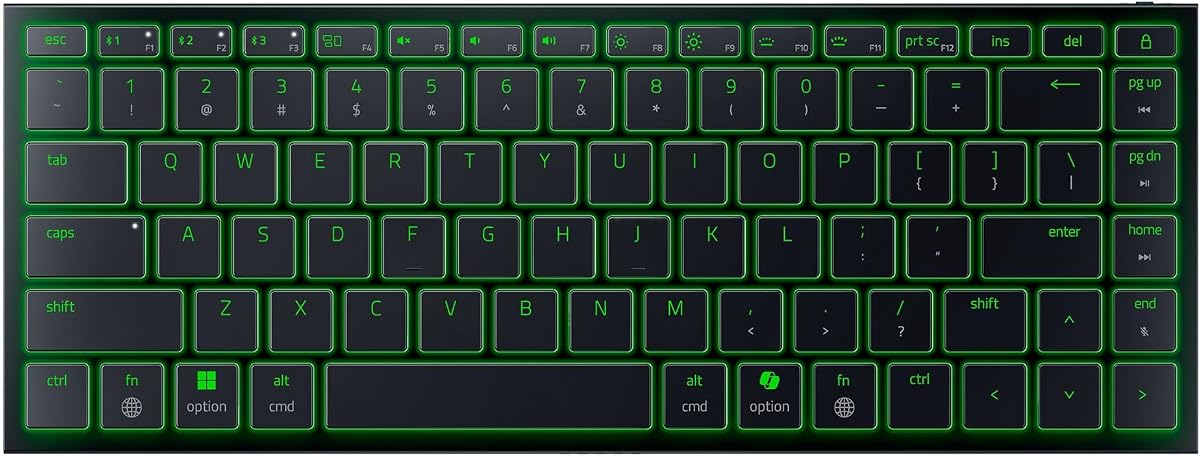
The Razer Joro packs a function row and arrows into a slim ultra portable 75 design with low-profile keys. It is perfect for travelers needing full controls in a light form.
We may earn a commission when you buy through this link, at no additional cost to you.
Its Bluetooth 5.0 connectivity supports up to three devices while Razer Chroma RGB personalizes your look. Synapse enables Snap Tap for faster directional changes during games.
The reduced layout means missing a numpad which some users may find limiting. Battery life also demands periodic checks though charging is easy via USB.
Buy this if mobility is your main concern. It fits commuters or gamers who need a compact board that works anywhere without sacrificing key functions.
Weighing just 374 grams it slips easily into bags for typing on the go.
Chroma RGB offers millions of colors and game sync for a dynamic portable setup.
We may earn a commission when you buy through this link, at no additional cost to you.
This Cherry keyboard emphasizes extremely high service life with gold crosspoint contacts and ergonomic compact dimensions. It targets industrial and office users needing dependable mechanical performance.
We may earn a commission when you buy through this link, at no additional cost to you.
The 104-key layout fits standard workflows while PS2 support ensures legacy compatibility. Its space saving profile places mouse and keyboard closer for natural positioning.
Availability may be limited and older design lacks modern RGB or wireless features. Still the core durability remains strong for specific professional needs.
Choose this for environments prioritizing longevity. If your priority is a reliable mechanical keyboard built to last this model fits.
Gold contacts protect against wear maintaining consistent performance even under frequent use.
Compact dimensions reduce arm stretch improving comfort during long typing sessions.
We may earn a commission when you buy through this link, at no additional cost to you.
The Cherry Stream offers scissor technology for precise pressure points and whisper quiet operation in a compact TKL form. It suits typists in shared spaces needing reliability without cost.
We may earn a commission when you buy through this link, at no additional cost to you.
Abrasion-resistant lettering and multimedia keys add usability while the non-slip feet ensure stability. The GS mark award highlights its safety and quality standards.
Lacking a numpad and wireless options may not fit data entry or remote setups. However its price and quiet performance make it an excellent budget pick.
Buy this for office typing on a budget. It provides a high quality typing experience without extra costs or noise.
Scissor technology reduces noise making it ideal for open offices or shared workspaces.
The GS mark ensures the keyboard meets recognized safety and quality testing standards.
We may earn a commission when you buy through this link, at no additional cost to you.
The Logitech Pebble Keys 2 K380s is a slim portable Bluetooth keyboard with round keys and multi device switching. It fits users who value style and portability over numpad function.
We may earn a commission when you buy through this link, at no additional cost to you.
Its three-year battery life and recycled materials support long use and sustainability. Fn keys provide quick access to search and screen capture for productivity boosts.
Missing a numpad and mechanical switches may limit heavy data entry or gaming. However its design and battery life make it ideal for casual typing on the go.
Choose this for casual multi device use. It is perfect for home or travel where space and battery longevity matter most.
Switch between up to three devices instantly with Easy-Switch buttons for seamless workflow.
Recycled plastic parts reduce environmental impact without sacrificing durability or style.
We may earn a commission when you buy through this link, at no additional cost to you.
The ProtoArc XK04 folds into a pocket-sized form with Bluetooth 5.1 and a leather cover. It targets mobile users needing physical typing on phones and tablets anywhere.
We may earn a commission when you buy through this link, at no additional cost to you.
Its layout optimizes for on-the-go messaging and notes with 33ft range and auto sleep standby. The USB-C recharge ensures readiness during travel or commuting.
Small keycaps and lack of numpad limit extended desktop use. Still for mobile typing it offers unmatched portability and style.
Buy this for travelers or mobile professionals. It adds physical typing to tablets and phones in a sleek portable package.
Foldable design and leather cover protect the keyboard during transit for worry-free carrying.
Layout suits phones and tablets delivering physical typing where touchscreens fall short.
We may earn a commission when you buy through this link, at no additional cost to you.
Selecting the right 1800 compact keyboard depends on your workflow priorities and environment needs.
Decide between mechanical and membrane based on typing feel and noise preferences. Mechanical offers tactile feedback and durability while membrane provides cushioned quiet action at lower cost.
Wireless options give desk flexibility whereas wired ensure stable performance without charging needs. Match the connection method to your workspace setup.
Check if the model includes a numpad or arrow keys you need. The 1800 format balances space and function but details vary by brand.
Look for robust materials and reputable switch manufacturers. High life expectancy ensures the keyboard withstands daily use without failure.
Hotswap sockets allow switch changes while software enables macro and lighting control. Consider how much personalization you want for your setup.
Designs with high profiles or adjustable angles reduce strain during long sessions. A comfortable posture supports productivity and health over time.
Foldable or slim boards fit travel needs but may sacrifice durability. Decide if mobility is a priority over a stationary desk setup.
Prices range widely across models with features matching cost. Set a limit but prioritize core needs like typing comfort and reliability.
Position the keyboard so your wrists stay straight and elbows stay close to your body for comfort. Use wrist rests if you type many hours daily.
Clean keys weekly with compressed air or soft brush to remove dust debris. Wipe surfaces with a lightly damp cloth for a fresh look.
Store wireless boards in protective cases to prevent accidental damage. Keep them charged or powered off when not in use for longevity.
It is a layout combining full-size functionality with a smaller footprint by merging the numpad into the main block. This design saves desk space without removing essential keys like function row or arrow keys.
Yes many offer mechanical switches and low latency needed for responsive gameplay. Compact layouts also leave room for mouse movement which helps aim accuracy during sessions.
Definitely the included function row and numpad support data entry and shortcut workflows. Their balanced layout suits office and creative work needing both speed and control.
Many modern models offer Bluetooth or USB receiver options alongside wired choices. Wireless boards free up desk space while keeping reliable connections for daily tasks.
Some models include hotswap sockets allowing you to change switches without soldering. This feature helps customize typing feel and extend the keyboard life easily.
Use compressed air to remove dust between keys and wipe surfaces with a microfiber cloth. Avoid harsh chemicals or excess moisture that might damage internal components.
This guide reviewed ten 1800 compact keyboards highlighting top picks for gaming industrial and wireless needs. Each model balances space-saving design with essential controls tailored to different user workflows.
Prioritize switch type and connectivity first to match your typing and workspace needs. Then consider ergonomics and build quality to ensure long-term comfort and reliability.
Always check current prices and availability before purchasing as details may vary over time. Choose the board that best fits your daily tasks for lasting satisfaction.