
Thermaltake Pure 20 Series
4.5Editor score
High performance airflow
Quiet operation
Easy installation
Choosing the right cooling solution is vital for any computer build. Large 200mm case fans offer superior airflow and lower noise levels than smaller options. They help maintain optimal temperatures during intense gaming or work sessions.
We evaluated ten top-rated fans based on performance, noise, and build quality. Our analysis covers various price points and features to suit different needs. Each model was scrutinized for its real-world cooling potential and reliability.
This guide highlights the best picks for budget, performance, and premium builds. You will find detailed insights into specifications and user feedback. Note that prices and availability may fluctuate over time.
4.5Editor score
4.8Editor score
4.5Editor score
As an Amazon Associate we earn from qualifying purchases.
This section provides a side-by-side comparison of all ten models. You can quickly see key specifications and pricing to make an informed decision for your specific case and cooling needs.


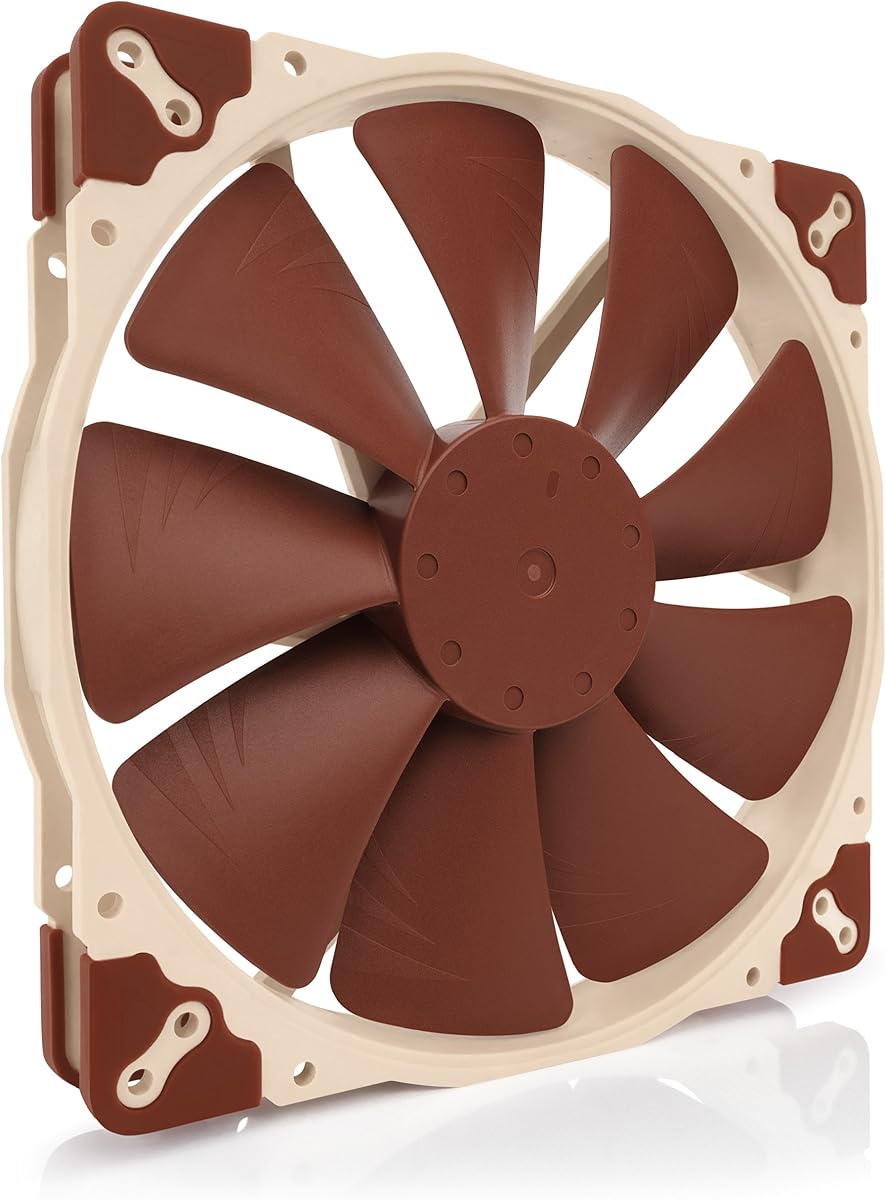
This fan is a premium quiet model designed for high performance. It holds an excellent rating and stands out for its low noise levels. The build quality ensures long term reliability for your system.
We may earn a commission when you buy through this link, at no additional cost to you.
The award winning A-series design features flow acceleration channels. This optimizes airflow while the acoustic frame reduces sound. You get high cooling power without disturbing your environment.
Trade-offs include the higher cost and specific size requirements. The 30mm thickness needs case space. However, the silence and efficiency justify the investment for quiet builds.
Buy this if you want top tier silent cooling. It is ideal for enthusiasts who value performance and longevity. It remains a reliable choice for serious system setups.
The fan delivers high airflow at extremely low noise levels for a peaceful workspace.
Three sets of mounting holes ensure compatibility with various PC cases and layouts.
We may earn a commission when you buy through this link, at no additional cost to you.
This model offers a perfect balance of silence and efficiency. It is rated highly for its high airflow design and quiet operation. The thick frame aids in air pressure for better cooling.
We may earn a commission when you buy through this link, at no additional cost to you.
The fan blade focuses airflow to reduce noise. Long life sleeve bearing extends the lifespan. Shaved frame allows for more installation flexibility especially with Thermaltake chassis.
Standard sleeve bearings may not last as long as premium options. The design is practical rather than flashy. However it remains a solid budget choice for cooling needs.
Choose this for an affordable and efficient solution. It fits well in builds needing reliable airflow without breaking the bank. Great for budget conscious system builders.
Fan blades are designed to focus airflow creating a torrent of air without excess noise.
Shaved frame and anti vibration mounting system make setup straightforward for users.
We may earn a commission when you buy through this link, at no additional cost to you.
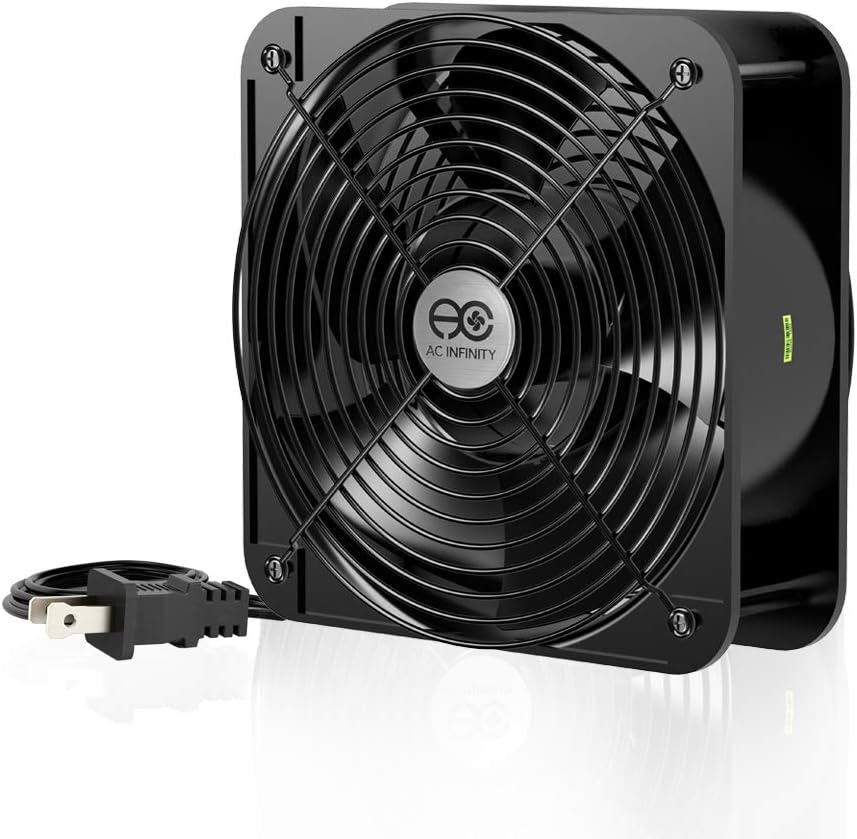
This is a heavy duty muffin fan designed for projects requiring extreme cooling. It has a solid aluminum build and dual ball bearings. The airflow capacity is massive compared to standard case fans.
We may earn a commission when you buy through this link, at no additional cost to you.
The high speed maximizes airflow for demanding applications. It includes guards and mounting sets for safety. The dual ball bearings allow a lifespan of 67000 hours.
Noise levels are high which may not suit all PCs. It requires 120V AC power which limits placement. These trade-offs are acceptable for server or specialized cooling projects.
Select this for industrial or high heat projects. It is a robust solution for ventilation beyond standard PC cases. Ideal when extreme airflow is the priority.
Designed to maximize airflow with 425 CFM for cooling or ventilation projects.
Dual ball bearings and heavy duty aluminum ensure long term reliable operation.
We may earn a commission when you buy through this link, at no additional cost to you.
This is a premium quiet fan with an all black design. It features Flow Acceleration Channels for superior quiet cooling. The chromax black swap edition allows for color customization.
We may earn a commission when you buy through this link, at no additional cost to you.
Large diameter ensures high airflow at low noise levels. PWM version offers automatic speed control via motherboard headers. The MTTF rating indicates excellent durability for daily use.
The custom pads add flexibility but cost more than standard. It requires space for the large diameter and thickness. These are minor issues for a high quality fan.
Perfect for users wanting style and silence. The customizable aspect fits well with modern black builds. A top choice for aesthetic focused system builders.
Swappable anti vibration pads in multiple colors allow for unique system styling.
Advanced acoustic frame design reduces noise while maintaining high airflow efficiency.
We may earn a commission when you buy through this link, at no additional cost to you.
This fan is a premium quiet model with dual speeds. It operates at 800 or 550 RPM for maximum airflow or silence. The design focuses on low noise performance.
We may earn a commission when you buy through this link, at no additional cost to you.
Flow acceleration channels and acoustic frame optimize cooling. Mounting holes ensure compatibility with various cases. The adaptor allows powering from the power supply directly.
Max speed is limited compared to PWM versions. Power connection relies on 3-pin Molex. These trade-offs are acceptable for users prioritizing quiet and simplicity.
Buy this for near silent operation. Ideal for media centers or office PCs. The reliability is a key advantage for long term use.
Low-Noise Adaptor provides two speed settings for tuning noise and airflow needs.
Includes adaptor for powering the fan directly from the power supply easily.
We may earn a commission when you buy through this link, at no additional cost to you.
This fan uses a 5V 4-pin PWM connector for control. It works with USB host ports or power banks. The design ensures quiet performance with high efficiency.
We may earn a commission when you buy through this link, at no additional cost to you.
Flow Acceleration Channels improve airflow. The OmniJoin adaptor set connects to proprietary headers. Pairs protection ensures safety for USB applications.
Max speed is capped at 800 RPM. It needs a 5V power source which may limit setups. These constraints are acceptable for portable or specific use cases.
Great for USB powered or portable systems. Allows easy integration with modern interfaces. A unique choice for flexible cooling projects.
USB power adaptor allows fan to run on power banks or portable devices easily.
OmniJoin adaptor set enables connection to proprietary fan headers for ease.
We may earn a commission when you buy through this link, at no additional cost to you.
This fan is designed to perform and compliment the CT fan lineup. It offers optimal airflow with 131.6 CFM. Hydraulic bearings provide silent and reliable operation.
We may earn a commission when you buy through this link, at no additional cost to you.
Optimized 9 blades push airflow and static pressure. Daisy chain connectors allow quick installation. Speed control ranges from 500 to 900 RPM.
Sound levels may vary under load. The design is specific to Thermaltake cases. These are acceptable trade-offs for matching system aesthetics and cooling.
Best for Thermaltake owners needing extra fans. Provides matching look and solid performance. Good choice for consistent build design.
Optimized with 9 blades to push up to 131.6 CFM of airflow efficiently.
Daisy chainable 4-Pin PWM connectors simplify cable management and installation.
We may earn a commission when you buy through this link, at no additional cost to you.
This fan is engineered for cases supporting 200mm. It delivers high airflow and efficient cooling quietly. The aRGB Gen2 lighting creates a vibrant effect.
We may earn a commission when you buy through this link, at no additional cost to you.
Redesigned hybrid frame optimizes airflow and stability. Frosted blade design enhances lighting dispersion. Two-tier sealing mechanism prevents dust and oil leakage.
Requires RGB controller for full features. Max speed is lower for noise balance. These trade-offs suit users prioritizing aesthetics and quiet cooling.
Ideal for RGB focused builds. Provides dynamic lighting with solid cooling. Great for visually appealing system designs.
Frosted blade design enhances the dispersion of aRGB lighting for vibrant effects.
Hybrid PBT frame design minimizes noise and ensures stability over time.
We may earn a commission when you buy through this link, at no additional cost to you.
This is a premium quality RGB fan certified for various boards. It features a hybrid design for static pressure and airflow. Noise reduction technology keeps operation quiet.
We may earn a commission when you buy through this link, at no additional cost to you.
Jet Engine and helicopter blade design balance airflow and pressure. Smart fan sensor stops motor if jammed. This protects the fan and system from damage.
Requires an RGB controller for lighting. Design is optimized for in-take specific. These are manageable constraints for RGB users.
Choose for RGB compatibility and safety. Provides reliable airflow with smart protection. Good for builds needing RGB sync.
Certified compatible with Asus Aura, Gigabyte Fusion, and other major RGB systems.
Smart fan sensor protects the fan by automatically stopping if jammed.
We may earn a commission when you buy through this link, at no additional cost to you.
This fan utilizes hydraulic bearing for long life and silent operation. It features 34 RGB lamp beads for vibrant lighting. Large air volume ensures efficient cooling.
We may earn a commission when you buy through this link, at no additional cost to you.
5V ARGB sync with major brands allows control. Standard 4PIN PWM interface manages speed. The included cables simplify installation.
Brand may be less known than others. Mounting is standard but simple. These trade-offs suit budget RGB builders.
Good for affordable RGB lighting. Balances silence and cooling well. Recommended for entry level RGB setups.
Motherboard sync allows direct control and customization from software easily.
Large oil storage space reduces friction and ensures stable long term performance.
We may earn a commission when you buy through this link, at no additional cost to you.
Selecting the right fan requires balancing airflow, noise, and compatibility.
Airflow determines how much air moves through the case while static pressure pushes air through restrictions like filters. Look for high CFM values if you need rapid cooling or static pressure for radiators.
Choose high airflow for open cases and static pressure for restricted vents.
Noise is measured in decibels and lower values indicate quieter operation. High speed fans are louder so consider your environment when selecting RPM. Many users prefer under 25 dB for bedrooms.
Prioritize lower dB ratings for silent builds.
Bearing types affect lifespan and noise. Sleeve bearings are budget friendly but wear faster. Ball bearings last longer and handle heat better. Hydraulic is a solid middle ground.
Invest in hydraulic or ball for longevity.
PWM offers precise speed control via motherboard headers. Voltage control is simpler but less accurate. Choose PWM if your motherboard supports headers for dynamic adjustments.
PWM is best for precise speed management.
Standard fans are 200mm but thickness varies. 25mm is slim while 30mm or 60mm is thick. Ensure your case has enough clearance for the chosen size.
Check case specs for thickness limits.
If lighting is key ensure RGB sync with your software. Some need controllers while others connect to 3V headers. Verify compatibility before buying.
Match ARGB type to your motherboard.
Higher price often means better build and quieter performance. Budget fans work well for non critical spots. Balance your needs with the available funds.
Allocate more to primary intake fans.
Look for included screws and anti vibration mounts. These reduce noise transmission to the case. Some offer multiple hole patterns for flexibility.
Ensure mounting accessories are included.
Install fans to create positive pressure by mounting more intake than exhaust fans. This reduces dust accumulation and improves overall cooling efficiency inside the chassis.
Use the included anti vibration mounts to minimize noise transmission. Tighten screws evenly to prevent the frame from warping or vibrating during operation.
Dust your fans regularly with compressed air to maintain performance. Clean the bearings if they become noisy and replace the unit if the speed drops unexpectedly.
The 200mm fan provides significantly more airflow at lower RPM compared to smaller fans. This results in quieter operation and efficient cooling for large cases or servers.
Most modern cases support 200mm but some only accept standard 120mm or 140mm. Always check your case manual for fan mount dimensions before purchasing.
Standard DC fans use 12V from the motherboard. The AC fan uses 120V AC which is separate. Verify the voltage type in the specs to avoid connection issues.
Yes you can use a PWM fan on a 3-pin header but you lose speed control. The fan will run at full speed unless the motherboard supports voltage control.
Use compressed air to blow dust out of the blades while holding them still. Do not spin the blades too fast with air as it can damage the bearing.
For most cases yes they are better due to higher volume and lower noise. However they are not available in all cases so check compatibility first.
Hydraulic bearings use a fluid seal to reduce friction and extend life. They are quieter and more durable than sleeve bearings for long term use.
We identified the Noctua NF-A20 PWM as the top pick for overall performance and silence. The Thermaltake Pure 20 offers the best budget value for basic cooling needs.
Prioritize noise levels and airflow based on your usage. Silent builders should look for high quality bearings while budget builds can choose efficient budget options.
Remember to check the current prices before buying to get the best deal. These prices fluctuate often so timing your purchase may save you money.