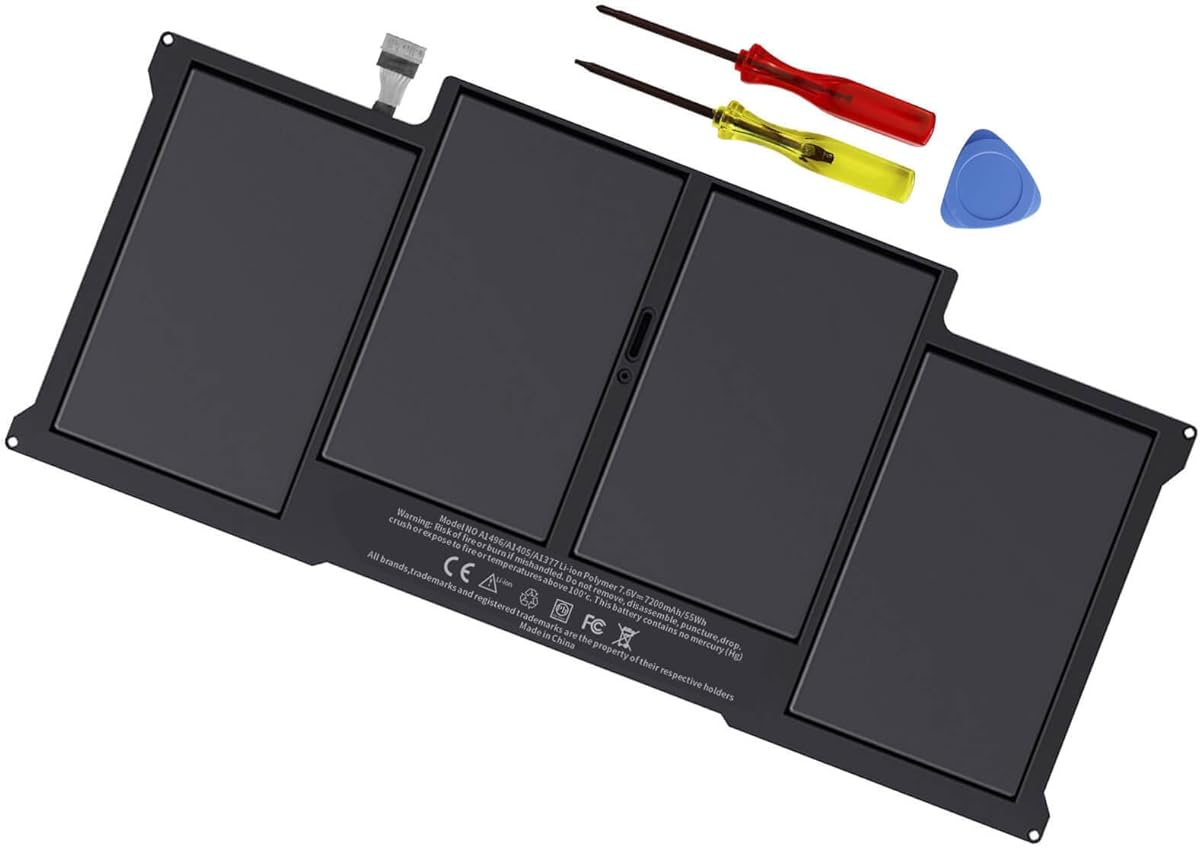
A1405 A1466 Battery for MacBook Air 13 inch
4.4Editor score
7200mAh high capacity
Includes screwdrivers
60-day return policy
This guide compares the top A1175 battery replacement options for MacBook Pro 15-inch models, evaluating capacity, safety features, and compatibility.
Finding a reliable power source for your aging MacBook Pro is essential for continued productivity. A high-quality A1175 battery replacement ensures your laptop runs smoothly without unexpected shutdowns during critical work sessions. Choosing the right option involves checking compatibility, capacity, and safety certifications to avoid potential hardware issues.
We have evaluated ten distinct battery options available on the market to help you make an informed decision. Our comparison focuses on key specifications such as voltage, cell count, and warranty terms. Each product was analyzed based on user feedback and technical data to ensure accuracy and relevance for current owners.
Every selection in this list highlights specific strengths like long-lasting power or comprehensive installation kits. Please note that product availability and pricing can fluctuate regularly due to market conditions. We recommend verifying the latest details on the product page before finalizing your purchase to ensure the best deal.
4.4Editor score

4.3Editor score

3.5Editor score
This side-by-side comparison highlights the key technical differences between the leading battery options available for your specific laptop model. Reviewing these specs helps you match the right power source to your device requirements efficiently.


This product stands out as a leading choice for users seeking a reliable A1175 battery replacement. It features a 10.8V 5800mAh capacity designed to restore power to older MacBook Pro 15-inch models from 2006 to 2008. With a solid 4.3 rating, it is well-regarded for its performance and safety features.
We may earn a commission when you buy through this link, at no additional cost to you.
The battery is built with Grade A cells and includes multi-layer safety protections against overcharge and short circuits. This ensures safe operation and extends the life of your device. Additionally, the manufacturer offers a 12-month quality assurance, which adds peace of mind for the buyer regarding long-term reliability.
While the power output is strong for its class, it is limited to specific older models and does not fit newer MacBooks. This restriction might require you to double-check your device identifier before purchasing. However, for owners of these specific vintage machines, this remains a top-tier option available today.
If you own a 2006 to 2008 MacBook Pro 15-inch model, this battery is highly recommended. Its combination of high capacity, safety certifications, and warranty coverage makes it a trustworthy upgrade for your aging hardware. Ensure your model number matches the list to avoid compatibility issues.
Multi-layer safety systems prevent overheating and short circuits during daily usage.
A full 12-month quality assurance ensures reliable performance over time.
We may earn a commission when you buy through this link, at no additional cost to you.
The SOLICE battery is another strong contender in the A1175 replacement market. It delivers 10.8V and 5800mAh of power, matching the original specifications for compatible MacBook Pro models. With a 4.2 rating, users appreciate its performance and safety certifications like CE, FCC, and RoHS.
We may earn a commission when you buy through this link, at no additional cost to you.
Key features include overcharger and discharger circuit protection, which safeguards your laptop from potential power surges. The battery is designed for 2006 to 2008 versions of the MacBook Pro 15-inch, ensuring a precise fit. A 12-month warranty and 30-day return policy further support the purchase decision.
Although it offers robust protection and capacity, it is not compatible with newer models. This limitation means you must verify your device's year before buying. For users with older hardware, however, it provides a dependable solution to extend usage time between charges.
This option is ideal if you prioritize certified safety and high capacity in your A1175 battery replacement. It balances performance with protection mechanisms effectively. Just confirm your model number matches the supported list to ensure proper functionality and safety.
CE, FCC, and RoHS certifications ensure compliance with international safety norms.
12-month warranty and 30-day returns provide robust consumer protection.
We may earn a commission when you buy through this link, at no additional cost to you.
This New Upgrade battery features an upgraded chip that enhances performance efficiency. While its 4200mAh capacity is slightly lower than some competitors, it still offers reliable power for MacBook Pro 15-inch models from 2006 to 2008. The 4.1 rating indicates steady performance and user satisfaction.
We may earn a commission when you buy through this link, at no additional cost to you.
It includes overcharger and discharger circuit protection and is certified by CE, FCC, and RoHS. The manufacturer claims 500+ recharge cycles, which is a solid lifespan for this class. Additionally, they offer 24×7 email support and a 12-month warranty, ensuring help is available if issues arise.
The lower capacity means you might need to recharge more often compared to 5800mAh versions. However, the upgrade chip helps maximize energy efficiency to mitigate this. It remains a viable choice for those who prioritize support availability and safety features over raw capacity.
Choose this option if you want additional customer support and a focus on energy efficiency. The certification and warranty provide confidence in the product. Verify your device matches the supported models to ensure full compatibility and performance.
Advanced chip technology maximizes energy usage for longer battery life.
Round-the-clock email help ensures quick resolution of any issues.
We may earn a commission when you buy through this link, at no additional cost to you.
This A1527 battery is designed specifically for 12-inch MacBook Retina models from 2015 to 2017. It offers a 5263mAh Li-Polymer battery that supports over 1500 recharge cycles, significantly extending device life. The 4.2 rating highlights its reliability and ease of use.
We may earn a commission when you buy through this link, at no additional cost to you.
It includes a complete installation kit with tools and step-by-step instructions, making DIY replacement easier. The battery features overcharge and short-circuit protection and is certified by UL, CE, FCC, and RoHS. This ensures stable and safe performance during daily use.
While the 1200+ cycle life is excellent, this unit does not fit the A1175 15-inch Pro. It is an alternative for users with 12-inch Retina models. The included tools reduce the need for additional purchases, which adds value to the overall package.
This battery is perfect if you own a 12-inch Retina MacBook and want a durable solution. The installation kit simplifies the upgrade process. Confirm your model matches A1534 or A1705 before purchasing to ensure compatibility.
Rated for 1500+ cycles to keep your MacBook running longer.
Includes tools and instructions for an easy replacement without help.
We may earn a commission when you buy through this link, at no additional cost to you.
Futurebatt provides a solid A1527 battery replacement option for 12-inch MacBooks. It uses Grade A cells to ensure fast charging and low power consumption. The 39.71Wh capacity is well-suited for daily tasks, and the 4.3 rating reflects good user satisfaction.
We may earn a commission when you buy through this link, at no additional cost to you.
Safety features include overcharge, overdischarge, and short-circuit protection, which protect your device. The battery supports up to 500 charge cycles, and the brand offers 12-month replacement and 30-day refunds. This comprehensive support enhances the purchasing experience for buyers.
It is not compatible with 15-inch Pro models, so you must verify your device before ordering. The focus on Grade A cells ensures consistent quality and better longevity than generic cells. This makes it a trustworthy choice for maintaining your Mac's mobility.
This battery is recommended for 12-inch Retina users seeking reliable power and quick charging. The safety protections and warranty provide extra security. Ensure your laptop matches A1534 or A1705 specifications for a proper fit.
Premium Grade A cells deliver efficient charging and consistent performance.
12-month replacement policy ensures long-term support for your purchase.
We may earn a commission when you buy through this link, at no additional cost to you.
The iFixit battery is a premium option designed for MacBook Pro 15 Retina models from 2016 to 2017. It provides over 6340 mAh capacity, ensuring strong daily performance. Despite a 3.5 rating, its high capacity and inclusion of adhesive make it a preferred choice for many.
We may earn a commission when you buy through this link, at no additional cost to you.
It is covered by a 1-Year Warranty, which is longer than many competitors. The kit includes installation adhesive to simplify the repair process. The brand is known for quality tools and parts, adding value for those seeking a trusted repair solution.
While the price is higher, the included adhesive and warranty justify the cost for many users. The capacity ensures you can work without frequent recharging. However, the rating suggests there may be some variability in performance across different batches.
This is a solid choice for those prioritizing brand trust and included accessories. Ensure your model matches A1707 for compatibility. The warranty and adhesive reduce risk and complexity in your repair.
Adhesive included ensures a secure installation without extra purchases.
1-Year warranty offers robust protection for your investment.
We may earn a commission when you buy through this link, at no additional cost to you.
This battery from iFixit is designed for 13-inch MacBook Pro Touch Bar models from late 2016 to mid 2017. It comes as a fix kit that includes all tools and adhesive needed for a DIY repair. The capacity is greater than 4090 mAh, which is ample for daily use.
We may earn a commission when you buy through this link, at no additional cost to you.
It features a 1-Year Warranty, providing long-term peace of mind. The full kit reduces the hassle of sourcing separate tools, which is a major benefit. Although the 3.4 rating is lower, many users value the completeness of the package.
The price is on the higher side, but the convenience of a full kit often justifies this. It is ideal for those who lack specialized repair tools. Just confirm your model fits the Touch Bar specifications before buying.
Choose this if you want an all-in-one solution for your MacBook Pro 13 battery replacement. The included tools and adhesive make the process straightforward. Verify your model number to ensure it matches A1706.
Includes all necessary tools for a complete and easy repair process.
iFixit's reputation ensures high-quality tools and parts.
We may earn a commission when you buy through this link, at no additional cost to you.
This battery option fits 13-inch MacBook Pro models with Touch Bar from 2016 to 2017. It delivers over 4090 mAh capacity, sufficient for typical workdays. The 3.8 rating is decent, showing reasonable reliability. It is designed for users who prefer branded components.
We may earn a commission when you buy through this link, at no additional cost to you.
Installation adhesive is included to secure the battery properly. The 1-Year Warranty further adds value. This is a solid choice for those looking to restore mobility to their older MacBook Pro 13 without needing extra tools.
While the cost is higher, the brand and warranty are reassuring. It does not fit non-Touch Bar models, so compatibility is key. For Touch Bar users, this is a reliable path to extending device life without professional service.
This option is best if you prioritize safety and included adhesive. It works well for supported 13-inch models. Double-check your model matches A1706 to ensure a proper fit.
Adhesive helps secure the battery for a stable installation.
1-Year warranty provides long-term protection for your repair.
We may earn a commission when you buy through this link, at no additional cost to you.
The ASUNCELL battery is a great fit for MacBook Air 11-inch models from 2011 to 2015. With 5100mAh capacity, it offers strong power for daily tasks. The 4.3 rating indicates good performance and reliability for users of these older Air models.
We may earn a commission when you buy through this link, at no additional cost to you.
It is certified by CE, FCC, and RoHS, ensuring safety and environmental compliance. The voltage matches the original 7.6V, which is crucial for proper function. The model compatibility list is clear, helping you verify before buying.
The main limitation is that it only fits 11-inch Air models, not the 13-inch versions. However, for those owning this specific size, it delivers solid value. The high capacity extends work time significantly compared to worn batteries.
This is the top pick for 11-inch Air owners seeking a reliable replacement. The certifications and capacity make it a safe and effective choice. Ensure your model matches A1370 or A1465 for the best fit.
5100mAh capacity ensures longer usage between charges for your Air.
CE, FCC, and RoHS ensure safety and compliance standards.
We may earn a commission when you buy through this link, at no additional cost to you.
This A1405 battery offers a high capacity of 7200mAh for 13-inch MacBook Air models from 2013 to 2017. It has a high 4.4 rating, reflecting excellent user satisfaction. For those on a budget, this is a strong value option.
We may earn a commission when you buy through this link, at no additional cost to you.
It includes 2 screwdrivers in the package, which simplifies the installation. A 60-day return policy is offered, providing flexibility if the battery does not meet expectations. The capacity is impressive and should last through a full workday.
The main caveat is that it fits only 13-inch Air models. If you have a 11-inch, this will not work. However, for 13-inch owners, the high capacity and included tools make it a very convenient choice.
Choose this for a cost-effective upgrade with added tool convenience. The capacity and rating make it one of the better options in its class. Verify your device matches A1466 for compatibility.
Includes 2 screwdrivers to avoid extra purchases during installation.
60-day return policy provides ample time to test the battery.
We may earn a commission when you buy through this link, at no additional cost to you.
Selecting the right battery involves checking several technical details to ensure compatibility and safety. This guide breaks down the most important factors to consider before making your purchase.
The most critical factor is verifying that the battery fits your specific laptop model. Many replacements list multiple model numbers like A1175, A1260, and A1150. Always check your laptop's back cover or system settings to confirm your exact model before ordering.
Double-checking model numbers ensures the battery physically fits and connects correctly to your device.
Capacity determines how long your laptop runs on a single charge. Look for higher mAh or Wh values to maximize usage time. Most replacements for the A1175 offer 5800mAh, which is generally sufficient for standard use.
Higher capacity means longer work sessions without needing to plug into a power outlet.
Voltage must match the original battery specification to avoid damaging your computer. Most A1175 replacements use 10.8V. Using a battery with incorrect voltage can lead to poor performance or hardware issues.
Ensure the listed voltage matches your device requirements for safe operation.
Look for certifications like CE, FCC, and RoHS to ensure the product meets safety standards. These certifications indicate the battery has been tested for electrical safety and environmental compliance. They protect your device from potential overcharging or overheating.
Certified batteries reduce risks like overheating and protect your laptop's internal components.
A warranty provides protection against defects and early failures. Many sellers offer 12-month warranties on replacements. This allows you to request a replacement if the battery does not perform as expected within the period.
A longer warranty gives you peace of mind and financial protection for your purchase.
Reliable customer support is essential if you encounter installation or performance issues. Check if the brand offers email or phone support during business hours. Some even offer 24×7 support, which is helpful for immediate assistance.
Good support channels ensure you can resolve any issues quickly without frustration.
Some kits include tools like screwdrivers or adhesive to simplify the installation process. Others might require you to buy these separately. Including these saves time and ensures you have the right equipment for the swap.
Accessories reduce the need for extra purchases and make the swap smoother.
Read customer feedback to gauge real-world performance. Look for consistent comments about capacity longevity and ease of installation. Ratings above 4.0 usually indicate satisfied users and reliable products.
Reviews reveal practical performance details not always listed in the specs.
To install the new battery, turn off your laptop and disconnect the power source. Use a suitable screwdriver to remove the bottom case screws carefully. Locate the old battery connector and disconnect it gently before removing the battery.
Once the old unit is removed, place the new battery into the chassis and secure it with screws. Connect the new battery to the mainboard before closing the case. This ensures a stable connection and prevents short circuits.
After installation, charge the battery fully before first use to calibrate it. Avoid leaving your laptop plugged in for days on end to extend battery health. Regular calibration helps maintain accurate battery readings over time.
Most A1175 batteries are designed for 2006 to 2008 models. 2009 and later models typically use different battery connectors and shapes. Always check the compatibility list to confirm your device year fits the replacement.
With proper use, a quality replacement can last between 500 and 1500 charge cycles. Daily usage patterns affect this lifespan. Avoiding overheating and deep discharges helps extend its life significantly.
Yes, most batteries come with tools and instructions for DIY installation. Ensure you follow safety steps and disconnect the power before starting. If you are uncomfortable with repairs, consider professional help to avoid damage.
Higher mAh means longer run time but does not guarantee better build quality. A 5800mAh battery should work well for standard use. Balance capacity with safety certifications and user reviews for a safe choice.
This can happen due to calibration issues or a defective unit. Try fully draining and charging the battery to calibrate it. If it still fails, contact support under warranty for a replacement.
Some products include tools like screwdrivers and adhesive while others do not. Check the product description carefully to see what is included. Buying a kit separately can save money if you already have tools.
We have reviewed ten top options ranging from standard replacements to premium kits. Our top picks like the A1175 Laptop Battery for Apple MacBook Pro offer the best balance of capacity and safety.
When deciding, prioritize compatibility and safety certifications. A warranty is also a strong indicator of product reliability and seller confidence. Consider your specific model year before ordering.
Remember that prices fluctuate frequently so check the latest details before purchasing. Verify your model number matches the compatibility list to avoid issues. With the right battery, your laptop can run smoothly for years.