
Amazon Basics AC-Powered Computer Speakers
4.3Editor score
Plugs into wall outlet
Simple front volume control
Built-in headphone jack
Finding the right audio solution for your workstation is essential for productivity and entertainment. AC powered computer speakers deliver consistent performance without draining your device battery. They offer robust power for clearer sound across music, calls, and media.
We evaluated ten top models based on audio fidelity, build quality, and connectivity options. Our analysis focuses on real-world performance metrics and user feedback to ensure reliability. Each product was selected for its ability to enhance your desktop experience effectively.
Every pick highlights specific strengths like bass response or connectivity flexibility. You will find options ranging from budget-friendly to premium audiophile-grade systems. Please note that pricing and availability may vary over time so check current listings.
4.3Editor score

4.6Editor score

4.6Editor score
As an Amazon Associate we earn from qualifying purchases.
This side-by-side comparison highlights key specifications and features across all ten selected models. We focus on power output, connectivity types, and design elements to help you make an informed decision for your specific needs.




The Amazon Basics AC-Powered Computer Speakers offer a straightforward solution for desktop audio needs. With a solid rating of 4.3 stars users appreciate the simplicity and reliability of this system. It delivers clear sound without requiring complex configuration or external power bricks.
We may earn a commission when you buy through this link, at no additional cost to you.
These speakers plug directly into a wall outlet ensuring consistent power delivery. The frequency range spans 68 Hz to 20 KHz providing adequate coverage for most media types. Volume control is handled via a single knob on the front making adjustments intuitive during use.
While the build is functional rather than premium the value proposition is strong. Some users note limited bass depth compared to higher-end models but it suffices for general tasks. The included headphone jack allows for private listening without unplugging the main unit.
This model is ideal for students or office workers needing reliable audio on a budget. If you prioritize basic functionality over audiophile quality this speaker set delivers exactly what it promises. Check current listings for availability and pricing updates before purchasing.
The direct AC connection eliminates reliance on USB power which can sometimes be inconsistent across different laptops.
Having volume and power in one place on the front simplifies daily interaction with the system.
We may earn a commission when you buy through this link, at no additional cost to you.
The Bose Companion 2 Series III continues to be a staple in desktop audio thanks to its consistent performance. Users rate it highly at 4.6 stars for clear sound at any volume level. It bridges the gap between budget options and high-end systems effectively.
We may earn a commission when you buy through this link, at no additional cost to you.
You can use the auxiliary input to connect devices like phones or tablets alongside your PC. This flexibility ensures you do not need to switch cables constantly when changing sources. The volume control and headphone jack are conveniently located on the front of the right speaker.
Although it lacks a dedicated subwoofer the balance of frequencies is well managed. The design is sleek enough to fit most modern desk setups without taking up excessive space. Bose reputation for reliability is evident in the long-term satisfaction reported by many owners.
This system suits professionals who need clear audio for calls and media without complexity. If you value brand reputation and consistent output this pair is a strong candidate. Review current availability and specific regional variants before finalizing your purchase decision.
The auxiliary input allows seamless switching between computer audio and mobile devices.
Mid-range frequencies are tuned well for voice calls and video conferencing clarity.
We may earn a commission when you buy through this link, at no additional cost to you.
The Bose Companion 2 Series II delivers a clearer and more realistic music or movie experience. Rated 4.1 stars it maintains the core strengths of the Bose line with an elegant appearance. It is designed to enhance your listening sessions with balanced audio output.
We may earn a commission when you buy through this link, at no additional cost to you.
Dual inputs make it easy to connect both your computer and an additional audio source. This setup allows for quick switching between devices without physical rewiring efforts. The contemporary design complements various workstation aesthetics without clashing with modern hardware.
Some users note it is an older model with fewer modern connectivity options compared to newer releases. However the core audio performance remains solid for general multimedia consumption. It is a dependable choice for those who prefer a no-fuss approach to desktop audio.
Consider this model if you appreciate classic design and reliable sound over cutting-edge features. It serves well for home offices or study spaces where aesthetics and function are both priorities. Verify product condition if buying through third-party sellers due to age.
Sound tuning focuses on realism which works well for spoken word and classical music.
Having two inputs simplifies workflow for users who manage multiple audio sources.
We may earn a commission when you buy through this link, at no additional cost to you.
The Bose Companion 20 offers a premium two-piece system that delivers full natural sound. With a 4.6 rating it stands out for its TrueSpace technology which creates a wide soundstage. It is engineered specifically for listening at your computer ensuring optimal audio positioning.
We may earn a commission when you buy through this link, at no additional cost to you.
A convenient control pod allows you to adjust volume mute or connect headphones easily. The sleek design complements your computer setup while eliminating the need for a dedicated bass module. Active electronic equalization balances frequencies for a more natural tone and clarity.
Advanced port design and drivers provide powerful low-note performance despite the compact size. All sound comes from just two sleek speakers which simplifies cable management significantly. While the price is higher the audio fidelity justifies the investment for critical listeners.
This system is perfect for users who want high-quality audio without extra clutter. If you value natural sound reproduction and ease of use this model is an excellent choice. Compare current offers to find the best deal given the premium positioning.
TrueSpace digital processing creates a sense of space that exceeds typical stereo setups.
The control pod brings essential functions within easy reach without reaching behind the PC.
We may earn a commission when you buy through this link, at no additional cost to you.
The Edifier R1280T is a powerful contender for the best overall value with a 4.6 rating. It features natural sound reproduction driven by a 13mm silk dome tweeter and 4 inch unit. The classic wood finish makes them look great on any home or office desk.
We may earn a commission when you buy through this link, at no additional cost to you.
With two AUX inputs you can connect two devices simultaneously without plugging and switching. A remote control allows volume adjustments from your chair while bass and treble controls sit on the side. This level of control is rare at this price point.
These speakers require no setup beyond plugging in and connecting your source. The wood vinyl finish is a compliment to various decor styles without feeling cheap. Some users might miss Bluetooth but the wired reliability ensures no connection dropouts or latency.
Recommend this system for music lovers and casual users alike who want studio-like quality. The combination of features and build quality makes it a top pick for most buyers. Check your desk depth to ensure the speakers fit comfortably alongside your monitor.
Two inputs mean you can keep a laptop and phone connected for instant switching.
Side panel knobs let you tweak bass and treble to match room acoustics.
We may earn a commission when you buy through this link, at no additional cost to you.
The Edifier R980T delivers 24 watts of RMS power in a compact active bookshelf system. With a 4.6 rating users appreciate the rich immersive sound it creates for music and movies. The 100% wooden enclosures minimize acoustic resonance for cleaner audio output.
We may earn a commission when you buy through this link, at no additional cost to you.
It includes RCA and 3.5mm cables along with speaker wire for flexible connectivity. The flared bass reflex port in the front enhances low-frequency response effectively. You can connect two devices at once via the dual inputs without any switching hassle.
The universal power supply works across 110V to 240V which is great for travel or relocation. Since controls are on the speaker you do not need extra peripherals to manage volume. This simplicity keeps the setup clean and straightforward for daily use.
This model is suitable for those who want studio-quality sound in a smaller footprint. The wooden build feels premium and adds a touch of elegance to any setup. Ensure you have enough space for the speakers to breathe near the front ports.
Wooden enclosures significantly reduce unwanted vibrations compared to plastic alternatives.
The front port makes it easier to place speakers near walls without bass muddiness.
We may earn a commission when you buy through this link, at no additional cost to you.
The Cyber Acoustics CA-2014 delivers clear sound for music video and voice applications. Rated 4.2 stars it is a compact option that fits small desks or workstations easily. It uses a standard 3.5mm jack for compatible devices including desktops and Chromebooks.
We may earn a commission when you buy through this link, at no additional cost to you.
Front panel controls on the right speaker include power volume and a headphone jack. The LED power indicator confirms status at a glance which helps avoid confusion. An AC adapter powers the system ensuring it does not drain laptop batteries during use.
While the 4W output is modest it provides adequate volume for personal listening in quiet environments. The one year warranty offers peace of mind against early failures for budget buyers. Build materials are basic but functional for the price range offered.
This pair is ideal for tight budgets where space is limited on the desk. If you need basic sound for browsing or calls this model handles daily tasks well. Check if the included cables are long enough for your specific desk layout before buying.
Compact dimensions allow placement even on cramped desks without obstructing keyboards.
Optimized for voice clarity making it suitable for online meetings and tutorials.
We may earn a commission when you buy through this link, at no additional cost to you.
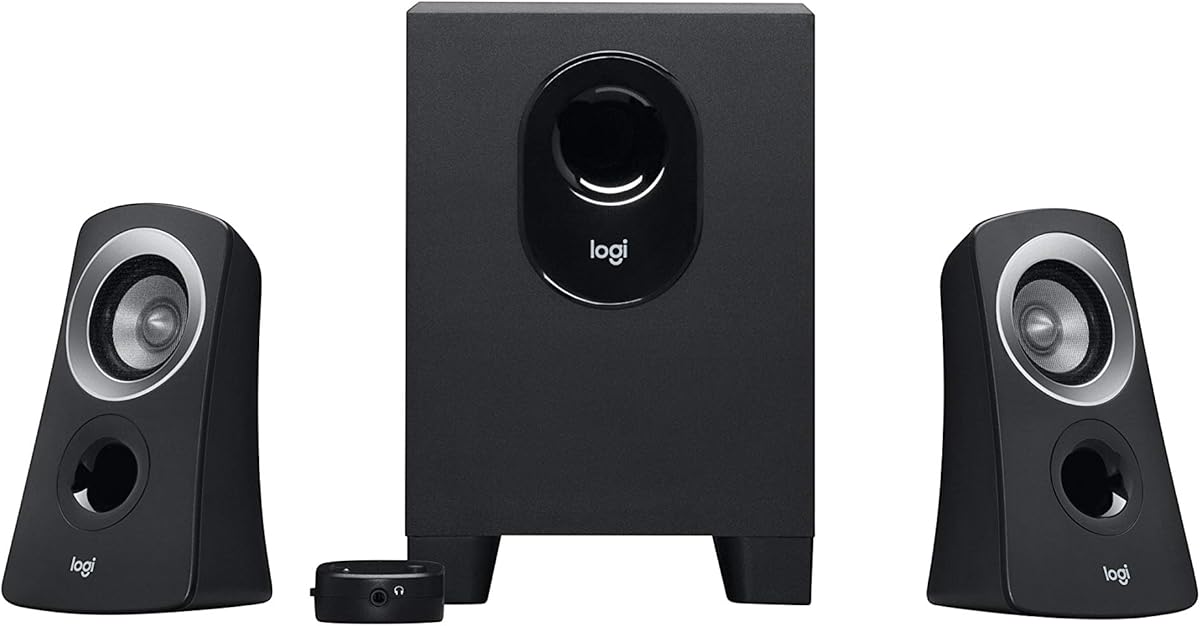
The Logitech Z313 offers a 2.1 system with 25 Watts RMS output for powerful audio. Rated 4.4 stars it includes a compact subwoofer that adds depth to your listening experience. This setup is great for movies and games where bass presence matters significantly.
We may earn a commission when you buy through this link, at no additional cost to you.
A convenient control pod sits on your desk for easy volume and power adjustments. The subwoofer is designed to be compact so it does not take up excessive floor space. You get a balanced sound profile that covers mids and highs as well as lows.
Cabling is straightforward with connections for your PC and power source. The black finish matches standard computer peripherals well without drawing too much attention. While the subwoofer adds wires it significantly enhances the overall impact of the system.
Choose this system if you want more bass than standard 2.0 speakers can provide. It is a solid upgrade for entertainment use where low frequencies add immersion. Verify your floor space availability to accommodate the subwoofer comfortably near your desk.
The dedicated subwoofer adds a low-end punch that 2.0 systems usually lack.
The control pod keeps volume adjustments accessible without reaching for the PC.
We may earn a commission when you buy through this link, at no additional cost to you.
The Nylavee Computer Speakers feature four speaker units and two passive radiators for balanced stereo. Rated 4.2 stars they support Bluetooth 5.0 and 3.5mm AUX for flexible device connections. These PC speakers deliver louder sound than typical USB options for desktop listening.
We may earn a commission when you buy through this link, at no additional cost to you.
One-button EQ modes let you switch between relaxed and engaging sound profiles easily. The RGB lighting offers four ambient modes that can be turned off when focus is needed. Physical buttons and a volume knob provide intuitive control without software installation.
Measuring just 3.2 by 4.0 by 7.5 inches they provide full sound without taking up space. The AC adapter ensures consistent power for clearer audio compared to battery-dependent units. This mix of features makes them appealing for modern gaming or entertainment setups.
Ideal for users who want connectivity and ambiance in a single compact package. The ability to turn off lights ensures they remain professional during work hours. Check Bluetooth range in your specific room to ensure stable wireless performance throughout.
Wireless and wired options mean you can switch sources without moving devices.
Ambient lighting enhances the desk look but can be disabled for a clean workspace.
We may earn a commission when you buy through this link, at no additional cost to you.
The LITTOAK Bluetooth PC Speakers boast 2 by 15W output for robust room-filling sound. Rated 4.2 stars they feature dedicated EQ presets for music movie and gaming scenarios. This ensures perfect sound tailored to your current activity without complex tuning.
We may earn a commission when you buy through this link, at no additional cost to you.
Vibrant RGB ambiance lighting transforms your desk with six customizable modes. Front panel controls allow long-press activation for quick gaming sessions or music starts. Plug and play setup with included cables means you can start using them immediately.
A USB port on the speaker adds convenience for charging devices or connecting accessories. The 3.5mm audio cable provides a reliable wired option when needed. This complete package includes everything required to elevate your small computer audio setup.
Best for gamers and streamers who want visual flair alongside powerful audio. Ensure you have a nearby power outlet since it relies on an AC adapter. Compare current listings for bundle deals that might include extra accessories or cables.
Preset EQ modes save time by optimizing audio for specific media types instantly.
RGB lighting adds a dynamic visual layer that complements gaming or movie nights.
We may earn a commission when you buy through this link, at no additional cost to you.
Selecting the right speakers requires evaluating power source, connectivity, and sound quality. This guide outlines key factors to consider for a tailored choice.
AC powered speakers plug directly into wall outlets providing consistent energy for higher volume and lower distortion. Look for RMS wattage to understand real power output rather than peak ratings. Higher wattage generally means better performance at high volumes.
Prioritize AC models for reliability and consistent sound quality across different devices.
Check for inputs like 3.5mm AUX RCA or Bluetooth to match your devices. Dual inputs allow you to connect two sources without constant cable swapping. Consider if you need a headphone jack for private listening sessions.
Ensure the speaker supports your primary device connection methods for ease of use.
Review the frequency range to see how deep bass and how clear highs are. A wider range like 68Hz to 20KHz ensures broader coverage of audible sounds. Consider if you need a subwoofer for deep bass in movies or music.
Select speakers with balanced frequency response for versatile usage across media types.
Materials like wood enclosures reduce resonance compared to plastic bodies for clearer audio. Check dimensions to ensure they fit your desk without blocking monitors or keyboards. A compact design is essential for limited workspace environments.
Choose a design that balances acoustic performance with your desk aesthetic.
Front panel knobs or remote controls make volume adjustments easy without reaching. Some models include control pods for centralized management of power and volume. Look for intuitive layouts that support daily interaction.
Prioritize accessible controls to streamline your daily interaction with the speakers.
Features like RGB lighting or EQ modes can enhance immersion but may distract. Check if the model supports USB ports or other extra functionality you value. Balance extras with core audio performance to avoid unnecessary cost.
Evaluate extras to ensure they add value without compromising sound quality.
Place speakers at least two feet away from walls to reduce acoustic reflections for clearer sound. Aim tweeters at ear level for optimal mid-range clarity during calls or music. Keep them symmetrically placed around your monitor for balanced stereo imaging.
Use the included power cable securely plugged into a grounded outlet for safety. Avoid placing speakers near monitors to prevent electromagnetic interference that could cause buzzing. Adjust volume gradually to test sound before high usage sessions.
Clean dust gently with a dry cloth to maintain driver performance and appearance. Do not use liquid cleaners on speaker grilles or control knobs. Periodically check cable connections to ensure they remain secure and undamaged.
Yes, AC powered speakers generally deliver higher wattage and consistent power which results in louder volume and less distortion. USB speakers are limited by port power and may struggle at high volumes.
Yes, most AC speakers use standard 3.5mm AUX or USB inputs compatible with both Mac and Windows. Always check your PC output ports match the speaker input types before purchasing.
Absolutely, many AC speakers are designed for gaming with low latency wired connections. Models with subwoofers or surround features enhance immersion for action titles significantly.
RMS stands for Root Mean Square and indicates continuous power output. It provides a realistic measure of speaker strength compared to peak power ratings.
Use speakers with dual inputs like two AUX jacks or RCA. This allows simultaneous connection to a PC and a phone without switching cables.
No, most AC speakers work plug and play with standard operating system drivers. Only specialized software features might require additional installation for full control.
Not necessarily, wired connections are more reliable for desktop use. Bluetooth adds convenience for mobile devices but may introduce latency in games.
Quality AC speakers often last five years or more with proper care. Clean dust regularly and avoid overdriving volume to extend driver lifespan.
We explored ten distinct AC powered computer speakers covering budget to premium tiers. The Edifier R1280T stands out for value while Bose Companion 20 leads in audio fidelity. Each model serves specific needs depending on your desk and usage.
Prioritize power output and connectivity that match your primary use cases for best results. If you need immersion look for subwoofers or dedicated gaming features like EQ modes. Reliability should not be overlooked as consistent power improves sound longevity.
Remember that prices fluctuate and availability may vary by region over time. Verify current listings and warranty terms before finalizing your purchase decision. Investing in the right pair enhances your daily computing experience significantly.