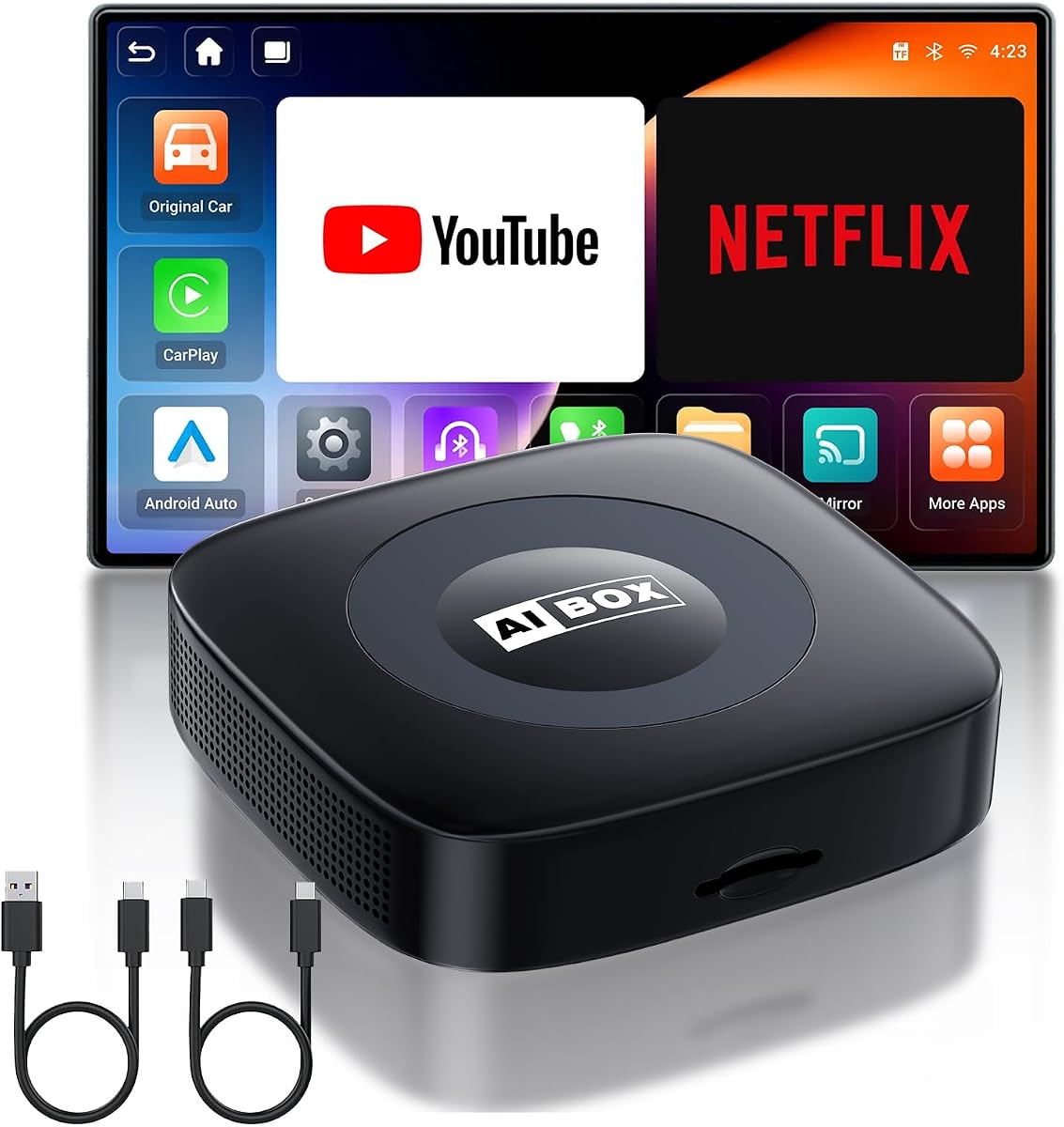
AI Box Carplay 2026 Upgraded
5.0Editor score
WiFi 6 and Bluetooth 5.3
Compact Portable Design
2GB RAM 16GB Storage
Discover the top Carplay Box with Google Play models for 2026. We compare features, performance, and compatibility to help you choose the right smart adapter
Transform your factory wired infotainment system into a fully customizable smart hub with a Carplay Box with Google Play. These devices unlock access to streaming apps, advanced navigation, and AI assistants directly on your car screen. They are perfect for drivers who want more flexibility and entertainment options while parked or waiting.
We evaluated ten top-rated models based on connection stability, app ecosystem support, processing power, and ease of use. Each product offers unique strengths, from built-in AI co-pilots to robust offline playback capabilities. Our comparison ensures you find a solution that matches your specific vehicle and lifestyle needs without compromise.
Every pick below highlights key specifications, pros, cons, and ideal use cases to streamline your decision process. Note that availability and details may shift as manufacturers release updates. Always verify your car compatibility before purchasing to ensure a seamless experience with your existing wired system.
5.0Editor score

4.7Editor score

5.0Editor score
This side-by-side comparison outlines the core capabilities of each model to help you weigh trade-offs between performance, connectivity, and features. Whether you prioritize raw power, specific AI tools, or simple plug-and-play reliability, the table below clarifies which unit stands out for your needs.


The AI Box Wireless CarPlay Adapter stands out as a top performer by turning your wired CarPlay system into a full Android smart hub. With a high rating and strong user feedback, it delivers seamless app access without needing complex installations. Its standout quality lies in giving you the Google Play Store directly on your car display.
We may earn a commission when you buy through this link, at no additional cost to you.
This device transforms entertainment possibilities by letting you download YouTube, TikTok, and more via your phone hotspot. The screen mirroring feature allows you to cast photos or videos effortlessly, ensuring passengers stay engaged during long stops. Setup is straightforward, requiring only a single Bluetooth pairing before auto-connecting every time you start your engine.
While highly capable, remember that video playback works only when parked to comply with safety laws. You must also connect to a mobile hotspot for most streaming apps, which uses your phone data. These limitations are acceptable trade-offs for the freedom to customize your in-car software beyond standard restrictions.
Ideal for tech-savvy drivers who want total control over their car screen apps and functions, this box is a smart choice. It bridges the gap between basic navigation and a full entertainment system without replacing your existing hardware. For reliable performance and flexibility, this model earns our top recommendation for 2026.
Access the full Google Play Store to download apps that are not typically available on standard CarPlay systems.
Cast content from your phone directly to the car display for sharing photos or media without extra cables.
We may earn a commission when you buy through this link, at no additional cost to you.
The AI Box CarPlay 3-in-1 focuses on delivering a rock-solid connection through dual-band WiFi and Bluetooth 5.3 technology. Users praise its ability to maintain stable streams for navigation and entertainment simultaneously without audio lag. This reliability makes it a strong contender for daily commuting and road trips alike.
We may earn a commission when you buy through this link, at no additional cost to you.
It comes pre-loaded with popular apps like Netflix and YouTube, letting you start watching immediately after connecting to your hotspot. The aluminum alloy body ensures better heat dissipation than plastic alternatives, extending the device lifespan in extreme temperatures. USB playback support adds versatility for offline media when signals are weak.
Despite its strengths, you cannot use this with BMW or Tesla vehicles, so check compatibility carefully before ordering. Also, it requires your car to have factory wired CarPlay or Android Auto, which limits options for newer wireless-only systems. These constraints are minor compared to the consistent performance it offers on supported models.
If you value connection stability and durable hardware, this unit delivers premium results without breaking the bank. It is an excellent choice for drivers who need dependable streaming and navigation support without constant reconnections. For most users with compatible OEM systems, this adapter provides a robust upgrade experience.
Dual-band WiFi ensures smooth video and audio playback without stuttering during long trips.
Premium metal casing dissipates heat effectively to maintain performance in hot or cold conditions.
We may earn a commission when you buy through this link, at no additional cost to you.
The AI Box Carplay 2026 Upgraded offers exceptional value by combining modern WiFi 6 tech with a compact form factor at a budget-friendly rate. Its perfect rating highlights how well it performs despite the lower cost, making it accessible for many drivers seeking wireless freedom. The quad-core processor ensures smooth operation for daily apps and navigation.
We may earn a commission when you buy through this link, at no additional cost to you.
Its small size reduces cable clutter and optimizes interior space, fitting neatly into your car console. You get seamless switching between CarPlay and Android Auto alongside offline playback support via TF card slot for added flexibility. The included 3-year warranty adds peace of mind, signaling confidence in its long-term reliability.
While it lacks the massive storage of high-end units, the 16GB ROM is sufficient for essential apps and media caching. You still need a hotspot for streaming content, which is standard across this category of devices. These factors make it an ideal entry point for those wanting advanced features without overspending on hardware.
Choose this model if you want a reliable, fast adapter that fits any budget and covers basic smart features well. It is perfect for commuters who need quick access to maps and music without investing in heavy AI tools. For practical everyday use, this box delivers top-tier performance for its price range.
Faster transmission and stronger signal strength ensure stable streaming even in crowded signal areas.
A 3-year warranty provides long-term protection and support against potential hardware failures.
We may earn a commission when you buy through this link, at no additional cost to you.
The Wireless Android Auto Carplay Adapter represents the peak of performance with an 8-core Qualcomm platform and full Android 13 system. This premium unit goes beyond simple wireless conversion by offering independent 4G LTE connectivity so you do not rely on your phone hotspot. It transforms your car screen into a truly connected smart hub.
We may earn a commission when you buy through this link, at no additional cost to you.
Its ScenePilot AI ecosystem adds unique features like DriveChat, trip logging, and privacy locks to protect personal data when sharing vehicles. Users appreciate the ability to record journey history and secure apps via Bluetooth Lock for better vehicle management. High-quality hardware ensures it handles multitasking effortlessly without lag.
The cost is higher than entry-level models, reflecting the extra processing power and advanced software tools included. You must also ensure your vehicle has factory wired CarPlay before buying to avoid compatibility issues with newer wireless systems. However, the performance gains justify the investment for drivers needing maximum capability.
For tech enthusiasts who want a standalone in-car system with AI help and private trip logs, this is the best option. It stands out for those who frequently share cars or need reliable internet without phone tethering. If you seek premium features and raw speed, this adapter delivers unmatched versatility.
Use a SIM card for internet access independently of your smartphone hotspot for uninterrupted service.
Track routes and lock personal accounts to keep your data safe in shared or public vehicles.
We may earn a commission when you buy through this link, at no additional cost to you.
The LAMTTO Wireless CarPlay Adapter introduces Google Gemini AI to help plan trips, control smart homes, and answer questions hands-free. With 4GB RAM, it handles switching between music, maps, and voice features smoothly. The included HDMI output lets you mirror content to rear screens, making it great for family entertainment.
We may earn a commission when you buy through this link, at no additional cost to you.
You can download any app from Google Play and store plenty of media thanks to 32GB internal storage. This flexibility turns your dashboard into a fully customizable hub tailored to your habits rather than default settings. The dual-band WiFi allows simultaneous use of navigation and streaming without interruptions.
Some users report needing to clear cached data periodically to maintain smooth performance, which adds a minor maintenance step. Its overall rating is lower than other models, suggesting potential firmware quirks that may affect reliability. Despite this, the AI features and expansion options remain attractive for advanced users.
If voice-assisted planning and large multitasking windows are priorities, this model offers unique value. It suits families who want back-seat entertainment via HDMI and drivers who rely on smart home integration while on the road. For those willing to tweak settings occasionally, the features are compelling.
Ask Gemini to plan routes or set reminders hands-free to stay focused on driving tasks.
Connect to external headrest screens so passengers watch movies while driver keeps navigation visible.
We may earn a commission when you buy through this link, at no additional cost to you.
The 2026 Upgraded Magic Box delivers a refined package combining wireless CarPlay, Android Auto, and video playback in a tiny shell. Its perfect rating reflects how well it balances size with capability, making it easy to hide when not in use. The design focuses on heat dissipation to keep performance stable during long sessions.
We may earn a commission when you buy through this link, at no additional cost to you.
It supports HDMI connections for outdoor projectors or larger screens, adding versatility for camping or tailgating scenarios. USB transfer ports let you play offline content directly from a drive, which is handy in areas with weak signal. Auto-connect ensures you start driving immediately without fiddling with setup every time.
The lack of a SIM slot means you depend on phone hotspots for internet, which may drain your mobile data faster. Storage is also modest compared to premium models, so manage your apps carefully to avoid filling it up. Still, for users who prioritize portability, this unit excels.
Select this if you want a discreet adapter that handles all basic smart functions without bulk or hassle. It fits drivers who need reliable streaming and navigation in a small package. For simplicity and clean interior look, this magic box is a smart and effective choice.
Connect to projectors or external screens for entertainment during camping or parking stops.
Refined housing keeps the device cool for consistent performance during extended driving times.
We may earn a commission when you buy through this link, at no additional cost to you.
The 5-in-1 Android Auto Adapter lets you switch freely between CarPlay and Android Auto, supporting multiple phones or family members easily. It includes built-in streaming apps and TF card support for offline playback, adding flexibility for those with limited internet access. Steering wheel control remains intact for safe operation on the road.
We may earn a commission when you buy through this link, at no additional cost to you.
Setup is quick with auto-connect after pairing, letting you plug in and go within seconds every day. The dual system design means you do not need separate devices if both iOS and Android users share the car. This adaptability makes it a practical choice for diverse households or mixed device environments.
One limitation is that you cannot use streaming services and CarPlay functions at the exact same time, so plan accordingly. The basic RAM might show minor lag when running heavy apps, which is common in this price range. Still, these trade-offs are reasonable for the convenience it offers.
If you need a versatile adapter that handles different phones and provides offline media options, this model fits well. It is suitable for families wanting one solution that works for everyone without extra cost. For flexible connectivity and easy setup, this adapter stands out as a solid pick.
Switch between iPhone and Android profiles instantly without needing to reconnect or swap dongles.
Play movies from a microSD card when WiFi is unavailable to stay entertained during trips.
We may earn a commission when you buy through this link, at no additional cost to you.
The CarlinKit 3-in-1 AI Box stands out with 64GB storage and 4G RAM, allowing you to cache many apps and large video files locally. It runs Android 13 for a smoother interface and supports 4G LTE via SIM to keep your car connected even without phone hotspots. This makes it ideal for frequent travelers or remote areas.
We may earn a commission when you buy through this link, at no additional cost to you.
Its 8-core processor ensures fast data transfer and quick app launches, reducing waiting times when switching tasks. The SIM option provides independence for internet access, which is valuable during road trips or in areas with weak mobile signals. You also get standard Bluetooth phone and music integration.
Note that SIM usage requires an IMEI and may need a separate data plan activation, adding a step to setup. The unit is somewhat larger than compact models, which might be noticeable on smaller consoles. Despite this, the raw storage and processing power offer clear benefits for heavy users.
Choose this if you store lots of offline content or need independent internet access without draining your phone battery. It suits power users who want maximum flexibility and capacity for apps and media. For storage and connectivity independence, this model provides significant advantages over standard units.
64GB space lets you download many movies and apps for offline use without worrying about space.
Insert a SIM card to get internet access independently of your phone hotspot for consistent service.
We may earn a commission when you buy through this link, at no additional cost to you.
The LAMTTO Wireless AI Adapter combines CarPlay and Android Auto with Gemini voice features for hands-free control of reminders, stories, and navigation. Dual-band WiFi ensures reliable streaming when parked, and the HD media output lets you show content on rear headrest displays for kids. It keeps drivers focused while maintaining cabin entertainment.
We may earn a commission when you buy through this link, at no additional cost to you.
You can use USB drives for offline media playback when signal is poor, ensuring fun never stops during long trips. The auto-reconnect feature saves time by linking automatically after each start, so you never wait to connect. This simplicity works well for daily commuting and quick school pick-ups.
Streaming is restricted to when parked, and voice features are basic compared to standalone smart speakers. App options are somewhat limited compared to boxes with full Play Store access. However, for voice convenience and family use, the included tools serve well.
Ideal for parents who want safe driving with easy entertainment for passengers via rear screens. It suits users who prefer voice commands over typing and need basic offline options. For family-oriented convenience and voice control, this adapter delivers practical benefits.
Wake Gemini with voice to set reminders or play podcasts without taking hands off the wheel.
Use HD output to connect to headrest screens so passengers watch shows independently of driver.
We may earn a commission when you buy through this link, at no additional cost to you.
The 6-in-1 Magic Video Box offers basic streaming via Netflix and YouTube with TF card support for offline use. It handles wireless CarPlay and Android Auto switching to suit both iPhone and Android users. Setup is straightforward with auto-connect, making it a simple addition to your wired system.
We may earn a commission when you buy through this link, at no additional cost to you.
It lets you play videos from a microSD card when internet is unavailable, ensuring passengers stay occupied during drives. The dual system support means one device works for multiple family phones without needing extra dongles. For pure media playback, it provides decent functionality at a competitive rate.
You cannot download extra apps beyond the preloaded ones, which limits customization compared to full Android units. The processor is basic, so expect minor delays when switching between heavy apps. These constraints make it better for simple needs rather than power users.
Choose this if you want an affordable solution focused primarily on video playback and basic connectivity. It suits casual drivers who need simple wireless conversion without complex software features. For straightforward media access and low cost, this box serves practical daily needs well.
Use a TF card to play downloaded videos when internet is unavailable for uninterrupted viewing.
Support both CarPlay and Android Auto so any passenger can connect their phone easily.
We may earn a commission when you buy through this link, at no additional cost to you.
Selecting the right Carplay Box with Google Play involves weighing several technical factors to match your vehicle and usage patterns. This guide breaks down key elements to consider so you can make an informed choice based on your needs.
Verify that your car has a factory wired CarPlay or Android Auto system since most adapters require this to function. Some brands like BMW or Tesla often need specific versions or may not work at all due to proprietary protocols. Check the manufacturer's compatibility list or consult your car manual before purchasing.
Ensure your vehicle model is supported to avoid connection issues or returning the device for a refund later.
Look for units running Android 12 or 13 to access the latest features, security patches, and app compatibility. Newer OS versions reduce bugs and improve app performance on your car screen compared to older legacy systems. This ensures your device remains relevant as apps update over time.
Prioritize models with recent OS releases to get the smoothest and most secure Android experience.
Choose at least 4GB RAM if you plan to multitask between maps, music, and video apps simultaneously. Storage capacity should ideally be 32GB or more to store offline media and apps without running out of space quickly. High memory prevents lag when switching tasks, especially in premium models.
Adequate memory ensures your system runs smoothly without freezing during daily use.
Dual-band WiFi and Bluetooth 5.3 offer stable connections with less interference from other signals in your car. Consider models with SIM slots for independent internet if you often drive in areas with weak phone signals. Reliable connectivity ensures uninterrupted streaming and navigation without dropouts.
Strong wireless protocols are essential for lag-free performance and consistent app behavior.
Some boxes come with built-in apps like Netflix or YouTube, while others require you to download them via Google Play. Confirm if you want full app access or just pre-loaded content to decide between limited and flexible systems. This affects how much you can customize your entertainment options inside the car.
Full access to the Play Store gives you more freedom to install niche or newer apps.
If you travel through rural areas or tunnels without signal, ensure the adapter supports USB or TF card playback. Offline capability allows you to play stored videos and music from a drive when live streaming is impossible. This feature is crucial for long trips where internet access is unreliable.
Look for TF or USB slots to keep passengers entertained regardless of connection status.
Choose devices with metal housings or built-in heat dissipation designs to withstand hot car environments better. Overheating can cause crashes or reduced performance, so sturdy materials help maintain stability during summer months. Check reviews regarding durability under extreme temperature conditions.
Quality build materials extend the lifespan of your adapter and prevent thermal shutdowns.
Select brands that offer at least a 12-month warranty and responsive technical support for setup or bug issues. Good support helps resolve connection problems quickly if you encounter errors during initial configuration. A longer warranty indicates the manufacturer trusts their hardware durability.
Always verify customer service availability to ensure help is there if something goes wrong.
Begin by plugging the adapter into your car's original wired USB port where your phone usually connects to access CarPlay. Enable Apple CarPlay or Android Auto in your vehicle settings before pairing to ensure the system recognizes the device correctly. Follow the on-screen prompts to complete the initial Bluetooth setup.
Once connected, use your phone's hotspot to provide internet access for downloading apps or streaming content on the box. Open the pre-installed streaming apps or Play Store to customize your dashboard with the tools and entertainment you want. Set up offline downloads to videos for offline use when driving through poor signal zones.
Keep the device ventilated and avoid placing it in direct sunlight for long periods to prevent overheating during use. Clean the exterior with a dry cloth regularly to remove dust that could affect performance or ports. Update firmware via OTA when notified to keep security patches and features current for better stability.
Most models do not require a SIM card because they rely on your smartphone's hotspot for internet access. However, premium units offer optional SIM slots if you prefer independent internet without using phone data. You can choose either option based on your driving habits and data needs.
Video playback is restricted when the vehicle is moving in most systems for safety compliance. You can watch content only when parked to avoid distractions and follow traffic laws in your region. Always ensure the car is stationary before starting media apps or streaming content.
No, most adapters require factory wired CarPlay or Android Auto systems to function correctly. If your car has wireless CarPlay built-in, these boxes will not be necessary or compatible for that setup. Always check compatibility before purchasing to ensure it fits your existing hardware.
You can update apps by connecting the device to your phone's hotspot or home Wi-Fi. Open the Google Play Store within the box interface and check for updates available for installed applications. Some units also support automatic over-the-air updates for firmware improvements and new features.
Yes, you can pair multiple devices and switch between them easily in most models. Simply switch the CarPlay or Android Auto settings to connect a different phone when needed. This allows family members to use their own profiles without reinstalling apps every time.
Yes, leaving the device plugged in while the engine is off may slowly drain your car battery over time. It is best to unplug the unit when the car is parked for long durations to avoid battery issues. Using it only during driving helps maintain your car's power levels effectively.
Our top picks cover a range of needs from budget-friendly options to high-performance premium units. The AI Box Wireless CarPlay Adapter leads with full Android access, while the AI Box Carplay 2026 Upgraded offers great value. Premium models like the ScenePilot version provide extra LTE features for power users.
When choosing, prioritize your main needs such as storage size, connection independence, or specific AI tools. Consider whether you need offline playback or independent internet access before buying a model. Matching these factors ensures you get the most utility from your smart car upgrade.
Always check current availability and warranty terms before making a purchase decision online. Prices and features may vary so verify the latest details with the seller to ensure the best deal. With the right setup, your car becomes a versatile entertainment and navigation hub today.