
SANSUI 34-Inch Curved Gaming Monitor
4.4Editor score
34 inch 200Hz refresh
UWQHD 3440×1440 resolution
AI built-in gaming features
Finding a cheap ultrawide monitor that balances performance and price is essential for modern setups. These displays offer expansive screens for multitasking and immersive gaming without breaking the bank.
We compared ten top-rated models based on resolution, refresh rate, panel technology, and user feedback. Each option delivers unique strengths for different budgets and use cases.
Each pick highlights key specs, pros, cons, and ideal users to help you decide. Keep in mind that prices fluctuate regularly, so check current listings before purchasing.
4.4Editor score

4.2Editor score

4.6Editor score
As an Amazon Associate we earn from qualifying purchases.
Explore our detailed side-by-side comparison of the ten most popular affordable ultrawide monitors available this month.


The SANSUI 34-Inch Curved Gaming Monitor stands out as a powerful budget option delivering top-tier gaming performance with its 200Hz refresh rate and UWQHD resolution. This monitor is ideal for gamers seeking high-speed visuals without overspending on premium brand names.
We may earn a commission when you buy through this link, at no additional cost to you.
Its standout features include AI technology for Blue Light reduction, Crosshair, and PQ enhancement, alongside 1ms response time and VRR support for lag-free gameplay. The curved 1500R design immerses you deeply in the action while the fast VA panel ensures vibrant visuals.
Trade-offs include the lack of built-in speakers and a stand limited to tilt adjustments without height or pivot options. These compromises are acceptable given the aggressive price point, allowing users to allocate budget elsewhere.
Gamers and budget-conscious buyers seeking high refresh rates and resolution should strongly consider this monitor. It delivers flagship-level specs at an entry-level price, making it a top contender for the best cheap ultrawide monitor.
With 200Hz refresh rate and 1ms response time, this monitor ensures smooth, tear-free gameplay for competitive and immersive experiences.
Built-in AI features like Crosshair and PQ optimization enhance gameplay and image quality without requiring extra software.
We may earn a commission when you buy through this link, at no additional cost to you.
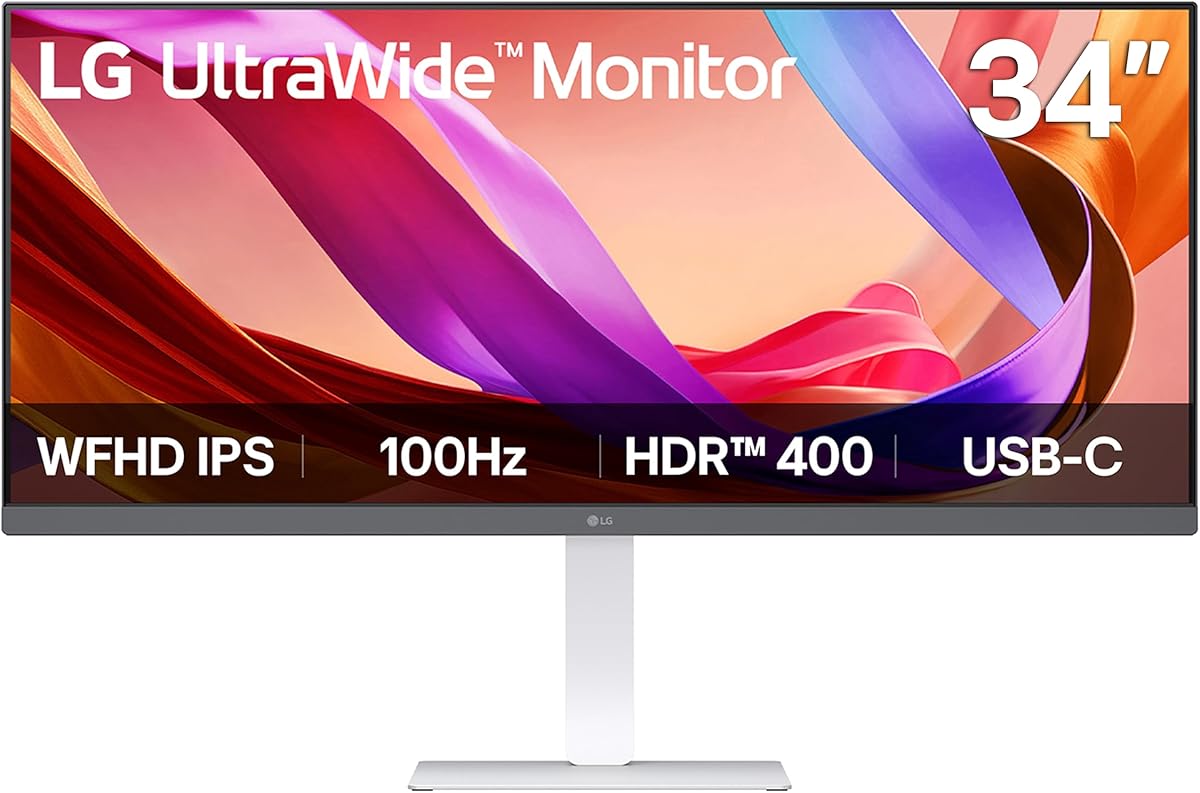
The LG 34U530A-W is a versatile ultrawide monitor tailored for productivity and everyday tasks. Its WFHD resolution and IPS panel deliver clear visuals with excellent viewing angles and HDR support.
We may earn a commission when you buy through this link, at no additional cost to you.
Key strengths include a fully adjustable stand for ergonomic comfort, USB Type-C for single-cable laptop connection, and built-in MaxxAudio speakers. The narrow bezel design enhances multitasking by reducing visual interruptions.
The main trade-off is its lower resolution compared to UWQHD monitors, which may limit detail for creative work or gaming. Additionally, the 100Hz refresh rate is adequate but not ideal for competitive gaming.
Office professionals and casual users prioritizing ergonomics and connectivity should find this model satisfying. It offers reliable performance for general computing at a competitive price.
The height, tilt, and swivel adjustable stand ensures comfortable viewing positions during long work sessions.
USB Type-C support allows easy connection and data transfer with laptops, reducing cable clutter significantly.
We may earn a commission when you buy through this link, at no additional cost to you.
The msi PRO MP341CQ E12 strikes an excellent balance between performance and usability with its UWQHD resolution and 120Hz refresh rate. It is optimized for productivity and casual gaming alike.
We may earn a commission when you buy through this link, at no additional cost to you.
Its strengths include eye care features like flicker-free technology and low blue light certification alongside adaptive sync to eliminate screen tearing. The high contrast VA panel delivers deep blacks and rich colors.
Downsides include a tilt-only stand limiting ergonomic customization and viewing angles not as wide as IPS panels. However, these trade-offs remain reasonable for the price and feature set.
Professionals seeking a reliable ultrawide monitor with gaming capabilities will appreciate this model's versatility. It delivers crisp visuals and smooth motion without breaking the bank.
The UWQHD resolution provides sharp text and detailed graphics ideal for multitasking and creative tasks.
Certified flicker-free and low blue light features reduce strain during extended work sessions.
We may earn a commission when you buy through this link, at no additional cost to you.
The LG 34WR55QK-B combines premium features like USB Type-C power delivery and HDR10 support with a curved WQHD display. It is designed for users seeking top-tier connectivity and visual fidelity.
We may earn a commission when you buy through this link, at no additional cost to you.
Its strengths include rich color accuracy, ergonomic stand adjustments, and OnScreen Control tools for multitasking. The built-in USB Type-C hub simplifies desk setups significantly.
Compared to gaming-focused models, its 5ms response time is slower which may affect fast-paced games. The price is also higher, reflecting its premium build and features.
Professionals and creatives prioritizing color quality and connectivity will find this monitor exceptional. It offers a refined experience with minimal clutter and superior visual performance.
USB Type-C port delivers display, data, and laptop charging through one cable for a clean workspace.
HDR10 and 99% sRGB coverage deliver vivid colors and dynamic contrast for media and design.
We may earn a commission when you buy through this link, at no additional cost to you.
The LG 34U650A-B offers a compelling mix of IPS clarity and curved immersion with its WQHD display and powerful USB-C connectivity. It is tailored for professionals and casual users alike.
We may earn a commission when you buy through this link, at no additional cost to you.
Key strengths include wide viewing angles, HDR10 support, and high wattage USB-C charging. The built-in speakers and Switch app further enhance multitasking productivity.
Its response time is moderate compared to gaming monitors and the price sits higher than budget picks. These factors are acceptable given its comprehensive feature set.
Users wanting a premium curved IPS monitor with robust connectivity should strongly consider this model. It delivers versatile performance for work and media with a refined design.
IPS panel ensures accurate colors and clarity from almost any angle during long sessions.
Up to 96W power delivery supports charging laptops while transferring data and video.
We may earn a commission when you buy through this link, at no additional cost to you.
The SAMSUNG 34 ViewFinity S50GC emphasizes eye comfort and multitasking with its ambient light sensor and Picture By Picture modes. It is ideal for users prioritizing wellness and productivity.
We may earn a commission when you buy through this link, at no additional cost to you.
Its strengths include HDR10 color depth, AMD FreeSync for smoother motion, and borderless design for immersive viewing. The Eye Saver Mode reduces blue light effectively during long sessions.
The stand lacks height adjustment and response time is moderate which limits gaming appeal. These trade-offs suit office environments where comfort outweighs raw speed.
Professionals and students seeking an ergonomic and eye-friendly monitor will find this model excellent. It balances visual quality with health-focused features at a reasonable price.
Ambient light sensor and Eye Saver Mode adapt brightness and reduce blue light to minimize strain.
Picture By Picture allows dual input viewing for seamless workflow without switching windows.
We may earn a commission when you buy through this link, at no additional cost to you.
The Samsung 34 ViewFinity S50GC delivers robust multitasking features with Picture By Picture modes and a minimal bezel design. It is crafted for users managing multiple workflows on one screen.
We may earn a commission when you buy through this link, at no additional cost to you.
Key strengths include HDR10 support, AMD FreeSync, and eye care technologies to reduce strain. The wide WQHD display offers ample space for documents and apps side by side.
Limitations include tilt-only stand adjustments and response times slower than gaming monitors. These trade-offs are acceptable for productivity-focused users prioritizing workflow over speed.
Professionals needing efficient single-screen multitasking and eye comfort will appreciate this model. It combines functional design with reliable performance for daily workloads.
PIP and PBP modes let you view two sources simultaneously for streamlined multitasking.
Thin bezels and wide WQHD screen maximize visual space and minimize distractions.
We may earn a commission when you buy through this link, at no additional cost to you.
The CRUA 34 Inch 165Hz offers an affordable entry into IPS ultrawide gaming with high refresh rates and vibrant colors. It balances gaming performance and visual quality at a competitive price.
We may earn a commission when you buy through this link, at no additional cost to you.
Its strengths include 120% sRGB coverage, FreeSync, and PBP modes for multitasking. The multiple ports allow seamless switching between gaming and productivity devices.
The stand lacks height adjustment and speakers are basic but external audio is common for gamers. These trade-offs fit well within the budget-friendly positioning.
Gamers and budget buyers seeking an IPS panel with high refresh rates should consider this model. It provides smooth visuals and rich colors without premium pricing.
120% sRGB gamut delivers rich, accurate colors ideal for gaming and content creation.
165Hz refresh rate with FreeSync ensures fluid gameplay without stutter or tearing.
We may earn a commission when you buy through this link, at no additional cost to you.
The Acer Nitro ED300C X1 is an ultra-budget gaming monitor delivering high-speed visuals with its 200Hz refresh rate and 1ms response time. It is perfect for players on a strict budget.
We may earn a commission when you buy through this link, at no additional cost to you.
Key strengths include AMD FreeSync Premium for tear-free gameplay and a curved screen for immersion. The affordable price makes high refresh rate gaming accessible to all.
Resolution and screen size are smaller than 34-inch models which limits multitasking and visual detail. These trade-offs suit focused gaming rather than productivity needs.
Entry-level gamers prioritizing speed over resolution and screen size will find this monitor ideal. It offers competitive performance at one of the lowest prices available.
200Hz refresh rate and 1ms response deliver ultra-smooth, responsive gameplay for competitive titles.
Low cost combined with premium features makes this an excellent entry point for ultrawide gaming.
We may earn a commission when you buy through this link, at no additional cost to you.
The KTC 34 Inch 180Hz delivers high-speed curved gaming with UWQHD resolution and a powerful 180Hz refresh rate. It combines performance and immersion for serious gamers.
We may earn a commission when you buy through this link, at no additional cost to you.
Its strengths include exceptional contrast from the HVA panel, multiple input options, and height adjustment support via VESA. The HDR support enhances visual depth significantly.
Stand adjustments are limited primarily to tilt and HDR brightness may not match premium displays. These trade-offs are acceptable given the excellent gaming features and price.
Gamers seeking high refresh rates and contrast-rich visuals will appreciate this model's balance. It provides a premium gaming experience with competitive pricing and versatile connectivity.
180Hz refresh rate ensures fluid, responsive gameplay ideal for competitive and action titles.
4000:1 HVA contrast and HDR support deliver deep blacks and vivid highlights for immersive viewing.
We may earn a commission when you buy through this link, at no additional cost to you.
Choosing the right affordable ultrawide monitor requires balancing resolution, refresh rate, and features with your specific needs.
Resolution determines clarity and screen real estate. UWQHD (3440×1440) offers more detail and workspace than WFHD (2560×1080). Larger sizes like 34 inches provide better immersion but may demand more GPU power.
Choose UWQHD for multitasking and gaming clarity; WFHD suits budget-conscious buyers prioritizing size over detail.
Refresh rate affects motion smoothness. Higher rates like 180Hz or 200Hz reduce blur and input lag critical for competitive gaming. Response time under 5ms prevents ghosting.
Prioritize refresh rate for gaming; 100Hz to 120Hz is sufficient for general use and casual gaming.
IPS panels offer superior viewing angles and color accuracy ideal for creative work. VA panels provide deeper blacks and contrast suited for movies and dark room gaming.
Select IPS for color-critical tasks and VA for immersive gaming and media consumption.
Modern monitors include HDMI, DisplayPort, and USB Type-C for versatile connection. USB Type-C with power delivery simplifies laptop setups by combining video and charging.
Ensure your monitor has the ports needed for your devices; USB-C hubs add significant convenience for modern laptops.
Adjustable stands with height tilt and swivel support proper posture reducing neck and eye strain. VESA mount compatibility allows flexible setups with monitor arms.
Look for height adjustability if you spend long hours at your desk; VESA mounts expand mounting options.
Features like flicker-free technology and low blue light modes reduce strain during extended use. Some models include ambient light sensors adjusting brightness automatically.
Prioritize these features if you work or game for long periods to maintain eye health and comfort.
Picture By Picture and Picture In Picture modes let you view multiple inputs simultaneously. Software tools like OnScreen Control help manage windows and layouts efficiently.
These features enhance productivity for users juggling multiple apps or devices on one screen.
Warranty coverage varies; some brands offer extended terms and responsive technical support. Reliable support minimizes risk when buying budget monitors.
Review warranty terms and support availability before purchasing to ensure peace of mind.
Position your monitor at eye level and about an arm’s length away to reduce strain. Adjust tilt and height to maintain a comfortable posture during use.
Use the provided settings menus to customize brightness and color profiles. Enable eye care modes such as blue light filters during extended sessions.
Clean the screen with a soft microfiber cloth and avoid harsh chemicals. Keep cables organized to prevent damage and maintain a clutter-free workspace.
Yes, many affordable ultrawide monitors offer high refresh rates and fast response times ideal for gaming. Look for models with FreeSync or G-Sync compatibility to minimize screen tearing.
Yes, most ultrawide monitors connect via HDMI or DisplayPort. Ensure your laptop supports the desired resolution and refresh rate to fully utilize the display.
WFHD resolution is sufficient for general productivity and multitasking with multiple windows. However, UWQHD offers sharper text and more space for detailed work.
Most models support VESA mounts allowing wall installation or arm mounts. Verify the mount pattern such as 100x100mm matches your chosen hardware.
Ultrawide monitors generally consume slightly more power than standard displays due to their larger size. Energy efficient models and features help minimize this impact.
Curved screens enhance immersion and reduce eye strain by matching natural vision. They are particularly beneficial for gaming and media consumption on ultrawide displays.
We’ve reviewed ten exceptional ultrawide monitors offering diverse features from high refresh rates to advanced connectivity. Each model brings unique strengths suited for different budgets and uses.
Prioritize resolution refresh rate and eye care features based on your primary tasks. Investing in the right specs ensures long-lasting performance and comfort.
Prices fluctuate frequently so check current listings and promotions before purchasing. Stay informed to secure the best deal for your next ultrawide monitor.