
Gwolves Skoll Mini SK-S
4.4Editor score
Honeycomb ergonomic build
Detachable cable included
Affordable competitive pricing
This guide compares the top 10 claw grip gaming mouse for small hands to help you find the best lightweight and ergonomic option for your setup.
Finding the right claw grip gaming mouse for small hands is essential for precision and comfort during intense sessions. Many standard mice feel too large or heavy for smaller grips and causing strain or lost accuracy. This guide focuses on compact designs that support claw positioning without compromising on sensor quality or build.
We evaluated ten top contenders based on weight, sensor performance, ergonomics, and user feedback. Each product was analyzed for its ability to support claw grip styles while maintaining stability and speed. Our comparison highlights the strengths and weaknesses of each model to help you make an informed decision tailored to your needs.
Each pick showcases specific features like optical switches, lightweight builds, and tailored sensor performance for competitive play. These mice are designed to enhance your aim and reduce fatigue over long periods of use. Keep in mind that prices and availability change frequently so check the latest offers before purchasing.
4.4Editor score

4.6Editor score

4.3Editor score
The following table compares the core specifications of all ten models to help you quickly identify the best fit for your hand size and grip style.



The Lamzu Atlantis Mini Champion Edition stands out as a top choice for gamers seeking a premium claw grip mouse for small hands. With its lightweight build of 51 grams and symmetrical hourglass shape, it reduces wrist strain during extended sessions. Its rating reflects strong user satisfaction regarding performance and comfort.
We may earn a commission when you buy through this link, at no additional cost to you.
Key strengths include the optical switch and PAW3950 sensor which deliver instant response and high precision up to 30000 DPI. The Nordic 52840 MCU ensures seamless wireless performance with low latency making it ideal for competitive play. The dust-proof encoder also adds to its reliability over time.
While the price is higher than some competitors the build quality and feature set justify the investment for serious gamers. The lightweight design might feel too light for those who prefer a heavier mouse but most users appreciate the reduced fatigue.
This mouse is best suited for competitive FPS players who value speed and precision. If you need a reliable wireless option for small hands the Lamzu Atlantis Mini offers exceptional performance and ergonomics that justify its cost.
The Nordic 52840 MCU ensures fast response times and accurate motion detection with no delays in game.
Its broad back and curved top help prevent finger cramps and provide a good experience for claw players.
We may earn a commission when you buy through this link, at no additional cost to you.
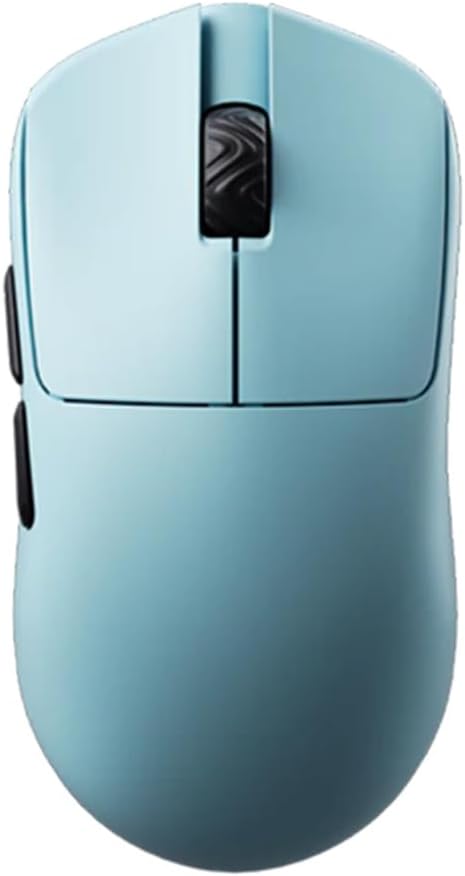
The Gwolves Skoll Mini SK-S delivers strong performance at a budget-friendly price making it a top pick for cost-conscious gamers. Weighing 50 grams it features a honeycomb design that reduces weight without sacrificing structural integrity. The rating indicates users appreciate its value and functionality.
We may earn a commission when you buy through this link, at no additional cost to you.
Its 3389 sensor provides solid tracking up to 16000 DPI ensuring smooth and accurate movement. The detachable cable adds convenience for portability and the PTFE skates offer low friction for effortless gliding across surfaces. This makes it a great entry point for claw grip users.
While it lacks premium features like optical switches the core performance is reliable for competitive gaming. The honeycomb shell can trap dust which may require occasional cleaning but this is a minor trade-off for the weight savings.
Ideal for players seeking a lightweight wired option without breaking the bank this mouse balances price and performance effectively. It is an excellent choice for beginners or those upgrading from heavier mice to a more agile setup.
Its lightweight build and honeycomb design reduce weight while maintaining durability for extended gaming.
PTFE skates ensure low friction and effortless gliding across different surfaces for better control.
We may earn a commission when you buy through this link, at no additional cost to you.
The Pulsar X3 LHD Crazylight redefines lightweight gaming with its featherweight 43 gram build. While specifically designed for left-handed users it offers a hybrid ergonomic shape that balances palm and claw grip comfort. The rating suggests high satisfaction among users who value speed and precision.
We may earn a commission when you buy through this link, at no additional cost to you.
Its XS-1 sensor delivers unparalleled precision with 32000 DPI and 750 IPS tracking speed. Optical switches ensure swift responses while the included DOT skates provide exceptional low friction for smooth gliding on any surface. These features make it a standout for competitive environments.
The premium price reflects its cutting edge technology and build quality but it may not suit all budgets. The left-handed design limits its appeal to right-handed gamers but for those it fits it provides exceptional comfort and performance.
This mouse is perfect for left-handed competitive gamers seeking the ultimate lightweight experience. If you need top tier sensor performance and a near weightless feel the Pulsar X3 LHD offers results that justify its high-end positioning.
The shape combines palm and claw comfort for lasting ease during extended gaming sessions.
XS-1 sensor ensures speed and precision with 750 IPS tracking and 32000 DPI resolution.
We may earn a commission when you buy through this link, at no additional cost to you.
The Pulsar X2H Mini Wireless offers a refined design with a higher hump and narrower waist for aggressive claw grips. This model is designed to provide improved stability and support for the palm making it versatile for small hands. The rating indicates good user feedback on comfort and responsiveness.
We may earn a commission when you buy through this link, at no additional cost to you.
Features include the PAW3395 sensor with Motion-Sync for consistent tracking and optical switches to reduce unintended clicks. The Nordic MCU extends battery life to up to 100 hours ensuring you stay connected without frequent charging. The internal structure is also sturdier for reliable clicks.
As a renewed product there may be some variation in cosmetic condition but functionality remains robust. It is slightly heavier than the lightest models but offers more stability which some players prefer for precise aiming.
This mouse is best for those who need a wireless option with strong ergonomics for small hands. If you seek balance between weight and stability the Pulsar X2H Mini delivers reliable performance for competitive play.
Elevated rear hump offers improved stability for aggressive claw grip and palm support.
Nordic MCU ensures blazing-fast processing and extended battery life for consistent use.
We may earn a commission when you buy through this link, at no additional cost to you.
The V8 Gaming Mouse impresses with an ultra-lightweight design of 36 grams making it one of the lightest options available. Its symmetrical shell supports versatile grip styles including claw and fingertip for a wide range of users. The rating highlights high satisfaction with its performance and weight reduction.
We may earn a commission when you buy through this link, at no additional cost to you.
Powered by the PAW3950 sensor it delivers accurate tracking and low latency suitable for competitive gaming. Kailh optical switches offer instant actuation and enhanced durability compared to traditional mechanical switches. The web-based driver allows easy adjustments without installing software.
While the brand is less known its component quality rivals established competitors. The web-based driver is convenient but may limit advanced settings for some users though most will find it sufficient for standard use.
Ideal for gamers prioritizing weight reduction this mouse enables quick cursor movements with minimal effort. If you want an ultra-light option with reliable sensor performance the V8 Gaming Mouse is a strong contender.
Ultra-light design helps reduce hand fatigue during long gaming sessions for better endurance.
Symmetrical shell design supports a wide range of hand sizes and grip styles comfortably.
We may earn a commission when you buy through this link, at no additional cost to you.
The V6 Gaming Mouse balances lightweight performance with a no-hole design for better protection and aesthetics. Weighing only 40 grams it significantly reduces hand fatigue while enabling precise movements for competitive FPS play. The rating indicates strong approval for its balance of weight and build quality.
We may earn a commission when you buy through this link, at no additional cost to you.
Equipped with the PAW3950 sensor it ensures accurate tracking with no noticeable acceleration or spin-outs. The concave buttons fit fingers naturally providing clear click positioning for improved consistency. A stable wireless connection ensures responsive lag-free performance.
The absence of holes means less dust collection but may feel less aerodynamic for some users. The web-based driver is efficient but may not support all customization needs for advanced settings though it is sufficient for most.
This mouse suits players who prefer a clean look without sacrificing performance or weight. If you need a wireless lightweight option with reliable tracking the V6 Gaming Mouse offers a solid choice.
No hole design offers protection and aesthetics while maintaining an ultra-light 40g weight.
Concave buttons fit fingers naturally for clear click positioning and improved consistency.
We may earn a commission when you buy through this link, at no additional cost to you.
The Bloody V7 is a dedicated ergonomic claw grip mouse designed to support precision and comfort. It includes macros and scripting capabilities for automation which adds value for productivity and gaming. The rating reflects consistent user satisfaction with its ergonomic shape and button layout.
We may earn a commission when you buy through this link, at no additional cost to you.
It offers an optical sensor with 3200 DPI and adjustable report rates for responsiveness. The eight programmable buttons provide flexibility for keybinds or macros while the rubberized coating ensures a secure grip. Compatibility across Windows and Linux makes it versatile for different setups.
The DPI limit is lower compared to modern high-end sensors but sufficient for most gaming needs. It is wired only so wireless convenience is not available but reliability is maintained through a stable connection.
Best for users needing macro support and ergonomic comfort without spending premium amounts. If you value programmability and claw ergonomics the Bloody V7 delivers a practical solution for diverse tasks.
Eight programmable buttons allow macros or script customization for enhanced gaming workflows.
Adjustable report rates allow players to fine-tune responsiveness to their preferred level.
We may earn a commission when you buy through this link, at no additional cost to you.
The BenQ Zowie S2-C is crafted for competitive performance with a driverless setup that simplifies use. Its symmetrical short design targets small hands and offers comfort for both palm and claw grip styles. The rating shows consistent approval among esports players for its reliability and design.
We may earn a commission when you buy through this link, at no additional cost to you.
It uses a 3360 optical sensor with four adjustable DPI levels and adjustable polling rates without software. The paracord cable minimizes drag while the small size ensures comfort during long sessions. Built-in settings allow quick adjustments without installing drivers.
The fixed DPI levels may limit fine-tuning compared to customizable options but suit players who prefer consistency. The price is higher for a wired mouse but the build quality and driverless design justify the investment for pros.
Ideal for players who want a no-frills reliable mouse out of the box. If you prefer simplicity and a compact form the BenQ Zowie S2-C delivers solid performance and comfort.
No driver needed allows for quick setup and seamless performance across different systems.
Symmetrical shortened shape works with palm or claw grip to ensure ideal competitive performance.
We may earn a commission when you buy through this link, at no additional cost to you.
The Pulsar X2H Wireless brings a mini compact form with wireless flexibility for small hands. Its higher hump and narrower waist provide stability for aggressive claw grips while maintaining a slender profile. The rating indicates solid user approval for its design and performance.
We may earn a commission when you buy through this link, at no additional cost to you.
Features include optical switches to reduce unintended clicks and a PAW3395 sensor for precision tracking. The Nordic MCU extends battery life and ensures efficient processing for consistent performance. The internal structure is sturdier to maintain rigidity and reliable clicks.
It shares many features with the Mini version but offers wireless connectivity which adds convenience. The price is higher than wired options but the freedom of movement justifies the cost for many users.
Best for players needing wireless flexibility in a compact symmetrical shape. If you prioritize mobility and precision the Pulsar X2H Wireless offers a reliable and comfortable experience.
Elevated rear hump and slender waist offer improved stability for aggressive claw grip.
Nordic MCU ensures extended battery life and efficient processing for responsive gameplay.
We may earn a commission when you buy through this link, at no additional cost to you.
The Corsair IRONCLAW Wireless SE features an ergonomic asymmetric shape and massive battery life for extended use. It offers ten programmable buttons and customizable RGB lighting for a tailored experience. The rating shows mixed feedback with some users appreciating the battery life while others note fit issues.
We may earn a commission when you buy through this link, at no additional cost to you.
The CORSAIR MARKSMAN sensor provides 26K DPI and surface calibration to adapt to any setup. Its battery life reaches up to 532 hours via Bluetooth making it ideal for marathon sessions without frequent charging. The 10 buttons support macros and keybinds easily.
The asymmetric shape is designed for right-handed players and larger hands which may not suit smaller grips. While the features are robust some users find it less comfortable for claw grip due to the size.
Best for users prioritizing battery life and programmability over compact size. If you need a versatile mouse with long endurance and robust software support the IRONCLAW Wireless SE is a solid option.
Up to 532 hours battery life on Bluetooth ensures more than enough for marathon sessions.
Unique shape provides more places for RGB lighting customization to personalize your setup.
We may earn a commission when you buy through this link, at no additional cost to you.
Selecting the right claw grip gaming mouse for small hands involves considering several key factors to ensure comfort and performance.
Weight plays a critical role in how a mouse feels during claw grip usage. Lighter mice reduce fatigue and allow quicker movements but some users prefer a bit of weight for stability. Look for models that balance weight to match your preference without feeling too light or heavy.
The shape must align with your hand size to prevent strain during claw grip positioning. Symmetrical designs offer versatility while asymmetrical shapes may support specific hand sizes. Ensure the mouse height and width allow your fingers to arch naturally for comfort.
A high-quality sensor ensures accurate tracking and low latency essential for competitive gaming. Look for sensors with high DPI ranges and IPS tracking speeds to handle fast movements smoothly. Reliable sensors prevent spin-outs and guarantee consistent performance across various surfaces.
Decide between wired and wireless based on your need for flexibility versus reliability. Wireless mice offer freedom of movement but require battery management while wired models provide consistent performance. Modern wireless tech often matches wired speeds so choose based on your convenience preferences.
Optical switches are increasingly preferred for their longer lifespan and faster response. They reduce issues like double clicking common with mechanical switches. Consider the switch type if you click frequently to ensure long-term reliability.
A sturdy shell and durable skates extend the mouse lifespan and improve gliding performance. Check for reinforced structures and quality materials that withstand rigorous use. A well-built mouse resists wear and tear ensuring consistent feel over time.
Software allows you to adjust DPI button mapping and lighting to suit your style. Some mice offer web-based drivers or onboard memory for ease of use across systems. Ensure the customization options meet your needs without complicated installation processes.
Prices vary widely across models so determine how much you are willing to invest. Higher-priced mice often offer better sensors and materials but budget options can still perform well. Balance your budget with essential features to get the best value for your setup.
Place the mouse on a consistent surface that supports smooth tracking to maintain sensor accuracy. Ensure your desk and mousepad provide enough space for wide movements without obstruction.
Clean the mouse regularly using a soft cloth to remove dust and debris especially on optical components. For honeycomb designs use a gentle brush to clear debris from holes to maintain hygiene.
Store the mouse in a dry environment away from direct sunlight to prevent material degradation. Avoid placing heavy objects on the mouse when not in use to protect its internal components.
A claw grip gaming mouse for small hands typically has a compact shape with a moderate arch to support the arched fingers. It is designed to prevent strain by fitting smaller hand dimensions while allowing precise cursor control during gaming.
Yes weight impacts comfort and control during claw grip usage. Lighter mice reduce fatigue and improve agility while heavier models offer stability. Choosing the right weight depends on your preference for speed versus control.
Modern wireless gaming mice offer response times comparable to wired options. They use advanced technologies like 8K polling to reduce latency making them suitable for competitive play without sacrificing performance.
Use a soft brush or compressed air to gently remove dust from the honeycomb holes. Wipe the surface with a slightly damp cloth and let it dry completely before use to avoid damage.
Optical switches generally have longer lifespans and faster response times than traditional mechanical switches. They eliminate contact bounce reducing the likelihood of double clicks over extended gaming sessions.
Optimize by choosing a mouse with appropriate size weight and grip texture. Adjust DPI settings for precision and ensure your hand forms a natural arch over the mouse during use.
Yes several manufacturers produce symmetrical or left-handed claw grip mice. These options ensure ergonomic comfort for left-handed users who prefer claw positioning during gameplay.
Most players prefer DPI settings between 400 and 1600 for precise control in competitive games. Higher DPI can be used for quick movements but consistency is key to building muscle memory.
Choosing the right claw grip gaming mouse for small hands can significantly improve your gaming experience and comfort. We highlighted top picks like the Lamzu Atlantis Mini and Pulsar X3 LHD for their lightweight designs and precise sensors.
Prioritize factors such as weight ergonomics and sensor performance when selecting your next mouse. Each model offers unique strengths so choose based on your specific needs and budget to find the best fit.
Remember to check current prices and availability as deals change frequently on Amazon. With the right mouse you can enjoy reduced fatigue and improved accuracy in every session.