
Switch Cooling Fan with Bottom Cooling
Affordable price point
Vertical stand design
Compatible with Steam Deck
This guide compares the top Cooling Fan Nintendo Switch Dock options to help you prevent overheating and ensure smooth gameplay on your console.
Gaming on your Nintendo Switch often leads to heat buildup during extended sessions. A reliable cooling fan for the dock can prevent throttling and keep performance steady. Choosing the right accessory ensures your hardware stays protected while you enjoy your favorite titles.
We evaluated ten top-rated models based on cooling efficiency, build quality, and ease of use. Each product was analyzed for its fan speed, noise levels, and compatibility with different Switch dock versions. This list covers the most effective solutions available for enhancing your console experience.
Every pick in this guide highlights specific features and real-world performance traits. Prices and availability change frequently so always verify details before purchasing. Read on to find the perfect cooling solution that matches your gaming setup and budget needs.

4.6Editor score

4.0Editor score
This side-by-side comparison outlines the key specifications and unique attributes of each model listed below. Use this table to quickly identify which device aligns with your specific console version and feature preferences.



This cooling fan stands out as a top choice for Switch owners seeking reliable thermal management. It holds a solid 4.6 rating from verified users who praise its ability to keep the console cool during long sessions. The included LED display provides real-time feedback on both fan speed and temperature which is a rare feature in this category.
We may earn a commission when you buy through this link, at no additional cost to you.
The adjustable fan speed ranging from 510 RPM to 6000 RPM allows you to customize airflow based on your needs. Below 2400 RPM it operates nearly silently making it perfect for quiet environments. The micro USB cable powers it directly from the dock while the fixed pad ensures stability and prevents scratches on your console base.
While the fan can produce some spinning sound at maximum speed this is expected for high-performance cooling. The noise is manageable and generally outweighed by the protection it offers against overheating. The package includes useful extras like a fixed pad and joystick caps adding value to the purchase.
Anyone who plays demanding titles for hours should consider this model for its consistent cooling and durability. The lifetime warranty offers peace of mind and shows the manufacturer stands behind their product. It remains a reliable choice for maintaining optimal Switch performance in the dock.
The LED display shows exhaust temperature in Celsius so you know exactly how well the fan is working.
The sponge pad prevents scratches and keeps the fan stable against the dock during intense gaming.
We may earn a commission when you buy through this link, at no additional cost to you.
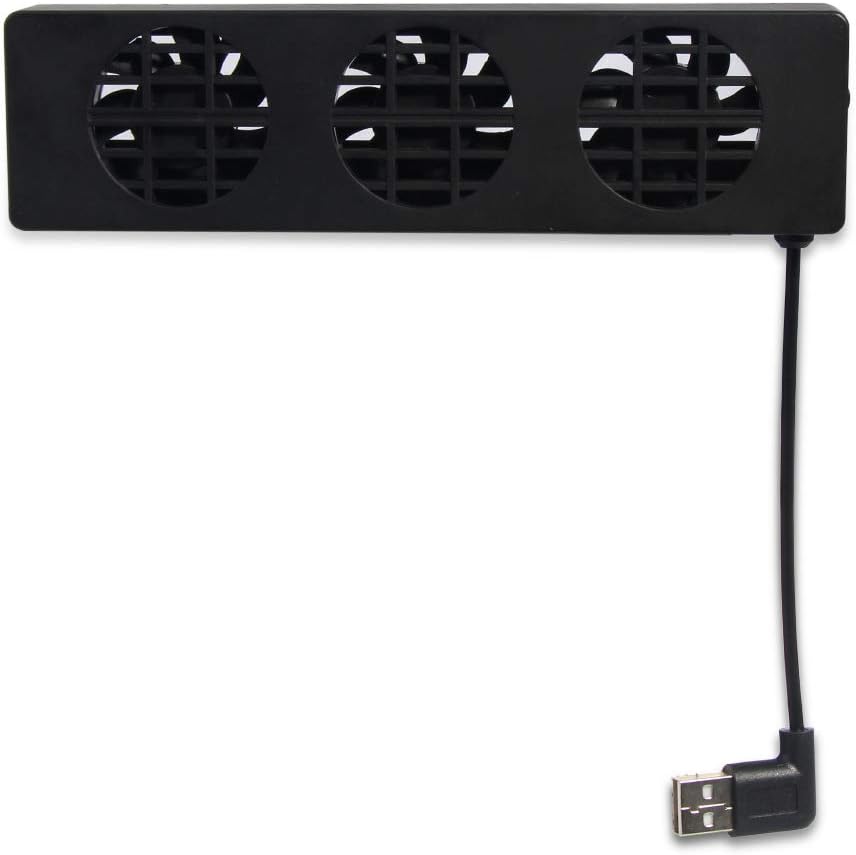
The TNP Cooling Fan offers a robust triple fan design aimed at improving heat dissipation for the original Switch dock. It is designed to keep the console cool and prevent system malfunctions caused by overheating. While its rating is lower than some competitors it still provides effective ventilation for standard gaming sessions.
We may earn a commission when you buy through this link, at no additional cost to you.
Its three high-speed fans work together to lower the console temperature quickly and quietly. You can switch between Turbo Normal and Off modes to balance cooling power with noise levels. The simple design allows it to fit seamlessly into your setup without taking up extra room on your entertainment center.
Installation is straightforward as you just insert it into the back of the dock and connect to the USB port. No tools are required which makes it convenient for quick setup. However it lacks a temperature display so you must rely on feel or game performance to judge cooling effectiveness.
This model is a solid choice for users who want a simple multi-fan solution without complex features. It helps extend the lifespan of your gaming system by maintaining consistent temperatures. If you prioritize airflow over digital readouts this cooler serves its purpose well.
Three built-in fans provide strong ventilation performance to effectively reduce console temperature quickly.
Connects directly to the dock USB port for power supply without needing extra cables.
We may earn a commission when you buy through this link, at no additional cost to you.
Designed specifically for the Switch 2 dock this cooling fan offers next-generation features tailored for modern gaming. It includes dual fans and automatic full-speed operation when connected ensuring your console stays cool during demanding tasks. The 4.0 rating reflects user satisfaction with its unique combination of cooling and utility features.
We may earn a commission when you buy through this link, at no additional cost to you.
The dual fan system promotes heat dissipation effectively helping to avoid lag or crashes during long play sessions. Additional USB ports allow you to charge controllers or connect headsets without using up your console connections. Six game card slots on the stand help you organize your collection for quick access between titles.
RGB light modes add a customizable visual element to your setup though you can turn them off if preferred. The button allows switching between three cooling levels to suit different performance needs. While this model targets the Switch 2 it shows where cooling technology is heading with integrated storage and connectivity.
Gamers looking for an all-in-one station that cools organ expands ports this innovative option. The design supports stable performance and body protection for the latest hardware. If you value extra functionality alongside cooling this stand delivers a premium experience.
Includes USB-A and USB-C output ports for charging and connecting accessories easily.
Nine vibrant RGB light modes let you match your setup to different game scenes.
We may earn a commission when you buy through this link, at no additional cost to you.
The GLDRAM cooling fan is crafted specifically for the 2021 OLED dock ensuring a perfect fit and reliable cooling. It uses a high-efficiency turbo fan to blow air directly onto the OLED base to dissipate heat rapidly. With a 4.4 rating users appreciate its ability to eliminate input delay during charging and play.
We may earn a commission when you buy through this link, at no additional cost to you.
One standout feature is the 14 game card slots on the top which help you organize your physical library. The blue light fan adds a tech-inspired look that matches the OLED aesthetic. It installs easily by plugging into the Type-C port and offers a control button for on-off switching at any time.
The fan is made of durable ABS material that is light yet sturdy enough to withstand regular use. While the blue light enhances the look it may not be ideal for dark rooms unless turned off. However the cooling performance remains strong and helps keep the console nice and cool after hours of use.
This option is perfect for OLED owners who want extra storage and style with their cooling solution. The Type-C connection ensures stable power delivery for consistent performance. If you value aesthetics and utility this model is a strong contender for your dock setup.
Fourteen slots on top store your frequently used game cards to prevent loss.
Fits the official Switch OLED base cover perfectly for a seamless installation experience.
We may earn a commission when you buy through this link, at no additional cost to you.
The Dobe Switch OLED Cooling Fan is designed to work with the original power adapter using a Type-C connection. It features a high-speed fan that increases air circulation inside the base to achieve effective heat dissipation. Users report it runs quietly and keeps the system cool with a simple press of the switch.
We may earn a commission when you buy through this link, at no additional cost to you.
The white design matches the OLED console look perfectly while the blue LED lighting syncs with the power state. Installation is straightforward requiring only the Type-C input port for power supply. It aims to maintain optimal host temperature during gaming sessions without introducing distracting noise.
While it lacks speed adjustments its single fan is sufficient for most casual to moderate play scenarios. The synchronized lighting effect adds a subtle visual cue that the fan is active. This simplicity makes it easy to integrate into your setup without complex configurations.
This model is ideal for those who prioritize quiet performance and visual harmony with their OLED setup. The Type-C connection ensures efficient power usage and consistent cooling. If you want a no-fuss cooler that blends well this fan meets those expectations.
The high speed fan is engineered to speed up air circulation quietly for minimal disturbance.
Connects directly to the TYPE-C input port for power supply from the OLED base.
We may earn a commission when you buy through this link, at no additional cost to you.
This cooling fan is built to keep your OLED running smoothly with a super turbo fan that accelerates airflow. It instantly cools the dock to improve heat dissipation which is essential for optimal performance. The compact and efficient design helps keep your gaming setup tidy while providing a smart cooling solution.
We may earn a commission when you buy through this link, at no additional cost to you.
The 3000 RPM fan ensures quick cooling during intense gameplay sessions to maintain system stability. It uses USB power from the OLED docking station so you do not need an extra outlet. The white color and blue LED light complement your console enhancing the look of your gaming setup.
While user ratings are currently unavailable the specs suggest strong performance for its price point. The space-saving design makes it a practical choice for entertainment cabinets or small TV stands. It aims to provide strong performance while saving room on your furniture.
If you need a reliable and stylish cooler that plugs into your existing USB port this is a good option. The white finish and LED match the OLED aesthetic well for a clean look. It serves as an accessible way to upgrade your dock's cooling capability.
The 3000 RPM fan quickly cools your console to ensure optimal performance during intense sessions.
Compact design saves room on your TV stand while keeping your setup from getting messy.
We may earn a commission when you buy through this link, at no additional cost to you.
The Bewinner cooling fan base stand is equipped with three fans inside to effectively dissipate heat from your console. It is designed to keep the system cool when gaming and is made from superior material to ensure durability. Users find it small and compact which makes it easy to set up and use in any environment.
We may earn a commission when you buy through this link, at no additional cost to you.
A side switch allows you to adjust the cooling speed between Turbo and Normal or turn it off completely. This flexibility lets you choose the right balance of airflow and noise for your current needs. The bracket design provides stable external cooling without requiring major changes to your dock.
The three-fan layout offers robust ventilation for those who play for extended periods. Its compact form factor means it does not take up much space on your shelf or desk. Installation is simple and does not require additional tools to attach to your console setup.
This model suits players looking for a practical multi-fan solution without extra frills. The side switch offers quick control over performance which is convenient during gameplay. If you value straightforward cooling and build quality this stand is a solid choice.
Three cooling fans inside effectively dissipate heat to keep the console cool during gaming.
A switch on the side lets you adjust speed or turn the cooler off as needed.
We may earn a commission when you buy through this link, at no additional cost to you.
The OSTENT cooler uses three fans to increase airflow to the console and speed up heat exchange. This design helps reduce game console temperature quickly and effectively to prolong the host lifespan. The product is easy to insert onto the back of the dock and adopts power from a USB port.
We may earn a commission when you buy through this link, at no additional cost to you.
You can choose between Turbo Normal and Off switch working modes to suit your needs. Normal speed works well for decent gaming while turbo is better for heavy sessions. The drive via the USB port on the dock ensures it has consistent power without extra needs.
Its size and shape make it easy to carry out and store when not in use. The three fans provide powerful ventilation that works well with standard dock setups. While it is a basic design it offers practical cooling for users on a budget.
This fan is a practical option for those who want a triple fan solution without spending much. The ability to switch modes adds versatility to its operation. If you need a straightforward cooling dock this model provides reliable support.
Turbo and Normal modes let you adjust performance to suit different gaming needs.
Driven via the USB port on the dock so no extra power supply is needed.
We may earn a commission when you buy through this link, at no additional cost to you.
This budget-friendly cooling fan fits the original dock station and also works with the Steam Deck. It lowers operating temperature effectively to avoid unexpected pauses caused by overheating during long sessions. The LED display shows real-time RPM and temperature which adds value at this price point.
We may earn a commission when you buy through this link, at no additional cost to you.
You can adjust speed from 510 to 6000 RPM to meet different heat dissipation needs. Below 2400 RPM it runs nearly silent while balancing cooling and noise experience. The package includes a Micro USB cable fixed stabilizer pad and joystick caps for a complete setup.
The sponge pad acts as an anti-slip layer to prevent the console from being scratched. It is made of high-quality material for durable use and comes with a lifetime warranty. This model proves you do not need to spend much to get effective cooling features.
Anyone seeking an affordable option with display features should consider this cooler. The compatibility with multiple consoles adds to its appeal. If you want reliable cooling without a high cost this product meets those needs.
Compatible with Switch OLED and Steam Deck to work with multiple handheld consoles.
The sponge pad provides anti-slip effect and prevents console from being scratched.
We may earn a commission when you buy through this link, at no additional cost to you.
This black cooling fan is designed specifically for the OLED dock model to provide targeted cooling. It holds a 4.0 rating indicating consistent performance and reliability. The compact size ensures it fits well with your OLED setup without adding bulk to your station.
We may earn a commission when you buy through this link, at no additional cost to you.
It functions as a dedicated dock fan to help maintain optimal temperatures during play. The black color matches standard console aesthetics for a clean look. While product details are limited its compatibility with the OLED dock makes it a safe choice.
You can install it with ease to enhance airflow around your console base. The fan aims to prevent overheating which supports better game performance. It is a practical accessory for those who want to keep their OLED dock running cool.
If you need a simple black fan that fits the OLED dock this model delivers. The rating suggests user satisfaction with its cooling capabilities. Consider it if you prefer a color matched option for your console.
Designed specifically for the OLED dock model to ensure proper fit and performance.
Small size keeps your gaming setup tidy while providing necessary cooling support.
We may earn a commission when you buy through this link, at no additional cost to you.
Selecting the right cooling fan for your Nintendo Switch dock depends on your specific console version and usage habits. This guide outlines key factors to consider before making a purchase decision.
Always confirm the fan matches your exact Switch dock model whether Original OLED or Switch 2. Using an incompatible unit may result in poor fit or ineffective cooling. Check product details for compatibility claims like HEG-007 support before buying.
Match the fan to your console version to ensure it fits properly and cools effectively.
Fans with multiple speed settings allow you to balance cooling power and noise levels. Turbo modes help during intense gaming while normal modes work for casual play. Adjustable RPM ranges let you tailor performance to your environment and needs.
Choose fans with adjustable speeds to optimize noise and cooling performance.
Most dock fans run off USB or Type-C power from the console itself. Ensure you have a free port available and that the cable type matches your dock. Some units include cables while others may require separate purchases.
Verify the power connection type to ensure you can power the fan easily.
Fan noise can be distracting during quiet gaming sessions. Look for models that operate silently at low speeds or have turbo modes for high performance. Reading reviews about noise levels helps set realistic expectations.
Check noise specifications to avoid disturbing your gaming experience.
Materials like ABS plastic offer durability and resistance to wear over time. Sturdy construction ensures the fan lasts through regular gaming sessions. A good warranty also indicates the manufacturer stands behind their product quality.
Prioritize durable materials and warranties for long-lasting cooling solutions.
Some fans include extras like game card slots USB ports or LED displays. These features add value by reducing cable clutter and improving organization. Decide if you want these extras or prefer a minimal design.
Extra features like ports and slots add convenience to your setup.
Easy installation saves time and avoids damage to your console. Look for designs that attach directly to the dock without extra tools. A stable placement ensures the fan does not shift during use.
Choose a fan that installs easily to avoid setup headaches.
Consider the price against the features provided to ensure fair value. Higher costs may bring premium features while budget options offer basic cooling. Balance your needs with your budget to find the best deal.
Compare price and features to find the most cost-effective option.
To use your cooling fan properly first ensure it matches your dock model. Attach it to the back of the dock aligning any tabs or pads for stability. Connect the provided cable to a free USB port on the console or dock.
Turn on the fan using its control button and select a speed suitable for your session. Watch the LED display if available to monitor temperature and fan speed. Keep the surrounding area clear to allow airflow around the console.
Regularly clean the fan vents with compressed air to prevent dust buildup. Dust can reduce cooling efficiency and cause the fan to work harder. Periodic checks ensure your cooling accessory maintains peak performance over time.
Not all fans fit every dock so check product compatibility carefully. Some models are designed specifically for the OLED dock HEG-007. Read the details to ensure the unit supports your console version before purchase.
Fan noise varies by model but many run quietly below 2400 RPM. Turbo modes tend to be louder but offer better cooling for intense sessions. Check reviews to see how quiet a specific fan is in real use.
Most fans draw power directly from the dock USB or Type-C port. You do not need a separate outlet or battery for these units. Ensure your dock has an available port to power the fan.
Adjustable fans let you balance cooling power and noise levels. Turbo modes provide extra cooling when needed while normal modes save on noise. This flexibility helps you choose the right speed for your current session.
Some fans like the Switch Cooling Fan with Bottom Cooling work with other devices. Check product descriptions for mentions of compatibility with models like Steam Deck. Ensure the physical fit is suitable for your console before buying.
Use compressed air to blow dust out of the fan vents regularly. This prevents dust buildup which can hinder cooling efficiency. Avoid using wet cloths near the electronics to protect the fan.
Some manufacturers offer lifetime warranties to show confidence in their product. This covers defects and issues that arise after purchase. Check the product details to see what warranty is included with your fan.
A fan helps maintain stable temperatures which can prevent lag from overheating. Consistent cooling supports smooth gameplay during long sessions. It protects your console from thermal stress that might affect performance.
We have reviewed ten top-rated options including the top pick with LED display and dual-fan premium choices. Each model offers unique features suited to different console versions and budget needs. Finding the right fan helps keep your system cool and ready for play.
Prioritize factors like dock compatibility noise levels and adjustable speeds for the best experience. Extra features like ports and slots add value if you need more connectivity. Always read the specs to ensure the fan matches your specific requirements.
Remember that prices and availability change frequently so verify details before buying. Check the latest product info and current listings on the retailer site. This ensures you get the right cooling solution at the best possible time.