EG Starts Kaby Intel CPU Delid
4.6Editor score
Safe aluminum block design
Works with Kaby Lake
Includes relid tool
This guide compares the top 10 delidding kits for CPUs and consoles to help you choose the right tool for safe heat spreader removal.
Delidding kits are essential tools for enthusiasts seeking to maximize thermal performance. By removing the integrated heat spreader, users expose the silicon die directly to coolers, significantly lowering temperatures under load.
We evaluated ten leading options based on compatibility, build quality, safety features, and user feedback. Our analysis covers specialized CPU tools, console-specific solutions, and general repair kits suitable for various hardware configurations.
Each pick highlights key strengths and potential limitations to guide your decision. Note that availability and pricing fluctuate frequently, so verify current stock before purchasing to ensure you get the best value available today.
4.6Editor score

4.5Editor score

4.1Editor score
The following table provides a side-by-side overview of all ten products, highlighting their primary use cases, compatibility, and key technical specifications to help you narrow down your choice quickly.


The Delid Tool V3 is specifically engineered for addressing overheating issues in PlayStation 3 consoles. With a high rating of 4.6 stars, it stands out for its precision engineering and replaceable blade feature that ensures longevity.
We may earn a commission when you buy through this link, at no additional cost to you.
Its Version 3 design features a sharper and more flexible blade compared to earlier iterations. This improvement enhances durability while maintaining the thin profile required for safe delidding without damaging sensitive components inside the console.
While it is purpose-built for the PS3, this specificity means it lacks versatility for PC CPUs. However, for console enthusiasts dealing with thermal throttling, the reduced risk compared to makeshift tools makes this trade-off worthwhile.
Buyers seeking to revive aging PS3 hardware should consider this tool for its user-friendly design. It bridges the gap between professional repair stations and DIY projects effectively.
Designed exclusively for PS3 internal geometry to ensure safe heat spreader removal.
Includes three blades to maintain cutting edge sharpness over multiple uses.
We may earn a commission when you buy through this link, at no additional cost to you.
The der8auer Delid-Die-Mate X is a professional-grade tool designed to make heatspreader removal routine rather than dangerous. Created by Roman der8auer Hartung, it targets specific high-end Intel sockets like Skylake-X.
We may earn a commission when you buy through this link, at no additional cost to you.
This tool transforms a risky DIY act into a harmless process by providing precise alignment and leverage. The aluminum and stainless steel construction ensures it remains robust through repeated use on expensive processors.
Users should note the potential for warranty voiding when delidding processors. Despite the cost, the reliability it offers for high-performance computing builds justifies the investment for serious overclockers.
This is the ideal choice for professionals or enthusiasts working with Socket 2066 CPUs who demand top-tier safety and precision during the delidding process.
Specifically engineered for Intel Skylake-X and Kaby Lake-X processors.
Protects silicon core from damage during heat spreader removal.
We may earn a commission when you buy through this link, at no additional cost to you.
This Knife Repair Kit targets the broader spectrum of electronics maintenance including BGA chip repair and motherboard servicing. Its ultra-thin blades allow for seamless movement between chips and baseplates without causing damage.
We may earn a commission when you buy through this link, at no additional cost to you.
Built with SK5 steel, the blades offer high heat tolerance and oxidation resistance. The ergonomic handle provides security during delicate tasks, making it suitable for detailed circuit board maintenance beyond just CPUs.
While the 3.6 rating suggests mixed experiences, the tool's versatility in handling power supply removal and adhesive scraping makes it a strong contender for general electronics repair stations.
Ideal for technicians who need a precision knife for various PCB components rather than a dedicated CPU delidding tool specifically.
Blades thinner than solder points ensure clean component extraction.
Quenching processed SK5 steel maintains sharpness during long sessions.
We may earn a commission when you buy through this link, at no additional cost to you.
The Thermal Grizzly Delid-Die-Mate is developed by der8auer and optimized for 12th and 13th Gen Intel Core processors. It is celebrated for enabling direct die cooling which reduces temperatures by up to 20 degrees Celsius.
We may earn a commission when you buy through this link, at no additional cost to you.
Constructed from black and red anodized aluminum, it balances durability with aesthetic appeal. The effortless installation design makes the delidding process straightforward even for less experienced users.
While it is limited to modern Intel sockets, the performance gains for gaming and rendering workloads are significant. The high 4.5 rating confirms its reliability and effectiveness in real world scenarios.
This tool is highly recommended for anyone upgrading to recent Intel hardware who wants to maximize thermal efficiency without compromising safety.
Facilitates direct contact between cooler and silicon for better heat dissipation.
Anodized aluminum body ensures long-term resilience and visual appeal.
We may earn a commission when you buy through this link, at no additional cost to you.
This 3-pack of TG Scrapers by Thermal Grizzly offers an affordable way to clean adhesive and solder residue after delidding. The acrylic construction ensures safety on delicate CPU components without scratching the package.
We may earn a commission when you buy through this link, at no additional cost to you.
The narrow tip is specifically designed to reach tight spots around silicon dies. Its ergonomic design allows for a comfortable grip which is crucial when working with very small electronic components.
With a 4.8 rating, these scrapers are beloved by enthusiasts for their reliability. While they do not remove the lid themselves, they are essential for the post-delidding cleanup process.
Buyers should purchase this alongside a primary removal tool to ensure a complete and safe workflow for CPU modifications.
Acrylic material prevents damage to CPU packages during residue removal.
Narrow tip targets silicone adhesive effectively without harming nearby areas.
We may earn a commission when you buy through this link, at no additional cost to you.
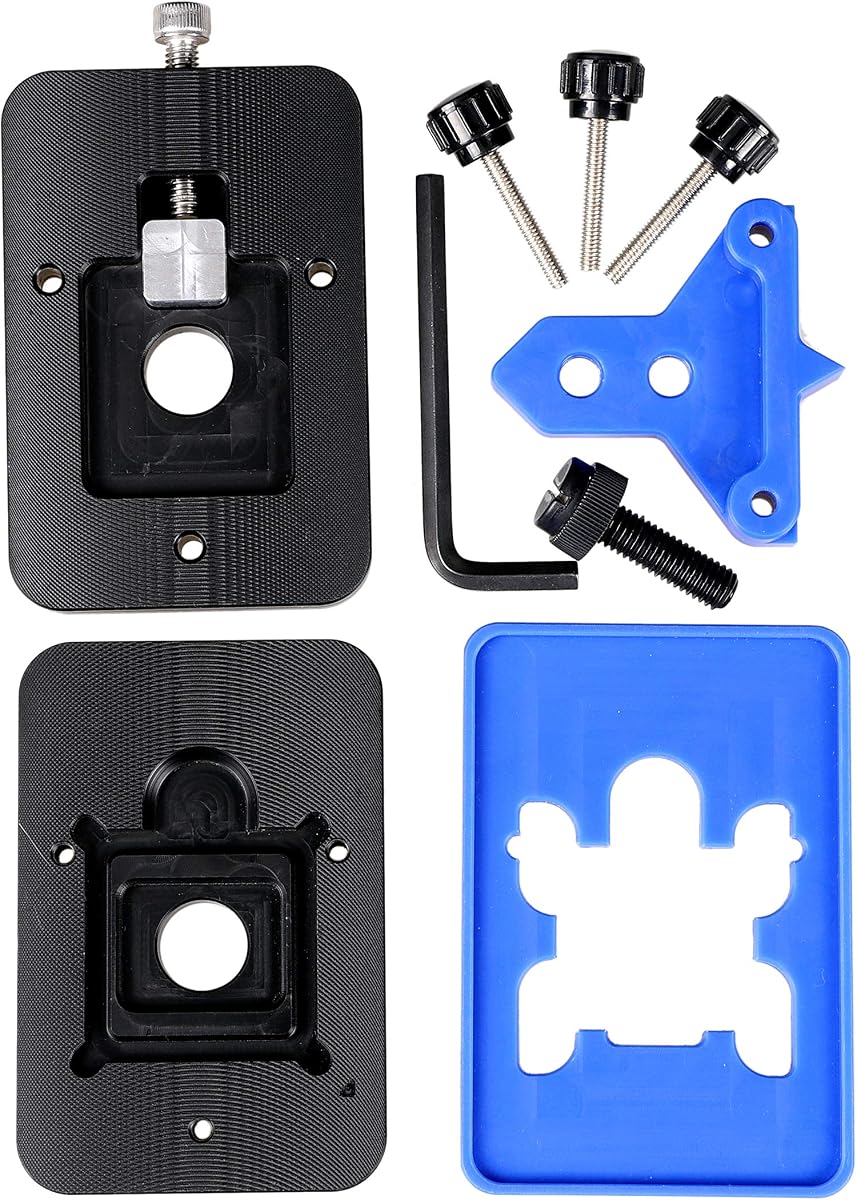
EG Starts offers a versatile opener cap tool compatible with a wide range of Intel processors from LGA 775 to Kaby Lake. It is designed as the safest and easiest method to delid CPUs without damaging the board.
We may earn a commission when you buy through this link, at no additional cost to you.
The tool includes an aluminum block to ensure proper height clearance during the process. It also comes with a relid tool allowing users to reinstall the lid with fresh thermal compound for long term cooling.
While manual precision is required to avoid damage, the high 4.6 rating indicates that most users find it reliable. This makes it a strong budget option for older CPU upgrades.
This kit is ideal for enthusiasts looking to improve older Intel Core i5 and i7 systems without spending a fortune on specialized equipment.
Supports multiple generations from 775 up to 1151 sockets.
Includes cap tool to reattach lid securely after the process.
We may earn a commission when you buy through this link, at no additional cost to you.
The QianLi ToolPlus 009 is a comprehensive repair solution engineered for a wide range of delicate tasks. It features a durable metal handle that provides balance and comfort during intricate work on circuit boards.
We may earn a commission when you buy through this link, at no additional cost to you.
The set includes ultra-thin blades designed to slide effortlessly under chips without damaging underlying components. Its versatility makes it suitable for everything from general motherboard repairs to specific CPU tasks.
Despite the lack of rating data, professional technicians often prefer such versatile sets for their ability to handle different challenges efficiently. The ergonomic non-slip design minimizes hand fatigue during extended sessions.
This kit is best for advanced users who need a reliable toolkit for various micro-soldering and repair projects beyond just delidding.
12-in-1 handles allows quick swaps between points and edges for different tasks.
Crafted from high-grade steel for durability and precision.
We may earn a commission when you buy through this link, at no additional cost to you.
This tool is specifically designed for removing the heat spreader from the RSX GPU chip in PlayStation 3 Fat and Slim models. It facilitates thermal paste replacement which can significantly lower console temperatures.
We may earn a commission when you buy through this link, at no additional cost to you.
The design helps keep the working edge away from the main board to reduce contact risks during the process. This is crucial as console boards are often more fragile than standard PC boards.
It is important to note this tool is only for the RSX chip and not the CELL CPU. Users should be aware of the risks involved in console modification before proceeding.
Console repair specialists will find this tool essential for maintaining the thermal integrity of aging PlayStation 3 hardware.
Tailored for RSX chip geometry in specific PS3 generations.
Engineered to minimize accidental contact with sensitive motherboard areas.
We may earn a commission when you buy through this link, at no additional cost to you.
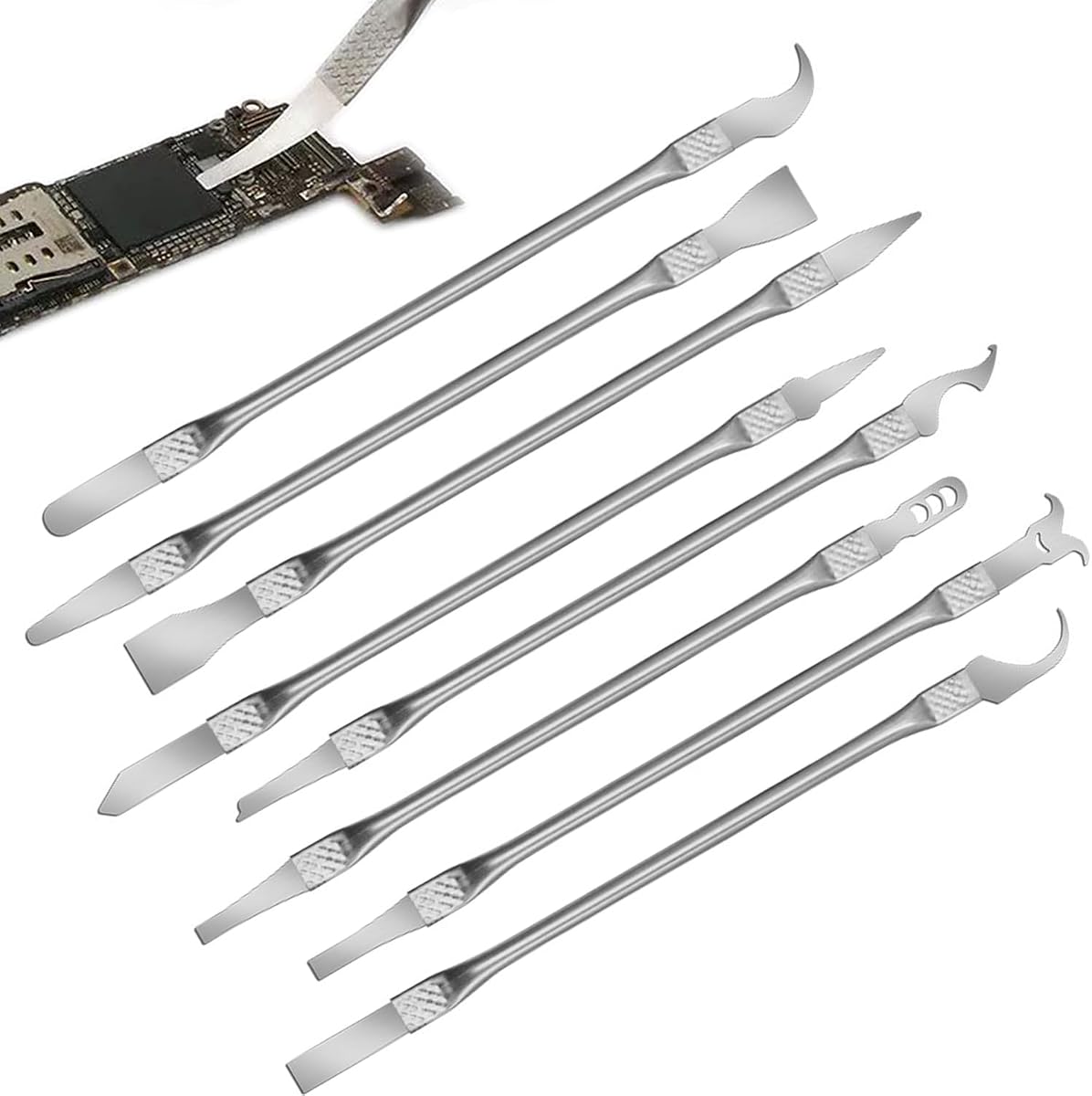
This 8-piece set is designed for versatile repair tasks including the removal of BGA chips and CPUs from smartphones and computers. Made from high-quality alloy, it resists corrosion and bending to ensure longevity.
We may earn a commission when you buy through this link, at no additional cost to you.
The integrated blade and handle design saves time by eliminating assembly needs. Its ergonomic design ensures a comfortable grip which reduces hand fatigue during extended use.
The 4.0 rating reflects its utility for general repair work. While not a dedicated CPU delidding tool, it offers precision for smaller components where specialized tools may be unavailable.
Ideal for mobile technicians who need a lightweight and effective solution for various component removal tasks.
Suitable for both smartphone and computer repair tasks.
High-quality alloy ensures resistance to corrosion and bending.
We may earn a commission when you buy through this link, at no additional cost to you.
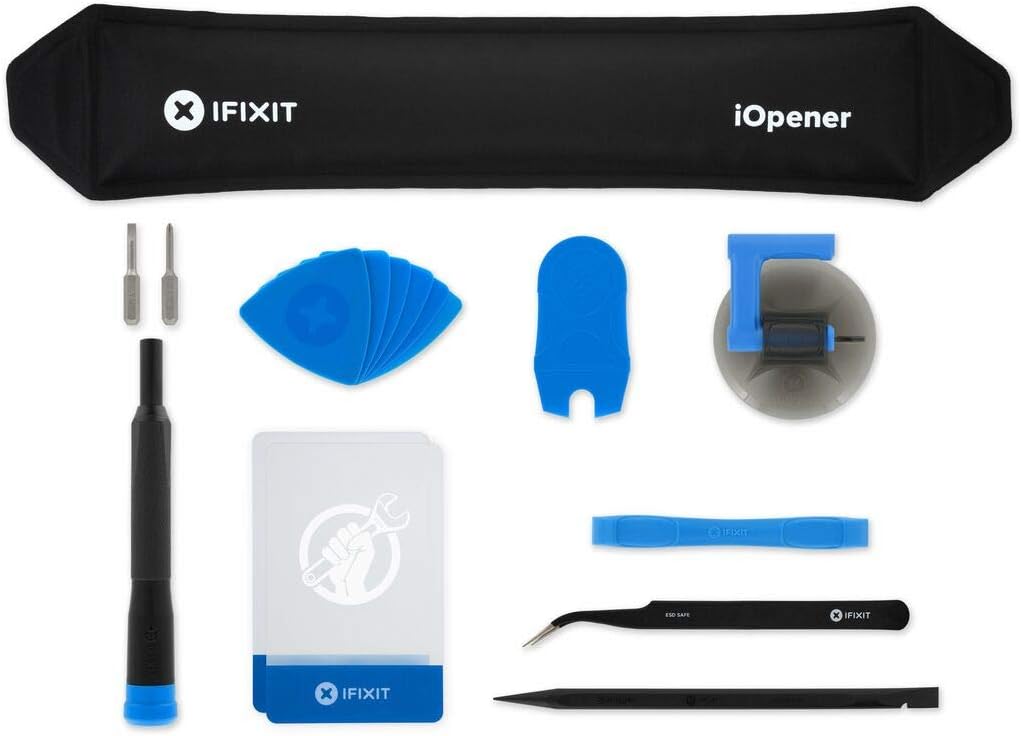
The iFixit iOpener is a heat pad designed to apply heat evenly to loosen adhesives during disassembly. It is widely used for tablets and laptops but also supports general electronics needing heat application.
We may earn a commission when you buy through this link, at no additional cost to you.
Its non-toxic and food-safe construction allows for safe handling without risk of chemical exposure. The tool is easy to use and comes in a kit with other common repair implements.
While it does not perform the cutting itself, it prepares surfaces for removal which is a critical step in many repair workflows. Its versatility makes it a staple in professional toolboxes.
This is an excellent accessory for users who need to soften adhesives before attempting any physical component removal.
Direct and even heat application softens tough glue and adhesive.
Non-toxic materials ensure safe handling during the repair process.
We may earn a commission when you buy through this link, at no additional cost to you.
Selecting the right delidding kit requires careful consideration of your specific hardware and technical skill level to ensure safe and effective results.
Ensure the tool matches your CPU socket or console model. Using a kit designed for Intel 13th gen on an older AMD chip will not work and may damage hardware.
Verify socket types and console generations before purchasing to avoid incompatibility issues.
Look for tools made from durable metals like aluminum or stainless steel. High quality materials reduce the risk of bending or breaking during the procedure.
Quality construction ensures the tool remains reliable over multiple uses.
Safety features such as alignment guides or protective blocks are crucial. They prevent accidental contact with the motherboard which can lead to permanent damage.
Always choose tools that prioritize safety to protect your investment.
Ergonomic designs and clear instructions make the process simpler. A tool that is comfortable to hold allows for better control during precise movements.
User friendly tools reduce the learning curve for beginners.
Be aware that delidding usually voids manufacturer warranties. Consider whether the performance gain outweighs the loss of support from the hardware manufacturer.
Check warranty terms before opening any sealed components.
Define your goals for temperature reduction. Some tools are optimized for extreme cooling while others are for basic maintenance.
Select a tool that meets your specific thermal requirements.
Check if the kit includes scrapers or relid tools. These accessories are necessary for cleaning residue and reinstalling the lid.
Complete kits offer better value than standalone tools.
Evaluate the cost relative to the quality. Cheaper tools may save money upfront but could lead to damaged components costing more in the long run.
Invest in tools that balance affordability with reliability.
Start by ensuring your CPU is completely disconnected from power. Clean the surface area around the chip to prevent dust from entering the core during the procedure.
Apply the tool according to the manufacturer's instructions carefully. Use steady pressure and avoid forcing the blade to prevent accidental damage to the silicon die.
After completion, clean the tool blades with alcohol wipes to remove residue. Store them in a dry case to protect the edges from corrosion or dulling.
Yes, removing the integrated heat spreader typically voids the manufacturer warranty. Most companies consider this unauthorized modification. You should proceed only if you accept this risk and understand the implications.
Generally no because console chips like the PS3 RSX differ in geometry from PC CPUs. Using the wrong tool can damage the console. Always check compatibility for specific hardware models.
Temperatures can drop by 10 to 20 degrees Celsius depending on cooling and load. Results vary by hardware but direct contact cooling significantly improves heat dissipation efficiency.
Yes if you plan to reattach the lid. A relid tool helps secure the lid properly with new adhesive or thermal paste which ensures stability during shipping or transport.
It carries risk so beginners should watch tutorials and proceed slowly. Having the right tools and patience minimizes danger. Practice on old hardware before attempting on valuable processors.
Use isopropyl alcohol and a soft lint-free cloth. Avoid abrasive materials that could scratch the silicon. Ensure it is completely dry before reassembly.
Standard knives are too thick and prone to slipping which increases damage risk. Specific delidding tools are engineered for safety and precision which makes them safer than improvised alternatives.
High grade steel like SK5 offers the best durability and sharpness retention. Thin flexible blades allow for precise cuts without exerting too much pressure on the package.
We reviewed ten options ranging from specialized CPU tools to console repair sets. Each offers unique benefits tailored to specific hardware needs and user expertise levels.
Prioritize compatibility and safety features to avoid costly mistakes. The right tool makes the process routine rather than dangerous for your hardware.
Prices and availability fluctuate so verify current details before purchasing. Choose the solution that best fits your technical goals and budget constraints.