
Switch Dock for Nintendo Switch/Switch OLED
4.2Editor score
100W PD Input Port
4K@60Hz HDMI Output
Compact Lightweight Design
This guide compares the top 10 portable docks for Nintendo Switch portable play, evaluating HDMI output, charging speed, and travel design to help you choose
Finding a reliable dock for Nintendo Switch portable play is essential for gamers who want seamless transitions between handheld and TV modes. Whether you are traveling or playing at home, a quality adapter ensures stable video output and consistent charging without bulky hardware.
We have evaluated ten top-rated docking stations based on port compatibility, build quality, and video performance. Our analysis focuses on models that support 4K HDMI, fast charging, and compact designs suitable for on-the-go gaming sessions.
Each selection highlights specific strengths like port variety and portability. Prices fluctuate frequently, so verify current offers before purchasing. This guide provides detailed insights to help you find the best dock for your specific gaming needs and travel requirements.
4.2Editor score

4.4Editor score

4.2Editor score
The following table provides a side-by-side comparison of all ten selected portable docks for Nintendo Switch portable play. Each entry lists key specifications and product links to help you make an informed decision based on your specific gaming and travel needs.
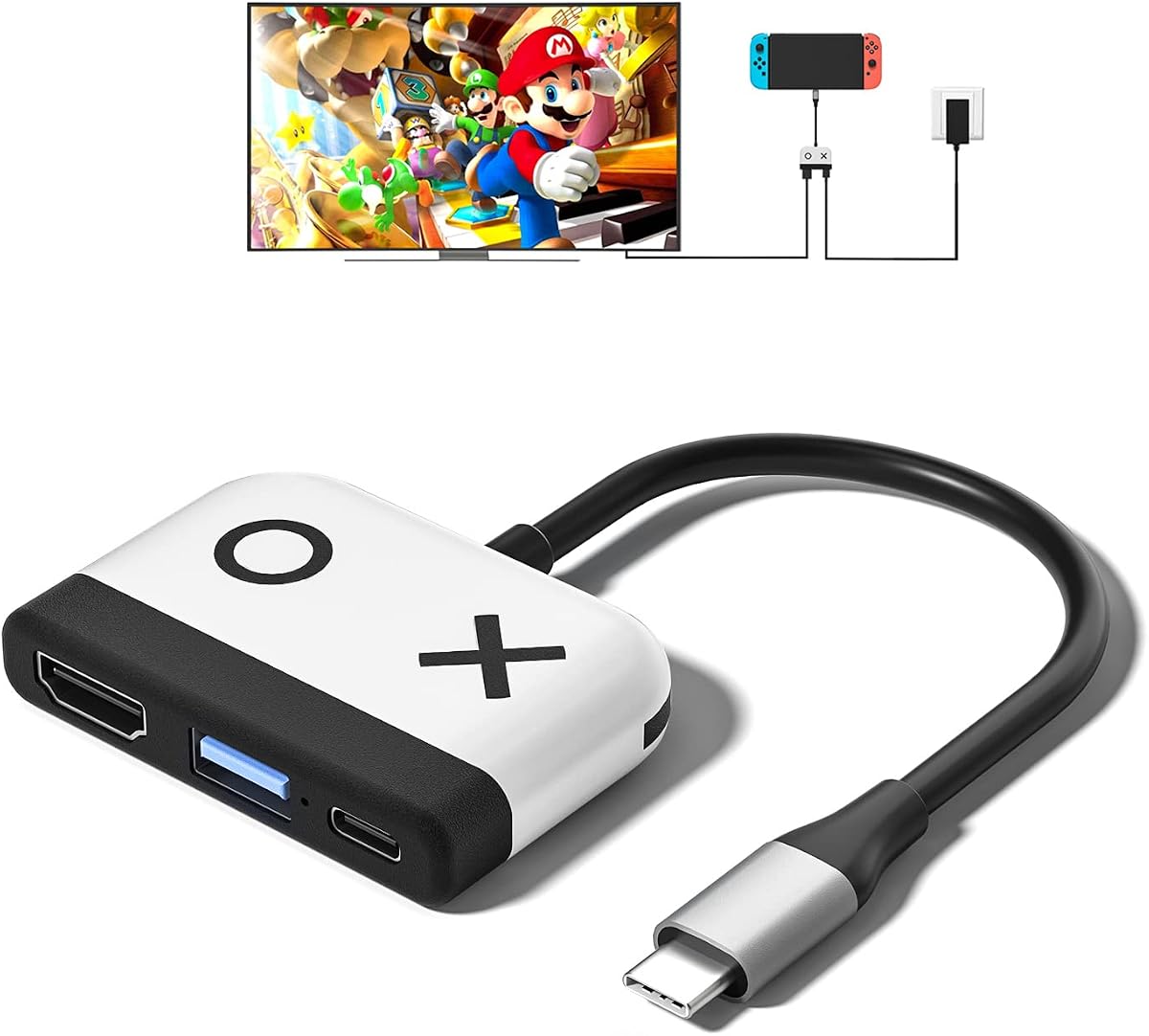


The pdobq Switch Dock is a leading option for portable gaming enthusiasts who need a reliable HDMI adapter. With a 4.2 rating, this device stands out for its ability to support 4K output on 60Hz TVs, making it suitable for modern displays.
We may earn a commission when you buy through this link, at no additional cost to you.
Its port selection includes HDMI 2.0 and USB 3.0, ensuring high-speed data transfer and stable video streaming. The compact design allows it to fit easily into a backpack, which is ideal for travelers seeking a slim replacement for the bulkier official dock.
While it performs well, it requires you to use an official Nintendo Switch charger to ensure stable power delivery during play. Additionally, HDMI cables and power adapters are not included in the package, so you must have your own accessories ready.
This dock is best suited for gamers who want a lightweight, high-performance alternative for home or travel. It offers solid video quality and connectivity options without compromising on portability or ease of use.
Supports 1080P@60Hz video output for Nintendo Switch and up to 4K on compatible devices for sharper visuals.
Lightweight and compact size fits easily into backpacks and bags, perfect for gaming on the go.
We may earn a commission when you buy through this link, at no additional cost to you.
The RREAKA TV Dock is a highly rated portable solution for Nintendo Switch users seeking premium features. It supports 4K@60Hz output and includes a 100W PD port for fast charging while playing, making it an excellent choice for modern setups.
We may earn a commission when you buy through this link, at no additional cost to you.
Its construction uses lightweight aluminum alloy, weighing only 1.5 ounces, which is significantly lighter than the official dock. The 4-in-1 design offers versatile connectivity including USB 3.0 and USB 2.0, accommodating various peripherals and accessories.
Users should note that this dock requires you to supply your own HDMI cable and power adapter for operation. While the built-in chip offers protection against overcurrent and overheating, it still needs an external power source to activate TV mode.
This dock is perfect for travelers and gamers who need high-resolution output and robust charging capabilities. Its compact size and durable build make it a reliable companion for on-the-go gaming and home entertainment.
Features a 100W PD charging port that allows simultaneous charging and gaming without power interruptions.
Delivers crisp 4K@60Hz visuals for an enhanced gaming experience on large screens and monitors.
We may earn a commission when you buy through this link, at no additional cost to you.
The Kstkry Switch Dock offers excellent value with its durable silicone construction and compact design. It supports 4K, 1080P, and 720P outputs, making it a versatile adapter for various display types and gaming needs.
We may earn a commission when you buy through this link, at no additional cost to you.
Its lightweight form factor allows it to be carried in a pocket or bag effortlessly, saving space compared to the original dock. The inclusion of HDMI and USB 3.0 ports ensures you can connect controllers and charge your device simultaneously.
Although it is affordable, you still need to provide your own power adapter to charge the Switch while playing. Additionally, it does not come with a protective case, so extra care is needed when transporting it in a bag.
This dock is ideal for budget-conscious gamers who do not want to sacrifice quality. It provides reliable connectivity and portability, making it a great choice for casual travel or local play sessions.
Made of high-quality wear-resistant silicone that prevents scratches and damage during daily use.
Includes HDMI USB 3.0 and USB-C ports for flexible peripheral and charging options.
We may earn a commission when you buy through this link, at no additional cost to you.
The iPLYGAM Switch Dock features a unique 6-in-1 design that includes multiple USB ports and a dedicated switch button. This flexibility allows you to connect multiple devices and manage TV and tabletop modes with ease.
We may earn a commission when you buy through this link, at no additional cost to you.
Its built-in smart chip provides overheat and short circuit protection, ensuring safe operation during long gaming sessions. The blue LED indicator offers a visual cue when the dock is active, adding convenience to the user experience.
However, like many third-party docks, it does not include HDMI or power cables, so you need to supply your own accessories. The dock is also slightly heavier than some ultra-compact options, which might affect portability for some users.
This dock is recommended for users who need multiple USB connections for peripherals like controllers or keyboards. It balances functionality with safety features, making it a solid choice for versatile gaming setups.
Features multiple USB ports and HDMI 2.0 to connect various devices simultaneously without needing extra hubs.
Built-in smart chip protects against overcharging and overheating for stable performance.
We may earn a commission when you buy through this link, at no additional cost to you.
The Travel Portable Switch 2 Dock is specifically designed to support the latest Nintendo Switch 2 console alongside older models. It supports 4K@60Hz resolution and provides 100W PD fast charging, ensuring high performance and power delivery.
We may earn a commission when you buy through this link, at no additional cost to you.
Its compact design is ideal for travelers who need a slim adapter to connect their console to TVs and monitors. The product manual includes clear steps to use the dock, making setup straightforward even for those unfamiliar with USB-C adapters.
Users must ensure they use an official Switch 2 power adapter to avoid issues with TV mode activation. Also, HDMI cables are not included, so you need to have a compatible cable ready for connecting to your display.
This dock is best for Switch 2 owners who want a portable solution that matches the console's capabilities. It delivers high-quality video and fast charging, making it a reliable choice for home and travel use.
Supports up to 4K@60Hz resolution for ultra-clear video on high-definition televisions and monitors.
Works seamlessly with Switch 2 as well as Switch 1 and OLED models for broad usability.
We may earn a commission when you buy through this link, at no additional cost to you.
This Switch Dock offers universal compatibility with Nintendo Switch, Steam Deck, and other USB-C devices. It features a 100W PD input port and HDMI output, providing fast charging and high-resolution display support in one compact unit.
We may earn a commission when you buy through this link, at no additional cost to you.
Its plug-and-play simplicity means no drivers are needed for setup, and the sleek design fits easily into any bag. The 4K@60Hz support ensures you get crisp visuals on modern televisions and monitors for an immersive experience.
However, power and HDMI cables are not included, so you must bring your own to make it operational. Additionally, while it is lightweight, care should be taken to avoid dropping it as it does not have ruggedized corners.
This dock is ideal for gamers with multiple devices who want a single portable docking solution. It balances performance, speed, and portability, making it a versatile choice for different gaming scenarios.
Compatible with Switch Steam Deck ROG Ally and other USB-C devices for broad versatility.
No drivers or complicated setup required; simply connect your device and HDMI to start.
We may earn a commission when you buy through this link, at no additional cost to you.
The BIYTC Switch Dock is a compact adapter designed for users who prioritize portability. It supports both Switch 1 and 2 models and provides three essential ports for video output and charging.
We may earn a commission when you buy through this link, at no additional cost to you.
Its pocket-size design allows it to be carried effortlessly in a handbag or backpack, making it ideal for frequent travelers. The setup process is straightforward, requiring only a power adapter and HDMI cable to activate the TV mode.
However, it supports up to 1080P at 30Hz, which is lower than the 60Hz offered by some competitors. Also, it does not include a power adapter, so you must use an official Nintendo Switch charger for best results.
This dock is best for those who need a small, functional adapter for occasional travel use. It offers reliable basic connectivity without unnecessary bulk, keeping your gaming setup simple and mobile.
Lightweight and small enough to fit in pockets or bags for easy transport anywhere.
Includes HDMI USB 3.0 and PD charging port for essential connectivity and power needs.
We may earn a commission when you buy through this link, at no additional cost to you.
The AHGEIIY Switch 2 Dock is one of the lightest options available, weighing only 39 grams. It supports 4K@60Hz output and includes a 100W PD port, delivering high performance while remaining highly portable for travelers.
We may earn a commission when you buy through this link, at no additional cost to you.
Its 4K@60Hz HDMI output ensures smooth and clear visuals for gaming on larger screens. The dock is compatible with various USB-C devices including MacBook and iPad, adding versatility to its design beyond just Nintendo consoles.
One limitation is that it only works with devices supporting DP Alt Mode, which excludes some older tablets or phones. Additionally, it does not come with any cables or power adapters, so you must source these separately to use it.
This dock is perfect for tech-savvy travelers who need a lightweight and powerful docking solution. It provides fast charging and high video output, making it an excellent choice for modern mobile gaming setups.
Weighs only 39 grams, making it incredibly easy to carry in a pocket or small bag.
Supports 4K@60Hz output for crisp and smooth video on compatible displays.
We may earn a commission when you buy through this link, at no additional cost to you.
The Switch 2 Dock Portable is designed with a durable aluminum alloy body and supports 4K@60Hz output. It weighs only 45 grams and provides a 100W PD charging port, making it a powerful portable option for gamers.
We may earn a commission when you buy through this link, at no additional cost to you.
Its compatibility extends to Switch 1 and OLED models as well, offering broad support across different console generations. The product includes a clear instruction manual to guide users through setup steps quickly and efficiently.
However, users must ensure they use an official power adapter to avoid activation issues with TV mode. HDMI and power cables are not included, so you need to have your own accessories ready before using the dock.
This dock is recommended for those seeking a high-performance lightweight adapter. It balances build quality and video capability, making it a strong choice for travel and home entertainment needs.
Built with high-quality aluminum for durability and heat dissipation during use.
Delivers high-definition video at 60Hz for smooth gameplay on compatible displays.
We may earn a commission when you buy through this link, at no additional cost to you.
The Portable Dock Station Switch includes a built-in cooling system and smart protection chip for safe and stable performance. It supports 4K HDMI output and features multiple USB ports, making it a versatile adapter for various devices.
We may earn a commission when you buy through this link, at no additional cost to you.
Its unique design allows the Switch to sit on top of the dock for easier access to buttons and ports. The spring stand connector reduces pressure on the console during insertion, helping to protect the charging port from wear.
While it offers many features, its lower overall rating suggests there may be variability in user experience. It also requires an official power adapter for stable operation, which may be a hurdle for those without one.
This dock is best for users who prioritize cooling and ease of access during extended play. It offers good connectivity and safety features, making it a reasonable choice for home and travel use.
Multiple ventilation openings and cooling system help prevent overheating during long gaming sessions.
Console sits on top of the dock allowing easy access to buttons and USB ports.
We may earn a commission when you buy through this link, at no additional cost to you.
Selecting a portable dock for Nintendo Switch portable play involves evaluating several technical factors to ensure compatibility and performance. This guide outlines key considerations to help you find a reliable adapter for your specific needs.
The video output resolution determines how clear your game will look on a TV or monitor. For best results, look for docks that support 4K@60Hz, which provides crisp images and smooth motion. If your TV only supports 1080P, a dock with HDMI 2.0 will still deliver excellent quality.
Prioritize docks that support high resolution to ensure your gaming visuals are as sharp and fluid as possible.
Power Delivery (PD) speed is crucial for keeping your console charged during extended sessions. Docks with 100W PD ports can charge faster and support more demanding tasks. Ensure the dock allows simultaneous charging and playing to avoid interruptions.
Choose a dock with at least 100W PD support to maintain battery life during long play sessions.
Port variety affects what accessories you can connect while using the dock. HDMI 2.0 ports ensure high-quality video, and USB 3.0 ports enable fast data transfer for peripherals. Some docks also include USB 2.0 ports for additional connectivity.
Select a dock with multiple ports to support controllers keyboards and charging at the same time.
Build quality impacts durability and reliability during travel. Lightweight materials like aluminum alloy are often preferred for portability without compromising strength. Check if the dock includes protective features such as overheat and short circuit protection.
Opt for a lightweight and durable dock with safety features to ensure long-lasting performance.
Compatibility ensures the dock works with your specific console model and other devices. Most portable docks support Switch 1 2 and OLED, but verify if your console is supported. Also check if the dock supports other USB-C devices like tablets.
Confirm the dock matches your console model and any other USB-C devices you plan to use.
Included accessories such as cables and chargers vary by product. Many portable docks require you to use your own HDMI and power cables, which adds to the cost and setup complexity. Review what comes in the box before purchasing.
Check whether necessary cables are included or if you need to purchase them separately.
The setup process should be simple to avoid frustration. Look for docks with plug-and-play functionality that do not require drivers or complex software. Clear instruction manuals or setup guides can also help users configure the dock quickly.
Prioritize docks that offer easy plug-and-play setup for hassle-free connection.
Price varies across different models based on features and build quality. Budget docks may lack some advanced features like 4K output or 100W PD charging. Determine which features are essential for your needs to balance cost with performance.
Weigh the features against the price to ensure you get the best value for your budget.
To use a portable dock, first connect the USB-C output to your Switch console and plug an HDMI cable into the dock's HDMI port. Then connect the dock to a power source using a compatible charger to activate TV mode. Wait a few seconds for the screen to switch to the display.
For care, always store the dock in a protective case or bag to prevent scratches and impacts during travel. Avoid exposing the dock to extreme temperatures or moisture to maintain performance. Clean the ports gently with a soft brush if debris accumulates.
Regularly check connections to ensure they are secure and free from damage. If you notice reduced performance or overheating, stop using the dock and inspect for signs of wear. Proper handling will extend the lifespan of your portable dock.
Yes, most portable docks are designed to be compatible with Nintendo Switch 2 as well as Switch 1 and OLED. Ensure the dock explicitly states Switch 2 compatibility before purchasing. Most docks with USB-C output support the new console without issues.
While some docks include HDMI cables, many require you to provide your own. For best performance, use an HDMI 2.0 cable to support 4K@60Hz resolution. Check the product details to see if cables are included or sold separately.
No, most portable docks require an external power source to activate TV mode. Without sufficient power, the console may not output video to a display. Always connect a compatible charger to the PD port to ensure proper operation.
Look for docks that are lightweight and compact to fit easily in bags. Features like 4K support and durable build also enhance travel convenience. Consider the number of ports you need to ensure versatility on the go.
Yes, most portable docks support play while charging via their PD ports. This allows your console to remain powered during gaming sessions. Always use a recommended power adapter to ensure stable charging and avoid interruptions.
Third-party docks may lack official certification, but reputable brands often include safety protections. Look for docks with overheat and short circuit protection to minimize risks. Always monitor the dock during use to detect any overheating issues.
The top picks for this guide offer reliable solutions for travelers and home gamers. Models like the pdobq and RREAKA docks stand out for their performance and portability. They provide the best balance of features for most users.
Prioritize docks that support 4K output and fast charging for the best experience. If you need multiple ports for accessories, look for 6-in-1 or similar multi-port designs. Weight and build quality should also influence your final decision.
Prices for portable docks change frequently, so check current listings before purchasing. Ensure your dock matches your console and display needs for optimal use. With careful selection, you can enjoy seamless gaming on any screen.