
GE BigEZ OneTouch Remote
4.3Editor score
Fully backlit white keys
Colorblind friendly button layout
Preset for five TV brands
This guide compares the top easy to use TV remote for seniors options based on button size, setup simplicity, and compatibility to help you choose the right
Finding a reliable remote can be challenging for older adults who struggle with tiny buttons or complex menus. A good remote should feature large keys, clear labels, and straightforward setup to ensure frustration-free entertainment at home.
We evaluated ten leading models focusing on usability, compatibility, and design features tailored for limited dexterity or vision. Each product was assessed for button layout, programming ease, and overall reliability across major television brands available today.
Every pick highlights specific strengths like backlighting, color coding, or universal support to match different household needs. Note that prices and availability may change frequently so check the latest details before making your final purchase decision.
4.3Editor score
4.2Editor score

4.4Editor score
The following table provides a side-by-side overview of all ten selected remotes highlighting their key specifications and unique features to help you compare options quickly.


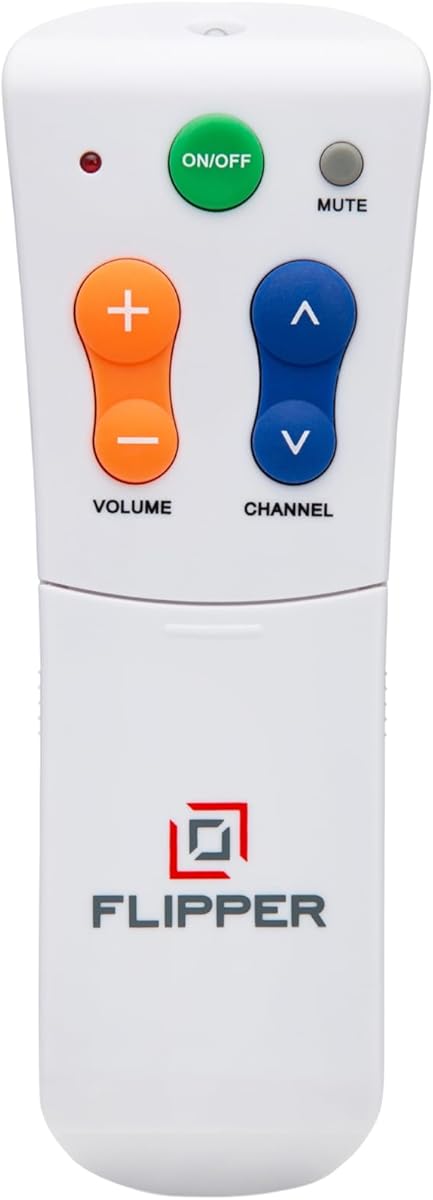
The Flipper Big Button TV Remote stands out as the top choice for seniors needing clarity and simplicity. With a 4.2 rating it delivers reliable performance through its intuitive design that reduces confusion during daily use.
We may earn a commission when you buy through this link, at no additional cost to you.
Its standout feature is the four-button main layout using distinct colors like green for power and orange for volume. Hidden buttons allow caregivers to program up to twenty-five favorite channels letting users cycle through shows without memorizing numbers.
While it lacks navigation for streaming apps like Netflix this limitation ensures focus on traditional TV functions which benefits users overwhelmed by complex menus. The higher price reflects the specialized design aimed at independence and caregiver peace of mind.
This remote is ideal for households with cable or satellite setups where basic control is paramount. It empowers seniors with dementia or low vision to enjoy TV independently while reducing frustration from misplaced buttons or confusing interfaces.
The four-button design ensures users only access essential functions without navigating hidden menus or confusing symbols.
Customizable favorites allow seniors to reach favorite channels instantly without needing assistance from caregivers.
We may earn a commission when you buy through this link, at no additional cost to you.
The GE BigEZ OneTouch Remote offers exceptional value with its fully backlit white design and colorblind-friendly buttons. Rated 4.3 it provides clear visibility in low-light conditions making it easy to locate buttons quickly at night.
We may earn a commission when you buy through this link, at no additional cost to you.
It comes preset for Samsung LG Vizio Sony and Roku TVs streamlining setup significantly. The OneTouch button reduces programming steps while U.S.-based technical support offers help if issues arise during configuration or daily use.
Though limited to five brands it covers most major manufacturers found in typical households. The affordable cost makes it accessible for multiple rooms or backup use without sacrificing essential features like backlighting and simplicity.
This remote suits budget-conscious buyers who prioritize visibility and ease of setup. It balances cost with functionality ensuring seniors can control their TV without struggling to see labels or navigate complex menus during evening viewing.
Full backlighting ensures buttons remain visible even in dark living rooms reducing the need for extra lamps.
Free technical support provides peace of mind for families needing assistance with programming or troubleshooting.
We may earn a commission when you buy through this link, at no additional cost to you.
This premium remote delivers standout features like a thirty-second backlight and included protective cover for Samsung TVs. Its 4.4 rating highlights reliability and speed with a 0.1-second response time that eliminates lag during channel changes.
We may earn a commission when you buy through this link, at no additional cost to you.
The included silicone cover and wall hook prevent loss and damage which benefits users with mobility challenges. No setup is required allowing immediate use after battery insertion while the ergonomic shape ensures comfortable handling for arthritic hands.
While limited to Samsung TVs the specialized design justifies the investment for households with that brand. The backlight duration provides ample time to locate buttons without needing to hold a light or search in darkness.
Buyers seeking top-tier reliability and convenience should consider this option. It combines speed protection and visibility in one package ensuring smooth daily operation for seniors who value quality and ease of access during viewing.
The soft silicone cover shields against drops and spills common in busy household environments.
Upgraded chip technology ensures instant command execution reducing wait time when changing channels.
We may earn a commission when you buy through this link, at no additional cost to you.
The EZclicker Big Button Universal Remote delivers solid performance with its extra-large enter button and tactile feedback. Its 4.2 rating reflects user satisfaction with the straightforward design that prioritizes comfort and accessibility over complex features.
We may earn a commission when you buy through this link, at no additional cost to you.
Setup involves holding mute and volume plus buttons until changes occur which is intuitive for most users. The compact 7-inch size makes it easy to grip and store while the black design blends into most living room setups.
It lacks support for streaming devices or cable boxes which may limit versatility but ensures focus on core TV functions. This trade-off suits seniors who primarily watch broadcast or cable channels without needing smart app navigation.
For those seeking a lightweight and simple remote the EZclicker is a reliable choice. It provides essential controls without overwhelming users making it suitable for daily use in standard TV viewing environments.
The lightweight and compact design reduces hand strain during extended holding periods.
Automatic pairing through mute and volume buttons removes the need for manual code entry.
We may earn a commission when you buy through this link, at no additional cost to you.
This remote offers immediate usability with no programming required and broad compatibility across nine major TV brands. A 4.4 rating confirms its reliability and ease of use for seniors needing a straightforward replacement for lost remotes.
We may earn a commission when you buy through this link, at no additional cost to you.
The extra-large enter button and tactile design ensure precise input without accidental presses. A ninety-day warranty provides additional peace of mind while responsive customer support helps resolve any issues quickly if they arise.
Like many models it does not support streaming devices limiting its scope to traditional TV functions. This simplifies the interface ensuring users only access essential controls without navigating app menus or complex settings.
Ideal for households seeking plug-and-play convenience this remote delivers dependable performance. Its wide brand support and warranty make it a safe choice for families needing a reliable solution without technical setup steps.
Users can insert batteries and begin using the remote immediately without code entry.
Compatibility with nine brands ensures most standard TVs work without additional configuration.
We may earn a commission when you buy through this link, at no additional cost to you.
This remote features a clear layout and ergonomic grip designed to reduce effort during daily use. Its 4.4 rating highlights satisfaction with the straightforward design that prioritizes visibility and comfort for elderly users.
We may earn a commission when you buy through this link, at no additional cost to you.
Extra-large buttons ensure easy visibility and precise pressing reducing the chance of accidental clicks. The durable build ensures longevity while the traditional TV focus avoids complexity that often confuses users with cognitive challenges.
Lacking backlighting it may require good ambient lighting for evening use. However this trade-off keeps costs low and simplicity high making it suitable for homes where lighting is adjusted to aid visibility.
For seniors needing a dependable and lightweight remote this model offers solid value. It balances durability with ease of use ensuring consistent performance for standard TV operations without unnecessary complications.
The body is shaped to fit naturally in the hand reducing fatigue during use.
Labels are large and distinct making identification quick even without reading glasses.
We may earn a commission when you buy through this link, at no additional cost to you.
The Philips BigEZ OneTouch provides essential features like a backlit keypad and OneTouch setup button for simplified programming. With a 3.8 rating it offers functional control though user feedback suggests occasional setup inconsistencies.
We may earn a commission when you buy through this link, at no additional cost to you.
Its colorblind-friendly layout uses distinct orange and blue buttons for volume and channels aiding users with vision issues. Multi-device control allows operation of TVs and soundbars which reduces clutter in shared entertainment setups.
Free U.S.-based technical support offers assistance if the OneTouch button fails to pair correctly. This support adds value for families unfamiliar with remote programming or troubleshooting signal issues.
This model suits those prioritizing backlighting and brand recognition. While setup may require patience the design delivers clear visibility and reliable daily use once configured properly for home entertainment systems.
Full keypad illumination helps locate buttons quickly in dark environments without extra lighting.
Direct technical assistance ensures help is available if initial setup encounters difficulties.
We may earn a commission when you buy through this link, at no additional cost to you.
This remote focuses on essential functions with big buttons and a clear layout for straightforward operation. A 3.0 rating indicates mixed experiences but it remains a functional option for basic TV control needs.
We may earn a commission when you buy through this link, at no additional cost to you.
The design prioritizes simplicity with large visible buttons that reduce accidental presses during use. It supports traditional TVs ensuring core functions like power and volume work without needing advanced features.
Due to its lower rating users should expect basic performance without premium features like backlighting or advanced setup aids. It serves as an entry-level solution for those needing a simple replacement at low cost.
Buyers seeking minimal cost and basic utility may find it sufficient. However those needing reliability or specialized features might benefit from higher-rated models in this roundup.
Focuses on only the most necessary buttons to avoid confusion.
Priced lower than many rivals making it accessible for tight budgets.
We may earn a commission when you buy through this link, at no additional cost to you.
The Anderic RR1004 features glow-in-the-dark keys and minimal essential controls for low-light operation. Its 4.0 rating reflects reliability for those prioritizing visibility and simple layouts over advanced features.
We may earn a commission when you buy through this link, at no additional cost to you.
Pre-programmed for LG TVs it offers immediate use while IR learning allows copying functions from existing remotes like input buttons. This flexibility helps tailor the device to specific household setups without complex code entry.
Setup requires line-of-sight and may need assistance initially but simplifies long-term use. The minimalist design reduces confusion by eliminating unnecessary buttons ensuring seniors only access core TV functions.
This model works well for LG owners or those needing a basic IR remote. The glow-in-the-dark feature adds practical value for night viewing ensuring controls remain visible without extra lighting.
Glowing keys ensure visibility in the dark for easier navigation.
IR learning lets users copy missing commands from their old remote.
We may earn a commission when you buy through this link, at no additional cost to you.
The EZclicker Simple Remote offers tactile feedback and a compact six-inch design for easy handling. Its 4.2 rating confirms user satisfaction with the straightforward layout that eliminates unnecessary complexity for daily viewing.
We may earn a commission when you buy through this link, at no additional cost to you.
Setup involves holding mute and volume buttons to pair which is simple for most users. It supports major TV brands but excludes streaming devices ensuring focus on traditional channels which suits seniors avoiding smart features.
The compact size makes it easy to store or carry between rooms without burdening the user. This practicality combined with tactile buttons provides a reliable experience for core TV operations.
Ideal for households seeking a basic and compact remote this model delivers consistent performance. It balances simplicity with reliability ensuring seniors can control their TV without frustration or technical hurdles.
Six-inch length ensures the remote fits easily in small spaces or hands.
Tactile buttons provide physical confirmation when pressed reducing mis-clicks.
We may earn a commission when you buy through this link, at no additional cost to you.
Selecting the right remote requires evaluating several key factors that impact daily usability and comfort for older adults.
Large buttons reduce accidental presses and make it easier for those with limited dexterity to find and press the right key. Tactile feedback ensures physical confirmation when a button is pressed which helps users who cannot rely solely on sight.
Prioritize remotes with oversized keys and raised surfaces for the best tactile experience.
Backlit or glow-in-the-dark keys allow users to find controls in low-light environments without needing extra lamps. Color coding helps distinguish between volume channel and power functions quickly reducing confusion during use.
Look for remotes with full backlighting or distinct color layouts for optimal visibility.
Remotes that require no manual code entry or use automatic pairing reduce setup frustration. One-touch or preset brand options allow immediate use which benefits caregivers and users who may struggle with complex instructions.
Choose models with automatic pairing or preset brand buttons for easiest setup.
Ensure the remote supports your specific TV brand and any additional devices like cable boxes or soundbars. Some remotes only work for TVs while others manage multiple devices helping reduce clutter and confusion.
Verify compatibility with your existing setup before purchasing to avoid functionality gaps.
A lightweight ergonomic design reduces hand strain during extended use while durable materials ensure longevity. Soft-touch surfaces or silicone covers can protect against drops and improve grip for users with shaky hands.
Opt for remotes with comfortable grips and sturdy construction to handle daily use.
Access to technical support and warranty protection ensures help is available if setup issues or failures occur. U.S.-based support or responsive customer service can save time for families unfamiliar with remote configuration.
Check for warranty terms and support availability to ensure long-term reliability.
Prices range significantly based on features like backlighting and programming ease. While premium remotes offer specialized benefits budget models provide essential functionality for those needing basic control without extra costs.
Balance cost against required features to find a remote that fits your needs.
Some remotes cannot navigate streaming apps which may be a limitation if users rely on services like Netflix or YouTube. Traditional remotes focus on power volume and channels simplifying the interface for standard broadcast viewing.
Decide if streaming navigation is necessary before selecting a remote model.
Start by inserting batteries according to the polarity marks inside the battery compartment. For remotes requiring setup follow the included guide to pair with your TV using the auto-pair or brand preset method.
Store the remote in a consistent accessible location like a bedside table or side table so it does not get misplaced. Use provided wall hooks or mounts if available to keep the remote within reach and off furniture where it could fall.
Clean buttons gently with a soft dry cloth to remove dust and oils without damaging the surface. Avoid liquids or harsh cleaners that may corrode internal components or reduce tactile feedback over time.
Yes many remotes support basic smart TV functions like power volume and channel control. However most lack navigation buttons for accessing streaming apps so users may need a separate remote for Netflix or similar services.
Most models do not include batteries so users should prepare AA or AAA cells depending on the specific remote. Check the product description carefully to confirm which type is required before purchasing.
Some remotes like the Flipper allow caregivers to program up to twenty-five favorite channels. These custom settings let users cycle through preferred shows easily without needing to recall channel numbers.
First check that batteries are fresh and inserted correctly. If issues persist contact customer support or refer to online setup videos provided by the manufacturer for troubleshooting guidance.
Some remotes support both TV and cable box control but others are TV only. Verify compatibility with your specific cable provider and box model before buying to ensure full functionality.
Simple pairing remotes often take less than a minute to connect. Models requiring manual code entry may take several minutes depending on the user's familiarity with the instructions.
The Flipper GE BigEZ and Backlit Big Button remotes lead this roundup with their unique designs that prioritize visibility simplicity and support for seniors. Each offers distinct strengths suited to different household needs and budget constraints.
When choosing focus on button size lighting features and setup complexity to ensure the remote matches the user's abilities. Compatibility with your TV brand and any additional devices should also be verified before purchase.
Prices and availability change regularly so review the latest details on each product page before finalizing your decision. Selecting the right remote can significantly improve daily viewing comfort and independence for older adults.