
Integral 4GB Crypto-197
4.1Editor score
FIPS 197 Certified
Auto-Lock Functionality
Waterproof Double Layer Design
This guide compares the top encrypted USB flash drives for security, speed, and durability to help you choose the right device for protecting your sensitive
In today's digital landscape, securing sensitive data is more critical than ever. Encrypted USB flash drives offer a robust solution for protecting confidential files from unauthorized access and physical theft. These devices combine hardware encryption with user-friendly interfaces to ensure your information remains safe wherever you go.
We have evaluated the leading models on the market based on encryption standards, build quality, and performance. Our analysis covers a wide range of options from budget-friendly choices to enterprise-grade solutions. Each product was selected for its ability to meet rigorous security requirements while maintaining ease of use for everyday tasks.
Every pick in this list highlights key features like FIPS validation, password protection, and hardware durability. Keep in mind that prices and availability can change rapidly due to market conditions. We recommend verifying the latest details before making your final purchase decision to ensure you get the best value for your needs.
4.1Editor score
4.6Editor score

4.5Editor score
The following table provides a side-by-side comparison of all ten models reviewed in this guide. It highlights key specifications and security features to help you quickly identify the device that best fits your specific protection needs.


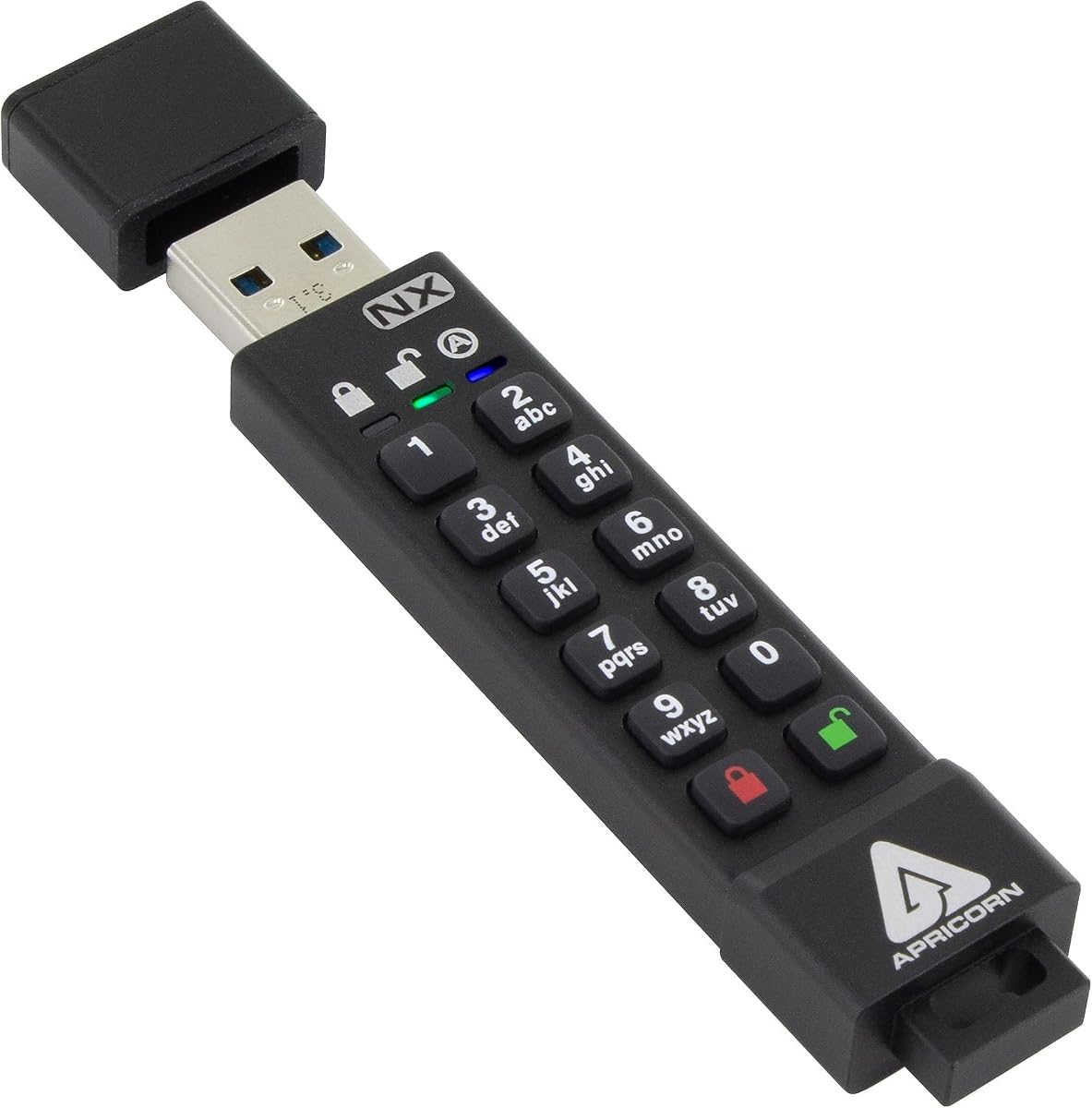
The Apricorn 8GB Aegis Secure Key 3 NX stands out as a top contender for those needing rigorous data protection. With FIPS 140-2 Level 3 validation, it meets the highest security standards available for commercial and government use. This device ensures that your sensitive information is protected by hardware encryption that is virtually impossible to bypass without the correct credentials.
We may earn a commission when you buy through this link, at no additional cost to you.
Its dual admin and user mode capability provides flexible access control suitable for various organizational needs. You can configure read-only modes to prevent accidental overwrites while maintaining the ability to share files securely. The inclusion of data recovery PINs adds a critical safety net should you forget your primary access code, ensuring you never lose vital data.
While the price is higher than standard flash drives, the security features justify the investment for professionals handling confidential information. The setup process requires attention to detail but pays off with long-term reliability and peace of mind. This drive is an excellent choice for anyone who prioritizes security above all else in their storage solution.
This product is ideal for IT administrators, compliance officers, and anyone who needs to transport classified data. We recommend it for users who value certified security over lower cost. Always verify the latest firmware updates to ensure you are benefiting from the most recent security patches and performance improvements.
FIPS 140-2 Level 3 validation means this drive meets rigorous government security standards for encryption modules.
Separate admin and user modes allow for granular control over who can read or write data to the drive.
We may earn a commission when you buy through this link, at no additional cost to you.
The Kingston IronKey Vault Privacy 50 delivers enterprise-level security with a generous 256GB storage capacity. It features XTS-AES 256-bit hardware encryption which is widely considered the gold standard for data protection. This drive is designed for businesses and individuals who need to store large volumes of sensitive files without compromising on security protocols.
We may earn a commission when you buy through this link, at no additional cost to you.
Its protection against brute force attacks and BadUSB threats makes it highly resilient against modern cyber threats. The multi-password option and new passphrase mode allow for complex authentication strategies that are harder to guess yet easier to remember. Dual read-only settings provide additional safety against accidental data corruption during file transfers.
The drive is TAA compliant which makes it eligible for government procurement contracts. This certification is essential for users in public sector roles who must adhere to strict trade agreements. While the initial setup might take some time, the robust security features offer unmatched peace of mind for long-term data safety.
We recommend this drive for enterprise users and government contractors needing high-capacity secure storage. It is best suited for those who require certified hardware encryption and are willing to pay a premium for it. Always keep your recovery credentials safe as losing them could result in permanent data loss.
Compliance with TAA and FIPS 197 ensures this drive meets government and enterprise procurement standards.
Multi-password and passphrase modes offer flexible security configurations to match your specific access requirements.
We may earn a commission when you buy through this link, at no additional cost to you.
The Apricorn Aegis Secure Key 3 NXC bridges the gap between legacy USB-A and modern Type-C devices. With USB 3.2 Type C connectivity it ensures compatibility with the latest laptops and tablets while maintaining FIPS 140-2 Level 3 validation. This makes it an excellent choice for users transitioning to newer hardware without sacrificing security standards.
We may earn a commission when you buy through this link, at no additional cost to you.
It operates without requiring any software installation which simplifies use across different operating systems. The separate admin and user modes provide the same granular control found in the A-series drives. The internal battery ensures the drive remains powered even if the host device cuts power unexpectedly during a write operation.
While the need for an internal battery adds complexity it ensures data integrity during transfer. The hardware encryption is robust and prevents unauthorized access even if the drive is stolen. This device is particularly useful for mobile professionals who rely on Type-C ports for all their peripherals and need high-speed data access.
We suggest this drive for users with modern laptops who need high security. It is a great solution for those who want seamless integration with Type-C ecosystems. Remember to charge the drive periodically to maintain its functionality for secure file transfers.
USB 3.2 Type C ensures broad compatibility with the latest mobile devices and laptops.
Internal battery support prevents data loss during power interruptions during write operations.
We may earn a commission when you buy through this link, at no additional cost to you.
The Integral 4GB Crypto-197 offers a cost-effective entry point into the world of secure storage. While its capacity is modest it provides FIPS 197 certification which ensures government approved high-level information security. The auto-lock feature and brute force protection make it a reliable option for casual users who need basic data protection.
We may earn a commission when you buy through this link, at no additional cost to you.
Its waterproof double layer design protects the electronics from water immersion and physical drops. This durability is rare in budget drives and makes it suitable for fieldwork or environments where equipment might get damaged. The simple password entry requirement ensures that only authorized individuals can access the stored data.
Users should be aware that the small capacity limits its use for large video or backup files. However for storing documents and small spreadsheets it is more than sufficient. The lack of software installation keeps it lightweight and easy to deploy across multiple computers without configuration issues.
We recommend this drive for students or casual users who need basic security on a budget. It is ideal for protecting essential documents rather than large media collections. Always remember to keep your password secure as there is limited recovery options on budget models.
This drive provides certified security at a fraction of the cost of enterprise solutions.
Waterproof and rugged casing ensures the drive survives harsh environments and accidental drops.
We may earn a commission when you buy through this link, at no additional cost to you.
The iStorage datAshur PRO features a hardware PIN keypad which adds a physical layer of security. You simply enter a 7-15 digit PIN to authenticate and use it as a normal USB flash drive. This design eliminates the risk of keyloggers capturing your password since no keyboard input is used on the host computer.
We may earn a commission when you buy through this link, at no additional cost to you.
It is compliant with GDPR CCPA and HIPAA regulations making it suitable for healthcare and legal professionals. The IP57 certification ensures it resists dust and water allowing for safe use in various environments. Compatibility with Windows macOS Linux and Android ensures you can use it across any device without software drivers.
While the keypad is convenient it may wear out over time with heavy use. The price is higher than software-based options but the physical security justifies the investment for sensitive data. This drive is perfect for users who want strong security without needing to install software on borrowed computers.
We recommend this drive for IT staff and healthcare workers who need versatile compliance. It is best suited for those who prefer physical authentication over software passwords. Ensure you protect the keypad from excessive force to extend the lifespan of the device.
Built-in keypad means passwords are never typed on the host computer preventing keylogger threats.
Meets major privacy regulations like GDPR and HIPAA for professional data protection.
We may earn a commission when you buy through this link, at no additional cost to you.
This secure flash drive offers 64GB of storage with built-in hardware encryption to protect your files. The automatic lock feature engages if the device is unplugged or not connected within 30 seconds. This helps prevent data theft if you accidentally leave the drive plugged into a public computer.
We may earn a commission when you buy through this link, at no additional cost to you.
The aluminum alloy shell provides a durable exterior that resists physical damage. It supports high-speed USB 3.0 transfers which make backing up large files quicker than standard drives. The reset function wipes all data after ten incorrect password attempts ensuring that brute force attacks do not compromise your information.
While the auto-wipe feature is a strong security measure it can be frustrating if you enter your password incorrectly multiple times. Users should be cautious and careful with their PINs to avoid losing data. This drive is a good middle ground for those who want decent storage and solid security without breaking the bank.
We suggest this drive for general office users who need to move confidential files. It is best for those who can manage their passwords carefully. Always store backup copies of critical data elsewhere to prevent loss from accidental resets.
Automatically locks when removed from the computer to prevent unauthorized access on shared devices.
Wipes data after repeated failed attempts to ensure physical compromise during brute force attacks.
We may earn a commission when you buy through this link, at no additional cost to you.
The Lexar JumpDrive F35 PRO utilizes fingerprint authentication to provide quick and secure access to your files. This eliminates the need to remember complex passwords while still maintaining strong encryption standards. You can save up to 10 different fingerprints which makes sharing the drive with a team easier.
We may earn a commission when you buy through this link, at no additional cost to you.
With read speeds up to 400MB/s this drive is one of the fastest options available. This speed is ideal for users who need to transfer large video files or backups quickly. The 256-bit AES encryption ensures that even if the drive is lost the data remains inaccessible to others.
Fingerprint scanners can sometimes be sensitive to dry skin or moisture so you may need to adjust the sensor. Additionally compatibility might be limited compared to standard password drives. However for users who want convenience and speed this drive offers a unique solution in the secure storage market.
We recommend this drive for creative professionals who handle large files regularly. It is best for those who value speed and easy access over complex administrative controls. Keep your fingerprint data secure as it is stored locally on the device.
Fingerprint scanner allows for fast and secure access without typing a password every time.
Ultra-fast read speeds make it perfect for transferring large media files quickly.
We may earn a commission when you buy through this link, at no additional cost to you.
The iStorage datAshur PRO2 is a rugged secure drive designed to withstand the harshest conditions. With an IP68 certification it is dust tight and can survive prolonged immersion in water. This level of protection makes it ideal for fieldwork or environments where equipment exposure to elements is high.
We may earn a commission when you buy through this link, at no additional cost to you.
It features the same PIN authentication as the previous model but with improved speed and durability. The USB 3.2 interface ensures fast data transfers which is crucial when working with time-sensitive data. Its cross-platform compatibility ensures it works seamlessly across Windows Linux and Android devices.
The drive is quite expensive which reflects its advanced durability and security features. It is best suited for industries like construction or military where standard electronics might fail. If you need a drive that can survive accidental drops and water submersion this is a top-tier choice.
We recommend this drive for professionals who work in extreme environments. It is an excellent choice for those who need guaranteed data safety regardless of conditions. Always ensure you back up your data before submerging the drive to prevent total loss if the casing fails.
IP68 rating ensures the drive survives total immersion and dust exposure.
Designed for users who need reliable access to data in demanding field conditions.
We may earn a commission when you buy through this link, at no additional cost to you.
The Kingston Ironkey D500S offers military-grade security with FIPS 140-3 Level 3 certification pending. This drive includes a dual hidden partition feature which allows you to hide sensitive data in plain sight. It also has BadUSB protection which prevents malicious code from executing when you plug the drive in.
We may earn a commission when you buy through this link, at no additional cost to you.
Its rugged zinc casing protects against physical attacks and ensures durability in high-risk environments. The crypto-erase password feature allows you to securely delete all data in an emergency if the drive is compromised. This makes it an essential tool for defense contractors or those handling highly sensitive information.
While the capacity is limited at 16GB the security features are paramount for its target audience. The configuration process is complex and requires careful planning to set up partitions correctly. However for those who need top-tier protection this drive provides peace of mind that few others can match.
We recommend this drive for military and government personnel handling classified data. It is ideal for high-security situations where physical and digital threats are high. Always document your crypto-erase codes securely in case they are needed for an emergency wipe.
Industry-first feature that allows you to create a hidden partition for stealth data storage.
Zinc casing offers resistance to physical attacks and extreme environmental damage.
We may earn a commission when you buy through this link, at no additional cost to you.
The Kingston D300S is a straightforward hardware encrypted drive that keeps essential documents safe. It uses AES 256 XTS encryption to ensure data security across multiple operating systems. This drive is designed for users who need a simple solution to protect a few files without complex features.
We may earn a commission when you buy through this link, at no additional cost to you.
Its small form factor makes it easy to carry on a keychain or in a pocket. The hardware encryption ensures that software vulnerabilities on your computer do not expose your data. It is a reliable choice for personal use where you need to move tax documents or passwords safely.
While it lacks advanced features like PIN keypads or partitions it delivers core security efficiently. The capacity is small but sufficient for text files and small databases. This drive is a solid recommendation for anyone who wants a hassle-free way to secure their USB storage.
We suggest this drive for users who want simple secure storage without complications. It is best for carrying small amounts of critical data securely. Always ensure you remember your password as the device has no built-in recovery mechanism.
256-bit XTS encryption provides high-grade security for files stored on the drive.
Simple password protection ensures anyone can use it without technical knowledge.
We may earn a commission when you buy through this link, at no additional cost to you.
Choosing the right secure storage device requires careful consideration of encryption standards and usage needs.
Look for hardware-based encryption using AES 256-bit algorithms. Hardware encryption is superior to software encryption because it protects data even if the drive is connected to a compromised computer. Ensure the encryption is self-contained within the drive itself.
Always prioritize drives with hardware encryption over software-only solutions for maximum security.
Certifications like FIPS 140-2 Level 3 provide assurance that the device meets government security standards. This is essential for professionals working in regulated industries like finance or healthcare. It validates the encryption module has passed rigorous testing by a third party.
Choose certified drives if you work in compliance-heavy industries to meet regulatory requirements.
Decide whether you want password entry or a physical PIN keypad. PIN keypads offer better protection against keyloggers since the password is never typed on the host computer. Biometric options like fingerprints offer convenience but may have sensitivity issues.
Select an authentication method that balances security with your daily workflow convenience.
Verify that the drive supports your specific operating system before purchasing. While most work on Windows and macOS Linux compatibility can sometimes require specific drivers or software. Cross-platform support ensures you can use the drive across different workstations without issues.
Confirm compatibility with all devices you plan to use to avoid connection or data access problems.
Physical durability is critical for portable storage. Look for waterproof and dust-resistant ratings if you work in field environments. Rugged casing protects the internal electronics from drops and impacts which are common with USB drives.
Select a drive with a sturdy build if you travel frequently or work in rough conditions.
Some premium models offer data recovery PINs or self-destruct modes. Recovery PINs ensure you do not lose data if you forget your password. Self-destruct modes help secure your data in case the drive is stolen or seized.
Consider recovery features to ensure you do not lose access to your data if credentials are lost.
Always enter your PIN or password before transferring any files. Ensure the drive is unlocked before copying data to it and lock it immediately after use to prevent unauthorized access. This habit keeps your data secure on shared or public computers.
Keep your backup credentials safe in a secure location separate from the drive. If you lose your password and recovery PIN you will lose access to your data permanently. Do not store recovery codes on the same device you are trying to protect.
Avoid exposing the drive to extreme temperatures or liquids if it is not rated for them. Dust and moisture can damage the internal electronics over time. Clean the connectors gently with a soft cloth to maintain reliable connection speeds.
Yes hardware encryption protects your data even if the host computer is infected with malware. Software encryption can be bypassed by keyloggers or screen capture tools but hardware encryption runs independently. This added security is essential for protecting sensitive personal or business information.
FIPS 140-2 focuses on the security of the cryptographic module including physical security and authentication. FIPS 197 focuses on the encryption algorithm itself ensuring it uses standards like AES. Both are valuable but FIPS 140-2 offers broader certification for the entire device.
Most encrypted drives work on Windows macOS and Linux without additional software. However some specialized models may require specific drivers for older systems. Always check the manufacturer requirements before using the drive on public or shared computers.
If you forget your PIN and have a recovery code you can reset the access using that code. Without a recovery code most devices will wipe the data to ensure security is not compromised. Always store recovery codes safely to prevent permanent data loss.
Many modern drives come with Type-C connectors or adapters for Type-C ports. Check the specifications to ensure compatibility with your specific device port type. Most top models support both USB-A and Type-C for maximum versatility.
Hardware encryption drives handle encryption internally without software installed on your computer. They typically look like a normal USB stick but require a PIN on the drive itself. Software drives require a program installed on the host computer to encrypt files.
We have reviewed ten top models that cater to different security needs and budgets. From the high-security Apricorn Aegis to the budget-friendly Integral Crypto each option offers unique benefits. Your choice should depend on your required security level and usage environment.
Prioritize hardware encryption and certified standards like FIPS to ensure your data is truly protected. Features like auto-lock and PIN keypads add layers of safety that software solutions cannot provide. Choose a drive that fits your workflow while maintaining rigorous security protocols.
Prices and availability change frequently so verify the latest details before purchasing. Always check current product reviews and ensure the model meets your needs before buying. Protecting your data is an investment in your privacy and security.