
RedThunder One Handed Gaming Keyboard RGB Backlit
4.4Editor score
35 anti-ghosting keys
RGB backlit modes
Compact ergonomic design
This guide compares the top 10 gaming keypads for 2026, covering wired and wireless models with macro keys, RGB lighting, and ergonomic designs for FPS and MMO
Gaming keypads offer a specialized way to enhance your gaming setup by providing dedicated controls for complex macros and actions. These devices free up your main keyboard and allow for quicker access to essential commands during intense sessions.
We compared ten top models based on switch types, programmability, ergonomics, and connectivity options. Our analysis includes wired and wireless designs tailored for FPS, MOBA, and RPG players who need reliable performance.
Each pick highlights unique strengths like Hall Effect switches, thumbsticks, or compact layouts. Note that prices fluctuate often, so check current listings before purchasing to ensure you get the best value available today.
4.4Editor score

4.3Editor score

4.3Editor score
The table below provides a side-by-side view of the ten selected gaming keypads. It outlines key specifications like switch types, key counts, and connectivity to help you decide quickly.




The Razer Tartarus V2 stands out as a top choice for gamers needing dedicated controls. With a 4.3 rating, it delivers reliable performance through its mecha-membrane switches that mimic mechanical feedback without the noise.
We may earn a commission when you buy through this link, at no additional cost to you.
Its 32 programmable keys allow you to map complex commands easily, while the 8-way directional thumbpad enhances movement control for console-style players. The Chroma lighting integrates seamlessly with games and other hardware.
While it requires Razer Synapse for full customization and is designed only for left-hand use, the ergonomic fit and soft cushions make long sessions comfortable. The thumbpad is a standout feature for strategy games.
If you want a polished, feature-rich keypad that balances comfort and power, this is an excellent investment. It suits gamers who prioritize customization and immersion in their setup.
The thumbpad provides natural movement controls, reducing strain on the left hand during long play sessions.
Lighting effects react to in-game events, enhancing immersion across supported titles and peripherals.
We may earn a commission when you buy through this link, at no additional cost to you.
The Redragon K585 Wired offers a robust feature set at a competitive price. Rated 4.4 by users, it provides 42 keys including 7 dedicated macro keys to streamline your gameplay commands.
We may earn a commission when you buy through this link, at no additional cost to you.
A standout utility is the USB pass-through port, allowing you to plug your mouse directly into the keypad for a cleaner desk. You can also swap switches without soldering to adjust tactile feedback.
While it lacks wireless options, the detachable wrist rest helps with portability and ergonomics. The RGB lighting offers vibrant customization to match your battlestation setup.
This keypad is ideal for budget-conscious gamers who need reliable performance and extra desk space. Its practical features make it a strong contender in the wired category.
Connect your mouse directly to the keypad to reduce cable clutter and optimize mouse movement space.
Upgraded sockets support most 3-pin or 5-pin switches, letting you tune the feel to match your main board.
We may earn a commission when you buy through this link, at no additional cost to you.
The Redragon K585 PRO adds wireless flexibility to the K585 series. With a 4.2 rating, it lets you place the keypad anywhere on your desk while maintaining consistent performance via Bluetooth or 2.4GHz.
We may earn a commission when you buy through this link, at no additional cost to you.
Battery life supports 15-20 hours of continuous play, enough for most gaming sessions. It retains the swappable switch socket and magnetic wrist rest for customization and comfort.
Although you must recharge occasionally, the freedom of wireless use is significant for tidy setups. The software allows deeper macro and lighting customization.
Choose this if you want wireless freedom without sacrificing the ergonomic and programmable features of the wired version. It fits well in modern, clean desk environments.
Both Bluetooth and 2.4GHz modes provide stable connections, letting you position the keypad freely.
A single charge offers up to 20 hours of gameplay, reducing downtime for charging during sessions.
We may earn a commission when you buy through this link, at no additional cost to you.
The AZERON Gaming Keypad delivers advanced control with its Hall Effect thumbstick. Rated 4.3, it replaces keyboard functions for the left hand, allowing WASD or 360-degree movement in supported games.
We may earn a commission when you buy through this link, at no additional cost to you.
This analog stick eliminates drift and offers adjustable zones and sensitivity. With 30 mappable inputs, you can configure macros and commands precisely across six control layouts.
Though it is pricier than standard keypads, the ergonomic design and modular software updates justify the cost. The thumbstick can even function as a mouse.
If you need high-end precision and analog control, this is a top-tier choice. It suits competitive gamers willing to invest in specialized hardware.
The Hall Effect sensor enables fine-tuned movement without drift, ensuring reliable control in FPS titles.
Future updates and modular enhancements are supported via the redesigned main board for longevity.
We may earn a commission when you buy through this link, at no additional cost to you.
The RedThunder One Handed Gaming Keyboard offers essential features at a low cost. With a 4.4 rating, it provides 35 anti-ghosting keys and a 3ms response speed for quick gameplay actions.
We may earn a commission when you buy through this link, at no additional cost to you.
Macro recording via FN+ESC and FN+F1/FN+F2 allows you to bind simple sequences without complex software. The RGB backlit modes add visual flair to your setup.
While it lacks advanced customization, its plug-and-play nature ensures easy use across Windows and Mac systems. The ergonomic wrist rest helps reduce fatigue.
For casual gamers or those on a strict budget, this model delivers great value. It’s a reliable starter option for one-handed gaming.
Recording macros uses simple key combos, making it easy to automate commands without software installation.
Built-in gaming chips ensure a 3ms response, keeping actions smooth during fast-paced matches.
We may earn a commission when you buy through this link, at no additional cost to you.
The Keychron C0 HE 8K is built for high-level FPS performance. Rated 4.2, it features an 8K polling rate and Hall Effect magnetic switches for rapid trigger and precise movement.
We may earn a commission when you buy through this link, at no additional cost to you.
Actuation points can be adjusted to 0.01 mm precision, allowing faster resets and consistent inputs. A web-based configurator removes the need for software installation on your PC.
While it is wired, the competitive-grade response time makes it ideal for Valorant or CS2 players. The layout suits MMOs and MOBA users too.
If you prioritize speed and precision in competitive titles, this keypad is a standout. Its web setup simplifies configuration across different systems.
Switches reset instantly on key lift, enabling faster movement and counter-strafing in shooters.
Configuration happens in your browser, keeping your system clean and ready across multiple PCs.
We may earn a commission when you buy through this link, at no additional cost to you.
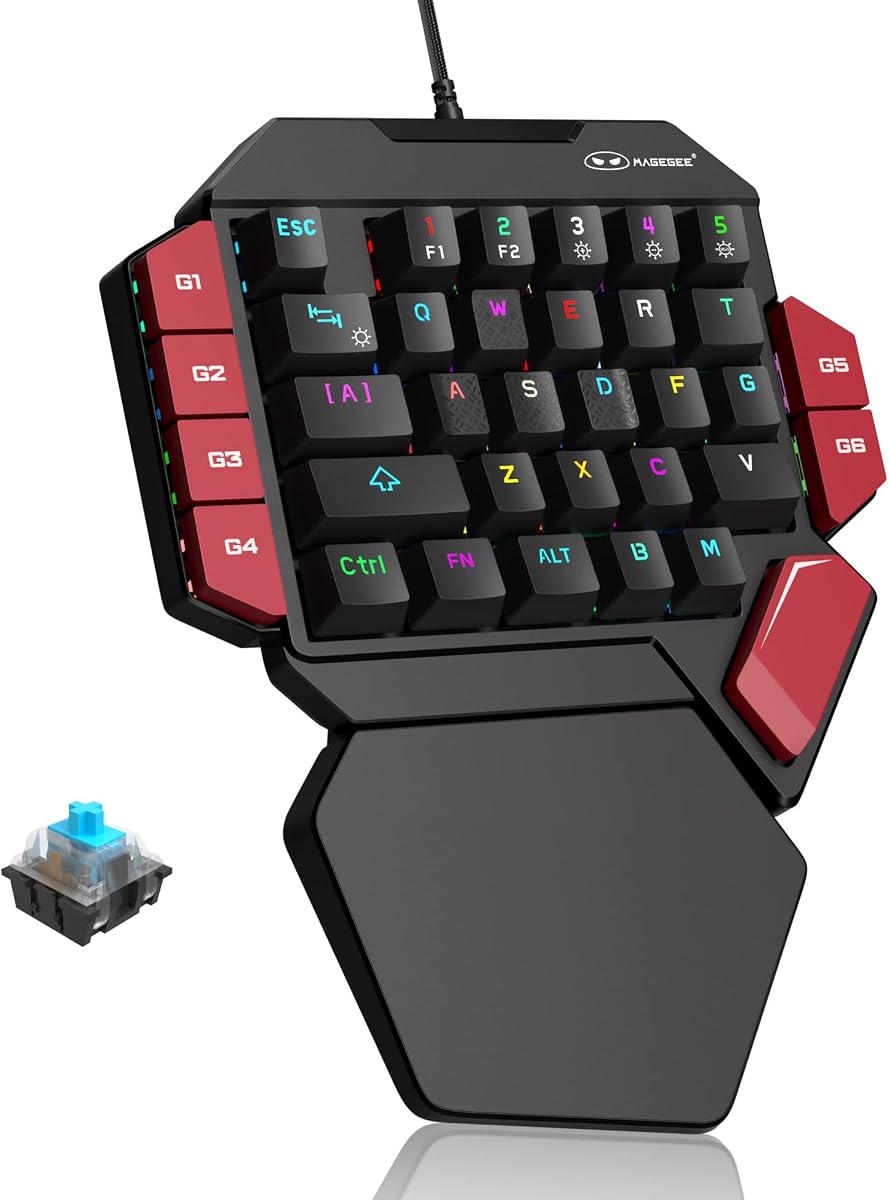
The MageGee One Handed uses Blue mechanical switches for strong tactile feedback. With a 4.3 rating, it provides crisp paragraph feeling and non-conflict keys for precise gaming inputs.
We may earn a commission when you buy through this link, at no additional cost to you.
Six macro recording keys let you bind commands easily via function combos. The RGB backlighting offers static and dynamic modes to suit your style.
Though the switch sound may be loud for shared spaces, the long service life ensures reliability. The palm rest effectively reduces hand fatigue during extended use.
This keypad suits gamers who enjoy the mechanical switch feel and need durable performance. It is a solid wired option for those who value tactile feedback.
Blue switches provide a distinct click and tactile bump, enhancing precision for typing and gaming.
Six keys can record custom macros, simplifying complex action chains in MMOs or RPGs.
We may earn a commission when you buy through this link, at no additional cost to you.
The AJAZZ AK029 packs advanced Hall Effect technology into a compact design. Rated 4.5, it saves 60% desk space, freeing room for large mouse movements.
We may earn a commission when you buy through this link, at no additional cost to you.
Switches offer 0.01mm precision and rapid trigger, eliminating dead zones and debounce delays. The web-based driver lets you customize actuation points directly.
With 20 RGB modes and a rigid aluminum plate, build quality remains high despite the small footprint. This suits FPS gamers needing quick, precise inputs.
If space is limited and speed matters, this keypad excels. It delivers tournament-grade performance without taking up too much desk room.
The 29-key layout is ultra-compact, maximizing desk space for wider mouse movement ranges.
Adjust actuation between 0.1mm and 3.5mm for tailored sensitivity without physical contact.
We may earn a commission when you buy through this link, at no additional cost to you.
The Razer Tartarus V2 Mecha-Membrane Gaming Keypad is a standard option for left-hand setups. Rated 4.2, it uses mecha-membrane tech to provide tactile feedback without noise.
We may earn a commission when you buy through this link, at no additional cost to you.
All 32 keys are programmable, allowing complex macros through Synapse software. The RGB lighting syncs with games and hardware for immersive effects.
While it shares features with the left-handed variant, it may suit users needing just the core keypad function. It fits Razer ecosystems well.
Choose this if you prefer a trusted brand with straightforward programmability. It balances comfort and function for general gaming.
Mecha-membrane switches offer a soft yet responsive keypress, reducing fatigue over time.
RGB effects sync with Chroma-enabled titles, enriching immersion during gameplay.
We may earn a commission when you buy through this link, at no additional cost to you.
The Redragon RM104 Wireless Gaming Keyboard features a smart control knob for audio and lighting. Rated 4.4, it offers tri-mode connectivity and a large battery for continuous use.
We may earn a commission when you buy through this link, at no additional cost to you.
The knob adjusts volume, mutes audio, and cycles RGB modes quickly. Anti-ghosting and programmable software support ensure smooth gaming performance.
Though larger than typical keypads, its versatility makes it ideal for multi-function setups. It pairs well with existing Redragon gear.
If you want a wireless device with extra controls beyond keys, this is a great option. It suits gamers who value convenience and desk flexibility.
Rotate or press the knob to manage audio and RGB without opening apps or using shortcuts.
Tri-mode connectivity ensures stable links via Bluetooth, 2.4GHz, or USB-C cable.
We may earn a commission when you buy through this link, at no additional cost to you.
Selecting the right gaming keypad depends on your play style and desk setup. Here are key factors to consider.
Switch type determines feedback and durability. Mechanical switches offer tactile clicks, while membrane ones are quieter. Hall Effect switches provide adjustable actuation and speed for competitive play.
Choose mechanical for tactile feel, or Hall Effect for speed and longevity.
Decide between wired or wireless. Wired offers zero latency, while wireless frees your desk. Look for Bluetooth or 2.4GHz options with good battery life.
Pick wireless for tidy setups, or wired for consistent connection.
Key count affects how many macros or commands you can map. 29 to 42 keys are common. More keys allow complex binds but take more space.
Opt for more keys if you play MMOs, fewer for FPS simplicity.
Ergonomics reduce strain during long sessions. Look for wrist rests or adjustable angles. A comfortable fit prevents fatigue.
Prioritize wrist support and hand size compatibility.
Customization lets you map keys to suit your game. Some use software, others offer onboard storage. More flexible options suit power users.
Choose software-based for deep changes, or onboard for portability.
RGB lighting enhances immersion and aesthetics. Some offer 16.8 million colors, others static modes. Syncing with games adds a dynamic element.
Select RGB if visual flair matters for your setup.
Build quality affects longevity and stability. Materials like aluminum plates add rigidity. Check reviews for durability reports.
Look for reinforced frames to prevent flex.
Ensure the keypad works with your OS. Windows and Mac compatibility is standard. Driver-free options simplify setup.
Verify system requirements before buying.
First, connect the keypad to your PC and install any required software. Map macros to keys using the provided tool.
Keep the device clean by wiping it with a dry cloth. Avoid moisture to prevent short circuits.
Store it in a cool, dry place when not in use to maintain battery and material health.
No, they suit many genres. MMOs and MOBA players benefit from macros and key binding. RPGs also use them for complex actions.
Some require software for full features. Others are plug-and-play. Check the product description before purchasing to confirm.
Yes, as long as it has USB or wireless support. Ensure your laptop has available ports or Bluetooth capability.
Use a soft brush to remove dust. For deeper cleaning, use compressed air. Avoid liquid cleaners directly on the keys.
Modern wireless models offer low latency. Look for 2.4GHz options to minimize delays during gameplay.
Only hot-swappable models allow this. Check if the device supports switch replacement before attempting.
The Razer Tartarus V2, RedThunder One Handed, and AZERON Gaming Keypad stand out as top picks for different needs and budgets.
Focus on what matters most: comfort, speed, or flexibility. Match the device to your primary games and desk space.
Prices may change, so review current listings before purchasing to secure the best deal available today.