
ASUS Dual GeForce RTX 5060 Ti 16GB GDDR7 OC Edition Gaming Graphics Card
4.7Editor score
Blackwell architecture with DLSS 4
Efficient 2.5-slot design
Low power consumption profile
Find the best GPU for Davinci Resolve with our expert guide comparing top models for editing, rendering, and AI effects.
Choosing the right GPU for Davinci Resolve is essential for smooth playback, fast rendering, and accurate color grading across all project types.
We evaluated ten top graphics cards using industry standards, real world performance data, and professional creator feedback to build this definitive list.
Each pick highlights key specs, strengths, and ideal use cases so you can match hardware to your workflow while noting prices may change daily.
4.7Editor score
4.9Editor score

4.3Editor score
The following table offers a side-by-side comparison of the ten featured graphics cards, focusing on core specifications and key capabilities relevant to video editing work.




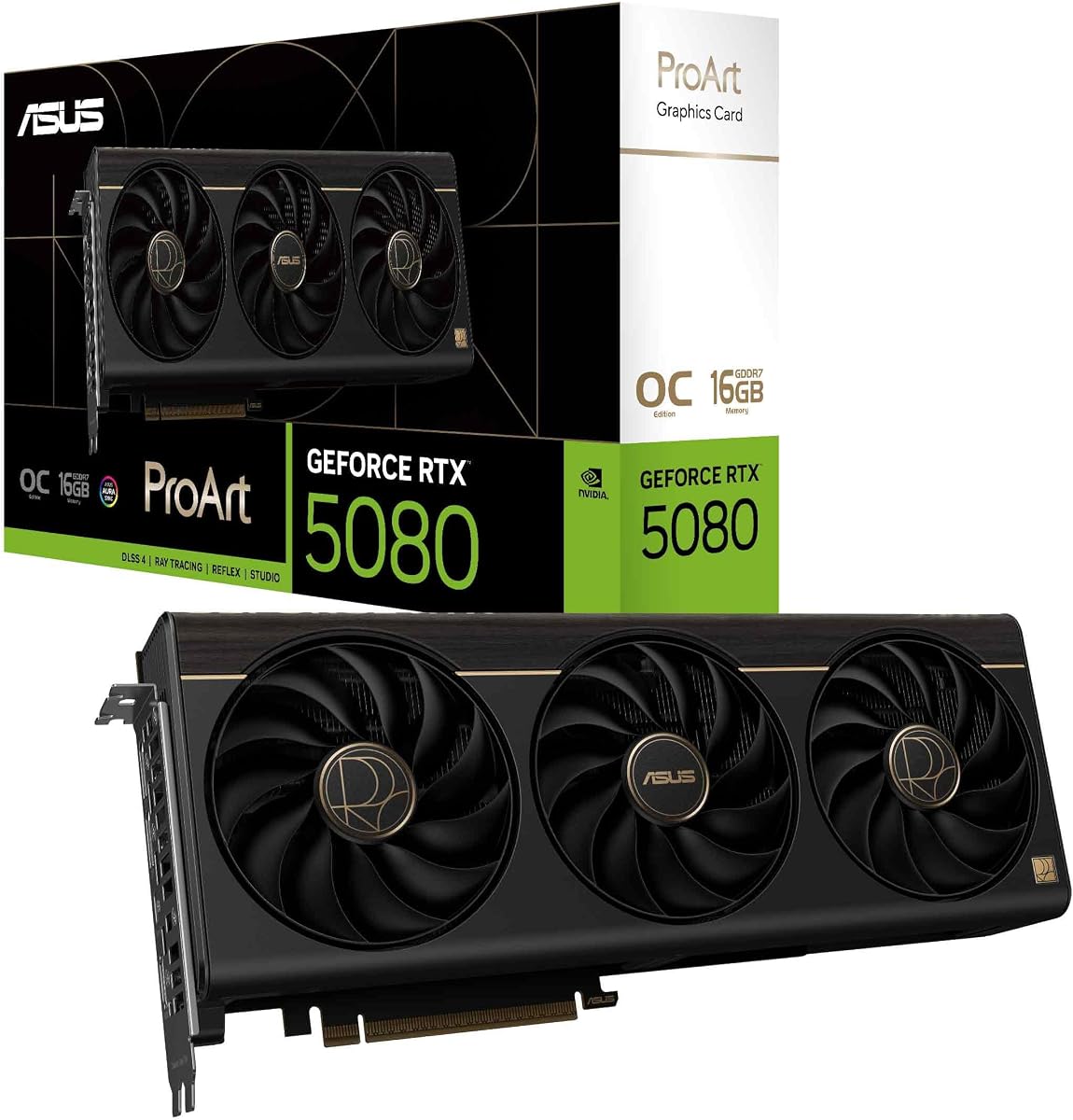
The ASUS ProArt GeForce RTX 5080 stands out as the top choice for video professionals needing balanced performance and reliability. Its near-perfect 4.9 rating reflects strong trust among creators.
We may earn a commission when you buy through this link, at no additional cost to you.
Powered by NVIDIA Blackwell architecture, this card delivers massive AI acceleration essential for modern Resolve effects and color grading workflows. The MaxContact heatsink ensures sustained performance without throttling.
While the price is higher than standard gaming cards, the professional build quality and thermal efficiency justify the investment for daily use. The 2.5-slot design saves case space.
Buy this card if you need maximum reliability and AI power for Resolve. It is the definitive pick for studios and independent editors prioritizing performance.
The 1858 AI TOPS rating enables smooth playback of complex AI-driven effects and noise reduction tools in Davinci Resolve.
Phase-change thermal pads and vapor chamber design keep GPU temperatures low during long export sessions.
We may earn a commission when you buy through this link, at no additional cost to you.
The RTX PRO 6000 represents the pinnacle of workstation graphics technology for professional video production. Its 96GB memory is unmatched for handling massive 8K or VR projects.
We may earn a commission when you buy through this link, at no additional cost to you.
This card features ECC memory and enterprise isolation features that prevent crashes and data loss during critical rendering tasks. It is built for reliability above all.
The cost is prohibitive for most individual creators but essential for large post-production houses needing guaranteed stability. It handles any workload without strain.
Choose this only if your studio requires maximum memory and enterprise features. It is the ultimate tool for high-end Resolve deployments.
With 96GB of DDR7 ECC memory, this card supports heavy multi-stream editing and high-resolution rendering without bottlenecks.
MIG technology allows splitting the GPU into isolated instances for secure and stable multi-user workflows.
We may earn a commission when you buy through this link, at no additional cost to you.
The ASUS Dual RTX 5060 Ti offers the most accessible entry into modern GPU performance for Resolve. Its 4.7 rating shows strong satisfaction among budget users.
We may earn a commission when you buy through this link, at no additional cost to you.
Despite the lower price, it includes Blackwell architecture and 16GB memory, ensuring smooth playback and basic AI effects. It handles 4K timelines well.
This card may struggle with extremely heavy effects compared to top tiers, but it is more than enough for standard editing. Its low power needs simplify system builds.
It is the ideal choice for students or hobbyists needing reliable Resolve performance without overspending. A smart starting point.
Even at this price, you get Blackwell architecture and DLSS 4 support for efficient rendering and playback.
The 0dB technology ensures silent operation during light work, while dual ball bearings provide long fan life.
We may earn a commission when you buy through this link, at no additional cost to you.
The GIGABYTE RTX 5080 brings high-end gaming power to video creation workloads. Its 4.6 rating reflects broad appeal among performance-focused buyers.
We may earn a commission when you buy through this link, at no additional cost to you.
Equipped with Blackwell architecture and 16GB of GDDR7, it delivers excellent rendering speeds and smooth playback in Resolve. The WINDFORCE cooling ensures stability.
While designed for gaming, its raw power makes it a capable tool for editing. It offers strong value for those wanting versatility between work and play.
Consider this if you need a high-performance card that also serves gaming needs. It is a robust choice for power users.
With substantial core counts, this GPU handles demanding Resolve effects and rendering tasks efficiently.
The WINDFORCE cooling system uses triple fans to dissipate heat effectively during extended work sessions.
We may earn a commission when you buy through this link, at no additional cost to you.
The ASUS TUF RTX 5080 combines extreme durability with high performance for demanding tasks. It earns a solid 4.6 rating for its reliability.
We may earn a commission when you buy through this link, at no additional cost to you.
Built with military-grade components and phase-change thermal pads, it handles sustained loads without overheating. This is vital for long Resolve exports.
Its 3.6-slot design may not fit all cases, but the build quality ensures consistent operation. It supports overclocking for extra performance headroom.
Buy this if you need a tough, fast card for professional and gaming use. It stands up to heavy daily workloads.
Components are selected for high reliability, ensuring the card lasts through years of intensive use.
Phase-change thermal pads improve heat transfer to the heatsink, maintaining lower temperatures during operation.
We may earn a commission when you buy through this link, at no additional cost to you.
The ASRock Radeon AI PRO R9700 offers a powerful alternative to NVIDIA for video editors seeking AMD solutions. Its 4.4 rating indicates solid professional performance.
We may earn a commission when you buy through this link, at no additional cost to you.
With 32GB of GDDR6 memory and dedicated AI accelerators, it supports complex workflows and 8K editing comfortably. The blower design suits multi-GPU setups.
Some software may favor CUDA cores over OpenCL, so check specific Resolve compatibility before buying. It is a strong contender for specific professional needs.
Opt for this card if you prefer AMD or require extra memory capacity. It brings workstation features to content creation.
32GB of GDDR6 memory allows handling high-resolution textures and heavy timelines without swapping.
The latest RDNA architecture provides efficient rendering and strong compute capabilities for professional workflows.
We may earn a commission when you buy through this link, at no additional cost to you.
This model continues to impress as a reliable mid-range option for video editing. It matches the earlier budget pick with a 4.7 rating.
We may earn a commission when you buy through this link, at no additional cost to you.
Featuring Blackwell architecture and 16GB of memory, it ensures smooth playback and decent AI support. The compact design fits smaller workstations.
It trades raw power for efficiency and low noise. For editors who do not push extreme effects, this is an ideal fit.
Purchase this for a quiet, efficient system. It delivers excellent value for everyday video editing tasks.
Low power consumption allows running on smaller power supplies without sacrificing core video performance.
Toggle between performance and quiet profiles to match your current workload or noise requirements.
We may earn a commission when you buy through this link, at no additional cost to you.
The ASRock Intel Arc Pro B60 represents Intel's entry into professional video workloads. With a 3.9 rating, it is a niche but growing option.
We may earn a commission when you buy through this link, at no additional cost to you.
It includes 24GB memory and dual media transcoders that handle AV1 and H.264 exports efficiently. The drivers are validated for studio software.
While it lags behind NVIDIA in raw CUDA performance, its encoding engines make it useful for streaming and export workflows. Check Resolve support carefully.
Consider this if you need specific encoding features or multi-monitor setups. It is an innovative card for specialized tasks.
Dual transcoders speed up exporting to modern formats like AV1, saving time in content delivery.
ISV certification ensures the drivers are optimized for stability in professional creative software.
We may earn a commission when you buy through this link, at no additional cost to you.
The GIGABYTE RX 9070 XT is a solid budget card for creators needing raw power without NVIDIA's features. It holds a 4.7 rating for reliability.
We may earn a commission when you buy through this link, at no additional cost to you.
With 16GB of memory and strong rendering speeds, it handles standard editing timelines well. The WINDFORCE cooling keeps it stable under load.
It lacks CUDA and OpenCL optimization for Resolve compared to NVIDIA. It may suit users who prioritize gaming and basic editing equally.
Choose this for a cost-effective balance of performance. It is best for lighter editing workloads.
This card provides strong performance per dollar, making it accessible for new editors on a budget.
The WINDFORCE system maintains safe temperatures even during intensive rendering sessions.
We may earn a commission when you buy through this link, at no additional cost to you.
The NVIDIA Titan RTX remains a respected card for professional workloads despite its age. It earns a 4.4 rating for enduring quality.
We may earn a commission when you buy through this link, at no additional cost to you.
With 4609 CUDA cores and 577 Tensor Cores, it still handles many AI and rendering tasks efficiently. Its build quality ensures longevity.
However, it lacks newer features like DLSS 4 and PCIe 5.0. Power draw and heat are higher than modern equivalents.
Keep this if you need proven performance without buying new hardware. It is a legacy workhorse for specific setups.
Even after several years, the card offers reliable performance for standard Resolve workflows and AI tasks.
Built to withstand continuous professional use, this card is durable for demanding environments.
We may earn a commission when you buy through this link, at no additional cost to you.
Selecting the right GPU involves balancing performance, memory, budget, and specific feature requirements for your workflow.
Modern architectures like NVIDIA Blackwell and AMD RDNA 4 provide significant improvements in AI processing and rendering speeds over older models. Choosing the latest architecture ensures better future compatibility and performance gains.
Always prioritize current-gen GPUs for optimal Resolve performance and support.
Video editing demands ample VRAM to handle high-resolution textures and complex effects without stuttering. 16GB is a solid baseline for 4K, while 32GB or more suits 8K workflows.
Prioritize GPUs with 16GB or more VRAM for smoother editing.
Davinci Resolve relies heavily on AI for noise reduction and color grading. GPUs with dedicated tensor cores and high TOPS ratings deliver faster processing of these features.
Look for GPUs with high AI TOPS or tensor core counts.
High memory bandwidth allows the GPU to access data quickly during real-time playback. GDDR7 and GDDR6X offer superior speeds compared to older DDR types.
Choose GPUs with wider memory buses and newer memory types.
High-performance GPUs often require robust power supplies and cooling. Ensure your system can support the TDP and connector types before purchasing.
Verify PSU capacity and connectors match the GPU needs.
Professional drivers ensure stability in creative software. Studio drivers from NVIDIA or ISV certified AMD drivers prevent crashes and glitches.
Opt for GPUs with strong professional driver support.
Physical size matters for workstation builds. Compact or blower designs fit better in multi-GPU setups or small cases.
Check case compatibility and slot count before buying.
Cost varies significantly between gaming and professional models. Balance your financial constraints against the performance needs of your projects.
Set a realistic budget aligned with project demands.
Install the latest professional drivers from NVIDIA or AMD to ensure stability and compatibility with Davinci Resolve updates.
Clean your system regularly to prevent dust buildup in fans and heatsinks which can cause overheating and throttling.
Monitor GPU temperatures and performance using built-in tools to maintain optimal operation during long editing sessions.
NVIDIA generally offers broader support and optimized features in Davinci Resolve due to its CUDA and OpenCL implementations. However, AMD GPUs are viable for many users and offer strong raw performance. Check specific feature support before choosing AMD.
For smooth 4K editing in Davinci Resolve, at least 16GB of VRAM is recommended. This allows handling complex effects and timelines without stuttering. More memory helps with high frame rates.
Workstation GPUs provide enhanced stability and certification for enterprise workflows. Gaming GPUs often perform well for individual creators. Choose based on your reliability needs and budget.
Davinci Resolve supports multi-GPU setups but requires careful driver and software configuration. Performance scaling depends on the tasks and specific GPU models used. Verify compatibility before adding more.
Newer generations typically offer better efficiency and feature support than older high-tier models. A recent mid-range GPU may outperform an older flagship in modern tasks. Prioritize generation.
The GPU significantly affects rendering speed for effects, color grading, and encoding. Higher performance GPUs reduce wait times substantially. Invest in performance to improve workflow speed.
Our top picks include the ASUS ProArt RTX 5080 for best overall performance, the RTX PRO 6000 for premium enterprise needs, and the RTX 5060 Ti for budget-conscious creators.
Prioritize VRAM and architecture to ensure your GPU handles current and future Resolve features smoothly without performance bottlenecks.
Prices fluctuate frequently so check current availability and deals before purchasing the card that best suits your workflow needs.