
ASRock Intel Arc A580 Challenger 8GB OC
4.6Editor score
8GB GDDR6 memory
Factory overclocked
Silent cooling tech
This guide compares the top Intel Arc GPUs for gaming, AI, and creative work, evaluating performance, VRAM, and features to help you choose the right card.
The landscape of discrete graphics processing has evolved significantly, with Intel Arc GPUs emerging as a strong contender for enthusiasts and professionals alike. These cards offer competitive performance in gaming and creative tasks, often providing exceptional value for those seeking high frame rates or robust AI capabilities without breaking the bank.
To compile this list, we analyzed technical specifications, user feedback, and benchmark data across a range of models from reputable manufacturers. We focused on key aspects such as architecture efficiency, memory bandwidth, cooling solutions, and overall system compatibility to ensure each recommendation stands up to real-world demands.
Each selection in this guide highlights specific strengths, whether you need raw power for 1440p gaming or massive memory for local large language model inference. Please note that prices and availability can fluctuate frequently, so verifying current listings before purchase is always advisable for the best deal.
4.6Editor score

4.7Editor score

3.9Editor score
The following table provides a side-by-side overview of all selected Intel Arc GPU models, highlighting their core specifications, memory capacity, and unique features to help you quickly identify the right fit for your specific workstation or gaming setup.



The ASRock Intel Arc B570 Challenger 10GB OC stands out as a compelling option for gamers seeking high performance without the premium price tag. With a strong rating and advanced Xe2-HPG architecture, it delivers smooth experiences at 1440p resolution while supporting modern upscaling technologies for enhanced visual fidelity.
We may earn a commission when you buy through this link, at no additional cost to you.
This card features a robust dual-fan cooling system that maintains optimal thermal performance during intense gaming sessions. The inclusion of 10GB of GDDR6 memory ensures that textures and assets load quickly, while the metal backplate adds structural rigidity to prevent sagging over time.
While Intel's driver ecosystem has matured significantly, some users may still encounter occasional optimization issues in older titles. However, the overall balance of performance per watt and future-ready features like AV1 encoding makes these trade-offs acceptable for most enthusiasts.
If you are building a new gaming rig or upgrading an older system for 1440p play, this GPU offers a sweet spot of power and affordability. It is particularly well-suited for those who prioritize high refresh rates and AI-driven upscaling in their gaming workflow.
Leveraging XeSS 2 technology, this card boosts frame rates and image quality in supported games by using machine learning to upscale lower-resolution renders.
The striped axial fans and 0dB silent cooling ensure the card runs quietly at low loads while maintaining temperatures during heavy workloads.
We may earn a commission when you buy through this link, at no additional cost to you.
For budget-conscious builders, the ASRock Intel Arc A580 Challenger 8GB OC provides an accessible entry point into discrete graphics. Its strong rating reflects consistent performance in creative workloads and gaming, supported by a high-bandwidth memory interface that handles data efficiently.
We may earn a commission when you buy through this link, at no additional cost to you.
Factory overclocked out of the box, this card ensures optimized performance right from the start. The dual-fan design with ultra-fit heatpipes manages heat effectively, while the 0dB silent cooling feature stops fans entirely at low temperatures for a noise-free experience.
Users should note the requirement for two 8-pin power connectors, which may necessitate a higher wattage PSU. Despite this, the cost savings on the card itself often offset the need for a more robust power supply in many system configurations.
This GPU is ideal for users who need reliable 1080p to 1440p gaming or multimedia creation without spending a fortune. Its extensive display output options also make it a versatile choice for multi-monitor setups in home offices.
The 256-bit interface running at 16 Gbps delivers excellent bandwidth that benefits both gaming textures and creative rendering tasks.
With 0dB silent cooling technology, fans stop completely at low temperatures ensuring a quiet environment during light tasks.
We may earn a commission when you buy through this link, at no additional cost to you.
The ASRock Intel Arc Pro B60 Creator 24GB is engineered for professionals who require substantial VRAM for complex tasks. While its rating varies, its specifications confirm it is built for AI inference, 3D rendering, and generative design where memory capacity is critical.
We may earn a commission when you buy through this link, at no additional cost to you.
Featuring a massive 24GB of GDDR6 memory, this card eliminates bottlenecks when loading large datasets or high-resolution textures. The ISV certified drivers ensure stability and validation across professional software suites, providing peace of mind for mission-critical workflows.
The blower-style cooling design is efficient for multi-GPU setups but may generate more noise than open-air coolers. Additionally, PCIe 5.0 support ensures future-proofing, though current platforms may not fully utilize the bandwidth immediately.
This GPU is recommended for workstation users and AI developers who need to run large models locally. It offers a specialized balance of memory and architectural features that generic gaming cards cannot match.
ISV certification ensures the card is validated for stability and performance across key engineering and design software applications.
Four DisplayPort 2.1 outputs allow connection to up to four high-resolution 8K displays for expansive multi-monitor workflows.
We may earn a commission when you buy through this link, at no additional cost to you.
Sparkle's entry into the Arc market offers a robust option with the Arc B580 Titan OC. With a strong user rating and high clock speeds, this card is designed to push boundaries in gaming performance while maintaining thermal stability through its advanced cooling design.
We may earn a commission when you buy through this link, at no additional cost to you.
The TORN Cooling 2.0 system paired with an axial fan keeps the GPU cool under load, preventing throttling during extended sessions. The metal backplate not only adds to the durability but also provides a sleek aesthetic with breathing light effects.
While the price is higher than some competitors, the 12GB of VRAM offers a comfortable buffer for modern titles and texture packs. However, Sparkle may not have the same widespread support channels as larger manufacturers.
This card is a solid choice for gamers who value high boost clocks and a distinct look. It balances performance with cooling efficiency effectively for those who need a reliable mid-range solution.
TORN Cooling 2.0 technology optimizes airflow to keep temperatures low even during intense gaming or rendering tasks.
The blue breathing light adds a subtle customization option that enhances the visual appeal of your PC build.
We may earn a commission when you buy through this link, at no additional cost to you.
This unique dual-GPU card combines two Arc Pro B60 cores to deliver a staggering 48GB of VRAM. While ratings are unavailable due to its niche nature, the specifications clearly point to a device built for running large language models locally without cloud dependencies.
We may earn a commission when you buy through this link, at no additional cost to you.
With a combined 394 TOPS compute power, this card handles high-concurrency inference and multi-turn dialogues with ease. The turbo cooling design ensures stable temperatures even during sustained loads, which is critical for AI workloads that run for hours.
The requirement for PCIe 5.0 bifurcation means you need a compatible motherboard to utilize full bandwidth. This technical hurdle makes it less plug-and-play than standard cards, but the ability to run 70B-class models locally is a major advantage.
AI researchers and developers with sufficient budget will find this card valuable for private, high-performance inference. It eliminates the need for external servers and offers full control over data and model execution.
48GB of GDDR6 VRAM allows loading large quantized models entirely on-card without swapping to slower system memory.
Two GPUs working in tandem provide significant INT8 TOPS performance for efficient AI and deep learning tasks.
We may earn a commission when you buy through this link, at no additional cost to you.
Similar to the WEELIAO model, this MAXSUN card pairs two Arc Pro B60 GPUs to create a unified 48GB VRAM solution. It targets professionals and enthusiasts who need heavy parallel processing power for rendering and AI without multi-card motherboard complications.
We may earn a commission when you buy through this link, at no additional cost to you.
The turbo cooling system with a single large-diameter fan efficiently exhausts heat out of the chassis, keeping thermals in check during heavy workloads. The dual-slot form factor ensures it fits in most standard cases without consuming excessive space.
Because this is a specialized workstation product, standard consumer benchmarks may not apply directly. However, for tasks involving large datasets, the memory capacity is a definitive advantage over single-GPU alternatives.
This card is best suited for specialized workstations focused on creative production or AI development. It offers a unique form factor that maximizes memory density within a typical expansion slot.
Two GPUs working in tandem deliver exceptional parallel processing power for demanding multi-threaded workloads.
The dual-slot form factor allows fitting two GPUs into one slot, saving valuable motherboard expansion space.
We may earn a commission when you buy through this link, at no additional cost to you.
This bundle pairs the popular Arc B570 GPU with a reliable 650W 80+ Gold PSU. With a perfect rating, it appeals to users looking for a quick, hassle-free upgrade path that ensures power compatibility right out of the box.
We may earn a commission when you buy through this link, at no additional cost to you.
The GPU itself benefits from the same Xe2-HPG architecture and 10GB memory as its standalone counterpart. The included power supply delivers stable, clean energy to maximize system performance and longevity for your gaming rig.
One limitation is the fixed wattage of the PSU. If you plan to upgrade to higher-end components later, you might need another power unit. However, for a dedicated gaming build, 650W is often sufficient.
This bundle is excellent for gamers who want a complete solution without checking complex power compatibility. It simplifies the purchasing process and ensures your system has clean power for the graphics card.
The 80 PLUS Gold certified PSU delivers efficient and clean power to ensure stable performance for your GPU.
With the GPU and PSU included, this bundle removes the guesswork for power compatibility during upgrades.
We may earn a commission when you buy through this link, at no additional cost to you.
For small form factor builds, this GUNNIR card offers a rare combination of low-profile design and professional specs. Although ratings are unavailable, the specs confirm it fits mini-towers or workstations requiring 16GB VRAM in a single slot.
We may earn a commission when you buy through this link, at no additional cost to you.
The 70W power draw means it runs directly off the PCIe slot without needing extra cables. This simplifies cable management in compact cases while still delivering decent AI inference and compute capabilities for professional tasks.
While the single-slot design limits physical cooling surface area, the turbo fan is optimized for server airflow. This makes it ideal for edge workstations where space is constrained but performance is still required.
This card is the top choice for IT departments or enthusiasts building powerful mini-PCs. It brings capable AI features into spaces that typically cannot support larger graphics cards.
Slim 167mm single-slot profile fits perfectly into small form factor cases and mini-tower chassis.
With a 70W draw, no external PCIe power connector is needed, simplifying installation in tight spaces.
We may earn a commission when you buy through this link, at no additional cost to you.
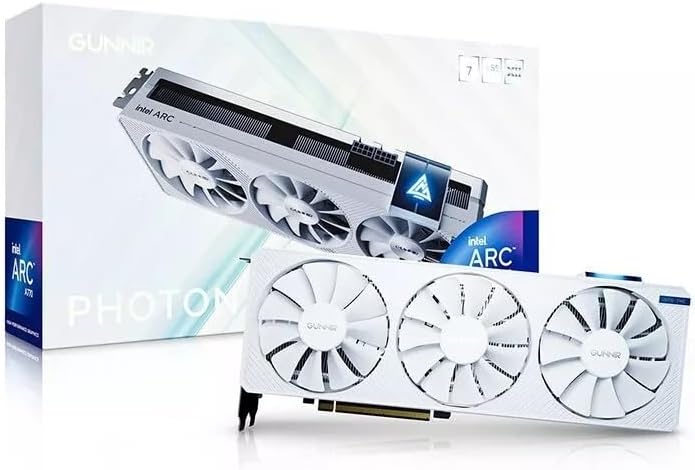
The GUNNIR Arc A770 Photon 8GB brings a unique white aesthetic and triple fan design to the Intel Arc family. With a solid rating, it proves effective at handling demanding workloads while maintaining stability through its robust cooling system.
We may earn a commission when you buy through this link, at no additional cost to you.
Featuring 8GB of GDDR6 VRAM and a wide 256-bit bus, this card manages data throughput well for 4K content. The triple fan setup ensures efficient heat dissipation, keeping the GPU stable during long gaming sessions or creative exports.
While the white look is distinct, buyers should ensure their case matches. Also, triple fans generally consume more power than dual fan models, so verify your PSU can handle the load comfortably.
This card is perfect for builders who want a visually distinct system without compromising on performance. It offers a great balance of cooling and connectivity for modern displays.
Three fans work together to provide efficient cooling and stable temperatures during intense gaming workloads.
The card is designed to handle demanding graphics workloads with ease for seamless gameplay at high resolutions.
We may earn a commission when you buy through this link, at no additional cost to you.
Designed for productivity, the Sparkle Arc A310 Omni View 4GB offers four HDMI outputs in a compact single-slot chassis. Its high rating reflects its reliability for office environments where multi-monitor setups are essential.
We may earn a commission when you buy through this link, at no additional cost to you.
With only 50W of power draw, it runs quietly and efficiently without needing external power connectors. This makes it ideal for upgrading workstations that need more screen real estate but not heavy graphical processing power.
The 4GB VRAM is sufficient for displaying multiple desktops or 4K productivity but not for modern gaming. However, for a home office or trading station, this limitation is rarely a bottleneck.
This card is the definitive choice for professionals needing an all-in-one display solution. It simplifies cable management and provides robust output options for a clean desk setup.
Four HDMI display outputs allow connecting up to four monitors simultaneously for expansive workspace productivity.
With a 50W TBP and single fan, it delivers quiet performance with minimal power draw and heat.
We may earn a commission when you buy through this link, at no additional cost to you.
Choosing the right Intel Arc GPU involves balancing performance needs, budget, and specific use cases like gaming or AI work. This guide breaks down the critical factors to consider before making a purchase.
Video RAM is crucial for handling textures, AI models, and large datasets. For gaming, 10GB to 12GB is recommended for 1440p, while 24GB or more is essential for local AI inference and professional rendering tasks.
Ensure the card has enough VRAM to meet your current and near-future software requirements without needing to downgrade settings.
Newer architectures like Xe2-HPG offer better efficiency and features like XeSS 2 upscaling. Check if the card supports the latest codecs like AV1 encoding for better streaming and editing performance.
Always prefer the latest generation available within your budget to ensure longevity and software support.
Thermal performance varies between dual-fan, triple-fan, and blower designs. Dual and triple fans are better for open cases, while blowers suit multi-GPU setups. Silent cooling features help in quiet environments.
Select a cooling solution that matches your case airflow and noise tolerance preferences.
Check the power draw and connector requirements. Some cards need multiple 8-pin connectors, while others like low-profile cards run off PCIe slots. Ensure your PSU has the capacity and connectors.
Match your PSU to the GPU's TDP to avoid instability and ensure long-term system reliability.
Modern cards offer HDMI 2.1 and DisplayPort 2.0/2.1. If you use multiple monitors or high refresh rate displays, verify the available ports and their bandwidth capabilities.
Choose a card with sufficient ports to support all your displays without adapters.
Intel has improved driver stability significantly, but some older games may still have issues. Check community feedback for the specific model you are considering to gauge current performance.
Prioritize models with active driver development and a track record of stability in your use case.
Measure your case space before buying. Some workstation cards are bulky, while others are single-slot or low-profile. Ensure physical clearance for length and height.
Select a form factor that fits your chassis and allows for proper airflow.
Some cards offer features like bifurcation support or ISV certification. These are critical for AI clusters or certified professional workstations.
Identify if you need specific enterprise features before opting for consumer-grade options.
Install the latest Intel Arc drivers directly from the official website to ensure optimal performance and bug fixes. Keep your drivers updated regularly to benefit from new game optimizations and stability improvements.
Clean your system periodically to prevent dust buildup on fans and heatsinks. Use compressed air to blow out dust, ensuring the GPU stays cool and operates efficiently over time.
If you experience display issues, check the DisplayPort or HDMI cable quality. High refresh rates and resolutions require certified cables to avoid signal loss or flickering.
Yes, Intel Arc GPUs are strong contenders for gaming, offering excellent value and performance at 1080p and 1440p resolutions. They support modern features like AV1 encoding and XeSS upscaling which enhance visual quality and frame rates.
Most mainstream Intel Arc cards require a standard ATX power supply with sufficient wattage. Models like the A580 may need multiple 8-pin connectors, so check your PSU specifications before purchasing.
Yes, Intel Arc GPUs support OpenVINO and PyTorch for AI workloads. Cards with higher VRAM like the 24GB and 48GB models are particularly capable for running large language models locally.
Driver support has improved significantly over the last year, with better compatibility for modern titles. However, older titles may still see occasional issues, so check community benchmarks before buying.
Cards like the WEELIAO MAXSUN Arc Pro B60 48G offer up to 48GB of VRAM. These are specialized workstation cards designed for heavy AI inference and large-scale rendering tasks.
Yes, models like the GUNNIR Arc Pro B50 LP are designed for low-profile and single-slot use. They are perfect for small form factor builds and mini-towers.
Yes, most Intel Arc GPUs support AV1 encoding and decoding. This is a key feature for streamers and video editors looking for efficient high-quality video compression.
We have reviewed ten diverse Intel Arc GPUs ranging from budget gaming cards to specialized AI workstation models. Whether you need a high refresh rate gaming experience or massive VRAM for local inference, there is a suitable option in this list.
Prioritize VRAM and cooling based on your primary use case. For gaming, the ASRock B570 offers great value, while the 48GB dual-card models serve specialized AI needs perfectly.
Prices and availability fluctuate often so verify the latest listings on Amazon before buying. Always check the current specs to ensure the card meets your specific system requirements.