
SABRENT 74 in 1 Internal Reader
4.0Editor score
Supports 74 card types
Includes USB 2.0 port
Low cost option
This guide compares the top 10 internal media card readers for desktop PCs based on compatibility, speed, and build quality to help you choose the right model.
Internal media card readers provide a reliable way to access memory cards directly from your desktop computer without needing external adapters. They fit neatly into drive bays and offer stable connections for photographers and content creators who need consistent data transfer speeds every day.
We evaluated ten real products based on their supported card formats, connection speeds, build quality, and ease of installation. Our analysis focuses on how well each unit integrates with modern motherboards and whether it offers enough versatility for different types of memory cards used in cameras and devices.
Each pick below highlights specific strengths like USB 3.0 support, multi-card access, or compact design. Keep in mind that availability and pricing can shift frequently, so checking current listings ensures you get the best value for your specific setup needs today.
4.0Editor score

4.5Editor score

4.0Editor score
The table below provides a side-by-side look at the key specifications and features of each model to help you compare compatibility and functionality at a glance.


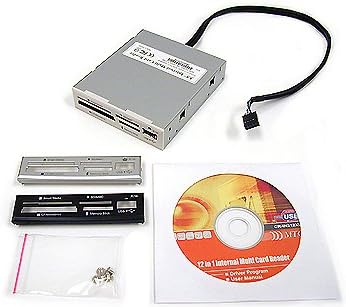
This StarTech internal card reader stands out for its robust design and broad compatibility with modern memory cards. With a 4.5 rating from users, it delivers consistent performance for professionals who need reliable data transfer without external clutter.
We may earn a commission when you buy through this link, at no additional cost to you.
The USB 3.0 interface ensures fast speeds, while support for UHS-II cards makes it suitable for high-resolution video workflows. Simultaneous slot access allows you to copy files between different card types at once, saving valuable time during editing sessions.
Installation requires connecting to a 20-pin motherboard header, which may be complex for novice builders. Additionally the price is higher than basic models, but the build quality and IT-ready compliance justify the investment for demanding environments.
Ideal for videographers and IT professionals, this reader balances speed and compatibility. Its durable construction and extensive support ensure it remains a reliable tool in your desktop setup for years to come.
Designed for IT environments, it includes TAA compliance and lifetime technical support for peace of mind.
Access multiple card slots at once to speed up workflows when moving data between different memory types.
We may earn a commission when you buy through this link, at no additional cost to you.
The SABRENT 74 in 1 reader offers an impressive range of supported formats at a very low price. With a 4.0 rating, it serves users who need to access many different card types without breaking the budget.
We may earn a commission when you buy through this link, at no additional cost to you.
Its main strength lies in supporting 74 different memory card formats, including M2, XD, and various SD variants. The included internal power connector ensures stable operation even with power-hungry external USB devices connected to the extra port.
Transfer speeds are limited to USB 2.0, which may be slow for large video files. The build relies on standard plastics rather than metal, but for occasional use or legacy support, it remains a practical choice.
Best for hobbyists or those needing legacy card support, this reader maximizes compatibility for minimal cost. It is a solid solution if speed is less critical than having every possible card slot available.
Supports an extensive list of 74 card types ensuring you can read almost any memory card you own.
Includes a USB 2.0 port for additional peripherals without needing a separate hub on your desktop.
We may earn a commission when you buy through this link, at no additional cost to you.
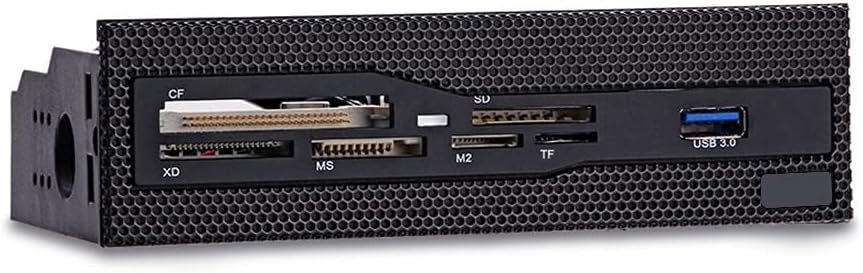
This dashboard-style reader combines speed with a sleek front panel design. Rated 4.3 stars, it delivers efficient data transmission for users with cases featuring a 5.25 inch drive bay.
We may earn a commission when you buy through this link, at no additional cost to you.
The inclusion of USB 3.0 ensures fast transfer times compared to older models. Copper-plated card slots enhance signal stability and reduce wear over time, which is a thoughtful touch for frequently used slots.
It supports six card formats including CF, XD, and SD, covering most common needs. However the requirement for a 5.25 inch bay limits it to larger cases, which might be a constraint for compact builds.
For users with spacious cases needing quick access to common cards, this model offers a great balance of speed and durability. It is particularly useful for those who prioritize a clean front interface.
Copper-plated contacts within the slots ensure consistent electrical connection during high-speed data transfers.
USB 3.0 port allows rapid file movement without needing to reach behind the computer tower.
We may earn a commission when you buy through this link, at no additional cost to you.
This panel extends your desktop functionality with multiple USB ports and audio jacks. With a 3.8 rating, it appeals to PC builders who want a comprehensive front interface alongside card reading capabilities.
We may earn a commission when you buy through this link, at no additional cost to you.
The built-in USB 3.0 hub offers 5Gbps speeds, while eSATA support adds flexibility for external drives. Audio jacks eliminate the need to reach behind the chassis for headphones or microphones.
Installation involves multiple cables for power USB and audio, which can clutter the case. The price is higher than single-function readers, but the added convenience justifies it for users wanting a full I/O solution.
Best for custom PC builds needing front panel expansion, this dashboard combines several utilities in one place. It is a strong choice if you value having audio and multiple USB ports directly accessible.
Combines card reading USB ports and audio jacks to replace multiple external adapters.
Built-in LED indicators show power and drive activity status for easy monitoring in dark rooms.
We may earn a commission when you buy through this link, at no additional cost to you.
This Vantec reader holds a perfect 5.0 rating from users, indicating exceptional satisfaction and reliability. It supports extremely high capacities for CF and SD cards making it future-proof for large storage needs.
We may earn a commission when you buy through this link, at no additional cost to you.
Multi-LUN support allows multiple card slots to be accessed simultaneously, which is efficient for bulk transfers. The USB 3.0 interface ensures that these transfers happen quickly without bottlenecks in your workflow.
As a pure internal reader without extra USB ports, it focuses on card reading performance. Installation requires a 20-pin header connection which may limit compatibility with older or very new motherboards lacking this header.
For professionals dealing with high-capacity memory cards, this reader is a top-tier choice. Its flawless user rating suggests it performs exactly as expected without the hiccups found in similar products.
Supports SD cards up to 2TB and CF cards up to 144PB for massive storage workflows.
Multi-LUN architecture allows reading and writing to multiple cards at once without conflicts.
We may earn a commission when you buy through this link, at no additional cost to you.
The TCC-QL5E is a comprehensive dashboard featuring six USB ports and card reading. With a 4.0 rating, it serves users who need extensive front connectivity for various devices and memory cards.
We may earn a commission when you buy through this link, at no additional cost to you.
Beyond card reading, it offers e-SATA and SATA ports which are rare in modern peripherals. This makes it suitable for older setups needing internal SATA connections or specialized external storage solutions.
The sheer number of ports means many cables must be connected to the motherboard. This can complicate installation and may require careful cable management to avoid clutter inside the PC case.
Ideal for users needing a full front-panel expansion solution, it combines card reading with multiple USB and audio options. While complex to install, it provides unmatched versatility for desktop workstations.
Six USB ports plus SATA options provide ample connectivity for multiple peripherals simultaneously.
Front speaker and microphone ports remove the need to access rear audio jacks often.
We may earn a commission when you buy through this link, at no additional cost to you.
This Sony reader delivers reliable performance with support for 17 card formats. With a 4.0 rating, it offers a trustworthy option for users who value brand reputation and straightforward functionality.
We may earn a commission when you buy through this link, at no additional cost to you.
Included software aids in drive letter recognition which simplifies setup on Windows systems. The unit fits standard 3.5 inch bays and comes with bezel options to match your case aesthetics.
Speed is limited by older USB 2.0 standards which may be slow for large data transfers. As an older model, finding current stock might be harder compared to newer USB 3.0 alternatives.
Best for legacy systems or users preferring trusted brands, this reader provides essential card support without complexity. It remains a functional choice if USB 3.0 speed is not a strict requirement.
Sony engineering ensures consistent quality and ease of use for standard card formats.
Software simplifies the setup process by handling drive letter assignments automatically.
We may earn a commission when you buy through this link, at no additional cost to you.
This compact reader holds a perfect 5.0 rating indicating high user satisfaction with its build and performance. It fits into 2.5 inch bays which can be useful for cases with limited 3.5 inch space.
We may earn a commission when you buy through this link, at no additional cost to you.
It comes with multiple bezel colors including black silver and white to match your system look. The focus is on reliable basic card reading without extra ports or complex setups.
Detailed specifications beyond basic sizing are not widely available for this generic model. This lack of detail might be a drawback if you need specific features like USB 3.0 or simultaneous access.
For users needing a simple reliable card reader that fits smaller bays, this is a strong choice. It is best for straightforward workflows where speed and extra features are less important.
Multiple bezel options allow you to match the reader to your case color scheme easily.
The 2.5 inch size makes it compatible with a wider range of modern slim cases.
We may earn a commission when you buy through this link, at no additional cost to you.
This Akasa reader is designed for convenience with dedicated ports for adapters. With a 4.2 rating, it simplifies accessing smaller cards like microSD without needing loose adapters that can get lost.
We may earn a commission when you buy through this link, at no additional cost to you.
The inclusion of an additional USB port allows you to connect flash drives directly to the front. It is a practical feature for users who frequently swap data between cards and USB sticks.
Build quality relies on standard plastics which is typical for this price range. The front fascia panels allow you to swap between black and white to suit your system style.
Best for those who want a simple front solution with extra USB access, this reader covers common needs effectively. It is a practical addition for casual users managing various storage media.
Built-in slots for adapters prevent the need to search for separate microSD or M2 adaptors.
An additional USB port on the front allows quick connection of flash drives or phones.
We may earn a commission when you buy through this link, at no additional cost to you.
This MTG reader supports 22 different card formats with a durable metal case. With a 4.0 rating, it offers a robust solution for users who need to read various legacy and modern cards securely.
We may earn a commission when you buy through this link, at no additional cost to you.
Four slots can be used at the same time allowing for efficient data exchange between multiple cards. The metal construction provides better durability and heat dissipation compared to plastic models.
Transfer speeds are capped at USB 2.0 which is slower than modern standards. This model is best for backup tasks or reading older cards where speed is less of a priority.
Ideal for users needing broad compatibility in a durable metal frame, it provides reliable everyday card access. It is a solid choice for those who prioritize build quality over high-speed transfers.
The metal casing offers improved durability and stability compared to standard plastic alternatives.
Four simultaneous slots allow you to manage multiple memory cards during file transfers.
We may earn a commission when you buy through this link, at no additional cost to you.
Selecting the right internal reader requires evaluating several technical factors to ensure compatibility and performance.
Different readers support different sets of memory cards. Ensure the model covers all the formats you currently use such as SDXC, CF, or Sony Memory Stick. Some units support up to 74 formats while others focus on a smaller subset.
Check the specific list of supported cards to avoid buying a reader that cannot read your specific media types.
USB 3.0 offers significantly faster transfer speeds than USB 2.0. For large video files or high-resolution photos, USB 3.0 is highly recommended. Some models include both a 3.0 hub and a 2.0 port for mixed needs.
Prioritize USB 3.0 interfaces if speed is a priority for your daily workflow.
Internal readers require opening your PC case and connecting cables to the motherboard. Most use a 20-pin header for USB 3.0 while others rely on simpler connectors. Ensure your motherboard has the required header before purchasing.
Be comfortable with basic PC building skills to install the unit correctly without damage.
Most readers fit into 3.5 inch bays but some require 5.25 inch bays. Check your PC case specifications to confirm which drive bay size is available. 5.25 inch units are often larger and include more features.
Confirm your case has the correct bay size to ensure the unit fits physically.
Some readers allow multiple card slots to be active at once. This feature is useful for transferring files between different cards without swapping them. Look for terms like Multi-LUN or simultaneous access in the specs.
Choose a model with multi-slot access if you frequently move data between multiple memory cards.
Readers come in plastic or metal constructions. Metal cases are more durable and dissipate heat better during long transfers. Plastic units are lighter but might be less robust over time.
Opt for metal construction if you plan to use the reader heavily over a long period.
Many dashboard-style readers include extra USB ports or audio jacks. These can be useful if you need more front panel connections without external hubs. Evaluate if these extras justify the higher price.
Consider models with additional USB or audio ports if you want to reduce external clutter.
Established brands like StarTech and Sabrent often provide better documentation and technical support. Checking reviews can reveal if a specific model has consistent performance issues or driver quirks.
Research the brand reputation and warranty terms to ensure reliable long-term support.
To install, open your PC case and locate the appropriate drive bay. Connect the internal USB header to your motherboard and plug the power cable into the power supply unit before securing the reader in place.
Insert memory cards into the slots carefully until they click. Your computer should recognize the drive automatically. Use file management tools to move data from the cards to your hard drive.
Handle cards by their edges to avoid static discharge. Periodically clean the slots with compressed air to remove dust that could interfere with connections. Avoid forcing cards that do not fit easily.
Many internal readers are compatible with Mac systems if your motherboard supports them. However macOS drivers may not be required as the system often handles generic USB headers automatically. Check specific product details for Mac OS X compatibility before purchasing.
No 5.25 inch readers are physically larger and will not fit into 3.5 inch bays. You need a bracket to fill the space if you install one in a larger bay but reversing the size is not possible without custom modifications.
Internal readers provide a cleaner look and more stable connections since they connect directly to the motherboard. They also save USB ports and are less likely to be damaged by accidental bumps compared to external units.
Only specific models explicitly mention UHS-II support. Most standard USB 3.0 readers support UHS-I speeds. Check the specs carefully to ensure the reader matches the speed of your high-end memory cards.
Brands like StarTech offer lifetime technical support while others may rely on community forums. Always check the warranty terms and contact options before buying if you expect professional assistance with setup.
Some models include multiple bezels like black and white so you can swap them later. Verify if your chosen product includes extra bezels if color matching is important for your build.
Most internal readers use Plug and Play drivers built into Windows. You usually do not need to install extra software unless the unit includes specific utilities like drive letter recognition tools.
Current models support cards up to 2TB for SDXC and some older CF cards up to 144PB. Always check the maximum capacity listed in the specs to ensure it meets your storage needs.
We highlighted the StarTech Internal Card Reader as our top choice for its professional features and broad compatibility. The Sabrent 74 in 1 model stands out for budget buyers needing maximum format support.
Prioritize USB 3.0 speeds and correct bay size to ensure the reader fits your system requirements. Additional features like simultaneous slot access or extra USB ports can improve your workflow significantly.
Prices and stock change regularly so verify current listings before buying. Checking recent user reviews helps ensure you get a reliable unit that matches your specific needs today.