
Transparent Mechanical Keyboard RGB Backlit
3.2Editor score
Ultra-transparent acrylic design
Triple-mode wireless connectivity
Silent linear switches
This guide compares the top 10 keyboards with acrylic chassis for aesthetics and performance, covering features like wireless connectivity and RGB lighting.
Discover the best keyboards with acrylic chassis for a stunning aesthetic upgrade. These transparent designs reveal internal mechanics while offering premium typing experiences and modern connectivity options.
We evaluated ten top models based on build quality, sound profile, connectivity, and customization. Each selection balances visual appeal with functional performance for gamers and professionals alike.
Read our detailed breakdown to find your perfect match. Note that availability and pricing may vary over time, so check current listings before purchasing your next mechanical keyboard.
3.2Editor score

4.7Editor score
5.0Editor score
This side-by-side comparison highlights key differences across our top ten picks, helping you choose the ideal acrylic chassis keyboard for your specific setup and usage needs.


The KiiBoom Phantom81 V4 stands out as a top contender in the acrylic chassis category, offering a mesmerizing frosted finish that balances transparency with sophistication. Its robust build quality and exceptional battery life make it suitable for both gaming and work.
We may earn a commission when you buy through this link, at no additional cost to you.
Equipped with a massive 8000mAh battery, this keyboard offers weeks of use on a single charge, even with RGB active. The gasket-mounted structure provides a creamy, thocky sound profile, while the tri-mode connectivity ensures seamless switching between devices.
While the price is higher than average, the build quality and features justify the cost. Users should note that the driver software requires some time to learn, but the customization options are extensive.
Ideal for enthusiasts seeking a premium aesthetic without compromising on performance, this keyboard delivers a reliable, long-lasting experience that fits well in modern setups.
The 8000mAh battery ensures you rarely need to plug in, offering peace of mind during long work sessions or gaming marathons.
The semi-transparent frosted acrylic hides internal components while letting RGB light shine through beautifully for a refined look.
We may earn a commission when you buy through this link, at no additional cost to you.
This transparent mechanical keyboard offers an accessible entry point into the world of acrylic chassis keyboards, featuring a crystal-clear design that reveals internal mechanics beautifully.
We may earn a commission when you buy through this link, at no additional cost to you.
It supports triple-mode connectivity and includes a rotary knob for volume control, making it versatile for both office and gaming use. The linear switches are notably quiet, which is great for shared spaces.
However, user ratings suggest some variability in build quality. The materials feel lighter compared to premium models, so expect a different tactile experience.
For those wanting to experiment with acrylic aesthetics without a large investment, this model provides a solid foundation for customization and daily use.
The ultra-transparent body allows you to see the PCB and switches, enhancing the visual appeal of RGB lighting effects.
The linear switches are designed for quiet keystrokes, making this a polite choice for office environments.
We may earn a commission when you buy through this link, at no additional cost to you.
The GravaStar Mercury K1 Lite is a visually striking keyboard featuring a Crystal Aurora colorway inspired by the Northern Lights. Its open-frame construction and pastel gradient make it a standout desk accessory.
We may earn a commission when you buy through this link, at no additional cost to you.
Performance is equally impressive, with a five-layer gasket mount system ensuring a soft, responsive typing experience. The custom linear switches provide light, effortless presses suitable for prolonged typing.
While the design is beautiful, it may not suit minimalist setups preferring solid colors. Additionally, high demand can sometimes limit availability.
If you value unique design and high-quality construction, this keyboard elevates your workspace with artful aesthetics and reliable mechanical performance.
The Crystal Aurora edition features a mesmerizing gradient that transforms any desk into a visual masterpiece.
Tuned for a deep, satisfying thock, the sound profile is rich without requiring additional modifications.
We may earn a commission when you buy through this link, at no additional cost to you.
The YUNZII X98 combines a 96% layout with a premium jelly aesthetic, offering a balance of functionality and visual appeal. It retains the numpad for productivity while keeping a compact footprint.
We may earn a commission when you buy through this link, at no additional cost to you.
Powered by QMK/VIA firmware, this keyboard allows deep customization of keys and macros. The gasket mount structure ensures a satisfying, creamy typing feel that is consistent across the board.
Although it is not fully transparent like others, the clear keycaps still provide a nice glow. Some users may find the software setup slightly complex initially.
Ideal for professionals needing number pad functionality, this keyboard offers a premium typing experience with the flexibility to tailor every key.
The 96% layout saves desk space while keeping the numpad, ideal for spreadsheets and data entry.
With QMK/VIA support, you can remap keys and adjust RGB to match your exact workflow needs.
We may earn a commission when you buy through this link, at no additional cost to you.
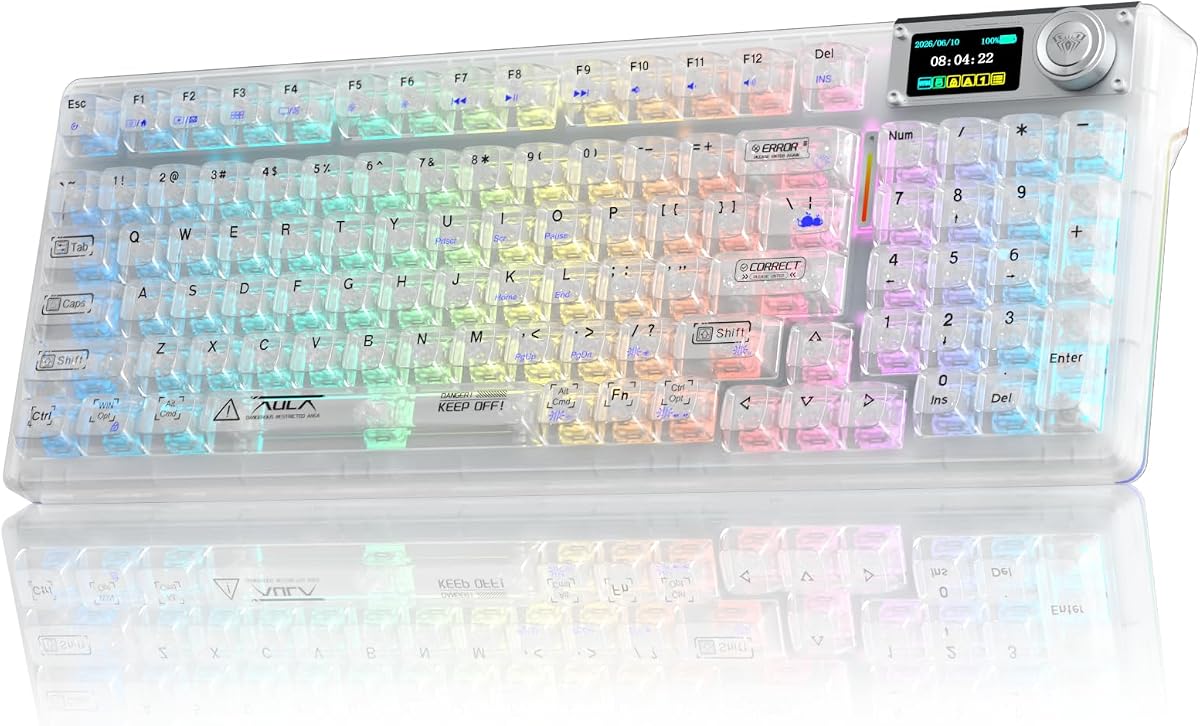
The Aula F98Pro V3 stands out with its built-in LCD screen that displays battery level and connection status. This unique feature adds a tech-forward touch to your desktop.
We may earn a commission when you buy through this link, at no additional cost to you.
Powered by a 10000mAh battery, it offers extended usage without frequent recharging. The keyboard is hot-swappable and features Ice Crystal switches that provide a smooth, quiet typing experience.
However, the screen customization requires a specific driver that is Windows-only. This limits its utility for Mac users who want full control over the display.
For those looking for a feature-packed keyboard with high battery life, this model offers excellent value and a futuristic look.
The smart TFT screen lets you monitor connection and battery status instantly without needing to check software.
With 10000mAh capacity, you can use this keyboard for weeks of continuous work or gaming.
We may earn a commission when you buy through this link, at no additional cost to you.
The YUNZII X98 Crystal version offers a high-transparency PC casing that reveals the internal layout beautifully. It combines this clear aesthetic with a robust gasket mount system.
We may earn a commission when you buy through this link, at no additional cost to you.
The pre-lubed Snow switches provide a silky-smooth feel and quiet actuation, making it suitable for long typing sessions. The five layers of dampening ensure a solid, muted sound.
While the transparency is appealing, the white finish may show fingerprints or dust more easily than dark colors. Regular cleaning keeps it looking pristine.
Perfect for users wanting a pure transparent look with high-quality switches, this keyboard balances visual impact with reliable performance.
The PC material casing maintains clarity and durability while showcasing the vibrant RGB lighting inside.
Pre-lubed Snow switches reduce noise significantly, perfect for quiet environments.
We may earn a commission when you buy through this link, at no additional cost to you.
The GravaStar Mercury V60 is built for competitive gamers, featuring Hall Effect magnetic switches for precise control. The Crystal Rose chassis adds a unique, vibrant look to your setup.
We may earn a commission when you buy through this link, at no additional cost to you.
With an 8K polling rate and Rapid Trigger technology, this keyboard offers faster movement and instant response. The adjustable actuation allows you to tailor the keypress to your specific gameplay style.
While expensive, the performance benefits are significant for competitive players. Setup requires some time to tune the magnetic sensors correctly.
If you play FPS games like Valorant or CS2, the responsiveness of this keyboard provides a genuine advantage and a beautiful aesthetic.
Hall Effect switches allow for adjustable actuation points, giving you full control over key sensitivity.
This feature resets keys the moment they are released, enabling faster directional control and strafing.
We may earn a commission when you buy through this link, at no additional cost to you.
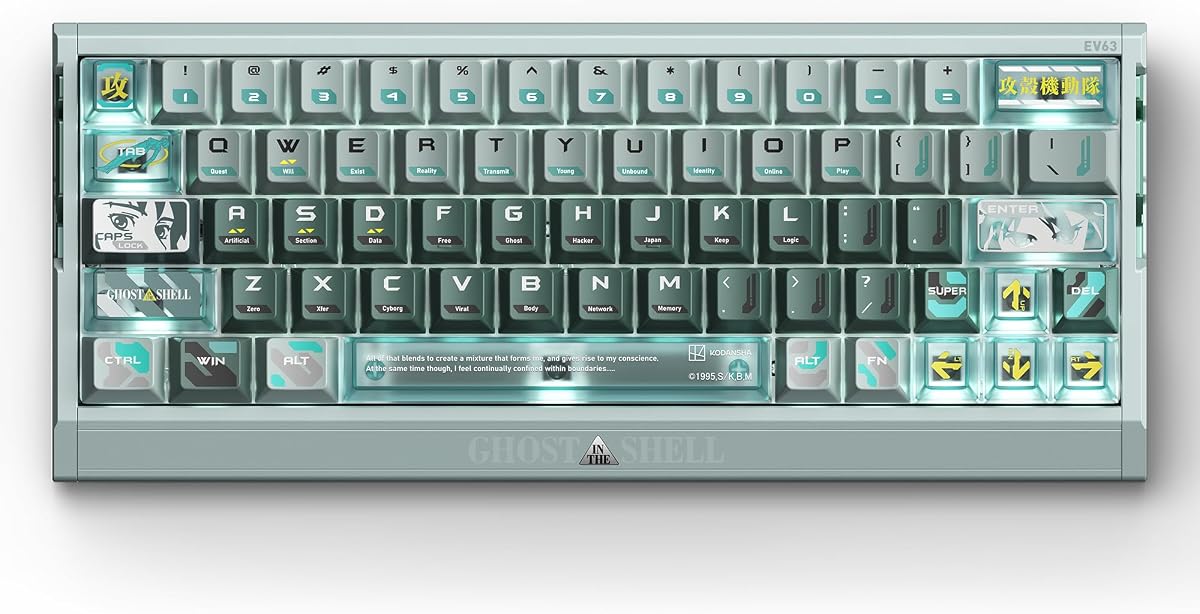
The IQUNIX EV63 is officially licensed for Ghost in the Shell, featuring a tactical cyberpunk design with a CNC aluminum case. It combines premium materials with high-performance Hall Effect switches.
We may earn a commission when you buy through this link, at no additional cost to you.
The magnetic switches offer smooth, linear movement with customizable actuation, making it ideal for precise gaming. The metal case provides a solid, cold-touch feel that feels premium.
While the design is stunning, it may not appeal to those who prefer more neutral or generic aesthetics. The price is also on the higher end.
For fans of the franchise or those seeking a unique, high-end controller, this keyboard delivers both style and cutting-edge performance.
The EV63 features official Ghost in the Shell artwork and accents for a unique desk centerpiece.
The CNC aluminum case adds weight and stability, ensuring a planted feel during intense gameplay.
We may earn a commission when you buy through this link, at no additional cost to you.
The KiiBoom Phantom81 Lite is designed for enthusiasts who want full customization via QMK/VIA. Its frosted finish offers a refined look that resists scratches and discoloration.
We may earn a commission when you buy through this link, at no additional cost to you.
The gasket-mounted structure with multiple damping materials ensures a creamy typing foundation and excellent sound quality. It supports tri-mode connectivity, allowing easy switching between devices.
This model lacks the extra features like screens found on other variants, focusing instead on core performance and customization. It remains a robust choice for purists.
Ideal for DIY enthusiasts who value software customization, this keyboard offers a reliable platform for building a personalized typing experience.
VIA support allows for deep customization of keymaps and macros without needing proprietary drivers.
Multiple damping layers ensure a soft, thocky sound that is pleasant to listen to.
We may earn a commission when you buy through this link, at no additional cost to you.
The Aula F98Pro V3 Pro features a smart LCD screen and a massive 10000mAh battery, ensuring long-term usability. The transparent keycaps enhance RGB brightness for a futuristic look.
We may earn a commission when you buy through this link, at no additional cost to you.
With a five-layer gasket structure, it provides a soft, elastic typing feel. The multi-function knob allows quick adjustments to volume and RGB settings.
While the screen adds visual interest, its customization is limited without the driver. Overall, it is a strong all-rounder for those wanting extra tech features.
Perfect for gamers needing reliable battery life and extra feedback, this keyboard balances modern tech with mechanical performance.
The 10000mAh battery ensures weeks of uninterrupted typing without needing constant recharges.
The keycaps improve RGB brightness and uniformity, creating a layered light transmission effect.
We may earn a commission when you buy through this link, at no additional cost to you.
Choosing the right acrylic keyboard involves evaluating build materials, connectivity, and customization features. This guide breaks down the key factors to consider.
Acrylic chassis can range from thin plastic to thick, high-transparency polycarbonate. Look for keyboards that use reinforced materials to ensure stability and resistance to scratches.
Prioritize models with sturdy bases to prevent flexing during intense typing or gaming sessions.
Ensure the keyboard supports the connectivity modes you need. Tri-mode options like 2.4GHz wireless, Bluetooth, and USB-C offer the most flexibility.
Check for low-latency polling rates if you plan to use the keyboard for competitive gaming.
Look for hot-swappable PCBs that allow you to change switches without soldering. Support for open-source firmware like QMK/VIA is a plus for advanced users.
Verify that the driver software is compatible with your operating system, especially if you use a Mac or Linux.
Wireless keyboards rely on battery capacity. Models with 4000mAh or higher are recommended for extended usage without charging.
USB-C charging is standard, so check if fast charging is supported for quick top-ups.
Translucent keycaps and south-facing LEDs enhance the glow-through effect. Choose a layout that fits your desk space, such as 60%, 75%, or 96%.
Customizable lighting patterns help match the keyboard to your overall setup theme.
Decide between linear, tactile, or clicky switches based on your preference. Linear switches are often quieter and preferred for gaming.
Consider Hall Effect switches for magnetic actuation if you need ultra-low latency and adjustable settings.
Gasket mounts and foam layers reduce unwanted noise and improve the acoustic profile. Look for models with multiple dampening layers.
A good acoustic structure ensures a satisfying sound without echo or resonance.
Acrylic keyboards can be lightweight. Check if the model includes a weight plate or heavy base to prevent sliding.
A heavy base is essential for maintaining position during rapid typing or gaming movements.
Clean the surface regularly with a soft microfiber cloth to prevent fingerprints and smudges. Avoid harsh chemicals that can damage the acrylic material.
Use a keycap puller to clean underneath the keys, ensuring debris does not build up in the transparent casing.
Store the keyboard in a cool, dry place when not in use to prevent any potential warping or discoloration of the chassis.
Yes, high-quality acrylic and polycarbonate materials are durable and resistant to scratches. However, they can crack if dropped or subjected to excessive force.
Acrylic does not conduct heat as well as metal, so the keyboard itself stays cool. Internal components may warm slightly during heavy use, but it is generally manageable.
If the keyboard is hot-swappable, you can easily replace the switches without soldering. Check the product specifications for hot-swap compatibility.
Modern 2.4GHz wireless with high polling rates is highly reliable and offers latency comparable to wired connections for gaming.
Use a soft cloth and mild soap solution for the body. Avoid abrasive materials that can scratch the transparent finish.
Most feature RGB to enhance the transparency, but not all models include customizable lighting or multiple modes.
A gasket mount uses dampening layers to decouple the PCB from the case, providing a softer and more uniform typing feel.
Magnetic switches offer lower latency and adjustable actuation points, making them ideal for competitive gaming but often more expensive.
Our top picks range from budget-friendly transparent models to high-end gaming boards with Hall Effect switches. The GravaStar K1 Lite offers the best balance of aesthetics and quality.
Prioritize battery life and customization if you plan to use the keyboard for long sessions. Ensure the software is compatible with your OS.
Remember that prices may fluctuate, so review current listings before finalizing your purchase to get the best deal.