
HP Everyday Slim Laptop
5.0Editor score
True Vision 720p HD camera
Dual array microphones
Long battery life
Choosing the right laptop for Zoom calls is essential for maintaining professionalism and clarity during virtual meetings. A good device ensures your video is crisp, your audio is clear, and your system runs smoothly without freezing. We have evaluated top models based on their camera quality, microphone performance, and overall processing power.
Our comparison process involved analyzing real-world specifications and user feedback to identify the most reliable options available in November 2026. We focused on devices that offer strong battery life, lightweight portability, and robust connectivity to support seamless wireless networking. Each product was selected for its ability to handle video conferencing demands efficiently.
Every pick in this list highlights specific strengths such as high-definition cameras, noise-canceling microphones, or expansive displays. These details help you understand exactly what you are investing in for your home office setup. Please note that prices and availability can change frequently, so always verify the latest details before purchasing.
5.0Editor score

5.0Editor score

4.5Editor score
As an Amazon Associate we earn from qualifying purchases.
This section provides a side-by-side overview of all ten products to help you compare key specifications quickly. You will find details on processor speed, memory capacity, storage type, and special features like camera quality or included software. Use this table to narrow down your options based on your specific needs for video conferencing.





This laptop stands out as a top choice for professionals needing reliable performance during virtual meetings. With a high rating and robust specifications, it ensures smooth operation without lag even when running multiple applications. The large screen and strong processing power make it ideal for complex tasks.
We may earn a commission when you buy through this link, at no additional cost to you.
Key strengths include the 16GB of RAM which allows you to keep dozens of tabs open alongside your video call software. The 512GB SSD provides fast storage for quick file access and system responsiveness. Its Intel N150 processor is optimized for efficiency handling modern workflows with ease.
While the laptop is slightly heavier than ultrabooks it remains portable enough for daily commuting. The premium price point is justified by the included warranty and superior hardware features. These trade-offs are acceptable for users who prioritize performance and reliability over minimal weight.
You should buy this if you need a dependable machine for remote work or student use. It balances power and portability effectively for those who value a large display and fast storage. This model is highly recommended for anyone seeking a comprehensive solution for their home office.
The 16GB RAM ensures you can switch between Zoom, spreadsheets, and browsers without slowdowns.
The 15.6 inch FHD screen provides clear visuals essential for detailed presentations and reading documents.
We may earn a commission when you buy through this link, at no additional cost to you.
This kit is an excellent accessory for enhancing your existing setup rather than a standalone computer. It offers a budget friendly way to improve your video presence during meetings significantly. The flexible design allows it to fit most monitors effortlessly.
We may earn a commission when you buy through this link, at no additional cost to you.
The adjustable color temperatures and brightness levels let you customize your look for any environment. Whether you are in a bright room or dim office you can find the perfect setting. The clip on design ensures stability without taking up desk space.
While it does not replace a laptop it is a crucial tool for professionals who already have a device. The USB power requirement means you need an available port but this is rarely an issue. Its value lies in making your existing camera look much better.
You should purchase this if you want to upgrade your visual quality without buying a new computer. It is perfect for students or remote workers looking to enhance their current workstation setup. This lighting kit is a practical investment for clearer video calls.
Five levels of brightness and three color temperatures ensure you always look professional.
The secure clip design keeps the light in place during long meetings or movement.
We may earn a commission when you buy through this link, at no additional cost to you.
This laptop is designed specifically for users who prioritize video communication features in their daily work. It received high ratings for its integrated camera and microphone systems which are vital for clear meetings. The slim profile makes it easy to carry anywhere you need to connect.
We may earn a commission when you buy through this link, at no additional cost to you.
The HP True Vision camera features noise reduction technology that improves image quality in various lighting conditions. Dual array microphones ensure your voice is picked up clearly without background noise interference. These hardware choices show a clear focus on conferencing quality.
Storage and RAM are modest which might limit heavy multitasking but suffice for standard tasks. The battery life supports all day use meaning you can join calls without hunting for outlets. This balance works well for professionals who prioritize communication over raw computing power.
Choose this device if you need a reliable portable computer optimized for virtual interaction. It is ideal for those who want a lightweight machine with top tier audio visual capabilities. This model offers a premium experience for everyday business needs.
Temporal noise reduction ensures your video looks clear even in low light environments.
Microsoft 365 and Copilot key streamline your workflow for efficient task management.
We may earn a commission when you buy through this link, at no additional cost to you.
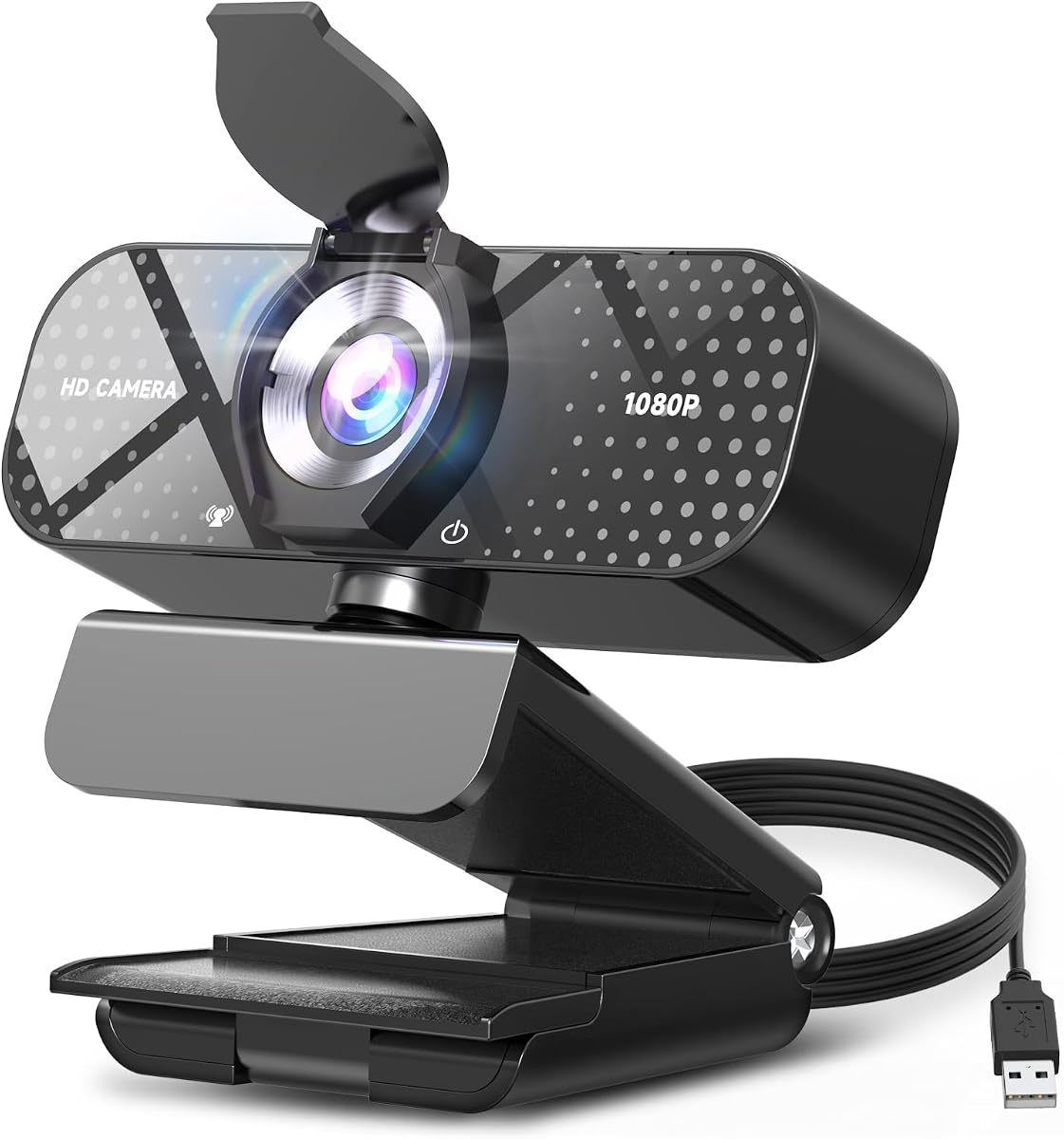
This webcam is a fantastic upgrade for anyone looking to enhance their video call quality on existing laptops. It delivers crisp 1080p resolution which is noticeably better than most built-in cameras. The wide angle lens captures more of your environment clearly.
We may earn a commission when you buy through this link, at no additional cost to you.
Auto light correction technology adjusts your image brightness and color dynamically based on your room. This ensures you always look professional regardless of whether you are in a dark or bright setting. The noise canceling microphone filters out ambient sounds for clear audio transmission.
The included privacy cover adds a layer of security when the camera is not in use. Setup is simple with plug and play compatibility across multiple operating systems and devices. You do not need to install any drivers to get started immediately.
Purchase this if your current laptop camera struggles with lighting or resolution issues. It is a practical and affordable solution for improving your digital presence in meetings. This accessory is essential for users demanding high quality visuals.
Automatic correction ensures consistent image quality without manual tweaking.
Built-in mic reduces background noise for clearer voice communication during calls.
We may earn a commission when you buy through this link, at no additional cost to you.
This desk light offers a versatile solution for lighting your workspace during video conferences. Its edge-lit technology provides uniform illumination that reduces harsh shadows on your face. The adjustable height allows you to position it perfectly for any desk setup.
We may earn a commission when you buy through this link, at no additional cost to you.
With a high CRI rating this light renders true to-life colors which is vital for presentations. You can choose from three color temperatures to match your environment or mood easily. The rotatable head gives you full control over the direction of the light.
While it takes up more space than clip-on models its stability and adjustability are superior. The metal base ensures it stays put without scratching your desk surface. This makes it ideal for users who prefer a dedicated lamp over a portable clip.
You should buy this if you want a high-quality lighting solution for your home office. It suits professionals who need precise control over their lighting environment. This desk lamp enhances your video quality significantly without complicated setup.
High CRI technology ensures your skin tones and surroundings appear natural on camera.
360-degree rotation and height adjustment allow for optimal light angles anytime.
We may earn a commission when you buy through this link, at no additional cost to you.
This ring light features a distinct circular design that offers softer illumination compared to flat lamps. Its high color rendering index ensures accurate color reproduction in your video feeds. The adjustable brightness levels allow for precise control over the light output.
We may earn a commission when you buy through this link, at no additional cost to you.
The circular shape helps eliminate shadows and glare providing a flattering light on your face. It includes modes for warm cool and mixed light to suit different time of day needs. This versatility makes it suitable for both professional calls and creative streaming.
While it is a simple clip on model its performance is reliable and consistent. The coating on the lampshade enhances brightness without causing eye strain during long sessions. It remains a compact and effective tool for improving webcam visuals.
Choose this if you want an effective and affordable lighting tool for your monitor. It works well for anyone needing quick and easy adjustments for their workspace lighting. This ring light is a practical addition to any video conference setup.
Circular design reduces shadows for a more flattering video image.
High CRI ensures your appearance and objects look true to life on screen.
We may earn a commission when you buy through this link, at no additional cost to you.
This model is tailored for business users who need a reliable machine for daily administrative tasks. It comes with Office 365 pre-installed saving you from immediate software purchases. The variety of ports ensures you can connect all necessary peripherals without adapters.
We may earn a commission when you buy through this link, at no additional cost to you.
The processor and RAM handle standard office work smoothly making it suitable for email and browsing. Its display is functional though not the sharpest available which is a trade-off for cost efficiency. The aesthetic design adds a touch of elegance to professional settings.
While the storage is adequate it may not suit those with large media libraries locally. The included earphones provide immediate audio capability for calls upon unboxing. These features combine to make a ready-to-use solution for business environments.
Buy this if you need a straightforward laptop for standard business tasks. It is a good fit for users who value connectivity and included software over high-end specs. This device offers solid value for professional use.
Multiple USB and HDMI ports support diverse peripheral connections easily.
One year of Office 365 provides essential tools for work from day one.
We may earn a commission when you buy through this link, at no additional cost to you.
This laptop emphasizes cloud integration offering significant storage offloaded to the cloud. It includes Copilot AI features designed to assist with tasks and productivity. The battery life supports extended use away from a power source for mobile workers.
We may earn a commission when you buy through this link, at no additional cost to you.
The local SSD is small but paired with 1TB cloud storage it covers basic document needs. Copilot AI can help manage emails and documents which streamlines workflow during meetings. Office 365 is included ensuring you have all necessary software immediately.
However the lower user rating suggests potential issues with overall satisfaction or durability. Local storage limits might be a concern if you store large files locally. These factors make it a niche choice for heavy cloud users.
Consider this if you rely heavily on cloud storage and prefer AI assistance. It is suitable for those who want a lightweight device with included productivity tools. This model is best for users comfortable with cloud-first workflows.
Copilot AI helps streamline daily tasks and document management efficiently.
1TB cloud storage ensures ample space for files without using local drive.
We may earn a commission when you buy through this link, at no additional cost to you.
This model is positioned as a future ready device with modern DDR5 RAM technology. It balances local and cloud storage to provide flexibility for document management. The slim profile makes it easy to transport between home and office locations.
We may earn a commission when you buy through this link, at no additional cost to you.
The DDR5 RAM offers slightly better performance and efficiency than older generations. Combined with the cloud storage you can maintain a clean local system while keeping data accessible. This setup is efficient for users who prioritize speed and mobility.
While local storage is limited the cloud component compensates for many use cases. The ports available allow for standard connectivity with monitors and peripherals easily. It is a solid choice for those needing a versatile tool for daily tasks.
You should buy this if you want a modern lightweight laptop for general productivity. It fits well in hybrid work environments where portability and connectivity are key. This laptop offers a balanced approach to storage and performance.
DDR5 RAM provides faster data handling for smoother multitasking.
Mix of local SSD and cloud storage optimizes performance and accessibility.
We may earn a commission when you buy through this link, at no additional cost to you.
This lighting kit uses two separate lamp bars to provide even and bright illumination. It includes a remote control and touch options giving you flexible ways to manage settings. The dual lamp design helps reduce shadows better than single units.
We may earn a commission when you buy through this link, at no additional cost to you.
You can adjust the height to fit different monitor sizes ensuring proper positioning. The color modes let you switch between cool warm or mixed light instantly. This versatility supports various video production needs beyond simple calls.
While it requires two USB ports it offers a professional setup for streaming or broadcasting. The sponge pads on the clamps protect your equipment from scratches during installation. This makes it a durable and reliable option for daily use.
Buy this if you want a professional lighting setup for streaming or video recording. It is ideal for creators who need more than basic clip on lighting. This kit delivers superior light control and coverage.
Two bars provide wider and even lighting for a professional look.
Remote control allows adjustment without touching the device or camera.
We may earn a commission when you buy through this link, at no additional cost to you.
Selecting the right laptop for video conferencing involves evaluating several key components that impact your meeting quality. This guide breaks down the essential factors you should consider to make an informed decision.
The camera is your primary window to others in virtual meetings. Look for laptops with at least 720p HD resolution or higher to ensure a clear image. Features like noise reduction and auto focus help maintain quality in varying lighting conditions.
Clear audio is just as critical as video for effective communication. Laptops with dual array microphones or noise-canceling tech filter out background distractions. If the built-in mic is weak consider an external accessory for better sound.
Video conferencing software requires significant processing power to run smoothly. A modern multi-core processor ensures you do not experience lag during calls. At least 8GB of RAM is recommended for multitasking with browsers and apps.
Long battery life allows you to join meetings anywhere without hunting for an outlet. Aim for a device that offers at least 8 to 10 hours of usage. This ensures uninterrupted work even during power outages or travel.
A larger display helps you see shared content and multiple participants clearly. 14 inches is a standard size for portability but 15.6 inches offers more screen real estate. Ensure the screen has anti-glare coating for comfortable viewing.
Having various ports simplifies connecting to external monitors or headsets. Look for USB-C for fast charging and data transfer. USB-A and HDMI ports are also useful for connecting older peripherals.
If you travel often or switch locations frequently weight matters significantly. A lightweight chassis reduces strain on your shoulders during commutes. Thin designs are easier to carry in bags alongside other work items.
A durable build ensures your device withstands daily handling. Look for materials like aluminum or reinforced plastic that protect against drops. A reliable warranty provides peace of mind against unexpected hardware failures.
Ensure your laptop is placed on a stable surface to maintain a consistent camera angle. Use a stand or books to raise the screen so the camera aligns with your eyes. This prevents looking down at your camera which can appear unprofessional.
Keep your workspace well-lit to improve the quality of your video feed. Avoid sitting with a bright window behind you as this can silhouette your face. Instead position lights in front of you or use accessories like ring lights for even illumination.
Regularly update your operating system and video conferencing software to access new features. Clean the screen and camera lens with a microfiber cloth to remove dust. This simple maintenance keeps your visual communication clear and professional.
For smooth Zoom calls you should look for a laptop with a modern processor like Intel Core i5 or N150. At least 8GB of RAM helps run the app alongside other tools. A 720p HD camera and dual microphone setup ensure clear audio and video.
Yes you can use a ring light with any laptop that has a USB port. These lights are designed to clip onto the monitor for easy setup. They help improve your lighting regardless of the camera hardware on your device.
An external webcam often offers higher resolution and better low light performance than built-in cameras. If your laptop screen is small an external webcam allows you to place it at eye level. This improves ergonomics and your overall video quality.
For basic video conferencing and document work 128GB to 256GB of storage is sufficient. Cloud storage can help you save files without filling up your local drive. If you record meetings locally aim for 512GB to avoid running out of space.
Yes a powerful processor ensures your video does not lag or freeze during meetings. It also allows you to run screen sharing and apps simultaneously without slowdowns. A modern multi-core processor is essential for a smooth virtual experience.
Yes including Microsoft 365 adds immediate value as it covers essential productivity tools. You save money on software subscriptions and get access to Word Excel and Teams. This is convenient for businesses and professionals needing a full suite.
We have reviewed ten top products ranging from affordable options to premium devices suited for professional needs. Each choice offers a distinct balance of performance camera quality and price. By understanding your specific requirements you can find a model that fits your workflow perfectly.
Prioritize features that matter most to your daily routine such as battery life or microphone clarity. Investing in the right accessories like lighting can also elevate your professional appearance significantly. Focus on reliability and support to ensure your device serves you well.
Always check the latest prices and availability before finalizing your purchase. Technology moves fast and deals change frequently so staying informed is key. With the right laptop you can ensure every virtual meeting is a success.