
HP 15.6 Portable Laptop
4.1Editor score
Affordable price point
Full-size numeric keypad
Windows 11 Home
This guide compares the top laptops with 10 keypad for productivity and accounting. Find the best models with numeric pads for efficient data entry and office
Finding a laptop with a dedicated numeric keypad is crucial for professionals who handle data entry, accounting, or spreadsheets daily. These devices streamline workflows by allowing faster number input compared to standard keyboards. We reviewed ten models to help you choose the right fit for your needs.
Our selection process focused on build quality, performance, display size, and keyboard comfort. We prioritized devices that offer full-size keyboards with clear numeric sections. Each product was evaluated based on its ability to handle demanding tasks while maintaining portability and battery efficiency.
Each pick includes detailed specifications, pros, and cons to guide your decision. Prices and availability may change frequently due to market demand. Please verify current details on the product pages before making a final purchase to ensure you get the best value available today.
4.1Editor score

4.5Editor score

4.3Editor score
Here is a side-by-side comparison of all ten selected laptops. This table highlights key specifications to help you quickly identify which model best suits your specific productivity requirements and budget constraints.


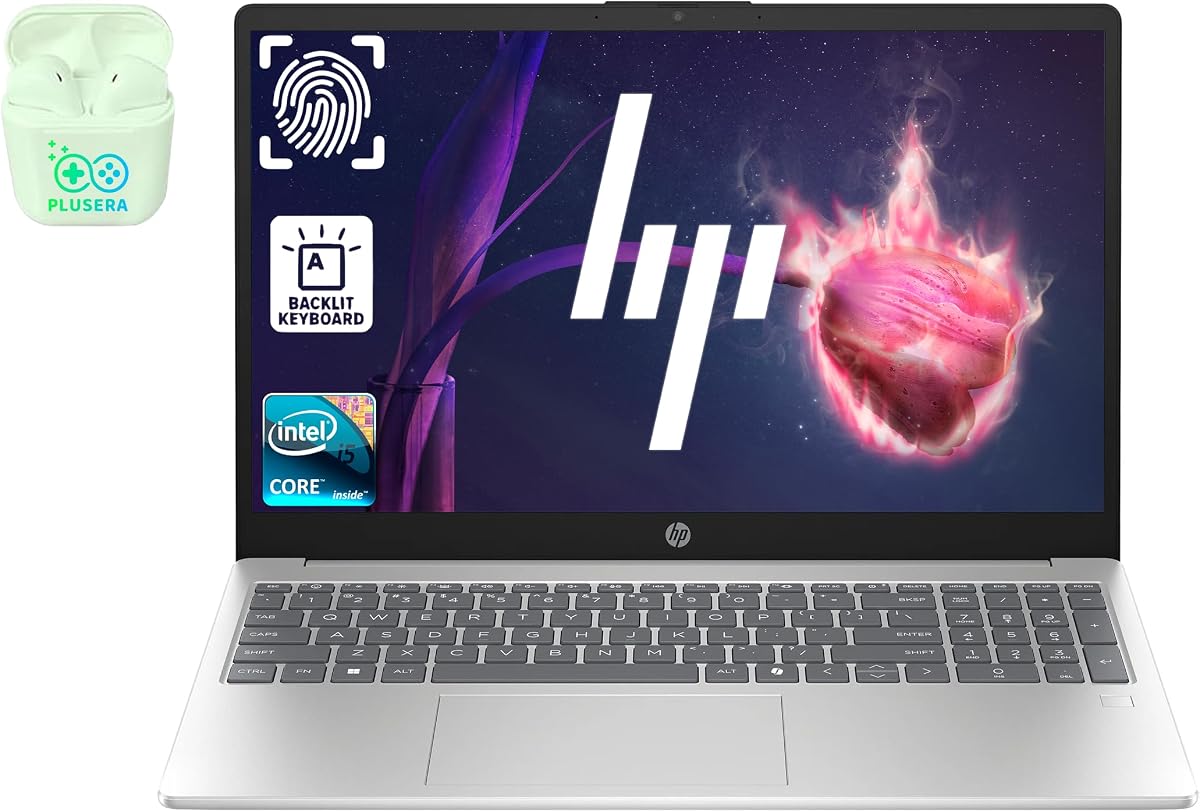

This HP laptop delivers essential computing power with a dedicated numeric keypad for efficient data entry. It features a spacious 15.6-inch display ideal for school assignments and daily tasks. Users appreciate its portability and up to ten hours of battery life.
We may earn a commission when you buy through this link, at no additional cost to you.
The 16GB RAM ensures smoother multitasking across web browsing and applications. With 600GB of storage including external drive support, you have ample room for documents and photos. The full-size keyboard supports comfortable typing and spreadsheets work.
While the processor handles everyday tasks well, it may struggle with heavy gaming. The storage configuration requires understanding internal versus external drive usage. These trade-offs are acceptable for users focused on productivity and basic workloads.
This model suits students and home users needing reliable performance and a numeric pad. It is an excellent choice for those prioritizing battery life and portability over raw processing speed.
With 16GB of RAM, this laptop handles multiple applications and browser tabs efficiently without slowing down.
Up to ten hours of battery life ensures you can work through the day without needing a power outlet.
We may earn a commission when you buy through this link, at no additional cost to you.
Designed for professionals, this HP laptop offers a massive 17.3-inch screen for side-by-side multitasking. The numeric keypad is perfect for accounting and data entry tasks. It balances performance with productivity features effectively.
We may earn a commission when you buy through this link, at no additional cost to you.
The Intel Core 5 processor provides smooth performance for office applications and video meetings. Fast storage ensures quick startup and file access. Connectivity options like HDMI and USB allow easy connection to peripherals and monitors.
The larger screen increases weight and reduces portability compared to 15-inch models. This is a consideration if you frequently travel. However, for stationary or light mobile office work, the screen real estate is invaluable.
This laptop is ideal for home office users and accountants needing screen space and numeric input. Prioritize this model if desktop replacement capabilities are more important than slim portability.
The spacious 17.3-inch screen allows multiple windows open side-by-side without feeling cramped.
Wi-Fi 6 ensures fast reliable internet connections for streaming and cloud-based work tools.
We may earn a commission when you buy through this link, at no additional cost to you.
This HP Pavilion combines sleek design with essential productivity features. It offers a full HD display that reduces eye strain during long sessions. The numeric keypad makes it suitable for data entry tasks without external peripherals.
We may earn a commission when you buy through this link, at no additional cost to you.
Fast SSD storage delivers boot times under ten seconds. The processor handles video conferencing and document editing efficiently. Connectivity is robust with multiple ports including USB-C and HDMI for external displays.
8GB RAM may limit heavy multitasking across many applications. The processor is designed for efficiency rather than high-intensity tasks. These limitations are minor for students and standard office work.
Ideal for students and professionals needing a lightweight daily driver. Choose this if you value screen quality and build sleekness over raw power.
PCIe NVMe SSD provides instant file access and rapid boot times for daily productivity.
At 3.64 lbs, this laptop is easy to carry to classes or meetings comfortably.
We may earn a commission when you buy through this link, at no additional cost to you.
Powered by an AMD Ryzen 7 processor, this laptop excels at multitasking and business applications. It includes Windows 11 Pro for enhanced security and remote access features. The numeric keypad supports efficient data entry workflows.
We may earn a commission when you buy through this link, at no additional cost to you.
The 16GB RAM and 512GB SSD provide ample speed and storage for professional files. Display quality is solid with FHD resolution suitable for detailed spreadsheets. Connectivity includes Wi-Fi 6 and HDMI for versatile setup options.
The chassis is durable but shows fingerprints easily on the black finish. While processing power is high, external display connectivity lacks Thunderbolt speeds. These are minor drawbacks for a productivity-focused machine.
Recommended for business users needing robust performance and Windows 11 Pro features. It balances high-end specs with practical business tools effectively.
Windows 11 Pro includes tools like BitLocker and remote desktop for secure business management.
16GB of RAM allows seamless switching between heavy applications and browser tabs.
We may earn a commission when you buy through this link, at no additional cost to you.
This model offers an affordable entry point for users needing a numeric keypad. It comes bundled with Microsoft 365 for a year, adding value for home users. The full-size keyboard supports comfortable typing for documents.
We may earn a commission when you buy through this link, at no additional cost to you.
The N200 processor handles basic tasks like web browsing and video streaming efficiently. 8GB RAM ensures smooth operation for typical daily workloads. Connectivity includes HDMI and USB-C for standard external devices.
Storage is limited to 128GB, so external drives may be needed for media files. The HD resolution is less sharp than FHD but acceptable for budget buyers. These trade-offs fit the price point perfectly.
Perfect for students or home users on a tight budget needing basic productivity tools. It delivers essential features without unnecessary expense.
Includes one year of Microsoft 365 subscription for Word and Excel essentials.
Fast SSD storage ensures the system starts up quickly for immediate use.
We may earn a commission when you buy through this link, at no additional cost to you.
Rated highly by users, this HP business laptop offers balanced specs for daily work. It includes AI Copilot for streamlined task organization. The numeric keypad supports spreadsheet work efficiently.
We may earn a commission when you buy through this link, at no additional cost to you.
With 16GB RAM, multitasking is smooth even with many tabs open. The display provides wide viewing angles for collaborative work sessions. Port selection includes USB-C and HDMI for external monitors.
The processor is efficient but not for heavy content creation. Battery life is decent but varies with screen usage. These constraints are acceptable for office environments.
Suitable for small businesses and remote workers seeking reliable performance. It offers a good mix of security features and usability.
Microsoft Copilot helps organize tasks and summarize documents quickly.
Wi-Fi 6 and Bluetooth 5.3 ensure stable connections for peripherals.
We may earn a commission when you buy through this link, at no additional cost to you.
This Lenovo model features an Ethernet port for stable wired network connections. It runs Windows 11 Pro for advanced business security. The numeric keypad is well-positioned for efficient number entry.
We may earn a commission when you buy through this link, at no additional cost to you.
The Core i5 processor handles demanding applications and video conferences smoothly. 16GB RAM ensures responsive performance during busy workdays. The build quality supports daily professional use reliably.
It lacks a touchscreen which some users might prefer. The chassis is thicker than ultra-portables but sturdy for business travel. These trade-offs are minor for professional environments.
Ideal for office professionals requiring wired connectivity and security features. It stands out for reliability and practical business tools.
RJ45 port ensures reliable internet connection for critical business meetings.
Windows 11 Pro includes BitLocker and better management tools for enterprise use.
We may earn a commission when you buy through this link, at no additional cost to you.
The touchscreen display offers interactive control and enhanced viewing. The numeric keypad remains accessible for data tasks. This device balances entertainment with business productivity features well.
We may earn a commission when you buy through this link, at no additional cost to you.
The 10-Core processor manages multitasking efficiently. Windows 11 Home supports a wide range of apps and tools. Connectivity includes a SD card reader for easy media transfers.
Touchscreen can reduce battery life slightly compared to non-touch models. 8GB RAM limits heavy application stacking. These are common trade-offs in mid-range touch laptops.
Recommended for users who prefer tactile screen interaction with business needs. It supports creative and educational tasks effectively.
Touchscreen allows intuitive navigation and quick annotations on documents.
SD Card Reader simplifies importing photos and large media files quickly.
We may earn a commission when you buy through this link, at no additional cost to you.
This HP laptop combines a numeric keypad with fingerprint security for quick access. The backlit keyboard assists in low-light environments. It scores highly for user satisfaction and build quality.
We may earn a commission when you buy through this link, at no additional cost to you.
The processor supports daily business apps without lag. Privacy shutter and dual-array mics enhance video conferencing quality. Renewed units offer significant savings compared to new models.
Display is HD rather than FHD which may limit clarity. Buying renewed carries minor risks compared to new stock. These factors are acceptable given the price and performance balance.
Best for security-focused users needing a reliable business laptop. The backlit keyboard is ideal for evening work sessions.
Biometric login ensures quick secure access to sensitive files.
Keyboard backlight allows typing in dimly lit rooms comfortably.
We may earn a commission when you buy through this link, at no additional cost to you.
This 2026 edition HP laptop delivers modern performance and a large screen. It supports Office 365 seamlessly for document management. The numeric keypad facilitates data entry tasks efficiently.
We may earn a commission when you buy through this link, at no additional cost to you.
The Ryzen 5 processor handles multitasking well. 16GB RAM ensures smooth operation for professional apps. Battery life supports all-day work without frequent charging.
The larger size makes travel less convenient than smaller laptops. It is pricier than budget options but offers modern features. These trade-offs suit professional stationary workstations.
Recommended for users seeking the latest hardware with large displays. It is a powerful choice for home office environments.
Latest Ryzen processor ensures compatibility with future software and OS updates.
Pre-integrated support for Office 365 simplifies document editing and sharing.
We may earn a commission when you buy through this link, at no additional cost to you.
Choosing a laptop with a numeric keypad involves evaluating performance, display, and portability needs. This section details the key factors to consider before purchasing.
The CPU determines how fast your laptop handles tasks. Look for Intel Core i5 or AMD Ryzen 5 for smooth multitasking. Entry-level processors suffice for basic browsing but struggle with heavy apps.
Prioritize multi-core processors for better productivity across multiple applications.
RAM affects how many programs you can run simultaneously. 16GB is ideal for professional workloads while 8GB works for basic office tasks. Consider upgradeability for future needs.
Choose 16GB RAM if you manage large spreadsheets or many browser tabs.
A larger screen reduces eye strain during long work sessions. FHD resolution is standard for clear text readability. Consider aspect ratios and anti-glare coatings for better viewing.
Select a 15 to 17-inch screen for optimal spreadsheet workspace.
SSDs provide faster boot times than hard drives. NVMe SSDs offer the quickest performance for file access. Ensure enough space for your documents and media files.
Look for at least 256GB of SSD storage for comfortable use.
Ports allow connection to external displays and peripherals. USB-C and HDMI support modern monitors. Ethernet ports provide stable internet for critical business tasks.
Check for sufficient USB ports to avoid needing additional hubs.
A full-size keyboard with a numeric section speeds up data entry. Key travel and backlighting improve comfort during long typing sessions. Ensure the layout matches your workflow.
Test keyboard feel before purchasing if possible for best ergonomics.
Windows 11 Home suits most users while Pro adds security tools. Some users prefer Linux but may require hardware compatibility checks. Consider integration with business networks.
Windows 11 Pro is recommended for business security features.
Long battery life supports working without outlets. Portability matters if you travel frequently for meetings. Weight and dimensions impact daily carry convenience.
Aim for 8+ hours of battery life for uninterrupted work.
Keep the numeric keypad clean by wiping it regularly with a soft microfiber cloth. Avoid using liquids directly on the keyboard to prevent damage to switches.
Use external cooling pads during intensive tasks to maintain performance. Ensure vents remain unblocked for proper airflow and thermal management.
Install regular software updates to maintain security. Avoid downloading files from untrusted sources to prevent malware affecting system performance.
A numeric keypad allows faster data entry for financial data entry It reduces hand movement across the keyboard which speeds up spreadsheets. This layout significantly improves productivity for accounting professionals.
Not always. While many 15-inch models include them, compact versions may omit them. Always check the product specifications to confirm the layout before purchase.
Yes, external USB numeric keypads are widely available. They connect easily to USB ports and offer full functionality. This is a good option if your laptop lacks one.
Minimal impact. The keypad consumes negligible power compared to the screen or processor. Battery drain is influenced more by screen brightness and task intensity than keyboard layout.
8GB is sufficient for basic tasks while 16GB offers better multitasking. If you run multiple applications simultaneously, 16GB ensures smooth performance without slowdowns.
No. Many slim and ultraportable models exclude them to save space. Desktop replacements usually include them. Verify the keyboard layout in the product details.
We reviewed ten laptops balancing performance, features, and price. The HP 17.3 Business laptop stands out for large screen productivity. The HP 15.6 Portable offers budget-friendly essentials.
Prioritize your specific needs such as processor speed or screen size. If accounting is your main task, look for models with comfortable numeric sections. Consider portability versus desk space trade-offs.
Prices change regularly so check current listings before buying. Ensure warranty details match your expectations. With the right choice, you can streamline your workflow effectively.