
SteelSeries Apex 3 Gaming Keyboard
4.6Editor score
IP32 water resistant design
Whisper quiet switches
Dedicated multimedia controls
This comprehensive guide compares the top Mac gaming keyboards for performance, compatibility, and value to help you find the perfect mechanical option for
Finding the right Mac gaming keyboard can transform your computing experience by blending productivity with high-performance gaming capabilities. Mac users often struggle to find devices that seamlessly integrate with macOS while delivering the tactile feedback and speed required for competitive play. This guide explores ten top-rated options designed to meet these specific needs.
We evaluated each keyboard based on build quality, switch type, connectivity options, and native macOS compatibility. Our analysis considers wireless reliability, key rollover performance, and ergonomic design to ensure long-term comfort during extended sessions. These factors help distinguish genuine gaming peripherals from standard office keyboards that lack necessary features.
Each pick highlights unique strengths such as budget-friendly pricing, premium materials, or specialized layouts tailored for Mac environments. Please note that prices and availability may change frequently on major retail platforms. We recommend verifying current deals before purchasing to ensure you get the best value for your specific requirements.
4.6Editor score
4.3Editor score

4.2Editor score
The following table provides a side-by-side comparison of all ten selected keyboards to help you quickly identify key specifications and differences relevant to Mac users.




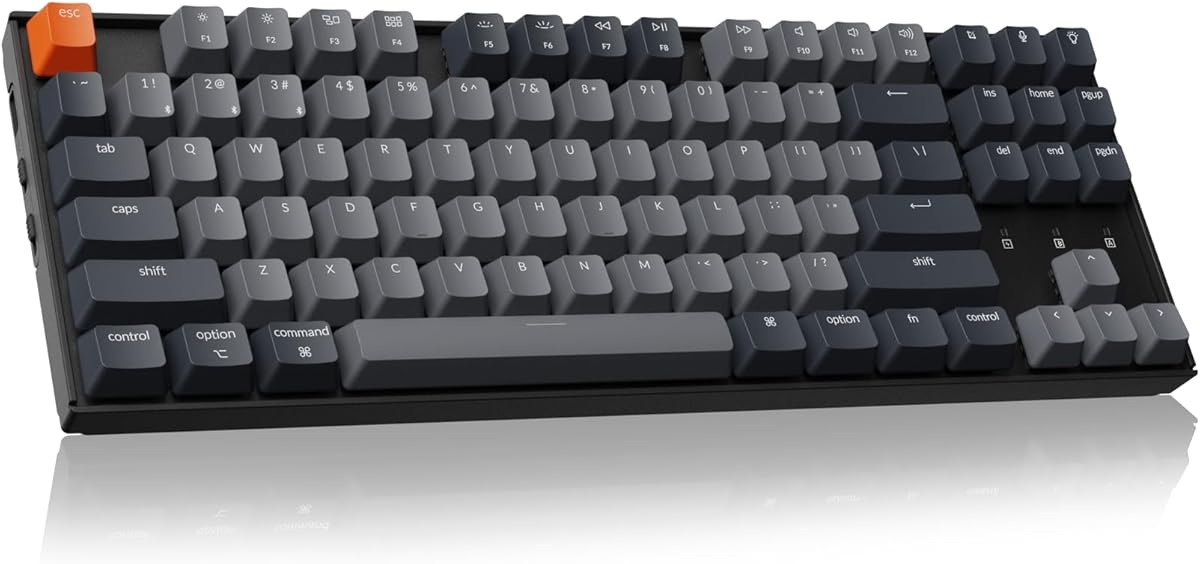
The Keychron K8 stands out as a top choice for Mac gamers due to its seamless integration with macOS and robust build quality. It receives high ratings for balancing wireless convenience with mechanical precision. This keyboard offers a versatile experience suitable for both work and gaming scenarios on Apple devices.
We may earn a commission when you buy through this link, at no additional cost to you.
Its dual-mode connectivity allows users to switch between Bluetooth and wired USB-C connections effortlessly. The battery life is exceptional, lasting up to 200 hours without backlighting. This ensures uninterrupted usage during long gaming sessions without frequent recharging needs.
While the brown switches provide excellent tactile feedback, they may lack the clicky sound some gamers prefer. The price is higher than budget options but justified by the quality and compatibility features. This trade-off is acceptable for users prioritizing reliability and macOS optimization.
This keyboard is ideal for Mac users who need a reliable, wireless mechanical keyboard for gaming and productivity. We recommend it for those willing to invest in a premium device that enhances their computing experience significantly.
The K8 includes dedicated Mac function keys and extra keycaps for full system integration.
Users can connect up to three devices via Bluetooth and switch between them instantly.
We may earn a commission when you buy through this link, at no additional cost to you.
The SteelSeries Apex 3 is an excellent budget option that delivers surprising performance for Mac users seeking a reliable input device. It is highly rated for its durability and quiet operation, making it suitable for shared spaces. This keyboard offers a comfortable typing experience without breaking the bank.
We may earn a commission when you buy through this link, at no additional cost to you.
Its IP32 water-resistant coating protects against accidental spills, a valuable feature for any gaming setup. The 10-zone RGB illumination adds visual flair while the whisper quiet switches ensure minimal disturbance to others. These features make it a practical choice for casual gamers and students.
While it lacks true mechanical switches, the tactile membrane design is adequate for most gaming needs. The limited macro capabilities might restrict advanced users but suffice for standard tasks. This compromise is reasonable given the low cost and robust construction.
We recommend this keyboard for budget-conscious gamers who value durability and quiet performance. It is a great entry-level choice for Mac users entering the gaming peripheral market.
The IP32 rating helps prevent damage from liquid spills common in gaming environments.
A magnetic wrist rest is included to provide palm support during extended typing.
We may earn a commission when you buy through this link, at no additional cost to you.
The EPOMAKER X Aula F75 MAX offers a premium experience with its unique TFT screen and gasket-mounted structure. It is highly rated for sound dampening and customization potential appealing to enthusiasts. This keyboard brings modern features to the Mac gaming niche with exceptional build quality.
We may earn a commission when you buy through this link, at no additional cost to you.
Its TFT display allows for dynamic GIFs and system monitoring adding a personal touch to the desk. The hot-swappable design enables users to change switches without soldering. This flexibility supports experimenting with different tactile experiences over time easily.
Software complexity can be a hurdle for casual users who may find customization daunting. Limited native Mac mapping requires some manual key adjustment. However these trade-offs are acceptable for users valuing deep personalization options heavily.
We recommend this keyboard for enthusiasts seeking a highly customizable mechanical device. It suits Mac users who prioritize unique design elements and sound tuning capabilities over simplicity.
The small screen displays battery levels custom GIFs and system information visually.
This design isolates the PCB reducing harsh bottom-out for softer keystrokes.
We may earn a commission when you buy through this link, at no additional cost to you.
The Logitech G915 X brings low-profile engineering to gaming with a full-size layout and premium materials. It is recognized for its speed and precision making it ideal for rapid input scenarios. This keyboard combines style with performance for users wanting a compact look with all keys.
We may earn a commission when you buy through this link, at no additional cost to you.
The GL switches offer a short actuation point for faster reactions during intense games. PBT keycaps ensure long-lasting durability against wear and shine. These features support high-performance gaming needs while maintaining a clean aesthetic profile.
Being a wired model limits portability compared to wireless alternatives. The cost is significant and may not fit tighter budgets. However the build quality and speed justify the investment for serious players.
We recommend this keyboard for gamers who prefer low-profile switches and a full layout. It suits Mac users seeking a robust wired peripheral for competitive play.
The 1.3mm actuation point helps increase actions per minute during gameplay.
Sand-blasted aluminum top plate provides a sturdy feel and premium look.
We may earn a commission when you buy through this link, at no additional cost to you.
The Logitech G413 TKL SE offers a compact tenkeyless design with durable PBT keycaps for reliable gaming. It is well-rated for its robust construction and tactile feedback suitable for daily use. This keyboard provides a balance of performance and affordability for Mac users.
We may earn a commission when you buy through this link, at no additional cost to you.
PBT keycaps resist wear and shine longer than standard ABS caps ensuring longevity. The aluminum-magnesium alloy top case adds structural rigidity reducing flex during intense typing. These details enhance the overall user experience significantly over time.
The lack of a numpad may inconvenience users needing numeric entry frequently. Single-color lighting limits aesthetic customization compared to RGB models. These are acceptable compromises for those prioritizing durability and space savings.
We recommend this keyboard for users needing a compact reliable mechanical option. It fits well with Mac setups requiring space efficiency without sacrificing build quality.
PBT keycaps are heat and wear resistant for long-term texture retention.
Removing the numpad frees up desk space for mouse movement during gaming.
We may earn a commission when you buy through this link, at no additional cost to you.
The Redragon K742 is a versatile compact wireless keyboard with advanced programmability for enthusiasts. It is highly rated for its tri-mode connectivity and gasket structure offering comfort and flexibility. This keyboard brings premium features to a competitive price point for Mac gamers.
We may earn a commission when you buy through this link, at no additional cost to you.
Users can connect via Bluetooth 5.0 2.4GHz or USB-C with instant switching. The hot-swappable PCB supports custom switch replacement for tailored feedback. These features provide unmatched adaptability for different usage scenarios and preferences.
QMK VIA support requires initial setup which might be complex for beginners. The included keycaps are standard limiting aesthetic variety without extra purchases. These trade-offs are minimal for users valuing functionality over aesthetics immediately.
We recommend this keyboard for tech-savvy users wanting wireless freedom and customization. It is an excellent choice for Mac setups requiring efficient desk layouts.
Switch between Bluetooth wireless dongle or wired modes for different devices easily.
QMK VIA allows deep key remapping and macro creation for efficiency.
We may earn a commission when you buy through this link, at no additional cost to you.
The Keychron K4 offers a compact 96% layout including a numpad for maximum utility in a small space. It is highly rated for its wireless reliability and Mac-specific key integration. This keyboard is perfect for users needing numeric entry without sacrificing desk space.
We may earn a commission when you buy through this link, at no additional cost to you.
The 4000mAh battery provides up to 240 hours of use without backlighting ensuring long runtime. Bluetooth 5.1 ensures stable connections across multiple devices seamlessly. These features support productivity and gaming sessions without interruption or charging anxiety.
Limited to white LED backlighting reduces aesthetic customization compared to RGB options. The price is moderate but reflects the quality and battery capacity well. This is acceptable for users prioritizing function over flashy lighting.
We recommend this keyboard for users needing a compact layout with numeric keys. It suits Mac environments requiring versatility and strong battery performance.
The 96% layout packs a numpad into a small frame for space saving.
A large 4000mAh battery ensures weeks of usage on a single charge.
We may earn a commission when you buy through this link, at no additional cost to you.
The Logitech MX Mechanical is a premium productivity hybrid with low-profile mechanical switches and smart illumination. It is highly rated for comfort and multi-device flow features beneficial for power users. This keyboard offers a sophisticated typing experience for Mac users.
We may earn a commission when you buy through this link, at no additional cost to you.
Smart backlighting adjusts to surroundings automatically saving power and reducing glare. The tactile quiet switches provide feedback without noise distraction. These features enhance typing comfort during long work sessions or casual gaming.
The price is high compared to standard gaming keyboards but justifies the build and features. Gaming specific features like RGB are less prominent than productivity tools. This trade-off is acceptable for users prioritizing professional aesthetics.
We recommend this keyboard for professionals who game occasionally and value comfort. It suits Mac users seeking a high-quality multi-device typing solution.
Backlights illuminate only when hands approach adapting to room light automatically.
Switch between paired devices and transfer text across systems effortlessly.
We may earn a commission when you buy through this link, at no additional cost to you.
The GravaStar Mercury K1 stands out with a futuristic aluminum exoskeleton and gasket mount design. It is highly rated for build quality and sound dampening providing a premium feel. This keyboard appeals to users wanting style without compromising performance.
We may earn a commission when you buy through this link, at no additional cost to you.
Tri-mode connectivity supports wired USB-C Bluetooth 5.0 and 2.4GHz wireless options. The custom RGB lighting offers 13 modes for visual personalization. These features support flexible setups across different devices and usage scenarios.
Software customization is basic compared to open-source alternatives like VIA. Switch choice is limited to pre-installed options without hot-swap support. These limitations are minor for users valuing aesthetic quality over modularity.
We recommend this keyboard for style-conscious gamers needing reliable wireless connectivity. It suits Mac users who prioritize design and typing comfort equally.
The aluminum alloy exoskeleton provides symmetrical stability and premium strength.
Five layers of foam dampening reduce noise for a quieter typing experience.
We may earn a commission when you buy through this link, at no additional cost to you.
The Logitech G213 Prodigy is a reliable budget-friendly wired option with dedicated media controls. It is recognized for its solid construction and full-size layout offering comfort. This keyboard provides essential gaming features without a high price tag.
We may earn a commission when you buy through this link, at no additional cost to you.
Anti-ghosting technology ensures accurate key input during complex commands. The integrated palm rest supports long sessions reducing wrist strain. These features make it a practical choice for casual gamers needing durability.
It uses membrane switches instead of mechanical ones affecting tactile feedback. Lighting zones are fixed rather than fully customizable per key. These compromises are acceptable given the low cost and functionality.
We recommend this keyboard for entry-level users needing a full layout and comfort. It suits Mac users on a budget seeking reliable everyday performance.
Dedicated buttons allow quick play pause mute and volume adjustment easily.
Integrated palm rest and adjustable feet support ergonomic typing positions.
We may earn a commission when you buy through this link, at no additional cost to you.
Choosing the right keyboard requires balancing compatibility with performance features to match your workflow.
Ensure the keyboard has dedicated macOS function keys like Command and Option for seamless workflow. Some models include extra keycaps to bridge Windows and Mac layouts ensuring all shortcuts function correctly without remapping.
Look for keyboards explicitly advertised as Mac compatible to avoid missing shortcuts.
Mechanical switches offer tactile feedback and durability superior to membrane alternatives. Linear switches provide smooth keystrokes for gaming while tactile switches offer bumps for typing precision.
Choose linear switches for fast reactions or tactile for better text entry accuracy.
Wireless keyboards offer cleaner desk setups but rely on battery life for sustained use. Wired options ensure zero latency which is critical for competitive gaming scenarios.
Prioritize wireless for convenience or wired for reliability and uninterrupted play.
Full-size keyboards include a numpad ideal for data entry but occupy more desk space. Tenkeyless or compact layouts save room for mouse movement enhancing gaming ergonomics.
Select full-size for utility or compact layouts for spacious gaming desks.
High-quality materials like aluminum or magnesium alloy frames increase durability and reduce flex during intense typing. Sturdy construction ensures long-term reliability under frequent use.
Opt for metal frames to extend the lifespan of your keyboard.
Software support for key remapping and macro creation allows tailoring the keyboard to your needs. Hot-swappable PCBs enable changing switches without soldering for future upgrades.
Check software compatibility with macOS before purchasing advanced customization models.
RGB lighting adds visual appeal but consumes more battery power on wireless models. Single-color backlighting offers a clean look while preserving battery life significantly.
Balance aesthetic preferences with battery efficiency based on your usage patterns.
Integrated wrist rests and adjustable feet help maintain neutral wrist positions reducing strain. Proper support is vital for preventing discomfort during extended gaming sessions.
Invest in models with ergonomic accessories for long-term health and comfort.
Pair your keyboard with Mac via Bluetooth or USB-C ensuring the Mac toggle is set correctly. Navigate System Preferences to verify all function keys map to expected commands.
Clean regularly with compressed air and soft brushes to remove debris between switches. Use a damp microfiber cloth for surface cleaning while avoiding liquids near internal components.
Store in a dry cool environment away from direct sunlight to preserve materials and battery life. Regularly update firmware or software to ensure optimal compatibility and feature access.
Most Bluetooth models connect easily to iPad running iPadOS. Ensure the switch is set to iOS or macOS mode and check specific model details for full support.
Many keyboards include extra keycaps to replace Windows keys with Mac equivalents. If not included third-party keycap sets can provide the necessary legends.
Linear switches like reds are often preferred for gaming due to smooth actuation. Tactile browns offer a middle ground suitable for both typing and gaming.
Modern Bluetooth 5.0 and 2.4GHz wireless tech offer near-zero latency. Wired connections remain slightly faster for competitive scenarios.
Some models like the SteelSeries Apex 3 offer IP32 water resistance. Others lack protection so use caution near drinks.
Check the physical toggle switch for OS selection. Use the software or macOS System Preferences to remap keys manually.
The Keychron K8 offers the best balance of macOS integration and wireless performance for most users. Budget buyers may prefer the SteelSeries Apex 3 for its affordability and durable design.
Prioritize switch type and connectivity based on your specific gaming needs and workspace constraints. Consider layout size and ergonomic features to ensure long-term comfort and usability.
Prices fluctuate frequently so verify current deals before purchasing. Check the latest specs to ensure compatibility with your Mac model and OS version.