
Anti Slip Laptop Rubber Feet Pad Replacement
4.4Editor score
Fits multiple laptop brands
Includes fifteen pieces total
Strong self adhesive backing
Laptop rubber feet are essential for stability and airflow yet they wear out over time causing your device to slide or overheat. Finding the right replacement ensures your machine stays secure during travel or daily use without damaging surfaces.
We evaluated ten highly rated replacement kits based on compatibility material quality and adhesive strength. Each product was reviewed for fit precision ease of installation and long term durability to help you choose the best match for your specific model.
Every pick in this list offers a unique solution from universal pads to model specific strips. While prices may fluctuate these options provide reliable grip and protection. Always verify your laptop model before purchasing to ensure a perfect fit.
4.4Editor score
4.4Editor score

4.5Editor score
As an Amazon Associate we earn from qualifying purchases.
This comparison table details the key specifications for each replacement kit. Use it to quickly identify the right size material and model compatibility for your specific laptop device needs.


This kit stands out as the top choice for HP 15 series owners needing reliable rubber feet. With a 4.4 rating it delivers excellent value by including both thick and thin pads for varied needs.
We may earn a commission when you buy through this link, at no additional cost to you.
The standout feature is the pre applied adhesive which eliminates the need to buy separate glue. The strips are made from high quality rubber that grips surfaces well and protects the bottom case from scratches effectively.
While the fit is precise for supported models it may not work for other brands. The thick pad adds noticeable height which aids cooling but might feel slightly elevated for some users seeking a flush fit.
If you own an HP 15-EF or DY model this is the most convenient and effective replacement. It restores stability without hassle making it a top recommendation for general users.
The included adhesive backing simplifies installation significantly. You just peel and stick without needing extra tools or glue purchases.
Having both thick and thin pads allows flexibility. Use the thick one for cooling or thin for a lower profile fit.
We may earn a commission when you buy through this link, at no additional cost to you.
This replacement kit is designed specifically for HP laptops focusing on restoring grip and stability. It comes with two strips of different thickness to suit various preferences and device requirements.
We may earn a commission when you buy through this link, at no additional cost to you.
The premium rubber material ensures high resistance to wear and heat. This helps maintain performance over time by allowing better airflow underneath the laptop which is crucial for thermal management.
You must verify your model matches the listed HP series before buying. If your device is not compatible the fit may be off which could reduce the effectiveness of the grip.
Ideal for HP users seeking a quick fix for worn feet. The dual thickness option provides flexibility whether you prioritize cooling or a low profile look.
The elevated design of the feet promotes airflow. This helps prevent overheating during long usage sessions.
Built from high quality rubber these feet resist wear and heat well. This ensures longevity and consistent performance.
We may earn a commission when you buy through this link, at no additional cost to you.
This is a versatile universal kit ideal for those who want extra pads for multiple devices. It includes fifteen pieces so you can use them on laptops speakers or keyboards as needed.
We may earn a commission when you buy through this link, at no additional cost to you.
The strong self adhesive backing ensures they stick firmly to any flat surface. They are slightly taller than original feet which helps lift the device for better air circulation and cooling.
Since these are not model specific the fit might not be perfect for every laptop. However for general stability and scratch protection they offer an affordable solution for many users.
Perfect for budget conscious buyers needing flexibility. Whether for a MacBook or generic laptop this kit delivers reliable grip at a low price point.
Beyond laptops these feet work on speakers and keyboards. This makes the fifteen pack highly practical for various home office needs.
The taller design raises the laptop slightly. This extra gap allows more air to flow underneath reducing heat buildup.
We may earn a commission when you buy through this link, at no additional cost to you.
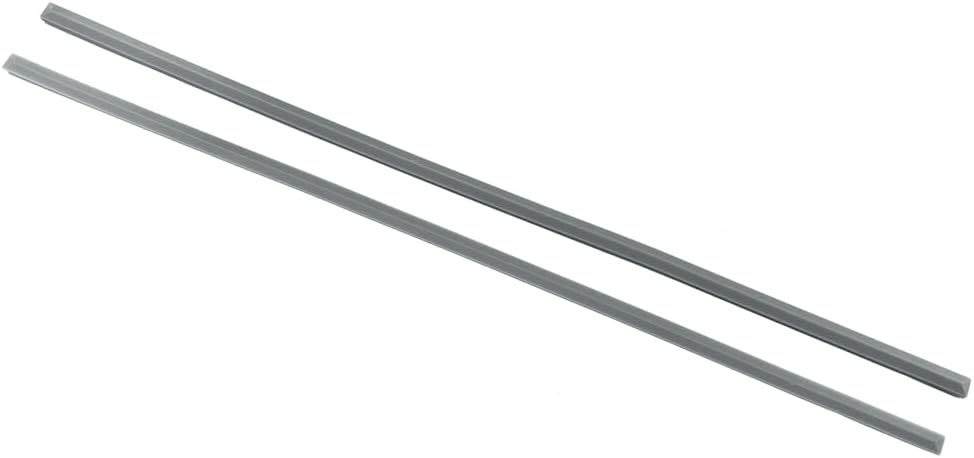
This replacement kit is tailored for HP Envy X360 users seeking a precise fit. With a 4.5 rating it offers high quality rubber strips that match the device design well.
We may earn a commission when you buy through this link, at no additional cost to you.
The grey color blends seamlessly with the laptop case. The material is durable and provides excellent grip preventing slips on smooth surfaces during use.
It works only for specific Envy models so check your series before ordering. If your laptop matches the specs the installation is straightforward and the result is secure.
Highly recommended for Envy owners. It restores the original look and feel while ensuring the laptop stays stable on any surface.
The grey strips match the laptop finish. This keeps the device looking professional and original after replacement.
Made specifically for X360 models these strips fit the grooves perfectly. This ensures a snug fit and long term stability.
We may earn a commission when you buy through this link, at no additional cost to you.
For Surface Book owners this kit offers a premium solution that matches original specs. It uses silicone which is durable and provides a soft non-slip surface for the laptop.
We may earn a commission when you buy through this link, at no additional cost to you.
The strips are designed specifically for the 13.5 inch Surface Book. This ensures they fit the bottom case exactly without overhang or gaps which maintains the sleek look.
While the cost is higher than generic options the quality justifies the price. You get a reliable grip that protects the surface and keeps the device stable.
Best for users who value premium quality. It restores the device functionality while keeping the design consistent with the original build.
Silicone offers better durability and grip than standard rubber. This ensures the feet last longer and perform better.
Designed for 13.5 inch Surface Book models these strips fit perfectly. This guarantees a secure install without modification.
We may earn a commission when you buy through this link, at no additional cost to you.
This kit is made for the Surface Laptop Studio ensuring a tailored fit. It includes two grey rubber strips that match the device design and provide essential non-slip protection.
We may earn a commission when you buy through this link, at no additional cost to you.
The rubber quality is high enough to resist wear effectively. Installation is simple with adhesive backing that sticks securely to the bottom case for immediate use.
With a lower rating than some other options it may have minor fit issues for some units. It is crucial to verify your specific model before purchasing.
Suitable for Studio owners needing quick replacement. It restores grip and stability while keeping the device looking consistent with its original aesthetic.
The grey strips match the Studio finish. This keeps the device looking new without visible mismatched parts.
Peel and stick application makes setup fast. You can replace old feet in minutes without tools.
We may earn a commission when you buy through this link, at no additional cost to you.
This pack offers reliable rubber feet for specific HP Envy x360 models. The black rubber strips are designed to replace missing worn feet with a secure adhesive backing.
We may earn a commission when you buy through this link, at no additional cost to you.
The adhesive ensures the strips stay in place during use. This prevents the laptop from sliding on smooth surfaces and protects the bottom cover from scratches.
You must confirm your model number matches the list. If not compatible the strips may not fit the grooves properly reducing their effectiveness.
Best for Envy users needing a direct replacement. It restores the original grip and protection to the device bottom effectively.
Strong adhesive holds the feet firmly. This prevents peeling even with regular use on different surfaces.
Black finish blends with the laptop case. This maintains the professional look of the device after repair.
We may earn a commission when you buy through this link, at no additional cost to you.
This is a versatile kit for general grip needs beyond laptops. It includes eight black strips made from premium rubber foam that stick securely to glass wood or other surfaces.
We may earn a commission when you buy through this link, at no additional cost to you.
The adhesive is tenacious keeping items like laptops keyboards or cutting boards from sliding. It is ideal for protecting surfaces and preventing accidental movement.
Because it is universal the fit on laptops may not be exact. It works best for adding grip to flat surfaces rather than fitting precise grooves.
Perfect for users needing extra stability. It keeps devices safe from scratches and sliding while protecting your desk surface.
Works on glass wood and plastic. This makes it great for various home office setups and devices.
Strong adhesive ensures items stay put. You won’t worry about your device sliding during use.
We may earn a commission when you buy through this link, at no additional cost to you.
This kit targets HP Elitebook X360 users needing reliable feet replacement. The rubber strips are made to fit the specific bottom case of the device.
We may earn a commission when you buy through this link, at no additional cost to you.
Each pack includes two strips with adhesive backing. This ensures a secure fit and non-slip performance which keeps the laptop stable on any surface.
You must check your exact model before purchasing. If the size does not match the grooves the grip may be compromised.
Ideal for Elitebook owners. It restores original stability and protects the device bottom from damage effectively.
Includes adhesive to ensure firm attachment. This prevents feet from lifting or slipping during use.
Tailored for Elitebook X360 series. This ensures a precise fit for optimal performance.
We may earn a commission when you buy through this link, at no additional cost to you.
This kit provides two sets of rubber feet suitable for most notebooks. It includes adhesive strips to help you reattach them securely to your device.
We may earn a commission when you buy through this link, at no additional cost to you.
The rubber feet are designed to be flexible for various laptop sizes. This allows you to adapt them to different bottom cases without needing exact model match.
Because it is universal the fit may require trimming. This makes it a good solution for older laptops where specific parts are hard to find.
Great for general notebook repairs. It offers a cost effective way to restore grip and stability across multiple devices.
Flexible design works on many notebooks. You can adjust feet to fit different laptop sizes easily.
Includes feet and adhesive strips. This provides everything needed for a quick and effective replacement.
We may earn a commission when you buy through this link, at no additional cost to you.
Choosing the right rubber feet requires checking compatibility material quality adhesive strength and design. Follow these factors to ensure a secure fit and long term durability for your laptop.
Always verify your exact laptop model before purchasing. Most products are made for specific brands or series like HP 15 or Surface Book. Using a wrong fit can lead to poor grip or damage to the bottom case.
Check product listings for model numbers. If unsure measure your old feet to confirm length width and thickness requirements before buying.
Look for premium rubber or silicone which resists wear and heat better than cheap plastic. High quality materials maintain flexibility and grip over time without cracking or peeling.
Avoid products that feel too hard or brittle. These may not provide adequate shock absorption or protection for your laptop bottom.
Strong adhesive backing ensures the feet stay attached during travel or use. Some kits include double sided adhesive for extra security while others rely on pre applied sticky backing.
Clean the surface before applying to remove old glue. This helps the new adhesive bond properly and last longer.
Thickness affects how much the laptop is lifted which influences airflow. Thicker feet improve cooling but may raise the device too high for some desk setups.
Choose between thick and thin options based on your needs. If stability is your main goal standard thickness works best.
Most packs include two strips which is enough for most laptops. Some universal kits offer more pieces allowing you to use them for multiple devices.
Check how many feet you need. Some laptops have four corner feet while others use long strips along the edges.
Match the color to your laptop for a clean look. Black and grey options are common and blend well with most device finishes.
Design should not overhang edges. Properly shaped strips ensure they fit into grooves without interfering with ports or cables.
Durability depends on the rubber compound quality. Look for terms like wear resistance or heat performance in product descriptions.
Durable feet won’t crack or peel quickly. This saves money by reducing the need for frequent replacements.
Easy installation means peel and stick design without extra tools. Some kits include cleaning instructions or extra adhesive for reinforcement.
Proper application ensures maximum grip. Take time to clean and dry the surface before sticking the new feet.
Start by removing the old feet. Use a soft tool to lift them gently and clean all leftover glue from the bottom case. Ensure the surface is dry and free of dust before proceeding.
Align the new strips with the grooves. Press firmly from center to edges to avoid air bubbles. Let the adhesive set for at least thirty minutes before using the laptop.
Regularly check the feet for peeling. Wipe them with a damp cloth to remove debris. If edges lift apply a small drop of glue to secure them.
Most replacement kits include pre applied adhesive on the strips. This makes installation easier without extra purchases. If you want extra security you can use strong double sided tape but it is usually not required.
Universal feet work on many devices but fit may not be exact. Measure your old feet to ensure length and width match. For best results choose model specific strips designed for your brand.
Use warm soapy water and a soft cloth. If glue is stubborn use a plastic scraper gently. Make sure the area is dry before applying new strips to ensure good adhesion.
Yes thicker feet lift the laptop higher allowing more air to flow underneath. This helps prevent overheating during heavy use. Just ensure the height fits your desk setup comfortably.
Replace them when they become cracked peeled or lose grip. For regular users this may be every few years. Inspect periodically to maintain stable and scratch protection.
This often happens if the surface wasn’t clean or adhesive was weak. Clean thoroughly and let it dry before sticking. Use strong adhesive if your surface is oily or dusty.
We found the Best Bottom Cover Rubber Feet Strips for HP to be the top value option offering thick and thin pads plus pre applied adhesive for convenience. For universal needs the Anti Slip Rubber Feet Pad provides great budget friendly flexibility.
Prioritize material quality and exact model match to ensure your device stays stable and protected. Strong adhesive and proper fit are crucial for long term performance and preventing surface damage.
Always check current pricing and stock before purchasing. Prices may change and availability varies so confirm the product fits your laptop model before completing your order.