
NexiGo N60
4.3Editor score
Full HD 1080p video quality
Built-in noise cancelling mic
Privacy cover included
Finding the right external webcam for your Mac can significantly improve your video call quality and streaming experience. With so many options available, it is essential to consider factors like resolution, microphone quality, and compatibility with macOS systems to ensure smooth performance.
We have carefully selected and reviewed ten top-rated webcams that work seamlessly with Mac devices. Our comparison focuses on real-world performance, image clarity, audio capture, and ease of use to help you make an informed decision for your specific needs.
Each pick in this guide highlights key features, pros, cons, and ideal use cases. Please note that product availability and pricing may change over time, so always check the latest details before making a purchase to ensure you get the best value.
4.3Editor score

4.6Editor score

4.6Editor score
As an Amazon Associate we earn from qualifying purchases.
This side-by-side comparison highlights the key specifications and features of each webcam to help you quickly identify the model that best fits your Mac setup and workflow requirements.




The Acer 4K Webcam stands out as a top choice for Mac users seeking high fidelity video without compromising on build quality. With a rating of 4.6 stars, it delivers exceptional clarity thanks to its genuine Sony sensor and advanced autofocus technology.
We may earn a commission when you buy through this link, at no additional cost to you.
Its all-metal unibody design not only looks elegant on any desk but also ensures fast heat dissipation for reliable performance during long sessions. The dual high sensitivity digital microphones capture clear audio from a distance while filtering out background noise effectively.
While the webcam offers plug and play functionality, accessing the full 4K resolution may require switching settings via external software like OBS or PotPlayer. Additionally, depending on your Mac model, you might need a USB-C adapter for connection.
If you value premium build quality and true 4K visuals for professional meetings or streaming, this webcam is a fantastic investment. It is ideal for content creators and professionals who need reliable video performance in various lighting conditions.
The large 1/2 inch CMOS sensor ensures balanced true-to-life visuals with exceptional light capture for brighter and more detailed images even in low light.
The magnetic privacy cover design features 12 powerful built-in magnets that snap securely over the lens to keep your privacy safe from unwanted peeks.
We may earn a commission when you buy through this link, at no additional cost to you.
The Anker PowerConf C200 provides a compelling balance of performance and affordability for Mac users who need more than standard HD resolution. Its 2K resolution ensures sharp and detailed video that enhances your professional setup significantly.
We may earn a commission when you buy through this link, at no additional cost to you.
Advanced audio clarity is achieved through AI noise cancellation which works alongside dual microphones to ensure your voice is heard clearly even in noisy environments. This makes it ideal for virtual meetings where communication is key.
Although it lacks autofocus, the superior low light performance helps capture crisp images in dim settings without requiring extra lighting. The customizable viewing angles allow you to frame your perfect shot during video calls with ease.
This webcam is a great fit for remote workers or students who prioritize audio quality and low-light capabilities over autofocus. It offers excellent value for those seeking a reliable 2K webcam that works smoothly with macOS.
This webcam features dual mics to ensure voices are crystal clear even in noisy environments making it ideal for virtual meetings and professional calls.
Choose from 65 78 or 95 degree viewing angles via software to frame your perfect shot during video calls with this versatile webcam for PC and Mac.
We may earn a commission when you buy through this link, at no additional cost to you.
The EMEET C960 delivers unmatched clarity with a true 4K resolution that avoids false upscaling making it an excellent choice for remote business meetings where detail matters. It is highly rated for its ability to make you feel like you are in the same room.
We may earn a commission when you buy through this link, at no additional cost to you.
Equipped with PDAF automatic focusing technology, this webcam ensures clear and stable focusing in various scenarios like business conferences and educational lectures. Auto light adjustment allows meetings to be conducted in both over-exposed and low-light settings.
The built-in dual microphones capture voices clearly for crisp natural audio which is perfect for conference calls and remote teaching. However, note that video resolution defaults to 1080P and you must switch to 4K via built-in software.
This webcam is perfect for professionals and educators who need high-quality visuals at a budget-friendly price. Its compatibility with macOS and ease of use make it a practical addition to any home office setup.
Experience ultra-clear video conferencing with a genuine EMEET SmartCam C960 4K CMOS sensor providing pure 4K quality for remote business meetings.
The default USB-A interface ensures you are up and running in no time with a privacy cover for security and no driver or cloud storage required.
We may earn a commission when you buy through this link, at no additional cost to you.
The NexiGo N60 is a fantastic budget-friendly option for Mac users who need reliable video quality without breaking the bank. Its 1080p CMOS produces exceptionally sharp and clear videos that are well optimized for indoor use.
We may earn a commission when you buy through this link, at no additional cost to you.
The built-in noise-cancelling microphone reduces ambient noise to enhance the sound quality of your video which is great for Zoom and FaceTime calls. The privacy cover blocks the lens when the webcam is not in use providing peace of mind.
While it works with USB 2.0 and 3.0 without additional drivers, the fixed distance optimization between 19.6 inches to 13 feet may limit flexibility. You should ensure your sitting position matches this range for the best image quality.
This webcam is ideal for students or casual users who need a simple and effective video solution. Its wide compatibility and ease of use make it a strong contender in the budget category.
Powered by a 1080p FHD two-MP CMOS this NexiGo N60 Webcam produces exceptionally sharp and clear videos at resolutions up to 1920 x 1080 with 30fps.
The privacy cover blocks the lens when the webcam is not in use which is perfect to help provide security and peace of mind to anyone.
We may earn a commission when you buy through this link, at no additional cost to you.
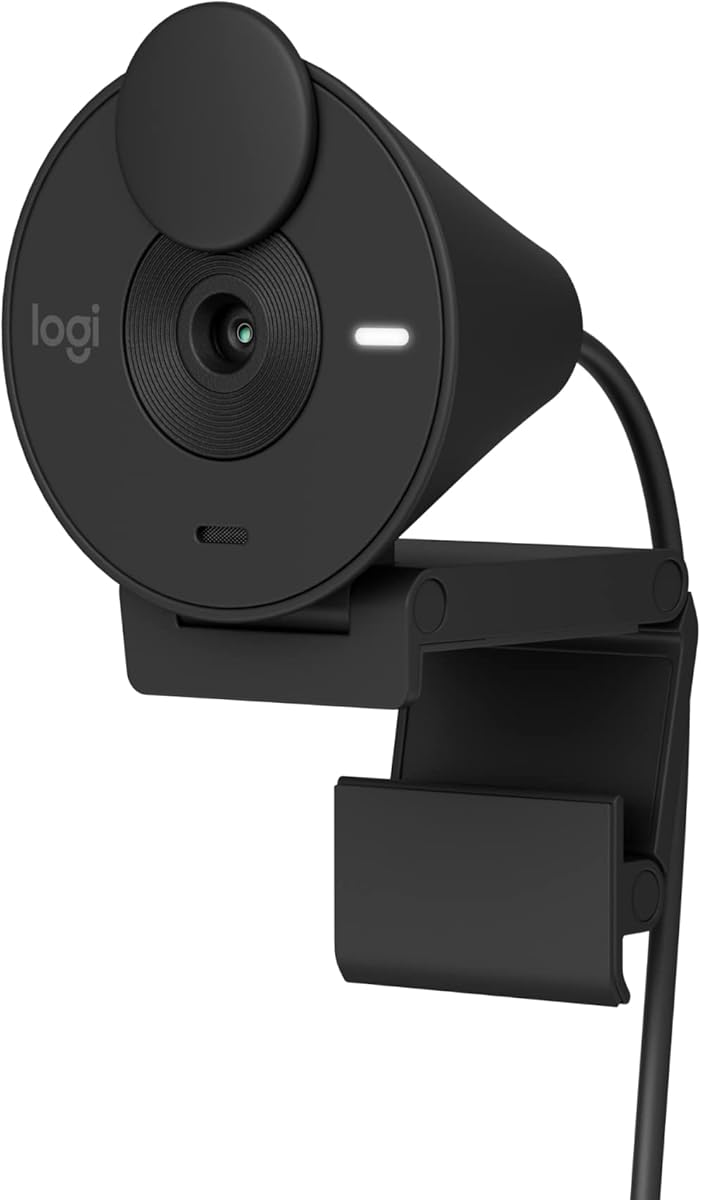
The Logitech Brio 100 offers a clean and sophisticated look that complements Apple devices beautifully. It provides Full HD 1080p resolution ensuring you look clearer in video calls for streaming and meetings alike.
We may earn a commission when you buy through this link, at no additional cost to you.
Auto-Light Balance technology boosts brightness by up to 50 percent reducing shadows so you look your best compared to previous-generation Logitech webcams. This is especially useful if your lighting environment changes frequently.
The integrated webcam cover makes it easy to get total reliable privacy when you are not on a video call which adds a layer of security. The webcam also supports a choice of colors to coordinate with your setup.
This is a solid choice for users who value design and ease of use over advanced features. It works with most video calling platforms including Microsoft Teams and Google Meet making it versatile for various needs.
Auto-Light Balance boosts brightness by up to 50 percent reducing shadows so you look your best compared to previous-generation Logitech webcams.
The Brio 100 Full HD Webcam is made with a minimum of 34 percent post-consumer plastic helping to reduce waste for a better future.
We may earn a commission when you buy through this link, at no additional cost to you.
The Logitech Brio 301 is designed specifically for meeting scenarios where natural image quality is key. It provides Full HD 1080p resolution so you look like the real you on all meeting apps without over-processing.
We may earn a commission when you buy through this link, at no additional cost to you.
RightLight 2 technology automatically compensates for poor video lighting conditions so you can be seen clearly even in challenging environments. The mono noise reduction mic suppresses background sound so everyone on the call can hear you easily.
You can spin the webcam privacy shutter to block the camera lens when you do not need to be on screen ensuring total privacy. The Logi Tune app allows you to customize your video experiences such as adjusting color and image quality.
This webcam is an excellent choice for professionals who need reliable performance on major video conferencing platforms. Its certification for Zoom and Microsoft Teams ensures seamless integration in the workplace.
RightLight 2 technology automatically compensates for poor video lighting conditions so you can be seen clearly on all your video calls.
Enjoy the free Logi Tune app to customize your video experiences such as adjusting color and image quality to suit your preferences.
We may earn a commission when you buy through this link, at no additional cost to you.
The Logitech C920e is designed with business environments in mind offering certification for Zoom and Microsoft Teams for seamless integration. Its 78 degree fixed field of view displays individual users in a well-balanced frame while allowing room to share projects.
We may earn a commission when you buy through this link, at no additional cost to you.
Two integrated omnidirectional microphones capture your audio clearly from up to one meter away so your voice always sounds natural and clear during calls. Built-in HD autofocus ensures you are seen clearly throughout your video calls.
The attachable privacy screen flips up and down to cover or expose the lens providing a simple glance confirmation if the lens can see into your space. It also comes with a sturdy adjustable clip for mounting on any laptop or monitor.
This webcam is ideal for corporate users who need certified reliability and consistent performance. Its compatibility and integration features make it a safe choice for workplace video collaboration.
The C920e webcam is certified for Zoom and Microsoft Teams and works with all popular video calling applications to ensure compatibility and seamless integration in the workplace.
The webcam features two integrated omnidirectional microphones that capture your audio clearly from up to one meter away so your voice sounds natural.
We may earn a commission when you buy through this link, at no additional cost to you.
The Logitech C922x HD Pro is a versatile option for streamers and content creators who need advanced capture capabilities. It offers Full HD 1080p video calling at 30 fps or 720p at 60fps for smoother motion which is ideal for live video.
We may earn a commission when you buy through this link, at no additional cost to you.
HD lighting adjustment and autofocus automatically fine-tunes the lighting producing bright razor-sharp images even in low-light settings. This makes it a great webcam for streaming and an ideal web camera for laptop use during long sessions.
Advanced capture software is included to easily create and share video content with this Logitech camera that is suitable for use as a desktop computer camera or a monitor webcam. It comes with a 3-month XSplit VCam license for background effects.
This webcam is perfect for professionals who need more control over their video setup. Its compatibility with various platforms and inclusion of software tools make it a strong choice for those focused on content creation.
Advanced capture software lets you easily create and share video content with this Logitech camera that is suitable for use as a desktop computer camera or a monitor webcam.
This web camera for desktop computers comes with a 3-month XSplit VCam license and no privacy shutter XSplit VCam lets you remove replace and blur your background without a green screen.
We may earn a commission when you buy through this link, at no additional cost to you.
The Logitech C920S HD Pro brings premium video quality to your desk with a full 1080p recording capability that makes you look like a professional. The glass lens ensures your recorded videos are crisp and vibrantly colored.
We may earn a commission when you buy through this link, at no additional cost to you.
The webcam comes with a privacy shutter that puts you in control of what you show and protects the lens with a snugly fitting cover. HD autofocus and light correction let you enjoy razor-sharp high definition in every environment.
Stereo audio with dual mics allows you to capture natural sound on calls and recorded videos without external equipment. This balance of features makes it a reliable choice for both personal and professional use.
This is an excellent all-rounder for users who want consistent quality and ease of use. Its high rating and solid performance make it a safe bet for anyone looking for a trusted webcam.
Webcam comes with privacy shutter that puts you in control of what you show and protects the lens with a snugly fitting cover.
Full HD 1080P video Recording means a glass lens and full HD mean your recorded videos are crisp and vibrantly colored.
We may earn a commission when you buy through this link, at no additional cost to you.
The Acer 4K Webcam brings high-quality imaging to a compact lightweight package suitable for modern mobile workers. It offers 4K resolution with a Sony sensor that delivers balanced true-to-life visuals and superior light capture.
We may earn a commission when you buy through this link, at no additional cost to you.
At just 57 grams this webcam is about the size of a pair of earbuds letting mobile workers take HD video calls and recordings anywhere from cafés to co-working spaces. The all-aluminum body ensures fast heat dissipation for reliable performance.
Dual high-sensitivity digital microphones capture your voice clearly from up to 2.5 meters away while filtering out wind and keyboard clicks. The magnetic privacy cover design keeps your privacy safe by snapping securely over the lens.
This is an ideal pick for users who prioritize portability without sacrificing image quality. Its compatibility with major platforms makes it a versatile choice for streaming or meetings on the go.
At just 57 grams and about the size of a pair of earbuds this 4K webcam is ultra-portable letting modern mobile workers take HD video calls and recordings anywhere.
The all-aluminum body ensures fast heat dissipation for reliable 24/7 video performance during long sessions or gaming.
We may earn a commission when you buy through this link, at no additional cost to you.
Selecting the right webcam involves evaluating resolution, audio quality, privacy features, and compatibility to ensure it meets your specific workflow and performance needs.
Video resolution determines the clarity and detail of your image. Higher resolutions like 4K provide sharper visuals which are ideal for professional meetings or content creation where every detail matters. Standard 1080p is sufficient for most daily calls and offers better compatibility with older systems.
Choose 4K if you need the highest quality and your hardware supports it. Otherwise 1080p or 2K options offer a good balance between performance and system resources.
Autofocus ensures that you remain sharp even when you move during a call. Models with Phase Detection Autofocus like PDAF offer faster and more accurate focusing than standard systems which helps avoid blurriness in any scene.
If you move frequently during meetings prioritize a webcam with advanced autofocus. Otherwise a fixed lens may suffice for static setups.
Clear audio is just as important as video. Look for webcams with dual microphones and noise cancellation features that filter out background sounds like keyboard clicks or wind. This ensures your voice is captured naturally without external microphones.
Prioritize models with noise cancellation if you work in noisy environments. Integrated mics should be clear enough to avoid needing a separate headset.
Many meetings happen in varied lighting conditions. Advanced webcams include automatic light correction or right light technology that boosts brightness and reduces shadows so you look good even in dim settings.
Check for low-light correction if you often meet at night or in rooms with poor lighting. This feature helps maintain a professional appearance.
Privacy is a critical concern for many users. Integrated privacy covers or shutters allow you to physically block the lens when not in use ensuring no unwanted access to your camera. Some models include magnetic covers for added convenience.
Ensure the webcam has a physical privacy shutter or cover. This adds a layer of security and peace of mind during breaks or when working from home.
Always verify that the webcam is explicitly compatible with macOS versions you are using. Most modern webcams work seamlessly via USB or USB-C but checking system requirements prevents connectivity issues after purchase.
Confirm compatibility with your macOS version before buying. Most top picks support current versions but checking details ensures a smooth setup.
Build quality affects durability and aesthetics. Metal unibody designs offer premium feel and better heat dissipation while lightweight models are easier to transport. Consider how the webcam will look and fit with your desk setup.
Choose a build that matches your lifestyle. If you travel often look for lightweight portable options. For desk setups prioritize sturdy and aesthetically pleasing designs.
Plug and play webcams connect instantly without drivers which simplifies setup. However some models offer proprietary software for adjusting settings like field of view or color balance. Consider whether you need advanced customization.
If you prefer simplicity look for plug and play models. If you need fine-grained control choose options with accompanying software applications.
To use your external webcam plug the USB or USB-C cable directly into your Mac and allow the system to recognize the device automatically. Once connected open any video app like Zoom or FaceTime and select the webcam as your default camera source.
For optimal performance place the webcam at eye level to ensure a natural viewing angle and avoid shadows on your face. Use the privacy cover when the camera is not in use to protect your privacy and prevent accidental activation.
Keep the lens clean by wiping it gently with a microfiber cloth to avoid dust buildup that can reduce image quality. Avoid exposing the webcam to extreme heat or moisture and store it in a safe place when transporting to prolong its lifespan.
Yes, most modern external webcams listed in this guide are compatible with Apple Silicon chips including M1 and M2. They typically connect via USB-A or USB-C which macOS supports natively. Always check the manufacturer specifications for any specific OS version requirements before purchasing.
Yes, you can use USB-A webcams by connecting them through a USB-C adapter or hub. Many models now come with USB-C cables or adapters included to ensure seamless connectivity with modern Mac devices. Just ensure the adapter supports video data transmission.
The main difference is resolution quality with 4K providing four times more pixels than 1080p for sharper detail. However, 4K requires more bandwidth and processing power. If your computer or network is limited, 1080p may offer a smoother experience without sacrificing much clarity for standard calls.
Most of the webcams in this guide are plug and play meaning they do not require driver installation on macOS. The operating system recognizes them automatically via USB. Some may include software apps for advanced settings but basic functionality works immediately upon connection.
Use a soft, dry microfiber cloth to gently wipe the lens in a circular motion to remove dust and fingerprints. Avoid using liquids or abrasive materials directly on the glass. For tougher stains, lightly dampen the cloth with water and ensure it is dry before wiping the lens again.
Some models like the Logitech C922x come with software licenses that offer background blur effects. Others rely on third-party apps or platform features like Zoom or Teams to handle background changes. Check the software support for the specific webcam before buying.
Choosing the right external webcam for your Mac depends largely on your specific needs and budget. The Acer 4K Webcam offers top-tier resolution and build quality making it a great choice for professionals. The NexiGo N60 provides excellent value for those on a tighter budget while the Logitech C922x serves content creators well.
When making your decision prioritize factors like resolution, microphone quality, and privacy features to ensure a smooth experience. If you move during calls look for autofocus models and if you work in dim rooms seek low-light correction capabilities.
Remember that product availability and prices can change over time so always check the current listings before making a purchase. We hope this guide helps you find the perfect webcam to enhance your video calls and streaming sessions on Mac.