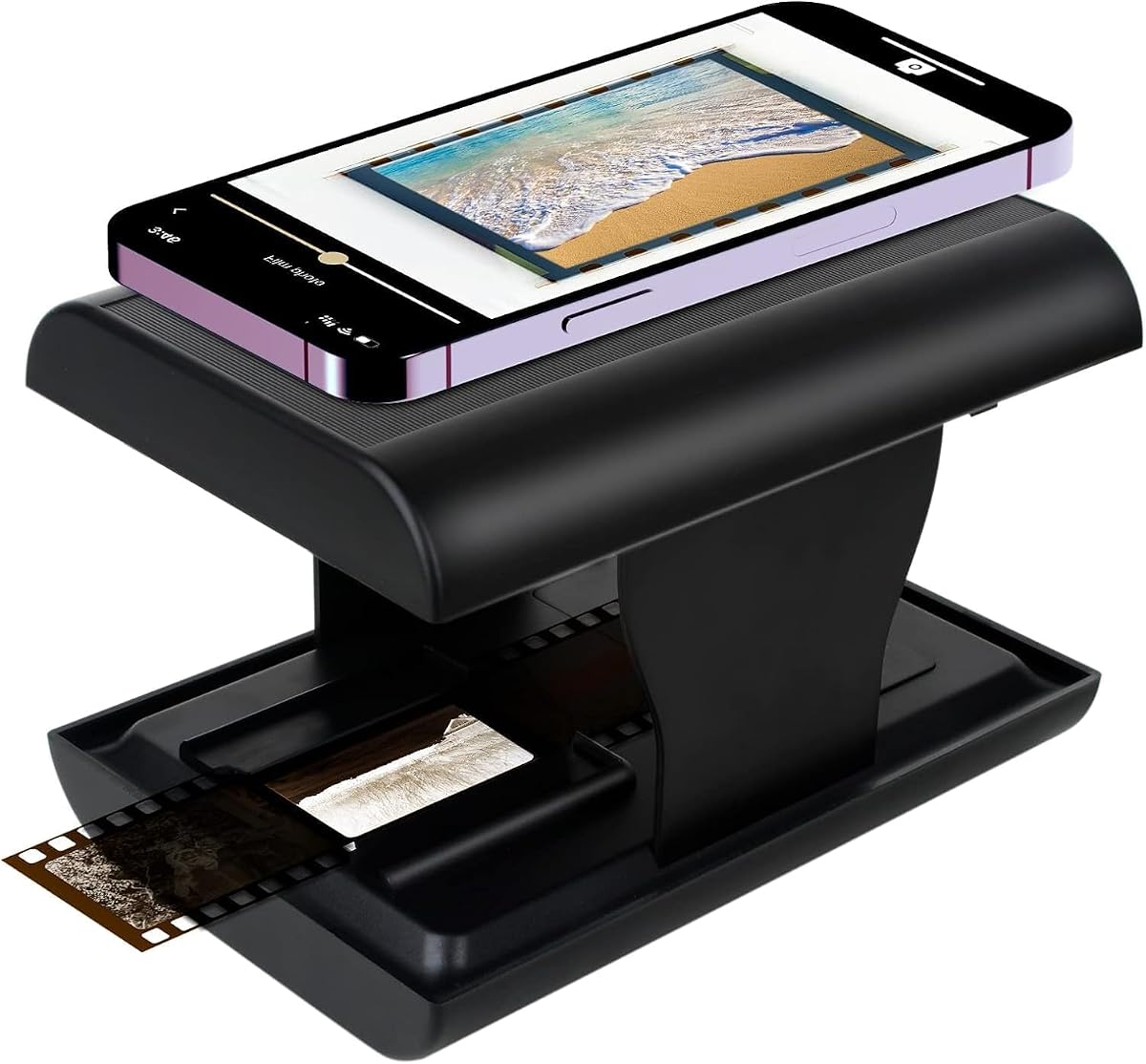
TCNEWCL 35mm Negative Slide Scanner
4.3Editor score
Smartphone integration
Foldable design
Free scanning app
Preserving film memories requires the right tools. A good Black and White Negative Scanner converts old reels into digital files quickly. Look for high resolution, easy handling, and reliable software support.
We compared ten models based on specs, user feedback, and versatility. This list covers standalone devices and budget-friendly options. Each entry highlights key strengths and potential weaknesses for buyers.
Every pick includes detailed specs, pros, cons, and usage tips. Prices and availability change often, so verify current details before buying. These guides help you choose the right scanner for your home archive.
4.3Editor score

4.2Editor score

4.3Editor score
As an Amazon Associate we earn from qualifying purchases.
This table contrasts the top ten scanners side-by-side. Each row lists key specs to help you compare resolution, connectivity, and film formats quickly.


The BEONEGLOBAL ClearScan MINI is a dedicated film digitizer designed for home archivists. It carries a 4.2 rating and delivers 16MP scans using a CMOS sensor. The device fits easily on a desk and scans 35mm slides without software.
We may earn a commission when you buy through this link, at no additional cost to you.
Its standout feature is the built-in editing. You can flip, rotate, and adjust colors right on the unit. The ergonomic buttons below the screen make operation intuitive. Scanning takes seconds, and you save directly to an SD card.
The main trade-off is the limited screen size. A 2.31-inch LCD is functional but small for detailed cropping. Also, the SD card is not included. These are minor issues for a device focused on speed and simplicity.
Buyers who want a quick, standalone solution for film and slides should pick this model. It is ideal for those who lack editing software or want a fast workflow. The clarity and speed make it a top pick.
Buttons placed below the screen allow natural operation without awkward hand moves.
Save photos immediately to SD card up to 32GB for quick sharing on social media.
We may earn a commission when you buy through this link, at no additional cost to you.
The KODAK Slide N Scan Max is built for diverse film formats including 110, 126, and 135. It has a 4.2 rating and features a smooth-moving tray that reduces manual repositioning. This makes it great for mixed batches of old reels.
We may earn a commission when you buy through this link, at no additional cost to you.
Its main strength is the universal film support. It handles slides and color or black-and-white negatives with ease. The one-touch editing simplifies resizing and adjustments. The output reaches up to 22MP via interpolation.
The larger size and higher cost may be drawbacks for casual users. It needs more desk space and budget. However, the versatility and brand reliability justify the investment for serious collectors.
This scanner suits families with varied film types. It is a solid choice for those needing a reliable, standalone tool. The KODAK name adds trust for long-term archiving projects.
The moving tray feeds film without constant repositioning for seamless operation.
Accommodates 110, 126, and 135mm slides and negatives for comprehensive archiving.
We may earn a commission when you buy through this link, at no additional cost to you.
The TCNEWCL scanner is a budget-friendly mobile solution for 35mm slides. It holds a 4.3 rating and relies on your smartphone camera for capture. The device folds into a small box for travel. It uses an LED light to illuminate the slide.
We may earn a commission when you buy through this link, at no additional cost to you.
Its primary benefit is affordability and portability. You insert a slide, hold your phone over the hole, and click. The free app helps with basic editing. This eliminates the need for a heavy standalone device.
The downside is that image quality depends on your phone camera. It is not as controlled as a dedicated scanner. Also, it only works with 35mm formats. But for beginners, it offers a great entry point.
Parents and travelers will appreciate this lightweight option. It is ideal for quick conversions without high costs. If you have a modern smartphone, this tool works well for basic archiving.
Foldable structure saves space and stores easily in a small box for travel.
Use your phone camera to capture images without needing a separate computer.
We may earn a commission when you buy through this link, at no additional cost to you.
The Magnasonic FS71 is a powerful 24MP scanner for 35mm and Super 8. With a 4.3 rating, it features a large 5-inch display for viewing. You can connect via HDMI to a TV. It saves to SD card up to 128GB.
We may earn a commission when you buy through this link, at no additional cost to you.
Its standout feature is the HDMI connectivity and large screen. You can view images on a monitor without a PC. The fast scanning takes less than 5 seconds per frame. It supports multiple film types including Super 8.
The setup is simple but may seem complex for very basic users. SD card is not included. However, the image quality and flexibility make it a top choice for home cinema enthusiasts.
Buyers seeking TV viewing and Super 8 support should choose this model. It offers a rich, interactive experience for family archives. The speed and resolution make it a strong contender.
Use an HDMI cable to view scanned images on a TV or monitor directly.
Convert 35mm and Super 8 negatives and slides to digital JPEG files.
We may earn a commission when you buy through this link, at no additional cost to you.
The Memory Vault Box is designed for at-home simplicity. It has a 3.4 rating and features simple buttons for grandparents. You can view on the LCD preview screen. It comes with a cleaning brush and USB cable.
We may earn a commission when you buy through this link, at no additional cost to you.
Its main benefit is the ease of use. The enhancement technology automatically improves brightness and color. You save to SD card directly. It handles 35mm slides and film efficiently.
The lower rating suggests quality may vary. SD card is not included. But the kit is complete with accessories. It is a strong choice for beginners seeking a stress-free experience.
Parents and grandparents looking for a no-fuss tool should pick this. It helps preserve family history without technical barriers. The included accessories make it ready to use right away.
Automatic brightness and color enhancement brings old faded slides back to life.
Includes scanner, holders, cleaning brush, and cables to start digitizing immediately.
We may earn a commission when you buy through this link, at no additional cost to you.
The HP HPFS500 is a premium scanner with a 5-inch touchscreen. It holds a 4.3 rating and supports USB-C power. The device allows editing on the display. It also functions as a picture frame in gallery mode.
We may earn a commission when you buy through this link, at no additional cost to you.
Its standout feature is the intuitive touchscreen and gallery mode. You can edit without a PC and view like a frame. The quick-load tray handles 110, 126, and 135 easily. It offers 22MP interpolation for clarity.
The higher cost and need for a USB adapter may be hurdles. However, the build quality and modern USB-C make it stand out. It is ideal for users wanting high-end features.
Buyers seeking a premium, sleek solution should choose this model. It balances editing and viewing seamlessly. The HP brand ensures reliable support for long-term use.
Preview and edit images directly on the all-angle LCD touchscreen display.
Powered through USB-C for PC or external adapter, simplifying your digitization process.
We may earn a commission when you buy through this link, at no additional cost to you.
This product entry is currently unavailable or incomplete. It may be a generic model. Always check the listing for specs and price. It is essential to verify support for 35mm or 126 films before buying.
We may earn a commission when you buy through this link, at no additional cost to you.
The data shows limited details. This suggests a lower profile brand. Ensure you read recent reviews to avoid compatibility issues. If listed, it might be a budget option.
The main drawback is uncertainty. You cannot confirm specs or ratings. Proceed with caution and look for verified sellers. It is better to choose models with clear documentation.
Buyers should prioritize models with transparent specs. If you must consider this, check the current page carefully. This ensures you avoid unexpected compatibility or quality issues.
Check the listing for film support and resolution before making a purchase.
Read recent feedback to confirm quality and avoid potential compatibility issues.
We may earn a commission when you buy through this link, at no additional cost to you.
Selecting a scanner depends on film formats, resolution, and budget. This guide covers the key factors that impact performance.
Resolution determines how much detail you capture from old film. A CMOS sensor with at least 13MP allows for good prints. Interpolation can increase file size but real detail comes from the sensor.
Prioritize native resolution and high-quality CMOS for clarity.
Ensure the scanner supports your specific film type. 35mm is common, but 110 and 126 require specific trays. Some units handle Super 8 too. Compatibility saves time and frustration.
Check the specs for all film sizes you need.
A simple interface is vital for family use. Look for devices with buttons or a touchscreen. Standalone models without software are easier for non-tech users. Editing tools built-in help too.
Choose a scanner with intuitive controls and minimal setup.
If you travel or have limited space, portability matters. Foldable and lightweight options save space. Some use smartphones and reduce the need for a heavy unit. Consider storage needs too.
Opt for compact, foldable, or smartphone-based options if space is tight.
Most scanners use SD cards for storage. Others connect via USB or HDMI. Ensure you have enough storage. A card slot up to 128GB is standard. HDMI helps if you want TV viewing.
Verify storage limits and connection types match your workflow.
Basic editing like flipping, rotating, and color adjust is useful. Standalone units with built-in tools avoid software. Apps are also good for mobile scanners. These help make negatives look natural.
Look for built-in tools to adjust brightness and orientation quickly.
Some models use USB or AC. USB-C allows flexible power. Standalone ones often need an adapter. Ensure you have the right supply. Battery operation is rare but convenient.
Check if the unit needs a dedicated adapter or uses USB power.
Budget models range from affordable to mid-range. Premium units offer more features. Consider how many films you have. Investing in a reliable device saves time. Cheap models may lack durability.
Balance your budget with expected usage volume and needs.
Insert your film or slide into the provided holder tray. Ensure the emulsion side faces the light source. This ensures the image captures correctly. Clean the film gently before loading.
Turn on the device and preview the image. Use buttons to adjust brightness and color. Rotate or flip as needed. Save to the SD card using the save function. The process usually takes seconds.
Store the device in a dry place to avoid damage. Keep lenses and holders dust free. If scanning multiple reels, handle with care to avoid scratches. Regular cleaning of the unit prolongs life.
Most modern standalone scanners do not require a computer. You can save files directly to an SD card. However, some models allow USB connection for PC access. Check the specs for software requirements.
Most units support 35mm and 126 formats. Some handle 110 and Super 8. Always check the product specs to ensure your films work. Specific trays are usually included in the kit.
The most common way is saving directly to an SD card. Insert the card before scanning. Some models also offer USB transfer. Verify the card size limit for storage.
Many devices allow basic edits like rotate, flip, and color adjustment. Standalone models often have built-in tools. Mobile scanners rely on free apps. This avoids needing external software.
Resolutions range from 12MP to 24MP. Higher native resolution offers more detail. Interpolation can increase file size. Aim for at least 13MP for good quality prints.
Most scanners do not include an SD card. You will need to purchase one separately. Ensure it matches the supported size limit, often 32GB or 128GB.
We highlighted ten options including top models like the BEONEGLOBAL and HP. The top picks balance speed, resolution, and cost. These models cover most common needs for home archives.
Prioritize resolution and ease of use. If you have varied film types, choose one with universal support. For budget, smartphone options work well. Always consider your workflow and space.
Prices change often, so verify current details before buying. This guide provides a solid starting point for digitization. Choose the model that best fits your film collection.