
ASUS Vivobook Go 15.6 Inch FHD Slim Laptop
4.3Editor score
AMD Ryzen 3 7320U Processor
8GB DDR5 RAM Memory
15.6 Inch FHD Display
This guide compares the top ten lightweight ASUS laptop models for performance, portability, and value to help you choose the right device for your needs.
Finding a lightweight laptop is essential for students and professionals who need mobility without sacrificing performance. ASUS offers a wide range of slim devices that balance power and portability effectively for modern users.
We have analyzed ten distinct models based on their processors, memory, storage, and build quality. This list covers options from budget-friendly entry-level machines to premium ultrabooks with advanced AI features.
Each pick highlights key specifications and real-world benefits to help you make an informed decision. Please note that prices and availability can change frequently so check the latest details before purchasing.
4.3Editor score

4.8Editor score
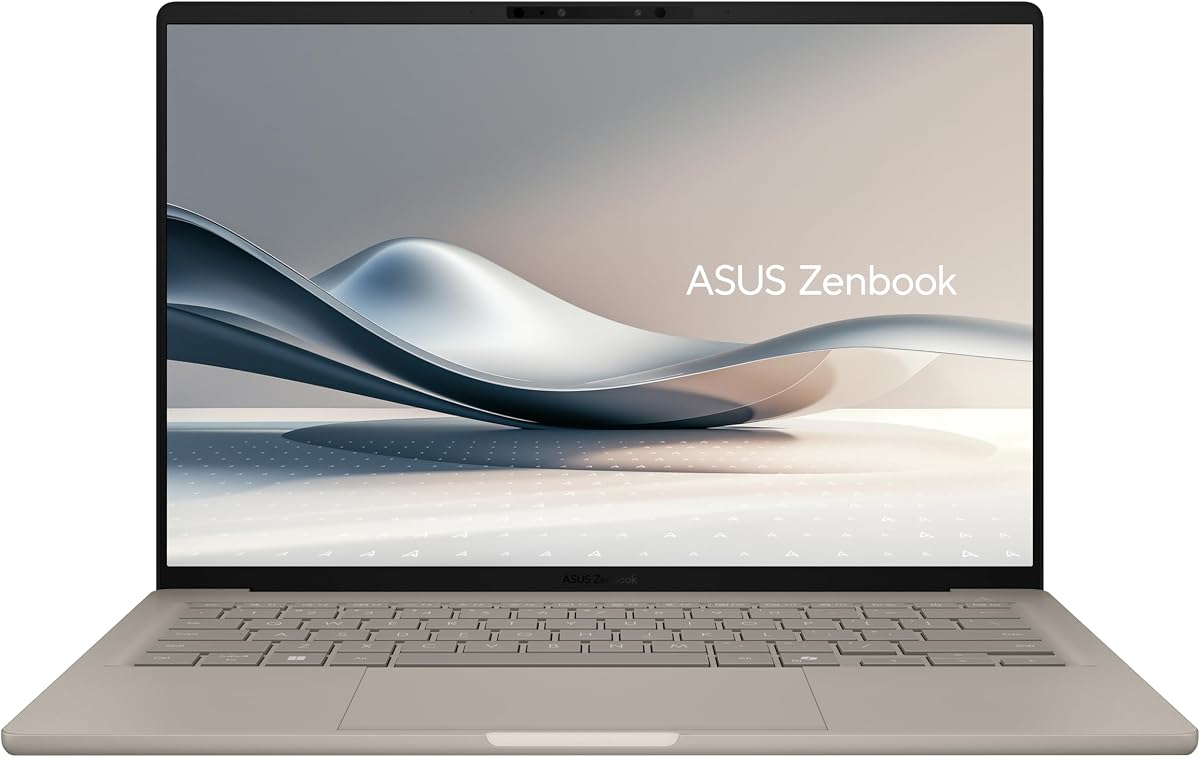
3.7Editor score
The following table provides a side-by-side overview of all ten selected models. Compare their processors, memory, storage, and display sizes to find the perfect fit for your workflow and budget requirements.





This model stands out as an affordable option for users needing a reliable portable machine. With a rating of 4.3 stars it offers solid value for students or casual users looking for essential computing tasks without breaking the bank.
We may earn a commission when you buy through this link, at no additional cost to you.
The AMD Ryzen 3 7320U processor provides efficient performance for browsing and productivity. Its 8GB DDR5 RAM ensures smoother multitasking compared to older DDR4 models while the military grade durability adds peace of mind for daily transport.
Storage is limited to 128GB so users might need external drives for large media libraries. The display offers 250 nits brightness which is adequate indoors but may struggle in bright sunlight environments.
Anyone seeking a cost effective daily driver for school or light work will find this laptop suitable. It balances price and performance well making it a top pick for budget conscious shoppers.
The Ryzen 3 processor handles everyday tasks like web browsing and document editing with ease.
Military grade testing ensures the chassis can withstand drops and vibrations common in travel.
We may earn a commission when you buy through this link, at no additional cost to you.
This variant improves upon the base model by offering double the storage and a slightly more powerful processor. It maintains the same lightweight form factor while providing more space for files and applications needed for productivity.
We may earn a commission when you buy through this link, at no additional cost to you.
The Ryzen 5 7520U handles light gaming and heavier multitasking better than the Ryzen 3. The 512GB SSD ensures quick boot times and ample room for media without immediate reliance on cloud storage solutions.
While the processor is an upgrade users should note that RAM remains at 8GB which is sufficient for most tasks but not expandable. The cooling system works well to maintain performance during extended use sessions.
Ideal for users who need more disk space than the base model offers. It serves as a solid mid-range option for those who want extra storage without stepping up to premium pricing tiers.
The 512GB SSD provides plenty of room for documents photos and applications without clutter.
Ryzen 5 architecture delivers smoother multitasking for power users managing multiple windows.
We may earn a commission when you buy through this link, at no additional cost to you.
This laptop earns the Editor's Choice badge for its blend of modern AI features and robust performance. With a high rating of 4.8 stars it excels in offering next generation computing capabilities in a portable form factor.
We may earn a commission when you buy through this link, at no additional cost to you.
The Snapdragon X processor brings significant power efficiency and AI acceleration through its NPU. Combined with 16GB RAM it handles complex workflows and heavy multitasking with ease making it ideal for professionals.
Users transitioning from x86 should verify app compatibility though Windows 11 on ARM has improved significantly. The battery life is exceptional allowing for full day work without needing a charger nearby.
Best for those who want the latest technology and AI tools in a lightweight package. It represents a strong step forward in ARM based laptops offering a compelling alternative to traditional Intel models.
The Snapdragon X NPU enables advanced AI tasks like live captions and enhanced photo editing.
Power efficiency allows for long unplugged sessions perfect for travelers and remote workers.
We may earn a commission when you buy through this link, at no additional cost to you.
This model scales up the screen size to 16 inches while keeping the efficient Snapdragon X architecture. It offers a wider workspace for multitasking while maintaining a respectable level of portability for its size class.
We may earn a commission when you buy through this link, at no additional cost to you.
The WUXGA display provides crisp visuals with a 16:10 aspect ratio that is great for productivity. The 16GB RAM ensures smooth operation when running multiple applications simultaneously without slowdowns or lag issues.
While it is larger than the 14 inch variant it remains surprisingly light for a 16 inch laptop. The extra screen real estate is beneficial for spreadsheet work or side by side document viewing.
Perfect for users who prioritize screen space over ultimate compactness. It balances performance and portability well making it a versatile choice for office work and content consumption on the go.
The 16 inch screen offers more room for windows and applications side by side.
Snapdragon architecture ensures long battery life even with the larger display panel.
We may earn a commission when you buy through this link, at no additional cost to you.
This entry level model targets basic computing needs with a focus on portability and cost. With a lower rating it reflects its limitations but remains a viable option for very light usage like reading and basic web browsing.
We may earn a commission when you buy through this link, at no additional cost to you.
The Intel Celeron N4500 is sufficient for single task operations but struggles with heavy loads. However the fast charge technology ensures you get back to work quickly if you run low on battery.
Users should be aware that 4GB RAM limits the number of browser tabs or apps open at once. The eMMC storage is slower than an SSD but acceptable for storing essential documents and media files.
Best for secondary devices or users with minimal computing requirements. It is a budget friendly solution for those who need a portable machine for occasional use or simple tasks.
This model offers the most accessible entry point into the ASUS laptop ecosystem for beginners.
Fast charge technology allows you to regain significant battery life in under an hour.
We may earn a commission when you buy through this link, at no additional cost to you.
This model provides a robust balance of power and portability with 16GB of RAM. The 16th Gen Intel processor delivers solid performance for multitasking and productivity tasks making it a reliable choice for students.
We may earn a commission when you buy through this link, at no additional cost to you.
The inclusion of Wi-Fi 6 ensures faster internet speeds and better connectivity in crowded environments. The 14 inch form factor is easy to carry around while still offering enough screen space for comfortable viewing.
While the display is not the brightest it provides clear visuals for daily use. The storage is ample for most users and the build quality feels sturdy enough for regular handling and transport.
Ideal for users needing more memory for professional work without going up to premium processors. It offers a great mix of specs that cover a wide range of everyday computing needs effectively.
16GB of RAM allows for smooth running of multiple applications and browser tabs.
Wi-Fi 6 support ensures stable and fast internet connections on networks.
We may earn a commission when you buy through this link, at no additional cost to you.
This variant shares the powerful Snapdragon X engine with a focus on visual clarity. The WUXGA display offers more vertical pixels than standard FHD making it great for reading and text heavy workflows.
We may earn a commission when you buy through this link, at no additional cost to you.
The cool silver finish gives it a professional look suitable for business environments. With 16GB RAM and a dedicated AI NPU it handles complex tasks efficiently while keeping power consumption low.
Users may need to adapt to ARM architecture if they rely on specific legacy software. However for modern web based tools and Windows apps the experience is smooth and responsive.
Best for those who prioritize screen resolution and battery life over raw clock speeds. It is a stylish option for professionals who need a reliable machine for meetings and work.
The WUXGA resolution provides sharper text and more desktop real estate for productivity.
The cool silver finish adds a touch of elegance to the device for business use.
We may earn a commission when you buy through this link, at no additional cost to you.
This edition features the latest 13th Gen Intel processor offering improved performance over previous generations. It keeps the chassis lightweight and thin for easy transport while maintaining strong connectivity options like Wi-Fi 6E.
We may earn a commission when you buy through this link, at no additional cost to you.
The 16GB RAM ensures that even with multiple applications open the system remains responsive. The privacy shutter on the webcam is a valuable security feature for users concerned about online safety.
Storage is adequate for most users though heavy media consumers might prefer external drives. The build quality feels solid and the keyboard provides a comfortable typing experience for long sessions.
Perfect for those who want the latest Intel architecture in a slim body. It delivers reliable performance for work and study with the added benefit of modern connectivity standards.
The 13th Gen Intel chip provides a noticeable speed boost for everyday tasks.
The physical privacy shutter on the webcam gives users full control over their privacy.
We may earn a commission when you buy through this link, at no additional cost to you.
This version improves storage to 256GB making it more practical than the 128GB base model. The numeric keypad is a valuable addition for users who enter data frequently or prefer full size keys.
We may earn a commission when you buy through this link, at no additional cost to you.
The battery life is rated up to 11 hours which covers a full work day comfortably. The military grade durability ensures the laptop can withstand the rigors of daily commuting and travel.
While the display is adequate for indoor use it may not be bright enough for outdoor environments. The processor is efficient but not designed for heavy gaming or intensive rendering tasks.
Best for students or professionals needing a reliable workhorse with more storage. It offers a practical balance of specs that suit a wide range of everyday computing scenarios well.
The full keyboard with numeric keypad speeds up data entry and calculations.
Up to 11 hours of battery life means you can work unplugged for the whole day.
We may earn a commission when you buy through this link, at no additional cost to you.
This premium model redefines portability with a weight under 1kg and a stunning OLED screen. Despite the high price it offers top-tier build quality with Ceraluminum that resists scratches and impacts effectively.
We may earn a commission when you buy through this link, at no additional cost to you.
The OLED panel delivers deep blacks and vibrant colors ideal for media consumption and creative work. The battery life is exceptional with up to 32 hours of video playback making it perfect for long flights.
Users should be aware that the body may show fingerprints more than darker finishes. However the texture is unique and feels premium to the touch offering a distinct look compared to standard aluminum.
Ideal for travelers and creatives who value screen quality and weight above all. It is the ultimate choice for those who want the lightest high performance laptop available today.
The OLED screen provides unmatched contrast and color accuracy for viewing media.
At 980 grams it is one of the lightest 14 inch laptops on the market.
We may earn a commission when you buy through this link, at no additional cost to you.
Choosing the right lightweight laptop involves balancing several factors to ensure it meets your specific needs. This guide breaks down the key elements to consider before making a purchase.
The processor determines how quickly your laptop can handle tasks. AMD Ryzen and Intel Core processors offer different benefits so look for the latest generations to ensure longevity and speed.
Prioritize processors that match your workload such as Ryzen 5 for general use or Snapdragon X for efficiency and AI tasks.
RAM is crucial for multitasking so 8GB is a minimum but 16GB is recommended for smoother performance. SSD storage loads files faster than traditional hard drives and is more durable for travel.
Aim for at least 256GB of storage to avoid running out of space quickly. If you store large media files consider cloud storage or external drives.
The screen is what you interact with most so resolution and brightness matter. WUXGA and OLED panels offer sharper images and better contrast compared to standard FHD displays.
Choose a display with high brightness if you work outdoors or in bright rooms. The 16:10 aspect ratio is also beneficial for productivity as it shows more vertical content.
Battery life determines how long you can use the laptop without a charger. Look for models that advertise all-day usage especially if you travel frequently or work remotely.
Efficient processors like Snapdragon X contribute significantly to longer battery life. Fast charging is also a valuable feature to quickly power up during short breaks.
A lightweight laptop should still be sturdy enough to withstand daily handling. Military grade durability testing ensures the chassis can survive drops and extreme temperatures.
Materials like aluminum or Ceraluminum provide strength without adding weight. A solid build ensures the laptop lasts longer and protects internal components.
Modern laptops often lack older ports so check for USB-C and HDMI availability. Wi-Fi 6 or 6E ensures fast wireless connectivity which is vital for streaming and downloading.
Ensure the laptop has enough ports for your peripherals. Some models may require dongles so factor that into your decision if you need multiple connections.
Comfort is key when typing for long periods. An ergonomic keyboard with good key travel reduces fatigue during writing or coding sessions.
A precise touchpad helps with navigation without needing a mouse. Look for models with backlit keyboards for working in low light environments.
Determine your budget early to narrow down options effectively. Entry level models save money but may lack advanced features found in premium tiers.
Consider the long term value of the device. Spending a bit more on better specs can extend the usable life of the laptop significantly.
Always start by updating your operating system and drivers to ensure peak performance. This helps maintain security and compatibility with newer applications.
Keep the laptop on hard flat surfaces to allow proper airflow. Avoid using it on beds or blankets as this can block vents and cause overheating.
Clean the screen with a microfiber cloth and avoid harsh chemicals. Store the device in a padded case when traveling to protect it from scratches and impacts.
Yes many of these models are ideal for students due to their portability and battery life. They can handle writing papers researching online and attending virtual classes easily.
Most lightweight models have soldered RAM meaning it cannot be upgraded later. Check the specific model specifications to confirm if it is expandable before purchasing.
Yes most come with USB-C or HDMI ports allowing you to connect external displays for a larger workspace during presentations or desktop work.
Battery life varies by model but most offer between 8 to 11 hours of standard use. The Zenbook A14 offers exceptional endurance of up to 32 hours of video playback.
Many models feature military grade durability testing which ensures they can withstand drops and vibrations. The Ceraluminum body in premium models adds even more scratch resistance.
Basic light gaming is possible on models with integrated Radeon or Adreno GPUs. However they are not designed for heavy gaming or intensive graphics tasks.
Choosing a lightweight ASUS laptop depends on balancing your budget with performance needs. The Vivobook Go series offers great value while the Zenbook models deliver premium features and style.
Prioritize battery life and display quality if you travel often. For heavy multitasking ensure you have at least 16GB of RAM to keep systems smooth.
Remember to check current prices and promotions before purchasing as deals change frequently. We hope this guide helps you find the perfect device for your daily workflow.