
8Bitdo M30 Wired Controller
4.2Editor score
Officially licensed by Xbox
USB-C wired connection
Three custom profiles
Discover the best fightpads for Xbox to elevate your competitive gaming experience with precision controls tailored for modern and classic fighting titles.
Finding the right fightpad for Xbox can transform your gaming experience significantly. Whether you are a casual player or a competitive enthusiast, having the right controller ensures your inputs are registered quickly and accurately during intense matches.
We compared ten top-rated controllers based on layout, responsiveness, build quality, and compatibility with Xbox Series X and Xbox One. Our analysis focuses on features that matter most to fighters, including D-pad accuracy, button feel, and latency performance.
Each pick below highlights key strengths and ideal use cases to help you choose confidently. Keep in mind that availability and pricing can change frequently, so verify current details before making your final purchase decision today.
4.2Editor score
3.5Editor score

4.4Editor score
This side-by-side comparison highlights the core specifications and unique features of each controller to help you identify the best match for your playstyle and budget needs.


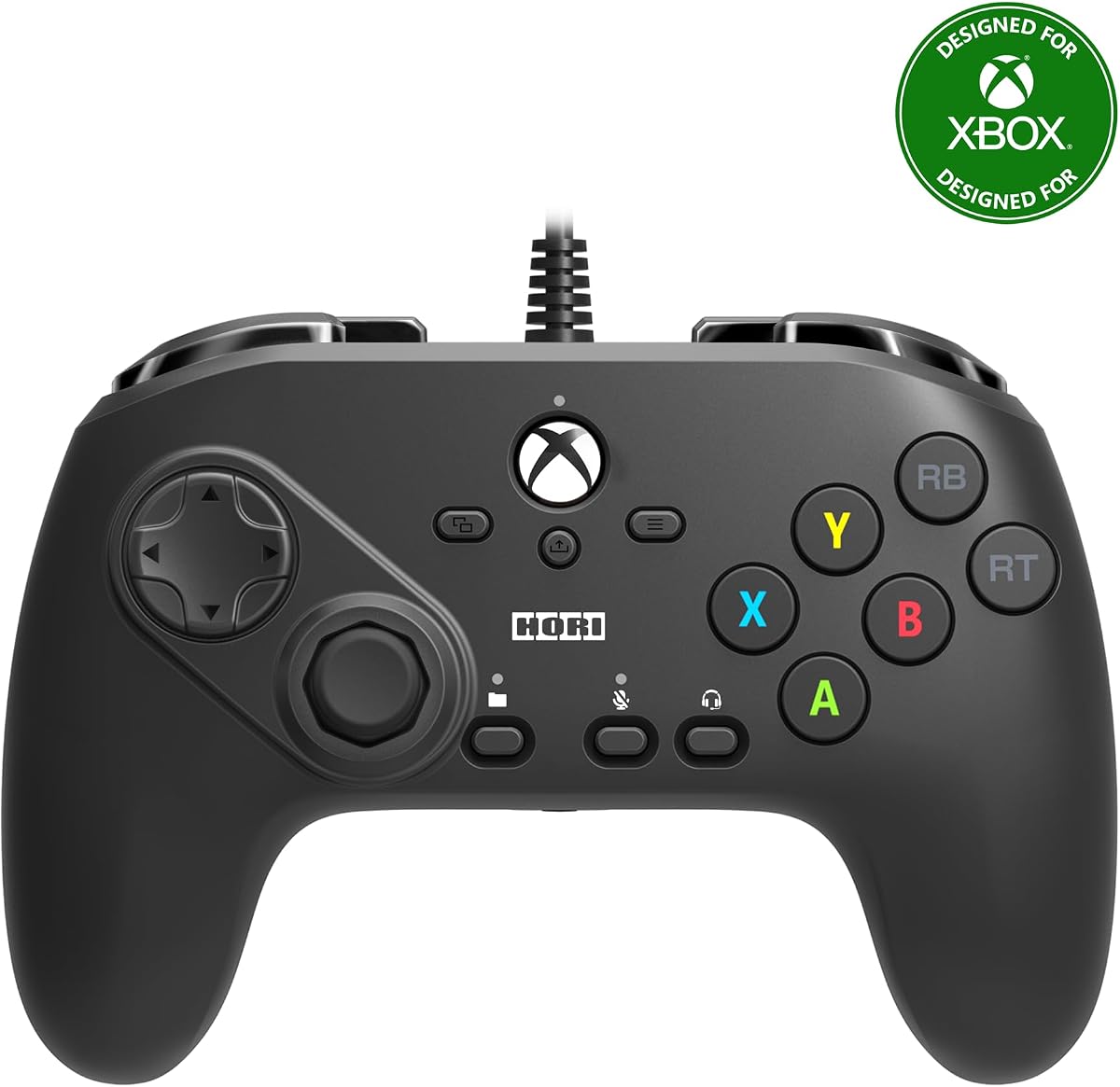
The HORI Fighting Commander Octa stands out as a dedicated solution for Xbox fighters, offering a layout optimized specifically for competitive play. With a 3.5 rating, it balances precision engineering with practical features that serious players appreciate.
We may earn a commission when you buy through this link, at no additional cost to you.
Its six-button layout mimics traditional arcade standards while maintaining the ergonomics of a modern console controller. The micro switch buttons provide tactile feedback essential for rapid inputs, and the adjustable d-pad allows you to tailor directional inputs to your preference.
While the short throw analog stick with an 8-way gate increases execution speed, some users may find the wired-only design less convenient than wireless alternatives. The price point also places it above standard controllers, which could be a barrier for casual gamers.
This controller is ideal for players who want authentic arcade mechanics without leaving the comfort of their couch. If you prioritize accurate inputs and profile customization, the Octa delivers reliable performance for both practice and tournament use.
The micro switches and adjustable d-pad ensure your directional commands and button presses register exactly when you intend them to during high-speed combos.
Save up to four profiles via the companion app and switch between them instantly using the profile button to adapt to different fighting games or playstyles.
We may earn a commission when you buy through this link, at no additional cost to you.
This vintage controller brings back the iconic aesthetic and functionality of the Street Fighter IV era. Although originally designed for Xbox 360, its 3.9 rating suggests enduring appeal among retro enthusiasts who value nostalgia in their setup.
We may earn a commission when you buy through this link, at no additional cost to you.
The enlarged circular 8-way floating D-Pad offers smooth transitions between directions, a staple feature for fighting games. The additional multi-speed Turbo functionality helps players execute rapid sequences without holding down buttons repeatedly during intense exchanges.
However, its compatibility may be restricted compared to modern Xbox Series X options, and the 9.8-foot USB cable limits where you can place your console relative to your seating. The headset port remains useful for voice chat but is less critical now.
Choose this pad if you are collecting legacy hardware or want a specific thematic controller for retro titles. It serves as a nostalgic piece that captures the spirit of classic arcade fighters on home consoles.
The Blanka-themed design and classic layout evoke memories of arcade cabinets, making it a fun addition for collectors and retro game fans.
Toggle multi-speed Turbo to automate rapid button presses, allowing you to focus on positioning and timing during complex combo executions.
We may earn a commission when you buy through this link, at no additional cost to you.
The 8Bitdo M30 offers an accessible entry point into fighting game controllers without sacrificing official licensing or reliability. With a solid 4.2 rating, it provides essential features at a budget-friendly price for newcomers to the genre.
We may earn a commission when you buy through this link, at no additional cost to you.
Its USB-C wired connection ensures stable performance with minimal latency, crucial for timing-sensitive moves. The 6-button layout mimics arcade standards, while the support for three profiles lets you switch configurations quickly during matches.
While it lacks the advanced customization of higher-end models, the inclusion of a 3.5mm audio jack and volume control adds practical utility for headset users. The build quality is dependable though it may not match premium tactile sensations.
This controller is perfect for casual fighters or those new to competitive gaming who need a straightforward, responsive tool. Its balance of price and official support makes it a smart choice for budget-conscious players.
The USB-C connection delivers a stable, lag-free experience that keeps your inputs synchronized with the game for precise timing.
Switch between three saved profiles on the fly to adapt button mappings for different games without needing complex software setup.
We may earn a commission when you buy through this link, at no additional cost to you.
The 8BitDo All-Button Arcade Controller redefines portability with a leverless design that fits easily in your bag while maintaining professional-grade accuracy. Its 4.6 rating highlights strong satisfaction among players who value speed and adaptability.
We may earn a commission when you buy through this link, at no additional cost to you.
Features like the quad-movement design and hot-swappable PCB allow you to fine-tune switches and optimize inputs for ultra-fast execution. Wireless 2.4G connectivity ensures you are not tethered to your console while fighting.
While the thin profile offers convenience, some users might need time to adjust to the lack of a traditional joystick. The programmable buttons and independent control panel provide deep customization for tournament settings or personal preferences.
Select this if you want a high-performance fightpad that travels well without compromising on functionality. It bridges the gap between home arcade sticks and handheld controllers effectively.
The all-button layout eliminates stick friction, allowing faster directional inputs and reduced physical strain during long practice sessions.
Swap out Kailh Wizard mechanical switches easily to match your tactile preferences without needing soldering tools or expertise.
We may earn a commission when you buy through this link, at no additional cost to you.
The HORI PAD Pro enhances the standard controller experience with granular control over sensitivity and feedback. Rated 4.2, it appeals to players who want optimization options without switching to a dedicated arcade layout entirely.
We may earn a commission when you buy through this link, at no additional cost to you.
You can adjust stick sensitivity, dead zones, and trigger responses to suit your specific game preferences. The companion app lets you save four profiles, making it easy to switch between different titles or character styles quickly.
While it lacks a specialized fighting layout, the Share button and vibration adjustments add value for content creators and immersive players alike. However, those seeking strict arcade buttons may still prefer a dedicated stick or fightpad.
This is a great choice for versatile players who play multiple genres on Xbox. It offers enough customization to improve fighting game performance while maintaining general usability for other games.
Adjust dead zones and trigger sensitivity to reduce accidental inputs and improve reaction times during competitive matches.
The Share button allows quick capture of gameplay highlights, making it easier to document matches or create social media clips.
We may earn a commission when you buy through this link, at no additional cost to you.
The Nacon Daija is built to professional standards, featuring SANWA parts known for durability and precision. With a 4.4 rating, it represents a serious investment for players dedicated to mastering fighting games on Xbox Series X.
We may earn a commission when you buy through this link, at no additional cost to you.
Designed with input from pro gamers, it includes features like button locking to prevent accidental presses and a textured palm rest for long session comfort. The full button mapping software allows deep customization across Xbox and PC.
While the price is steep and the size requires ample desk space, the included tools and interchangeable joystick heads offer significant value. The audio jack ensures you can connect high-quality headsets directly without extra adapters.
Invest in this stick if you want tournament-grade equipment that grows with your skills. It combines durability with ergonomic comfort for the most demanding competitive environments.
SANWA components are industry standards for competitive players, ensuring consistent performance even after thousands of hours of use.
The textured palm rest reduces hand fatigue and provides a secure grip so you can maintain focus during intense tournaments.
We may earn a commission when you buy through this link, at no additional cost to you.
The 8Bitdo Arcade Stick offers the freedom of wireless play while maintaining official Xbox compatibility. Its 4.6 rating reflects high user satisfaction with its balance of mobility and traditional stick performance.
We may earn a commission when you buy through this link, at no additional cost to you.
You can choose between 2.4G wireless or wired USB connectivity depending on your session needs. Fast-mapping and profile buttons make setup easy, and the battery lasts up to 30 hours for extended play without interruption.
Battery management is the primary trade-off compared to wired sticks, but the quick 4-hour charge time mitigates downtime. The included audio jack allows direct headset connection without compromising wireless functionality.
Pick this stick if you value a clean setup without visible cables but still want arcade precision. It is an excellent choice for living room setups where mobility matters.
Enjoy a clutter-free experience with wireless 2.4G technology that keeps inputs stable even during dynamic gaming positions.
With 30 hours of max play per charge, you can game for days before needing to plug in, ensuring consistent performance.
We may earn a commission when you buy through this link, at no additional cost to you.
The HORI Fighting Stick alpha provides a streamlined entry into modular fight sticks, allowing easy maintenance and customization. With a 4.3 rating, it appeals to players who want professional features without the complexity of full DIY builds.
We may earn a commission when you buy through this link, at no additional cost to you.
The chassis opens effortlessly to let you swap parts or artwork, giving you flexibility to update your look or hardware as needed. Features like the Key Lock Mode prevent accidental presses during transport or intense gameplay moments.
While it offers solid build quality, some users may prefer dedicated tournament boards with specific switch options out of the box. The Profile Button helps manage different game configurations easily, adding convenience to your setup.
Choose this stick if you want a balance between professional utility and user-friendly design. It serves as a reliable platform for both casual play and competitive improvement.
Access internal components easily to clean or upgrade parts without needing specialized tools or technical expertise.
Enable Key Lock Mode to avoid accidental inputs when traveling to tournaments or switching between characters.
We may earn a commission when you buy through this link, at no additional cost to you.
The Akko FUNBOX introduces next-gen Hall Effect switches with zero wear, promising long-term durability and consistency. Its 4.2 rating highlights strong performance in competitive environments where every millisecond matters.
We may earn a commission when you buy through this link, at no additional cost to you.
Adjustable Rapid Trigger and a full-color LCD let you fine-tune inputs and settings directly on the controller. This level of customization provides a decisive edge in fast-paced matches, allowing precise control over timing.
The learning curve for these advanced features might be steep for new users, and the price reflects the cutting-edge tech involved. However, tournament lock modes ensure compliance with official competition rules seamlessly.
This controller is ideal for tech-savvy competitors seeking an edge in precision. It combines innovation with multi-platform compatibility to support diverse fighting game needs.
Contactless Hall Effect switches eliminate friction and debris buildup, ensuring consistent performance over years of use without degradation.
Built-in Tournament Lock mode prevents accidental presses and adheres to official competition rules for fair play across different events.
We may earn a commission when you buy through this link, at no additional cost to you.
The HyperX Clutch Gladiate delivers a versatile gaming experience with features that enhance competitive performance. Its 4.3 rating reflects reliability and comfort for players who use standard controllers for fighting games.
We may earn a commission when you buy through this link, at no additional cost to you.
Dual Trigger Locks allow faster pulls for quicker attacks, while programmable rear buttons grant you extra access to commands without moving thumbs from sticks. Textured grips ensure you maintain control even during the most heated battles.
While not a dedicated fightpad, its immersive dual rumble motors and Share button offer a well-rounded package for all genres. The detachable USB-C cable adds durability and convenience for storage.
Select this if you want a premium all-rounder that performs well in fighters without needing a specialized setup. It bridges casual and competitive needs effectively for daily play.
Adjustable trigger locks let you choose between short quick pulls for attacks or longer presses for nuanced actions.
Textured grips and dual rumble motors provide tactile feedback and stability for extended sessions without hand fatigue.
We may earn a commission when you buy through this link, at no additional cost to you.
Selecting the right fightpad involves considering layout preferences, connection type, build quality, and budget to ensure optimal performance during matches.
Fightpads typically feature 6 or 8-button layouts similar to arcade cabinets. Choose a layout that feels natural to your fingers and supports the game mechanics you play most often.
Prioritize ergonomics and button spacing to prevent hand strain during long sessions. A design that suits your hand size can significantly improve execution speed.
Wired controllers offer stable connections with minimal latency, ideal for competitive play where timing is critical. Wireless options provide convenience but require battery management.
Ensure compatibility with your console generation to avoid connectivity issues. Modern USB-C connections are generally reliable and future-proof for new consoles.
Look for controllers made with high-quality materials like ABS plastic or metal components that withstand repeated presses. Hall Effect switches can reduce wear over time compared to mechanical ones.
Check for features like replaceable parts or hot-swappable buttons to extend the lifespan. A durable build ensures you don't need to replace the controller frequently.
Profiles, button mapping, and sensitivity adjustments allow you to tailor the controller to specific games. Companion apps enhance this functionality significantly.
Customization features help optimize your setup for different fighting titles. Ensure the software is user-friendly and supports Xbox platforms seamlessly.
Officially licensed controllers guarantee support for Xbox Series X and One without extra drivers. Multi-platform support is useful if you play on PC or Switch too.
Check the product details for specific system requirements to avoid compatibility problems. Certified products often receive better firmware updates and support.
A built-in 3.5mm audio jack allows direct connection to headsets for voice chat and game audio. This reduces the need for adapters or console connections.
Ensure volume controls are accessible for quick adjustments during matches. Audio clarity helps you stay aware of in-game sound cues critical for timing.
Prices range from affordable standard controllers to premium arcade sticks. Determine how much you value specialized features versus general versatility.
Balance cost with expected lifespan and performance. A slightly more expensive controller that lasts longer may save money over time.
Connect your controller via USB-C or wireless pairing as instructed. Navigate to the Xbox settings to verify the device is recognized and configured correctly for game input.
Regularly clean the buttons and surfaces with a soft cloth to prevent dirt buildup. Avoid using harsh chemicals that could damage the plastic or rubber coatings.
If using a wired controller, secure the cable to prevent tripping or accidental disconnection. For wireless models, charge fully before extended sessions and monitor battery levels.
Fightpads offer layouts closer to arcade sticks, which can improve precision and speed for complex combos. Standard controllers are more versatile for general play but may lack dedicated buttons.
All listed products are compatible with Xbox Series X and Xbox One unless specified as legacy models. Always verify product details to ensure current generation support before purchasing.
Wired fightpads provide stable latency-free connections ideal for competitive play. Wireless models offer convenience and less clutter but rely on battery power and may have slight input lag.
Many models support companion apps or software for custom button mapping and profile switching. Check the product features to ensure your preferred customization options are available.
High-quality switches typically last tens of millions of presses. Hall Effect switches claim zero wear due to contactless technology, which may extend the device lifespan significantly.
Most Xbox-licensed controllers work with Windows PCs via USB or wireless dongles. Verify system requirements in the product description for specific compatibility details.
Many controllers include tournament lock features and adhere to competition rules. Always check official tournament guidelines to confirm your controller meets specific event standards.
We explored ten top fightpads ranging from budget options like the 8Bitdo M30 to premium sticks like the Nacon Daija. Each offers unique strengths suited to different player needs and budgets.
Prioritize layout, connection stability, and customization features that match your playstyle. Whether you want a portable leverless pad or a full arcade stick, there is a fit for everyone.
Remember that product availability and pricing change frequently. Verify current details and read recent user reviews before making your final decision to ensure satisfaction.