
Logitech K120 Full Size Wired Keyboard USB Plug-and-Play Windows – Black
4.6Editor score
Spill resistant design
Full size standard layout
Easy plug and play setup
Durable anti fade keys
Explore our expert guide comparing the best keyboard with USB Port options for 2026. We review top models with hubs, multimedia keys, and ergonomic designs.
Finding a reliable keyboard with USB Port can streamline your workspace by reducing cable clutter. These devices integrate connectivity directly into the typing surface, allowing easy access to drives and mice without reaching behind your computer tower.
We have analyzed ten top-rated models based on user feedback, build quality, and feature sets. Each entry offers distinct advantages whether you need compact designs, premium mechanical switches, or extensive multimedia controls for daily tasks.
Each pick highlights specific strengths like durability, layout options, and port configurations. Please note that product availability and pricing fluctuate frequently on major online retailers so always verify current details before making your final purchase decision today.
4.6Editor score
4.4Editor score
4.3Editor score
This side by side comparison highlights key specifications across all ten selected models. You will find details on port counts, switch types, and specific design features to help you identify the right fit for your unique workspace needs.






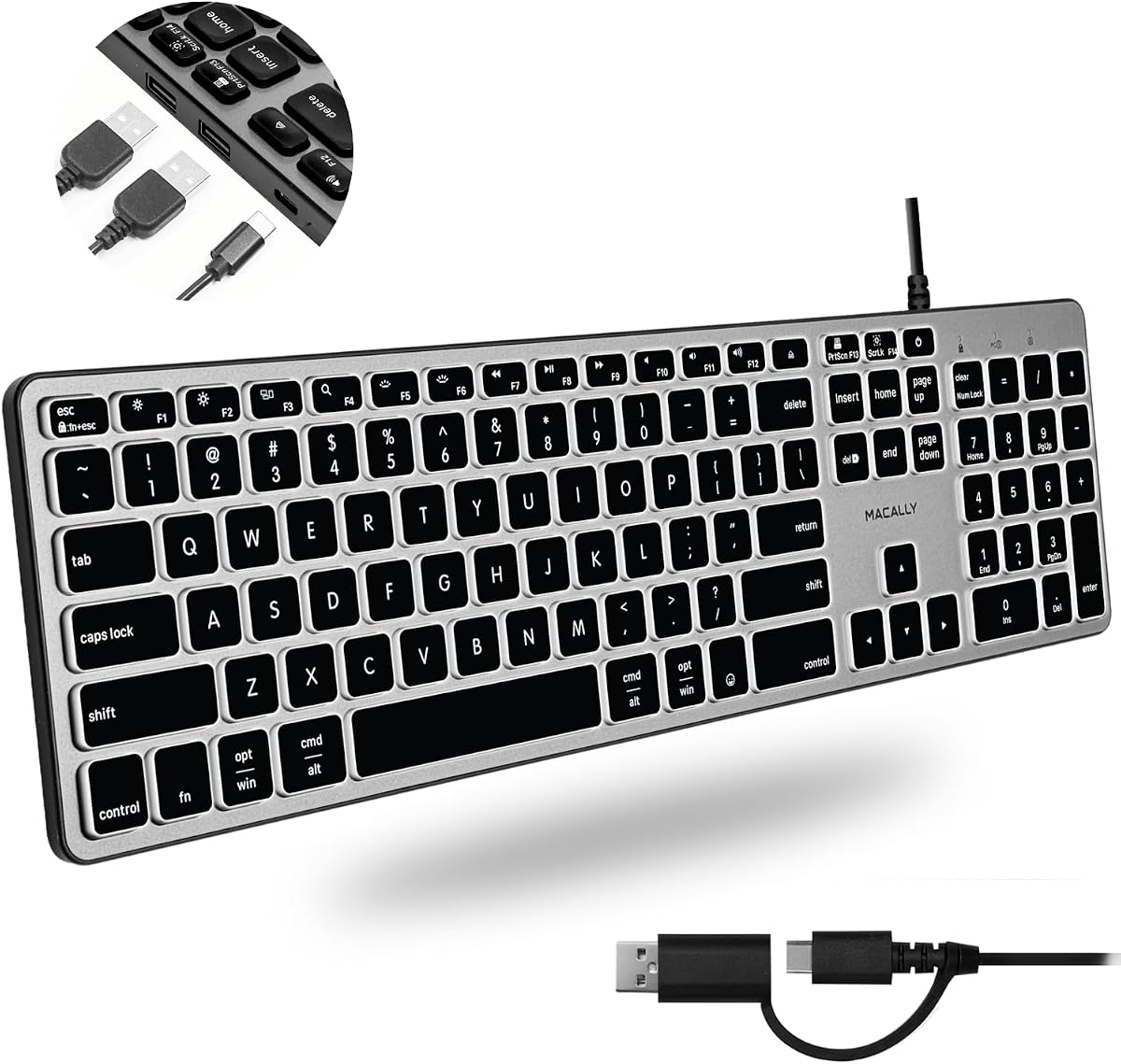
This model stands out for its adaptability across multiple operating systems and connection standards. With a 4.4 rating, it delivers reliable performance for both professional and home users seeking extra connectivity.
We may earn a commission when you buy through this link, at no additional cost to you.
The standout feature is the combination of USB-A and USB-C ports on the keyboard itself. This design eliminates the need for separate hubs and keeps your desk organized. Auto OS detection ensures keys work instantly whether you switch between Mac and Windows environments.
While the price is higher than standard membrane options, the build quality and included features justify the cost. The backlit keys offer practical visibility adjustments which is rare at this price tier. Some users might miss dedicated media buttons found on other models.
This keyboard is ideal for users who own multiple devices and need seamless switching. It is a strong recommendation for anyone upgrading to USB-C heavy setups who still need legacy USB-A support. Check current availability to ensure you get the dual interface version.
Auto OS detection instantly adapts key layouts when you switch between Mac and PC systems, saving time on manual configuration and ensuring all shortcuts function correctly immediately.
Connecting your mouse and external drives directly to the keyboard reduces cable clutter on your desk, creating a cleaner workspace while maintaining stable data transfer speeds for peripherals.
We may earn a commission when you buy through this link, at no additional cost to you.
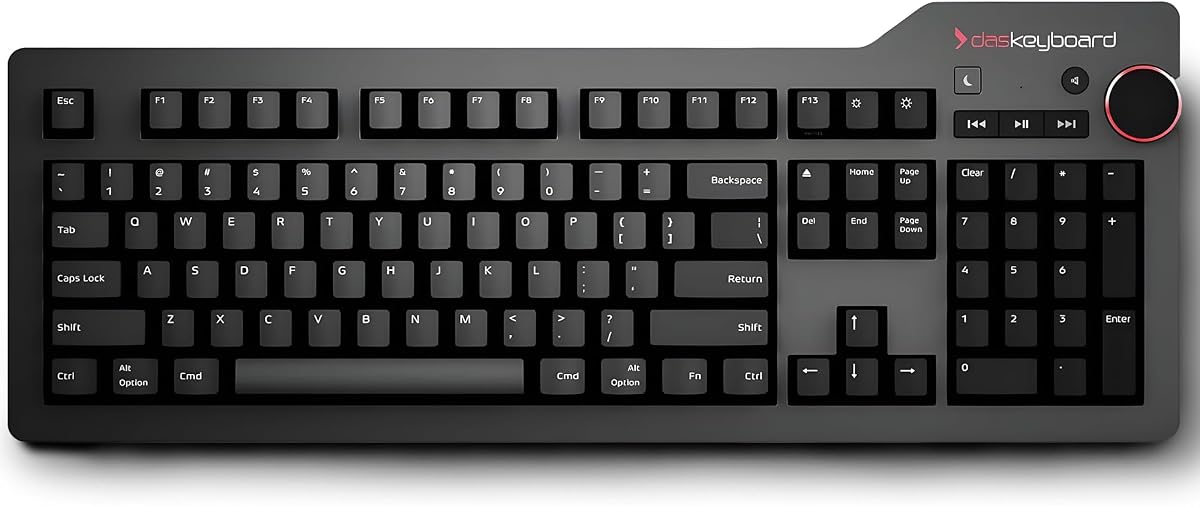
This premium model offers a distinct typing experience thanks to its mechanical switches and robust aluminum construction. It targets professionals who prioritize tactile feedback and durability for heavy daily use over years.
We may earn a commission when you buy through this link, at no additional cost to you.
The Cherry MX Blue switches provide clear tactile feedback with every keystroke which many typists find satisfying. The USB 3.0 hub supports high-speed data transfer for external drives and media. A dedicated volume knob allows easy audio adjustments without navigating menus.
The primary trade-off is the cost, which is much higher than standard options. Additionally the clicky nature of the switches might be loud in shared workspaces. However for solo users or enthusiasts this feedback is often considered a benefit.
This keyboard is best suited for developers or writers who type extensively. Its build quality ensures longevity and resistance to wear. If you value premium materials and mechanical switches this model delivers a reliable long-term solution.
Cherry MX Blue switches provide audible clicks and tactile bumps that confirm every keypress, reducing typing errors and increasing speed for power users who type all day.
The integrated USB 3.0 hub transfers files ten times faster than standard USB 2.0 ports, ensuring your external drives perform at peak efficiency without needing separate adapters.
We may earn a commission when you buy through this link, at no additional cost to you.
This model is a top choice for budget conscious buyers seeking a standard full-size layout. With a high rating, it proves that reliability does not require expensive features or complex setup steps.
We may earn a commission when you buy through this link, at no additional cost to you.
Its standout quality is the spill resistant design which protects the internal components from accidental liquid damage. The anti-fade keys ensure labels remain visible even after years of use. Setup requires only a simple USB connection to your computer.
The main limitation is the lack of built-in USB ports which some users might expect. Also the membrane switches are quieter and softer than mechanical options. However for basic tasks this design prioritizes durability and longevity effectively.
This keyboard is perfect for home offices or shared environments. It provides essential functionality without unnecessary extras. If you need a durable and economical input device this model is a highly recommended starting point.
The internal design channels liquids away from circuit boards, offering robust protection against accidental coffee or water spills that typically ruin standard keyboards.
Over half of the plastic parts come from certified post-consumer recycled materials, reducing environmental impact while maintaining structural integrity and daily durability.
We may earn a commission when you buy through this link, at no additional cost to you.
This model offers practical connectivity solutions with its built-in USB hubs. It is designed for users who need quick access to storage and media without leaving the keyboard zone.
We may earn a commission when you buy through this link, at no additional cost to you.
The three built-in USB ports allow you to plug in flash drives and mice directly. Windows One-Touch Controls let you launch apps like calculator or mail instantly. Quiet membrane switches make it suitable for shared spaces where noise is a concern.
While the feature set is robust, the rating suggests some users find it less refined than competitors. The Windows specific keys might not translate well to Mac users. Overall it serves well for basic Windows office tasks.
This keyboard fits well in budget-conscious offices needing extra ports. It balances functionality and cost effectively. For those prioritizing convenience and quick access to media, this model is a solid option.
Three built-in USB hubs let you connect flash drives and mice directly to the keyboard, reducing desk clutter and keeping cables organized near your typing area.
Dedicated one-touch controls launch common applications like calculator and mail instantly, saving time and reducing the need to navigate through menus with a mouse.
We may earn a commission when you buy through this link, at no additional cost to you.
This keyboard focuses on modern connectivity with its USB-C wired connection. It supports up to three devices through its ports making it ideal for newer laptop setups.
We may earn a commission when you buy through this link, at no additional cost to you.
The simple USB-C wired connection offers reliable data transfer without wireless lag. It features a full size layout compatible with Mac and PC. The low profile design ensures comfort during extended typing sessions.
The main limitation is the requirement for a USB-C cable which might not be available in older setups. Additionally the price reflects its premium features. However for Mac users needing a direct connection this is a strong match.
Ideal for professionals with USB-C hubs or laptops. It provides necessary connectivity without extra dongles. If your workflow involves newer devices, this model streamlines your desk setup effectively.
Using a direct USB-C connection ensures stable performance with modern MacBooks and iPads, eliminating the need for adapters while supporting high-speed data transfer for peripherals.
The low profile design reduces wrist strain during long typing sessions, providing a comfortable typing angle that supports natural hand positioning throughout the day.
We may earn a commission when you buy through this link, at no additional cost to you.
This model is designed for users with limited desk space. Its compact layout saves room while still providing essential USB hub functionality for peripherals.
We may earn a commission when you buy through this link, at no additional cost to you.
The mini design removes the number pad to fit smaller desks. Two built-in USB hubs allow you to connect a mouse and flash drive. The UV coated key caps ensure durability and clear labeling.
The absence of a number pad might be a drawback for data entry tasks. Also the cable length is standard but may not reach certain setups. For general computing it offers excellent space efficiency.
Best suited for home users needing a minimalist setup. It keeps the desk clear without sacrificing connectivity. If space is a priority this keyboard delivers a clean and functional solution.
The compact mini design removes the number pad to save desk space, ideal for users with limited room or those who prefer a cleaner, uncluttered workspace.
UV coated key caps resist fading and wear, ensuring that labels remain legible over time despite frequent use in daily office or home environments.
We may earn a commission when you buy through this link, at no additional cost to you.
This keyboard addresses accessibility with larger print fonts designed for easier viewing. It combines visibility features with standard full-size layout benefits for comfortable typing.
We may earn a commission when you buy through this link, at no additional cost to you.
The 4X larger print fonts help visually impaired users identify keys quickly. White LED backlight offers adjustable brightness for low light environments. The spill-proof design adds durability against accidental spills.
It lacks built-in USB hubs which some users might expect. Also it is primarily designed for Windows which limits cross-platform use. However for accessibility needs, the clarity offered is unmatched.
Ideal for users who need high visibility for daily tasks. It supports elderly or visually impaired users effectively. If clarity and comfort are priorities, this model provides a supportive typing experience.
Large print fonts are four times larger than standard, helping users with vision difficulties identify keys quickly without straining their eyes during prolonged use.
White LED backlight allows you to adjust brightness levels, ensuring clear visibility in dimly lit environments while reducing eye strain during night work.
We may earn a commission when you buy through this link, at no additional cost to you.
This model offers a professional look with its chiclet keys and sturdy build. It is designed for everyday office tasks with a focus on reliability and simplicity.
We may earn a commission when you buy through this link, at no additional cost to you.
The chiclet key style provides a clean look and comfortable typing. It includes a full number pad for data entry. Spill resistance protects the device from accidental liquids in busy environments.
The keyboard does not include USB hubs, which limits connectivity. It is also focused on basic multimedia without advanced controls. For business users, it offers essential functions without unnecessary complexity.
Best for corporate environments needing durable input devices. It fits well with standard office setups. If you prioritize a clean look and reliability, this keyboard meets essential work requirements.
The sleek chiclet key design offers a modern look that fits well in professional office settings, providing a clean appearance while maintaining typing comfort.
Designed for everyday office use, it delivers consistent performance and durability, ensuring minimal downtime and reliable input for critical daily business tasks.
We may earn a commission when you buy through this link, at no additional cost to you.
This model delivers premium mechanical typing experience similar to the Mac version but for general use. It is built for durability and high performance with top-tier components.
We may earn a commission when you buy through this link, at no additional cost to you.
Cherry MX Blue switches provide distinct tactile feedback with every keystroke. The USB 3.0 hub ensures fast data transfers for external drives. An aluminum top adds structural stability and professional looks.
The price is higher than standard options, reflecting the build quality. Clicky switches can be loud, which may be disruptive in quiet spaces. For enthusiasts, this trade-off is often acceptable.
Ideal for desktop users seeking long-term reliability. It offers a robust solution for heavy typing tasks. If you prefer mechanical feedback, this model provides a durable and responsive setup.
The aluminum top plate adds significant structural integrity, reducing flex and providing a premium feel that stands up to heavy daily use over years.
USB 3.0 ports support data speeds up to 5 Gbps, allowing you to transfer large files to external drives quickly without slowing down your workflow.
We may earn a commission when you buy through this link, at no additional cost to you.
This model is a genuine OEM replacement suitable for specific Dell systems. It offers standard business features with hot keys and USB hub integration for everyday office needs.
We may earn a commission when you buy through this link, at no additional cost to you.
The 2 USB hubs allow peripheral connectivity directly from the keyboard. It includes 14 hot keys for quick access to common functions. The removable palm rest adds comfort during long typing sessions.
Compatibility is limited to specific Dell part numbers which may restrict broader use. Also the design is basic without advanced features. For replacements, it offers a reliable and certified solution.
Best for users needing a direct replacement for older Dell setups. It ensures compatibility and standard functionality. If you need a reliable OEM part, this keyboard meets essential business requirements.
As a genuine Dell part, it ensures exact fit and compatibility with specific business laptops and desktops, simplifying replacement without needing additional drivers or configuration.
Two built-in USB hubs let you connect a mouse and flash drive directly, reducing desk clutter and improving workflow efficiency for standard office environments.
We may earn a commission when you buy through this link, at no additional cost to you.
Choosing the right keyboard with USB Port requires evaluating connectivity, build quality, and specific features that match your daily workflow. This section outlines the key factors to consider before making a purchase decision.
The number and type of ports matter significantly for your setup. Look for USB-A ports if you have older devices or USB-C for modern laptops to ensure seamless connectivity without extra adapters. Three ports are often sufficient for most users.
Prioritize at least two to three ports to avoid clutter and ensure you can connect a mouse and external drive simultaneously without reaching behind your computer tower for a standard setup.
Switch type determines tactile feedback and sound. Membrane switches are quiet and affordable while mechanical switches offer durability and distinct feedback. Consider your noise tolerance and typing volume before selecting between these options.
Choose membrane for quiet offices and mechanical for heavy typists who prefer tactile feedback. This decision impacts long-term satisfaction and comfort during extended work sessions.
Layouts range from compact mini to full size with number pads. Full size keyboards offer complete functionality for data entry while compact versions save desk space. Evaluate your desk size and need for numeric input before deciding on dimensions.
Select full size if you need a number pad for spreadsheets or compact for limited desk space. Matching the layout to your daily tasks ensures better ergonomic support and workflow efficiency.
Compatibility with your operating system is essential for key functionality. Ensure the keyboard supports Mac, Windows, or cross-platform needs to avoid missing shortcuts or key mappings that disrupt your daily tasks.
Verify system compatibility before buying to ensure all keys function correctly. Auto-detection models reduce configuration hassle when switching between different operating systems regularly.
Materials like aluminum tops or spill-resistant designs extend the lifespan of your keyboard. Look for sturdy constructions that resist wear and tear, especially if you work in busy or high-risk environments where accidents are more frequent.
Opt for spill-resistant designs if accidents are a concern. Aluminum tops add structural rigidity for long-term durability in professional or home office settings.
Multimedia controls allow quick access to volume, media playback, and common apps. These features enhance productivity but might be limited on basic models. Decide if you need these shortcuts for daily use.
Consider keyboards with dedicated media keys if you frequently adjust volume or launch apps. These shortcuts save time and reduce reliance on mouse interactions for common tasks.
Backlit keys improve visibility in low-light environments. Adjustability of brightness is a bonus feature that prevents eye strain. If you work at night, prioritize models with adjustable LED lighting for optimal comfort.
Choose LED backlit models for better visibility in dim settings. Adjustable brightness ensures you can customize the light level to suit your room and prevent eye fatigue.
Ergonomic features like adjustable feet or low profiles help reduce wrist strain. A comfortable keyboard supports better posture and prevents fatigue. Look for designs that align with your natural typing angle.
Prioritize adjustable tilt or low-profile designs to maintain neutral wrist posture. Ergonomic features reduce long-term physical strain during extended daily work sessions.
Begin by connecting the keyboard to a USB port on your computer. Ensure the cable is securely plugged in before powering on your device. Most modern models will be recognized automatically without requiring additional driver installations.
Keep your keyboard clean by regularly wiping the keys with a soft dry cloth. If spills occur, turn off the device immediately and allow it to dry thoroughly before reconnecting to avoid internal damage to the circuitry.
Utilize the built-in USB hubs by plugging your mouse and external drives directly into the keyboard. This setup simplifies cable management and ensures you have easy access to storage devices without reaching behind your computer tower.
Most modern keyboards with USB ports operate on plug and play basis. You connect the USB cable to your computer and the system automatically installs necessary drivers. However, advanced multimedia features might occasionally need specific software from the manufacturer.
Yes, models with multiple USB hubs allow you to connect a mouse and a flash drive at the same time. Check the port count before purchasing to ensure it supports all your required peripherals without overloading the hub.
Some models offer cross-platform compatibility while others are Windows specific. Look for Auto OS detection or explicit Mac support in the product description to ensure full functionality of all keys on macOS systems.
USB ports on a keyboard generally do not impact typing performance. However, high-speed data transfers like video streaming might be faster with dedicated USB 3.0 ports rather than USB 2.0 integrated into the keyboard.
USB-A is the traditional rectangular connector used for many peripherals, while USB-C is a newer reversible standard. Ensure you choose a keyboard that matches your computer's available ports to avoid needing adapters for connection.
Use a soft brush or compressed air to gently remove dust from the USB ports. Avoid using liquids or metal objects to prevent damage to the internal contacts. Regular maintenance keeps connections secure and reliable.
We reviewed ten diverse models ranging from budget-friendly options to premium mechanical builds. The Logitech K120 stands out for affordability, while the Das Keyboard 4 offers a high-end mechanical experience for enthusiasts.
When choosing, prioritize the number of USB ports and compatibility with your operating system. These factors ensure seamless integration into your workflow without needing additional adapters or hardware purchases.
Prices and availability change frequently so verify current details on the product page before making your final purchase. This guide serves as a reliable resource to help you select the right fit for your workspace today.